---
title: "ClickHouse® Tips #4: Materializing UNION ALL queries"
excerpt: "Master UNION ALL in ClickHouse®. Build faster materialized views and optimize queries with SimpleAggregateFunction."
authors: "Elena Torro"
categories: "The Data Base"
createdOn: "2023-09-25 00:00:00"
publishedOn: "2021-03-07 00:00:00"
updatedOn: "2022-09-08 00:00:00"
status: "published"
---

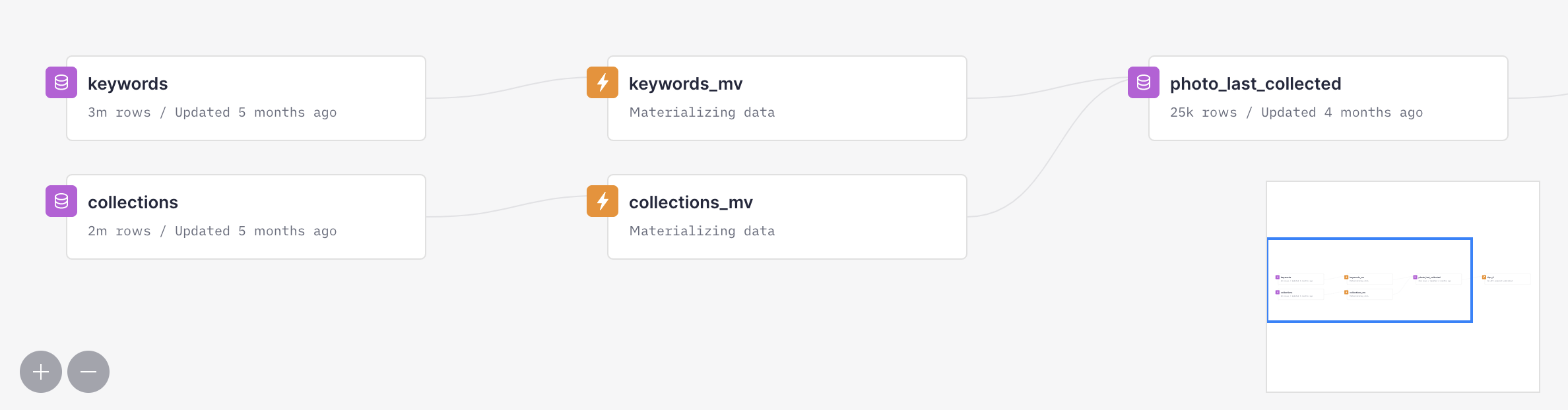
<h2 id="the-problem">The problem</h2><p>There are times when you have a query that involves <code>clickhouse union all</code> statements and you'd like to materialize it. If you try to do it on ClickHouse®, the union clickhouse operation will fail. The solution is to create two materialized views that write to the same table. In this post we'll explain how to do it on ClickHouse® and on Tinybird.</p><p>We’ll also use <a href="https://clickhouse.tech/docs/en/sql-reference/data-types/simpleaggregatefunction/">SimpleAggregateFunction(function, type)</a>. It is a data type that stores the value of the given aggregate function without storing the full state as <code>AggregateFunction</code> does. According to the documentation, “it can be applied to functions for which the following property holds: the result of applying a function f to a row set S1 UNION ALL S2 can be obtained by applying f to parts of the row set separately, and then again applying f to the results: f(S1 UNION ALL S2) = f(f(S1) UNION ALL f(S2))”. What does this mean?</p><p>Imagine that function is <code>sum</code>, one set is <code>[1, 3, 7]</code> and another set is <code>[2, 4, 6]</code>. Doing <code>sum(sum(1, 3, 7), sum(2, 4, 6))</code> will yield the same result as doing <code>sum(1, 3, 7, 2, 4, 6)</code>. So if we want to use <code>sum</code> in a materialize view, we can store the result in a <code>SimpleAggregationFunction(sum, type)</code> data type. Other functions where this happen are <code>any</code>, <code>anyLast</code>, <code>min</code>, <code>max</code>, and <a href="https://clickhouse.tech/docs/en/sql-reference/data-types/simpleaggregatefunction/">more</a>.</p><p>Therefore, SimpleAggregateFunctions data types will be useful, for instance, when using a data source to store the results of two materialized views in order to perform the same output as doing a "clickhouse union" of two tables, but faster.</p><h2 id="a-practical-example">A practical example</h2><p>Let’s see first an example of what we would like to achieve. In this example, we’ll be using <a href="https://github.com/unsplash/datasets">Unsplash</a> open data.</p><p>We have will be using two source tables: <strong>collections</strong> and <strong>keywords</strong>. The first one contains information about every time a photo has been added to a collection, and the second one about the keywords used to describe each photo.</p><p>Our purpose is to create an enpoint to get the last time a photo was added into a collection and some information about this collection along with the complete list of keywords for this photo. In order to explore the data and get an idea of what we want to accomplish, we will be doing something similar to the following aggregation over the result of an UNION ALL:</p><figure class="kg-card kg-embed-card"><iframe loading="lazy" width="100%" src="https://snippets.tinybird.co/endpoint?code=SELECT%0A%20%20photo_id%2C%0A%20%20anyLast%28photo_collected_at%29%20as%20last_time_collected_at%2C%0A%20%20anyLast%28collection_id%29%20as%20last_collection_id%2C%0A%20%20anyLast%28collection_title%29%20as%20last_collection_title%2C%20%0A%20%20groupArray%28keyword%29%20as%20keyword_list%0AFROM%20%28%0A%20%20SELECT%0A%20%20%20%20photo_id%2C%0A%20%20%20%20NULL%20as%20collection_id%2C%20%0A%20%20%20%20NULL%20as%20collection_title%2C%20%0A%20%20%20%20NULL%20as%20photo_collected_at%2C%0A%20%20%20%20keyword%0A%20%20FROM%20keywords%0A%20%20UNION%20ALL%0A%20%20SELECT%20%0A%20%20%20%20photo_id%2C%20%0A%20%20%20%20collection_id%2C%0A%20%20%20%20collection_title%2C%0A%20%20%20%20photo_collected_at%2C%20%0A%20%20%20%20NULL%20as%20keyword%0A%20%20FROM%20collections%0A%20%20ORDER%20BY%20photo_collected_at%0A%29%0AGROUP%20BY%20photo_id%0AORDER%20BY%20photo_id%0A&amp;language=Tinybird&amp;title=get_photo_last_collected_info&amp;run=run&amp;token=p.eyJ1IjogIjdmOTIwMmMzLWM1ZjctNDU4Ni1hZDUxLTdmYzUzNTRlMTk5YSIsICJpZCI6ICI3N2NiMDljOS1hYjVjLTQ2MzYtYTA4Yi00ZDYwNDQwMzUyZTYifQ.XhZPypxjhaeJbdJzNozOKmKPbFqM9CWkAil8WiXFaAE"></iframe></figure><p>How can we achieve the same result but using materialized views? We can not materialize the result of an UNION ALL, but we can make use of the <a href="https://clickhouse.tech/docs/en/engines/table-engines/mergetree-family/aggregatingmergetree/">AggregatingMergeTree</a> engine.</p><p>First of all, let’s create the destination table, <strong>photo_last_collected</strong>:</p><figure class="kg-card kg-embed-card"><iframe width="100%" src="https://snippets.tinybird.co/XQAAAAK_AwAAAAAAAABBKUqGk9nLKwQUU2g-jZn2gwnZrQ-FRqQcWe3oHmLFTU6h0t-TuztOutsqmuL4wMAC8-VX2zUJ28WWY0eLjl0JExMkJvavQnSZm_7xfIJMkPpkDwBKNEZQjatE0mtpWcjXzAo1onwMIIWpG7_7e2FVyjieT-up95RpnXjoyGfEeDLoC2BoDaYC11kZR_0upigp1lD9cy0gPpm-p92RoXSJCRfWioQBR57aOW-R5beVRNhbPXmH9RvpwGxO1v5xEm71SRuPorvRJaMlbuhASiSmAM8Q_UWqqbjnRvt5iedQpOe-UCpyiObXZwEK7fxPRMlAuTwDZkLJYn8owmvGWGrxHUPPj670YgejzFKEwCHjPPDf5UHbQTjLs4xW-hniOwBJL_6v-LR6VZulSR_A4OjSWoUpJGMNWs7PfW6Ka5YWi_TNEnOZkoSL7mYXeEFLdOmpY3wl2xAIYEL_92WPsA/embed"></iframe></figure><p>What should we take into account here:</p><ul><li>Every <code>SimpleAggregateFunction</code> using <code>groupArrayArray</code> must have Array type, and can’t be <code>Nullable</code>. The <code>groupArray</code> function can’t contain null values.</li><li>We could also use <code>groupUniqArrayArray</code> in order to avoid duplicated keywords</li></ul><p>Now, let’s create two materialized views, one per table. This view materializes the <strong>photo id</strong> and the <strong>keywords</strong> that belong to each photo to the <strong>photo_last_collected</strong> Data Source:</p><figure class="kg-card kg-embed-card"><iframe width="100%" src="https://snippets.tinybird.co/XQAAAAJ-AwAAAAAAAABBKUqGk9nLKzhOXwRIcweRxbi4fFg3lVsREl4uEP2tXWcIRjyDC-ItGoYBoqUNu7-nEO3fF2pDTY2Se6z1G9zjPG_t_oP33EoSzX1pL_hVvijeZzJy5NxQB2QinDobiOiYtTTftHXJOZ1WJ2xEVQkohT4QJ5OfrbakrJLqQcjgb2ntRseU1KZLKi1y4nisI2ipIKltQQou4HDdLB6cQ4AS0rqjQXrupn_7GBPkY-VrORnhDa2rRwLP7gjKrvmfBIeJq1wUWNqQcMPsOH0GKtb5PB6NjQM7a5pOenK5IP4mWm8cRVutfb--DV5LU7P0Wt0_1u3VjmSamDvsjguzhmNPAFEiKKFC9dPXrYgjKq8nOqm9shK-gt-5zzQd0Hz50zj2kVtfrDcuVWMI8pLCjiZY6ZAUdakF6BtF_QE7o1V9xklLAdRY7-0tqUO4NcbqPmndBPnlHGr-oIF0/embed"></iframe></figure><p>And the following view materializes the <strong>photo id</strong>, the <strong>last time</strong> it was added to a collection, the <strong>collection id</strong> and the <strong>collection title</strong> that belong to each photo to the <strong>photo_last_collected</strong> Data Source:</p><figure class="kg-card kg-embed-card"><iframe width="100%" src="https://snippets.tinybird.co/XQAAAAJ3AwAAAAAAAABBKUqGk9nLKzhQ5YhIcweRxbgE3erUC5bVGPuPs66N-ZWxTYB2aiyrkcw0aOj8SnTnV1_z62noO8d9IeoQY0_fm-sEyAZqxBxNiF7cbmCIpyIEVlzZq0DW0VpmIFkIILZtjPcrljzUvzMeKN1mgorziR2ON-OKr65a8QXh7y-RMgzelyWTnB-WotZSV4mn1XSS_U47Lx2FG4a46qbcxVD9_eUJ08Gu5vfuC2Y9ROPoZjk2nBtAKhStcNhmeh_cDKH21kCBdlI5vcrpV4jJIseGqNB5H000tuPXTB9RzorImWD8xvabtpiwNvX455H6igGtKoUoHyY3XTdldo80sQf3vYU2L1RHP4cPeeplmfWeJpDbGrIsAY8039nLCbJjCSuCMLKKlhmSpKkCADB8fnCQHuvFuf_tC2iWE1sNUUiiudC9XhYgaRPBmTF___XYPH4/embed"></iframe></figure><p>Key points:</p><ul><li>As a rule of thumb, column names must have the <strong>same name</strong> and must be inserted in the <strong>same order</strong> into the destination Data Source</li><li>The <code>keywords_list</code> can not simply be an empty array, we must cast it correctly to <code>Array(String)</code>, because that’s the data type of the destination column</li><li><code>last_time_collected_at</code>, <code>collection_id</code> and <code>collection_title</code> can’t either be <code>Null</code>, we have to cast them to the exact type of the column in the landing Data Source they’re being saved in</li></ul><p>If you create the Tinybird Data Sources and Pipe files under a project with this structure (the folder structure is already created when you do <code>tb init</code> with our <a href="https://docs.tinybird.co/cli.html">CLI</a>):</p><figure class="kg-card kg-embed-card"><iframe loading="lazy" width="100%" src="https://snippets.tinybird.co/endpoint?code=tb_project%0A%E2%94%9C%E2%94%80%E2%94%80%20.tinyb%0A%E2%94%9C%E2%94%80%E2%94%80%20datasources%0A%E2%94%82%20%20%20%E2%94%94%E2%94%80%E2%94%80%20photo_last_collected.datasource%0A%E2%94%9C%E2%94%80%E2%94%80%20endpoints%0A%E2%94%9C%E2%94%80%E2%94%80%20explorations%0A%E2%94%94%E2%94%80%E2%94%80%20pipes%0A%20%20%20%20%E2%94%9C%E2%94%80%E2%94%80%20collections_mv.pipe%0A%20%20%20%20%E2%94%94%E2%94%80%E2%94%80%20keywords_mv.pipe%0A&amp;language=shell&amp;title=folder_structure_created_by_tb_init&amp;run=&amp;token="></iframe></figure><p>You’d just have to run <code>tb push --push-deps --populate --wait</code> to create the Data Source on Tinybird, the materialized views, and populate the Data Source.</p><p>Then, you’d only have to get the data already joined from the <code>photo_last_collected</code> destination table.</p><figure class="kg-card kg-embed-card"><iframe loading="lazy" width="100%" src="https://snippets.tinybird.co/endpoint?code=SELECT%20%2A%20FROM%20photo_last_collected%0AORDER%20BY%20photo_id%0A&amp;language=Tinybird&amp;title=transform_example&amp;run=run&amp;token=p.eyJ1IjogIjdmOTIwMmMzLWM1ZjctNDU4Ni1hZDUxLTdmYzUzNTRlMTk5YSIsICJpZCI6ICI3N2NiMDljOS1hYjVjLTQ2MzYtYTA4Yi00ZDYwNDQwMzUyZTYifQ.XhZPypxjhaeJbdJzNozOKmKPbFqM9CWkAil8WiXFaAE"></iframe></figure><p>As you can see, the result is the same as from the first query, and it’s about <strong>6x faster</strong>.</p><figure class="kg-card kg-image-card kg-card-hascaption"><img src="https://tinybird-blog.ghost.io/content/images/2023/09/6253d9a6da78399c54b64cfe_photo_last_collected_data_flow_graph-11.png" class="kg-image" alt="In Tinybird's Data Flow graph you can see how the collections and keywords photos are materialize data into the photo_last_collected Data Source" loading="lazy"><figcaption>In Tinybird's Data Flow graph you can see how the collections and keywords photos are materialize data into the photo_last_collected Data Source</figcaption></figure><p>A similar result would have been obtained if we had used <a href="https://clickhouse.tech/docs/en/sql-reference/data-types/aggregatefunction/">AggregateFunction</a> when defining the <code>photo_last_collected</code> Data Source. Using <a href="https://clickhouse.tech/docs/en/sql-reference/data-types/simpleaggregatefunction/">SimpleAggregateFunction</a> has several advantages:</p><ul><li>As SimpleAggregateFunction just saves the value instead of the full state of its aggregate function (like AggregateFunction does), it’s more performant.</li><li>It lets us write the cleaner and simpler queries, as we don’t have to use the <code>-State</code> suffixes for the Materialized Views and we can just query the landing datasource doing <code>SELECT * FROM photo_last_collected</code>. Otherwise we’d have to use the <code>-Merge</code> suffix to merge the intermediate states of the aggregated columns.</li></ul>
