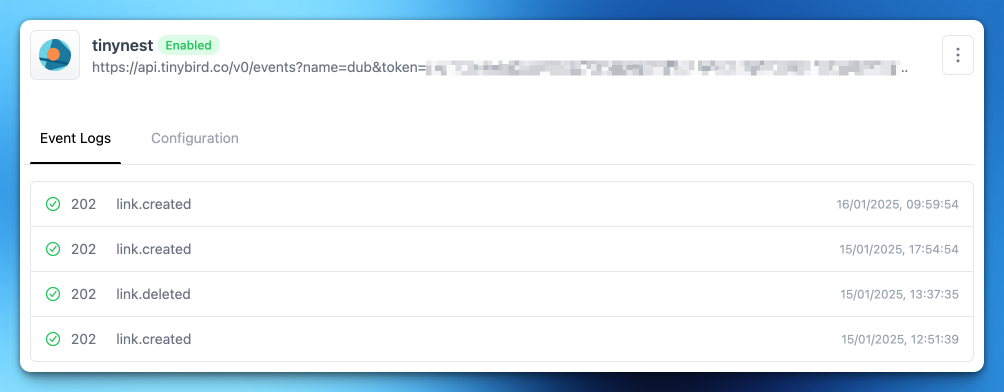
Dub is an open source link management and conversion tracking platform. Dub’s real-time analytics for link tracking are built with Tinybird, and Dub’s new webhooks feature also uses Tinybird behind the scenes of the Event Logs view.
Dub recently celebrated its 1-year anniversary, and Steven Tey (Dub founder & CEO) shared a view of the scale of data they are working with, and which is handled by Tinybird:
Today marks exactly 1 year since @dubdotco started as a company.
— Steven Tey (@steventey) January 16, 2025
Since then, we've reached 900+ paying customers, 1M+ links created, and 150M+ clicks tracked.
To celebrate that, we're launching a new About page to showcase our company vision, values, team, and investors 👇 pic.twitter.com/6WVvEb77nk
Dub provides an incredible cloud service (we're customers 😄), but the product is also fully open source.
So, let’s tour the code and see how Dub built its Event Logs view with Tinybird.
Logs for Dub’s Webhooks are stored in a Tinybird data source called dub_webhook_events.
The main webhook payload is stored as JSON in a String column called event. Other fields like http_status and webhook_id are kept as top-level columns to allow for efficient filtering.
The sorting key is webhook_id,timestamp. This means that, when webhooks are stored, they are sorted by these attributes in order, first by webhook_id, then timestamp.
Coupled with the MergeTree table engine, this means that we have a time-ordered append log of events per webhook. The webhook_id groups individual events by the webhook configuration to which they belong, so when you Create webhook in the Dub UI, any events delivered by that webhook will have the same webhook_id and be stored sequentially.
In particular, this webhook_id is a component of the sorting key, and we’ll see why this is a smart design choice further down when we look at how data is read.
Dub uses the zod-bird client to interact with Tinybird’s APIs. The neatly succinct recordWebhookEvent function wraps the zod-bird call to Tinybird’s Events API, which pushes JSONL formatted payloads to Tinybird via a HTTP POST request. The recordWebhookEvent function takes two inputs, the name of the data source described above (dub_webhooks_events) and the event payload.
Behind the scenes, this is making a POST request to Tinybird to a URL like https://api.tinybird.co/v0/events?name=dub_webhook_events, with the event in the request payload. When Tinybird receives that POST request, the event payload is written into the named data source.
Reading the data happens in a few parts: exposing the data in Tinybird, fetching data in Dub, and displaying data to the user in the app.
To expose webhook log data in Tinybird, Dub uses a Tinybird pipe called get_webhook_events. A pipe is an SQL query that is published as a REST API, which executes the query when the API is called.
This particular pipe is quite straightforward, as Dub is exposing an ordered event log view to their user, so there’s no complex logic needed. The query selects all fields using a SELECT *, orders by timestamp and limits the returned rows to 100.
The WHERE clause filters the response to a given webhook_id, so that all events returned belong to a single webhook.
The WHERE clause also uses Tinybird’s templating syntax to accept a dynamic parameter webhookId. When this Pipe is called, an HTTP GET request is made to a URL like https://api.tinybird.co/v0/pipes/get_webhook_events.json and the webhookId can be appended to the URL as a search param like ?webhookId=123. That 123 value is passed through to the SQL query when the request is made to create a dynamic filter.
Above, I mentioned that including the webhook_id in the sorting key was a smart design choice, and it is because of the filter in this pipe. When you execute this pipe, you only want to receive the data for the given webhook_id. And, if you want the response to be fast, you don’t want the database to waste time reading a bunch of data for a different webhook_id that you don’t care about. The sorting key lets you control how data is stored when it is written so that you can optimize for how it is read. Because this pipe only wants to get data for one webhook_id, it makes sense to write all events for one webhook_id together so that you can very quickly scan through it.
To fetch the data, Dub defines a function getWebhookEvents.
Again, this is a wrapper over the zod-bird client’s call to a Tinybird pipe (buildPipe). This function takes the name of the pipe (get_webhook_events) and the webhookId parameter.
You might have guessed from the name, but the goal of zod-bird is to provide type safety for Tinybird pipes using zod. Because of that, the final parameter to the getWebhookEvents function is a zod schema webhooksEventSchemaTB to validate the response from the Tinybird pipe. The result of this call is a type-safe object that resembles the same structure as the data source in which the events are stored.
Finally, the log of events is displayed to the user in the Dub UI. The structure of the Webhook details page is defined in dub/apps/web/app/app.dub.co/(dashboard)/[slug]/settings/webhooks/[webhookId]/page-client.tsx, which calls the API to retrieve the events and passes them to the WebhookEventsList component.
The WebhookEventsList component maps each event into individual WebhookEvent components, which handle displaying the icon, HTTP response, event type, and timestamp in the list view of the Event Logs screen.
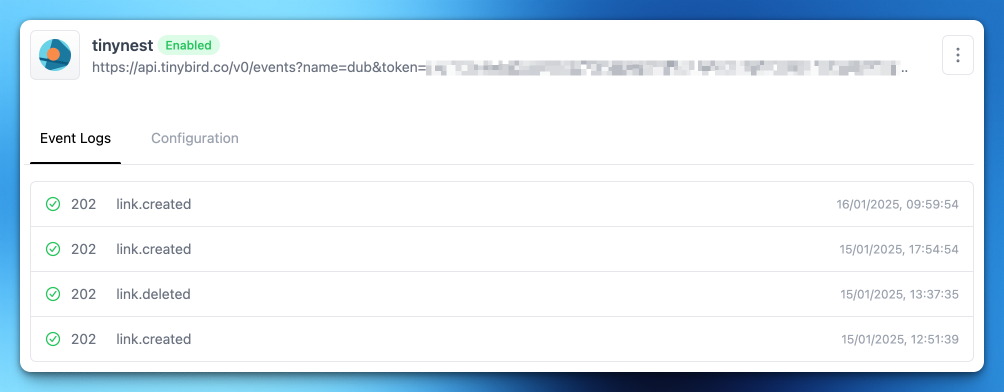
Dub webhooks can serve multiple integration use cases, giving you the power to create custom workflows, trigger automated functions, or build your own analytics layers.
By sending your Dub webhooks to Tinybird, you can connect your Dub analytics to the rest of your dev tools data stack.