---
title: "How I replaced Google Analytics with Retool and Tinybird, Part 2"
excerpt: "Tinybird serves as a powerful and flexible backend for building analytics dashboards in any UI - in this case Retool. Part 2 of 2."
authors: "Cameron Archer"
categories: "I Built This!"
createdOn: "2023-09-25 00:00:00"
publishedOn: "2022-09-05 00:00:00"
updatedOn: "2025-04-24 00:00:00"
status: "published"
---


<!--kg-card-begin: html-->
<div class="tip-box"><div class="tip-box-container"><div class="tip-box-title">Note</div><div class="tip-box-content">NoteThis post was <a href="https://retool.com/blog/how-i-replaced-google-analytics-with-tinybird-and-retool-part-2/">originally published</a> on the <a href="https://retool.com/">Retool</a> blog on September 5th, 2022.</div></div></div>
<!--kg-card-end: html-->
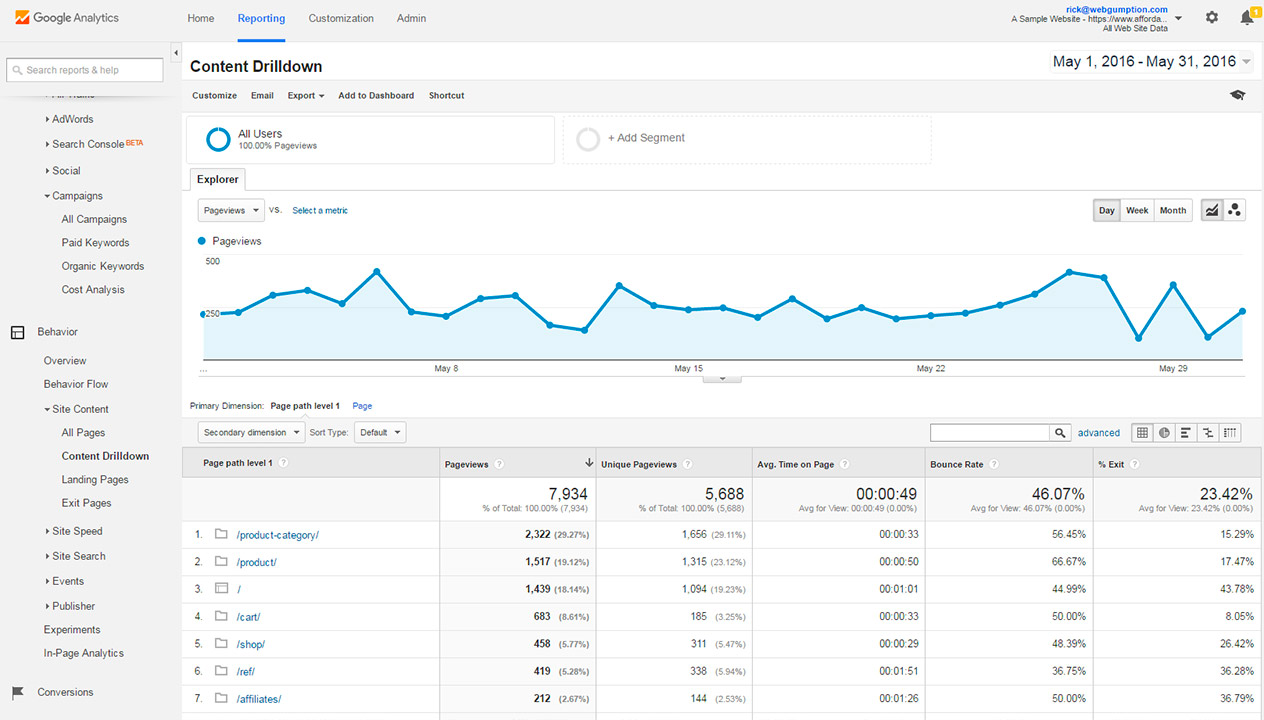
<p>This is the second post in a series of articles that explains how I’ve replaced Google Analytics with a DIY web analytics platform built with a little bit of JavaScript, Tinybird, and Retool. Check out the <a href="https://www.tinybird.co/blog-posts/how-i-replaced-google-analytics-with-retool-and-tinybird-part-1">first post</a>, which explains how I capture the web events data that powers my visualizations in Retool, and it provides some context for why I’d want to replace Google Analytics in the first place.</p><p>In this post, I’m going to explain how I used Retool and Tinybird to recreate one of my favorite Google Analytics views: <strong>the Content Drilldown</strong>.</p>
<!--kg-card-begin: html-->
<div class="tip-box"><div class="tip-box-container"><div class="tip-box-title">Use the Web Analytics Starter Kit</div><div class="tip-box-content">When I was working on this post, I used Retool as my front end. But since it was published, we've published an open source Web Analytics Starter Kit that lets you build a basic Google Analytics alternative in about 3 minutes. You can deploy that Starter Kit <a href="https://www.tinybird.co/docs/starter-kits/web-analytics">here</a>.</div></div></div>
<!--kg-card-end: html-->
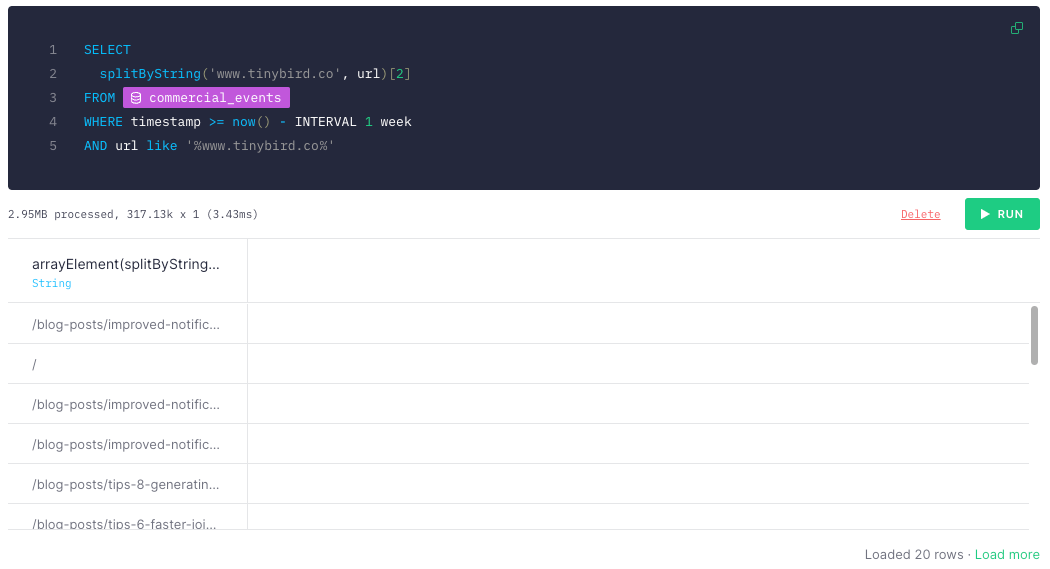
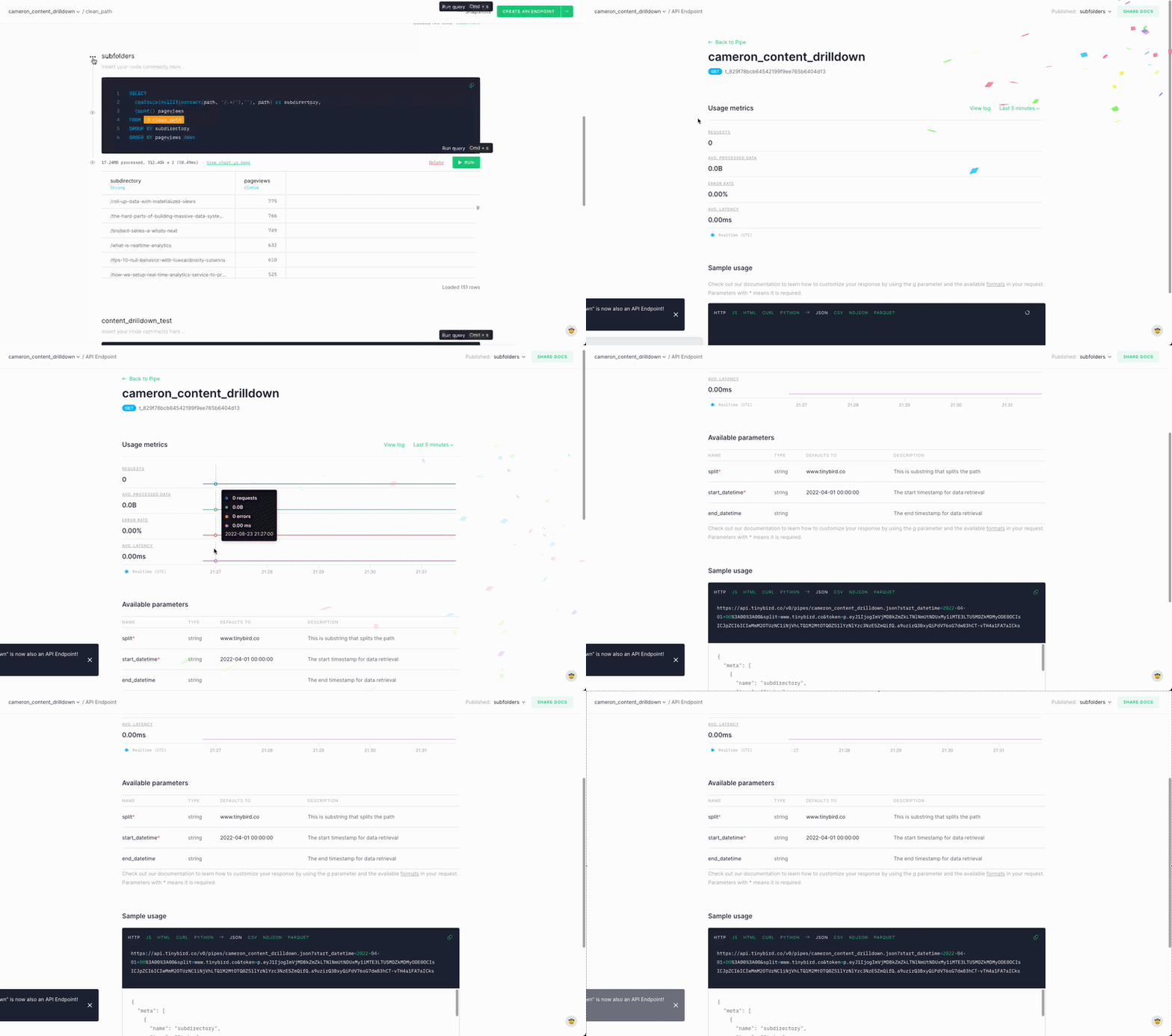
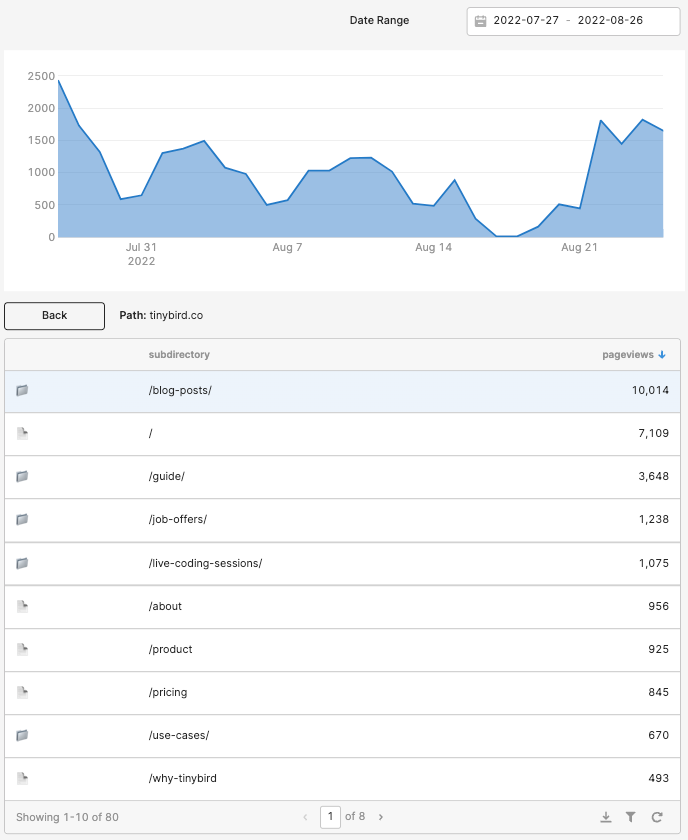
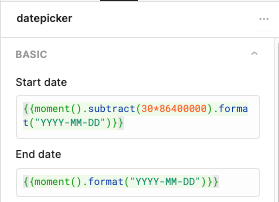
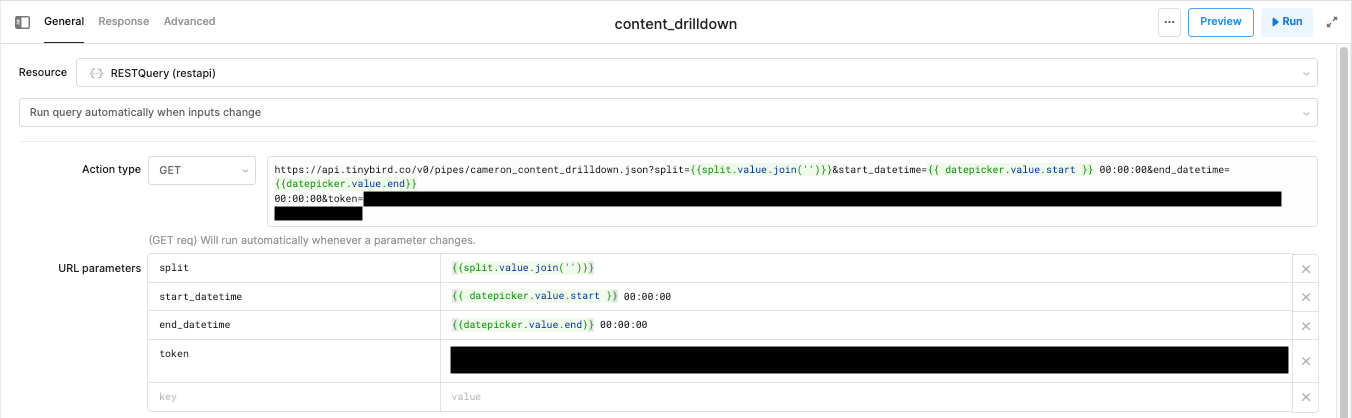
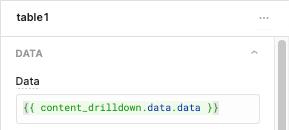
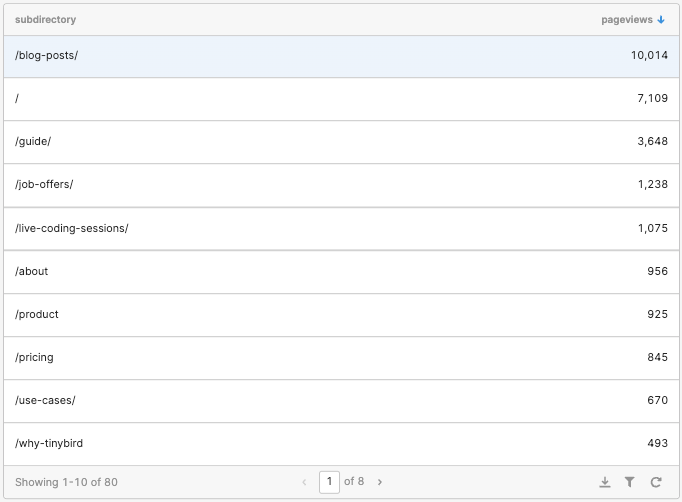
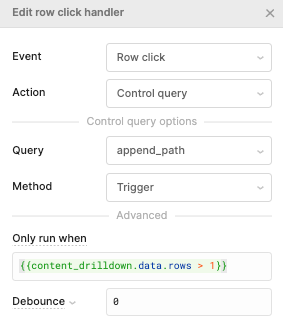
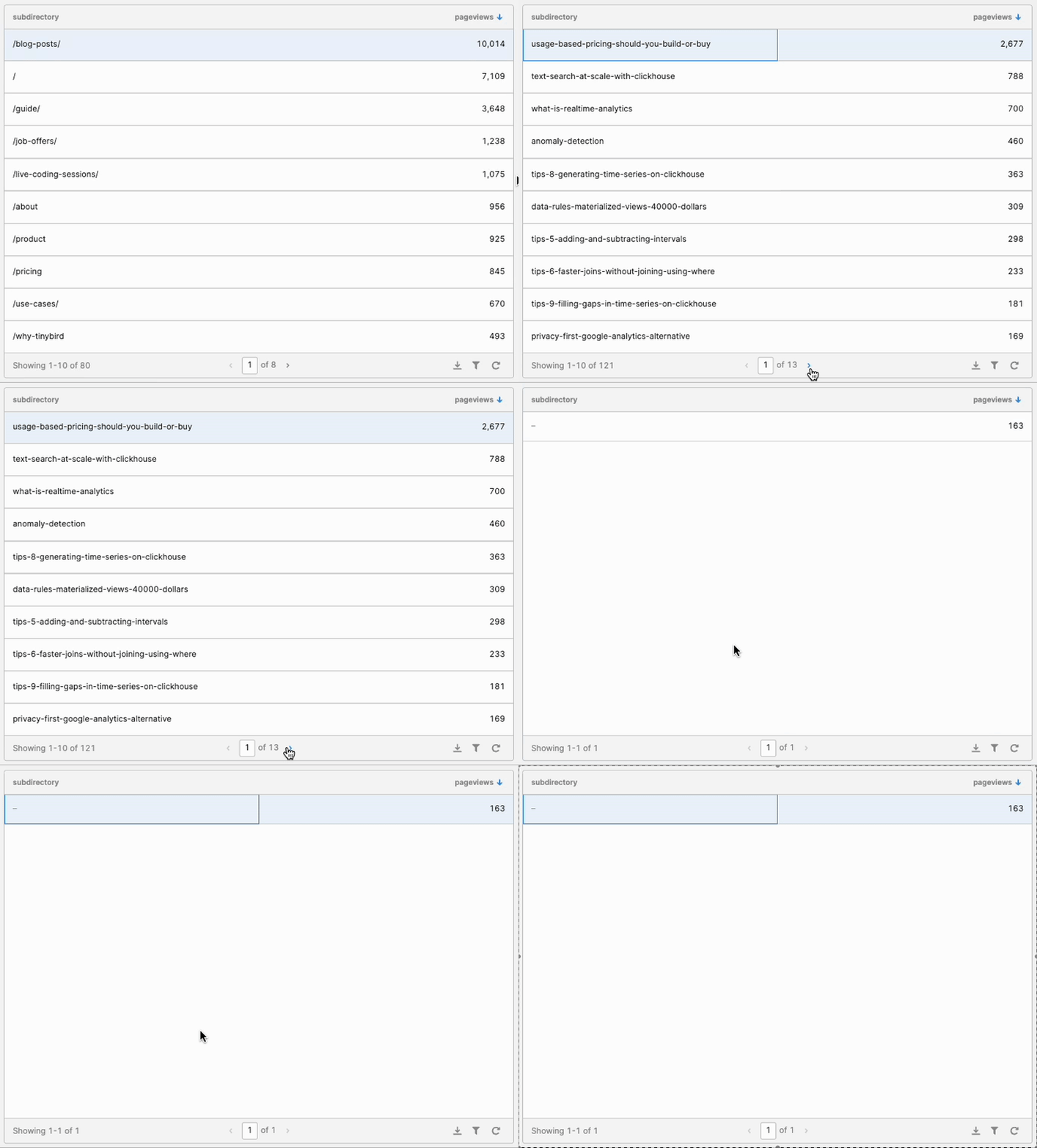
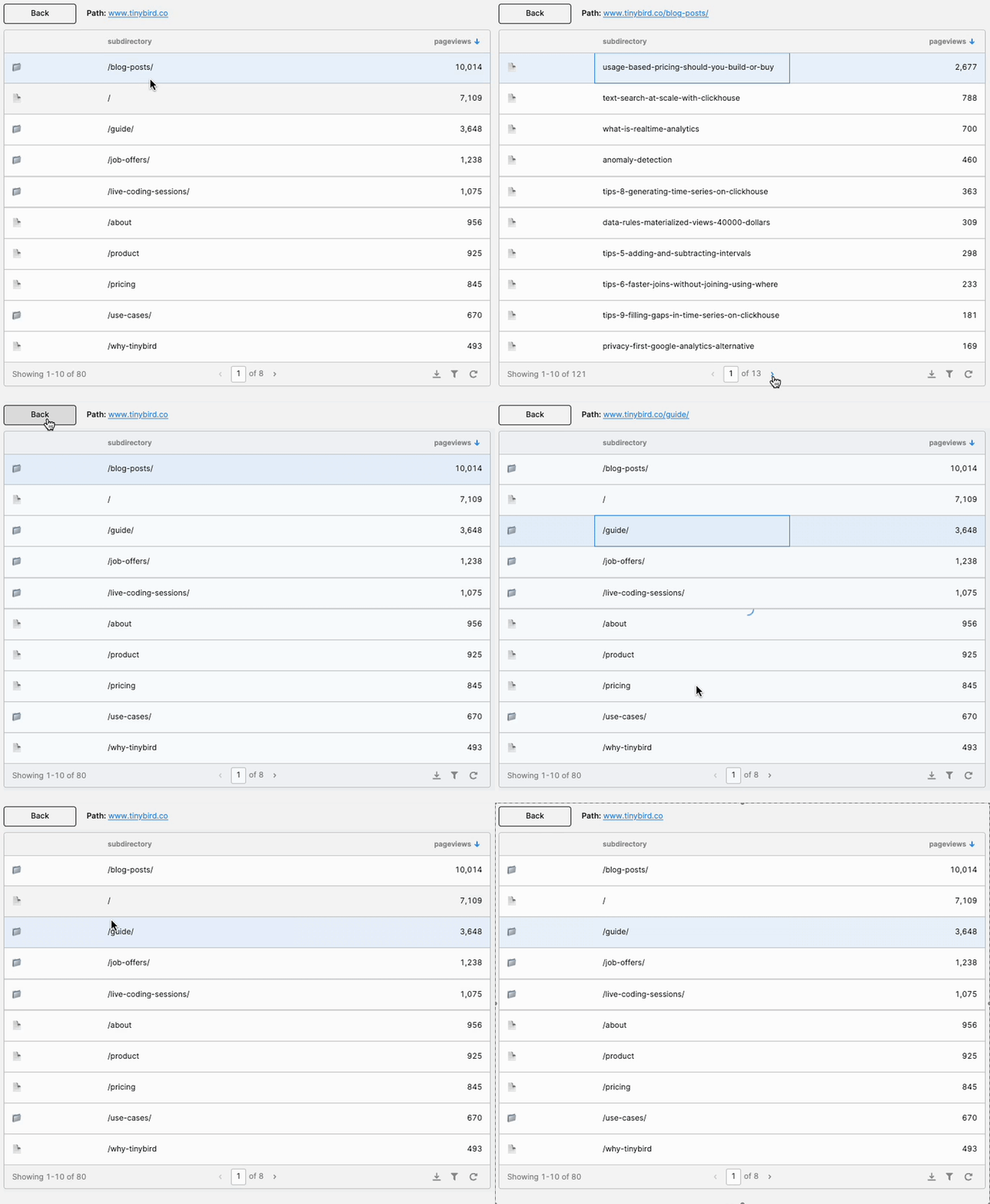
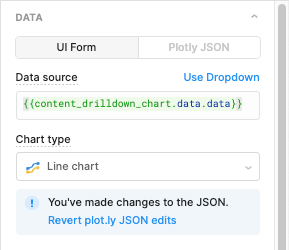
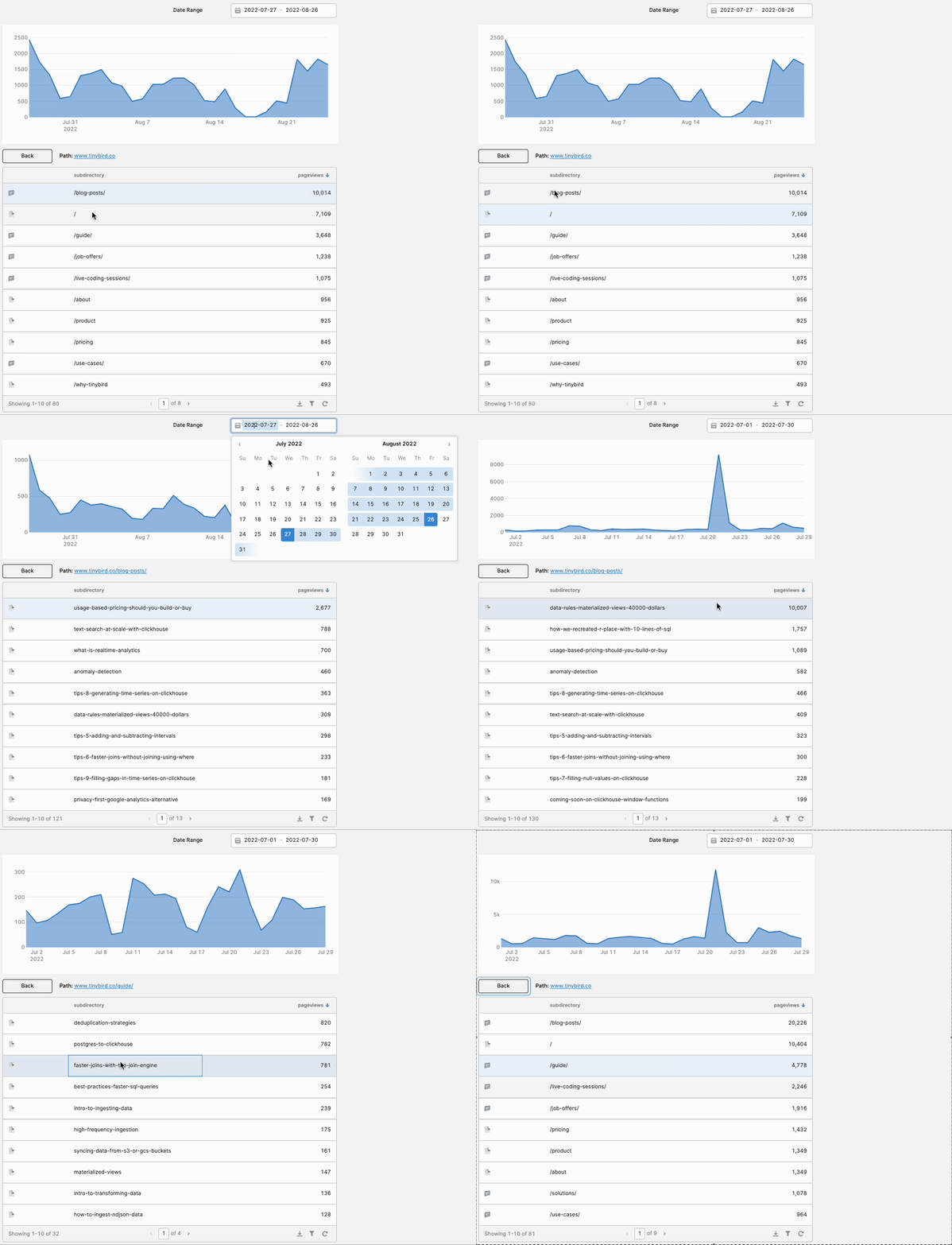
<h2 id="what-is-the-content-drilldown">What is the Content Drilldown?</h2><figure class="kg-card kg-image-card kg-card-hascaption"><img src="https://tinybird-blog.ghost.io/content/images/2023/09/6321d99d75748e677c89730a_zebRYpl2xPPuMP4FWNwdvStZC1twbJdzvMuAszNcIyQMQ_yQGPzzD0NocEnXI1pAiI5TiRzqx3E2HpuhKbRZoT39TTdRMxdAoX-hbXcWM7gcO77UjxvTG_jYouAclsOxkhkYCL-4I9_cvi-VHHBUd_SHIgZ5k1fAanWyRJdUDuAyx5kEeLXT9LJl7A-6.png" class="kg-image" alt="A screenshot of the Content Drilldown in Google Analytics" loading="lazy" width="1264" height="720" srcset="https://tinybird-blog.ghost.io/content/images/size/w600/2023/09/6321d99d75748e677c89730a_zebRYpl2xPPuMP4FWNwdvStZC1twbJdzvMuAszNcIyQMQ_yQGPzzD0NocEnXI1pAiI5TiRzqx3E2HpuhKbRZoT39TTdRMxdAoX-hbXcWM7gcO77UjxvTG_jYouAclsOxkhkYCL-4I9_cvi-VHHBUd_SHIgZ5k1fAanWyRJdUDuAyx5kEeLXT9LJl7A-6.png 600w, https://tinybird-blog.ghost.io/content/images/size/w1000/2023/09/6321d99d75748e677c89730a_zebRYpl2xPPuMP4FWNwdvStZC1twbJdzvMuAszNcIyQMQ_yQGPzzD0NocEnXI1pAiI5TiRzqx3E2HpuhKbRZoT39TTdRMxdAoX-hbXcWM7gcO77UjxvTG_jYouAclsOxkhkYCL-4I9_cvi-VHHBUd_SHIgZ5k1fAanWyRJdUDuAyx5kEeLXT9LJl7A-6.png 1000w, https://tinybird-blog.ghost.io/content/images/2023/09/6321d99d75748e677c89730a_zebRYpl2xPPuMP4FWNwdvStZC1twbJdzvMuAszNcIyQMQ_yQGPzzD0NocEnXI1pAiI5TiRzqx3E2HpuhKbRZoT39TTdRMxdAoX-hbXcWM7gcO77UjxvTG_jYouAclsOxkhkYCL-4I9_cvi-VHHBUd_SHIgZ5k1fAanWyRJdUDuAyx5kEeLXT9LJl7A-6.png 1264w" sizes="(min-width: 720px) 720px"><figcaption><span style="white-space: pre-wrap;">The Content Drilldown is useful for exploring aggregated metrics for subdirectories on your domain.</span></figcaption></figure><p>The Content Drilldown is a view in Google Analytics Universal Properties that lets you explore critical metrics for the various subdirectories on your website’s domain. If we used Google Analytics to track Tinybird website visits (we don’t), the Content Drilldown would allow me to see aggregated session metrics—in a single row—for all traffic that visited that page path.</p><p>For example, all of Tinybird’s blog posts are contained in the subdirectory “/blog-posts/”. Every blog post will have the same URL structure: “https://tinybird.co/blog-posts/blog-post-slug”. In this case, the Content Drilldown would let me view session metrics for my entire blog, not just individual blog posts.</p><p><a href="https://www.tmblast.com/blog/search/understanding-content-drilldown-in-google-analytics/">Here’s a decent primer</a> on the Content Drilldown if you want more detail.</p><h2 id="how-does-the-content-drilldown-work">How does the Content Drilldown work?</h2><p>When you land on the Content Drilldown in Google Analytics, you see a list of subdirectories and individual pages on your domain, including the homepage, ranked by the total number of pageviews for that page path over the specified time period. If you click on one of those subfolders or pages, the view will update to show the aggregate metrics within that page path. You can continue down this journey until you’re at the individual page level.</p><p><a href="https://www.youtube.com/watch?v=56lqEcYiaXQ">This video</a> shows the Content Drilldown behavior in more detail, if you’re interested.</p><h2 id="how-i-recreated-the-content-drilldown-with-retool-and-tinybird">How I recreated the Content Drilldown with Retool and Tinybird</h2><p>Because the Content Drilldown has been very useful to me in my career as a Content Marketer, and because we at Tinybird have transitioned away from Google Analytics for data privacy reasons (among others), I decided to recreate a basic version of this view using Retool and Tinybird. This was a great learning process for me, with a lot of trial and error. Here’s how I made it work.</p><h3 id="step-0-do-it-without-a-session-cookie">Step 0: Do it without a session cookie</h3><p>In my last post, I structured the data I was capturing from my website into discrete sessions. This was useful to capture session metrics like bounce rate and exit %, but in this case, I just built a Content Drilldown for individual pageviews. I reasoned I could always expand it later if I wanted to.</p><p>I liked this approach for two reasons. For one, it was just easier to implement. Less code. But it’s also a more <a href="https://www.tinybird.co/blog-posts/privacy-first-google-analytics-alternative">privacy-first approach</a>. If you can avoid using cookies for your use case, even session cookies, you’re more likely to have a bulletproof case for compliance with data privacy laws like GDPR. Did I mention it’s also easier??</p><h3 id="step-1-define-the-logic-in-tinybird">Step 1: Define the logic in Tinybird</h3><p>In case you missed the first post, the Tinybird website is equipped with a first-party tracker. This is just a bit of JavaScript that is hosted on the Tinybird domain and sends web events data like pageviews directly into a Tinybird data source using the <a href="https://www.tinybird.co/docs/api-reference/events-api" rel="noreferrer">Tinybird Events API</a>.</p><p>Once the data hits the Tinybird data source, I can analyze and transform the data using SQL in <a href="https://www.tinybird.co/docs/concepts/pipes" rel="noreferrer">Tinybird Pipes</a>, a series of chained, composable SQL nodes. With Pipes, each subsequent node can query over the prior node, which means you can avoid building massive queries with nested CTEs.</p><p>Any node in a Pipe can be <a href="https://www.tinybird.co/docs/classic/publish-data/endpoints" rel="noreferrer">published as a REST API</a>, which lets you easily get the results of your queries using any requests library in whatever frontend you’re building. In this case, I can use the API endpoints I create from my Pipes as <a href="https://docs.retool.com/docs/queries">Resource Queries</a> in Retool.</p><p>In the case of the Content Drilldown, I wanted the final node of my Pipe to return a list of subdirectories on the Tinybird website ranked by total pageviews within that subdirectory over the specified time period. In addition, I wanted to see a chart of those pageviews over time.</p><p>It took me a while to figure out the right approach here. My first challenge was simply understanding how the Content Drilldown works, theoretically. I have quite a few ripped-up, balled-up notepad sheets in my digital wastebasket to show for this.</p><p>But I figured it out eventually. Here’s how it went:</p><h4 id="step-1a-get-pageviews-under-the-selected-page-path">Step 1A: Get pageviews under the selected page path</h4><p>What I decided to do first was split every URL by the selected page path, filter URLs that only matched the selected page, only retain the trailing substring of the URL. This would match the basic functionality of Google Analytics.</p><p>Here’s an example of some  SQL in Tinybird that does that for the root domain for the last week of events data, for example:</p><figure class="kg-card kg-embed-card"><iframe width="100%" src="https://snippets.tinybird.co/XQAAAAL3AAAAAAAAAABBKUqGk9nLKzhOUnztQjEcAPcLpq3JQtNMRwMnRPU6x0ISoMuq9UOGZYOon2L0FdPRTCJqbX9MLQ7wWZOQV7mX80XQCpgcEE3N0RoyyRGmsBFkqoY70wUAvCcBgbsfi54fy2zLwEEprOz-eHEVBwhtgQ5uCWPFdXbGMTVTZy07vFaJAx5JmhfEqWhT2PFc5LL7EgpqHosOb89B46U0udKu6XP2wLBfaiExyFZC2zf43V6n40QmsBB8HeQmpqPsgUCAQp0M4v0WkooBbRBWxiQfQOEnn_5FgAA/embed"></iframe></figure><p>… and the results in Tinybird. Each row is a single pageview event that matches the substring.</p><figure class="kg-card kg-image-card kg-card-hascaption"><img src="https://tinybird-blog.ghost.io/content/images/2023/09/6321d99da5700115c89c1c15_MIyVtqLLRLd__KhMN18GZ3lID2EOgcVLIHrFz2xRn757EZBwGuy-8hq8Vw1ODHU-wm37-6vJRpc8IHb2CFaroFtEIWe7j3Hy6i75O4MW8n--76HWtb7ur37hPGoa5kX_-yHl8OlvbsY8x58tFOc9bXS-hA4Ro40XzBQYi16CA5d5UfdVcceWuTiB7Q-6.png" class="kg-image" alt="An SQL query and the results in Tinybird" loading="lazy" width="1050" height="569" srcset="https://tinybird-blog.ghost.io/content/images/size/w600/2023/09/6321d99da5700115c89c1c15_MIyVtqLLRLd__KhMN18GZ3lID2EOgcVLIHrFz2xRn757EZBwGuy-8hq8Vw1ODHU-wm37-6vJRpc8IHb2CFaroFtEIWe7j3Hy6i75O4MW8n--76HWtb7ur37hPGoa5kX_-yHl8OlvbsY8x58tFOc9bXS-hA4Ro40XzBQYi16CA5d5UfdVcceWuTiB7Q-6.png 600w, https://tinybird-blog.ghost.io/content/images/size/w1000/2023/09/6321d99da5700115c89c1c15_MIyVtqLLRLd__KhMN18GZ3lID2EOgcVLIHrFz2xRn757EZBwGuy-8hq8Vw1ODHU-wm37-6vJRpc8IHb2CFaroFtEIWe7j3Hy6i75O4MW8n--76HWtb7ur37hPGoa5kX_-yHl8OlvbsY8x58tFOc9bXS-hA4Ro40XzBQYi16CA5d5UfdVcceWuTiB7Q-6.png 1000w, https://tinybird-blog.ghost.io/content/images/2023/09/6321d99da5700115c89c1c15_MIyVtqLLRLd__KhMN18GZ3lID2EOgcVLIHrFz2xRn757EZBwGuy-8hq8Vw1ODHU-wm37-6vJRpc8IHb2CFaroFtEIWe7j3Hy6i75O4MW8n--76HWtb7ur37hPGoa5kX_-yHl8OlvbsY8x58tFOc9bXS-hA4Ro40XzBQYi16CA5d5UfdVcceWuTiB7Q-6.png 1050w" sizes="(min-width: 720px) 720px"><figcaption><span style="white-space: pre-wrap;">The SQL I used to get the path of each pageview.</span></figcaption></figure><p>Notes:</p><ul><li><code>splitByString()</code> is a ClickHouse® function that returns an array of substrings split by a designated separator. So <code>splitByString(‘www.tinybird.co’,’www.tinybird.co/blog-posts/this-is-a-blog-post’)</code> would return <code>[‘’, ‘/blog-posts/this-is-a-blog-post’]</code>.</li></ul><h4 id="step-1b-extract-subdirectories-and-single-pages">Step 1B: Extract subdirectories and single pages</h4><p>Once I had the results from the above query (every pageview event under the selected page path), the next step was to aggregate pageviews by the subsequent page path level.</p><p>Since the selected directory could always include pages or additional subdirectories, I need a way to tell them apart. Simple: Look for URLs containing more than one forward slash (‘/’). Those with more than one slash would represent a page within a <em>subsequent</em> <em>subdirectory</em>. Those with just one slash would represent a page within the <em>selected</em> directory.</p>
<!--kg-card-begin: html-->
<div class="tip-box"><div class="tip-box-container"><div class="tip-box-title">Note</div><div class="tip-box-content">Tinybird doesn’t use trailing slashes in our URL structure, so this logic worked, but in my final version, I trimmed trailing slashes from the URLs just to make sure.</div></div></div>
<!--kg-card-end: html-->
<p>Here’s how I did that one in Tinybird SQL:</p><figure class="kg-card kg-embed-card"><iframe width="100%" src="https://snippets.tinybird.co/XQAAAAIEAQAAAAAAAABBKUqGk9nLKzhQAX1_q3NDpLEDAOc5AWO179i5ECgQEoBbMh3a41w8TTNd04SYoksdO1Jg9ETxhKhP8yGSGV0WTbV771fXntAcsN4fB5-1s9QclDO3eMmRsEq_PTckkjPRop0i3cGEFL6lmMlC_aTdX9A5F9a6YL4apThNTquuLFfrnFFp1DrBOVACo3gXfd8R0r_mkK49-T3TXtrgIHFuMwuB61TgcUkBdF-R_HffQ3_qdnAUZ1MlWqWAFe18kH8qyKR2Flb4DS8QY8pfuajXkR1__3RAgwA/embed"></iframe></figure><p>Note this is the second node in the Pipe, querying over the results in the first node (which I named “clean_path”).</p><p>Here’s what’s happening in that first <code>SELECT</code> statement:</p><p>First, I’m using the ClickHouse® function <code>extract()</code> which returns a fragment of a string using a regular expression. The regex pattern <code>\/.*?\/</code> indicates I want the first fragment in between two forward slashes. If no such fragment exists because there’s only one forward slash (i.e. it’s a page and not a subdirectory), then this returns an empty string.</p><p>In the case of an empty string, I set it to null with the <code>nullIf()</code> function and used the <code>coalesce()</code> function to return the page path.</p><p>With this <code>SELECT</code> statement, I get the part of the URL within two forward slashes (if it’s a subdirectory), or the page slug (if it’s not).</p><p>There are probably other ways to do this, and ClickHouse® offers a <a href="https://clickhouse.com/docs/en/sql-reference/functions/url-functions/#functions-that-extract-parts-of-a-url">bevy of functions</a> for extracting URL parts, but I was just happy I got this to work!</p><p>From there, it was just a simple count aggregation.</p><h4 id="step-1c-add-query-parameters">Step 1C: Add query parameters</h4><p>As the name implies, the ability to drill down into subsequent page path levels is a critical part of the Content Drilldown. When you click a subdirectory displayed as a row in the table of the Content Drilldown, the table updates to show aggregate pageviews within that path. I wanted to implement the same functionality in Retool, which meant I’d need to pass a parameter to my resource query to let it know where to “split” the path. I’d also need query parameters to define the date range.</p><p>The next step, then, was to add query parameters in Tinybird using Tinybird’s templating language. Here’s how the <code>clean_path</code> node looked once updated with query parameters:</p><figure class="kg-card kg-embed-card"><iframe width="100%" src="https://snippets.tinybird.co/XQAAAALvAgAAAAAAAABBKUqGk9nLKwJ8ikxUKI5k5uW7ZOOFovUC8KL8cPgBg_I76OA-cioPV4V0ITZmbcOroXgdF8S4_0JdRhG1gzonkfIqpFaWUsuKNP0hXiuuQsL6jBfKBJjqR9SJ20O0Zn0gxPfeAJYd_qGUz-JuQZ0Hohuwb0VgLz094UkA2N-rpii1b3XRs9Y_BROgAoojusXqf0vGxY1_qVLX870cFRY0QfTCAjDZYTcV4DGB1za_CYEdxYCntJKth0ZcLjPuB3u2wu_LIbcPOMm3GhZCbpLnmUGES2LqLd3X0ZQNacFPHt-LPd6inoGvZvjoCkNsb2Iz9mkTk7qeKs49ZHILVPOAstjG-GgZegMyYOolyuR783ata_mSSfvDduq72S0ZKdWEEFx6soMIzxT876qtj8rbTMpUuhSjr8BOW5rxYlOMqVuGPlkhL86irATGurn_rQaAWobwf3H5T2T5t6GX_MpsJOxT3nEBvnmsza8Vpx_zqyo5MPF0kYt-BdukV3qGsKcGRfjB6nzE1FesAE3hAsLS6bA85Va__-y3JvM/embed"></iframe></figure><p>Notes:</p><ul><li>Anything inside of double curly braces is a parameter that I can use when I call an endpoint published from this Pipe. I’ve defined 3 query parameters: <code>split</code>, <code>start_datetime</code>, and <code>end_datetime</code>. The latter two are self-explanatory. The <code>split</code> query parameter let me define how I split the URL based on my selected page path in the Content Drilldown.</li><li>I cleaned up the URL by removing URL parameters (<code>?</code>), anchor tags (<code>#</code>), and trailing slashes.</li><li>As in my prior post, <code>{if defined()}</code> let me only execute the subsequent SQL statement if a value is passed for the query parameter. So I only filtered out events after <code>end_datetime</code> if that query parameter was defined.</li><li>I also made sure to filter out any pages that didn’t include the defined page path with that last <code>AND</code> statement. This used the same <code>split</code> query parameter.</li></ul><h4 id="step-1d-publish-the-tinybird-endpoint">Step 1D: Publish the Tinybird endpoint</h4><p>Tinybird makes it as easy as possible to publish the results of these queries as API endpoints. It’s a single click. So I just published the final node in that Pipe as an API:</p><figure class="kg-card kg-image-card kg-card-hascaption"><img src="https://tinybird-blog.ghost.io/content/images/2023/09/6321d99d31f65473c6b2eac8_BILaA4_Fxui8ySpcwAtcNXBc6hxSdcuKJhSm5k6wYYB2h6vi9dkb4LLM_GIorId9tdGKT2WjO3yWoyLdYQdWCpczn5V9laccgZclplmO7jVZVTavDi_15ab24lnEYa2vj_aFnS5lWeYNP4qPCafBtiImnNQMlxLP3hTYI9qzFu2jJRM4XNsXic7JgQ-6.gif" class="kg-image" alt="A gif showing how an SQL query is published as an API Endpoint in Tinybird" loading="lazy" width="800" height="472" srcset="https://tinybird-blog.ghost.io/content/images/size/w600/2023/09/6321d99d31f65473c6b2eac8_BILaA4_Fxui8ySpcwAtcNXBc6hxSdcuKJhSm5k6wYYB2h6vi9dkb4LLM_GIorId9tdGKT2WjO3yWoyLdYQdWCpczn5V9laccgZclplmO7jVZVTavDi_15ab24lnEYa2vj_aFnS5lWeYNP4qPCafBtiImnNQMlxLP3hTYI9qzFu2jJRM4XNsXic7JgQ-6.gif 600w, https://tinybird-blog.ghost.io/content/images/2023/09/6321d99d31f65473c6b2eac8_BILaA4_Fxui8ySpcwAtcNXBc6hxSdcuKJhSm5k6wYYB2h6vi9dkb4LLM_GIorId9tdGKT2WjO3yWoyLdYQdWCpczn5V9laccgZclplmO7jVZVTavDi_15ab24lnEYa2vj_aFnS5lWeYNP4qPCafBtiImnNQMlxLP3hTYI9qzFu2jJRM4XNsXic7JgQ-6.gif 800w" sizes="(min-width: 720px) 720px"><figcaption><span style="white-space: pre-wrap;">Publishing the results of the SQL query as an API in a click. Now I can start building!</span></figcaption></figure><p>That’s it! With the endpoint published, it was time to step into Retool.</p><h3 id="step-2-build-the-content-drilldown-in-retool">Step 2: Build the Content Drilldown in Retool</h3><p>Before I explain <em>how</em> I recreated the Content Drilldown, let me show you <em>what</em> I built. Here’s what the final product looks like in Retool:</p><figure class="kg-card kg-image-card kg-card-hascaption"><img src="https://tinybird-blog.ghost.io/content/images/2023/09/6321d99dc5fa8ced730b774d_e6QeKgHrNdpYzXlT6swk6-VFvKH2bGLDWjWI0-dpARNpNqNf4jXrEjyeFbYyOlu7gAFDqGZl6Ck0DoMb2LHnkN4CbYiOOB9Ouf8paiVlq_AwJQbNzW7fPapCMn17KIYfBdGDVljODGl_MqmOndiUEOrGeX-sakduGR67qgU7Ex_ms9mN6ShVZxy-IA-6.png" class="kg-image" alt="A reproduction of the Google Analytics Content Drilldown in Retool" loading="lazy" width="688" height="840" srcset="https://tinybird-blog.ghost.io/content/images/size/w600/2023/09/6321d99dc5fa8ced730b774d_e6QeKgHrNdpYzXlT6swk6-VFvKH2bGLDWjWI0-dpARNpNqNf4jXrEjyeFbYyOlu7gAFDqGZl6Ck0DoMb2LHnkN4CbYiOOB9Ouf8paiVlq_AwJQbNzW7fPapCMn17KIYfBdGDVljODGl_MqmOndiUEOrGeX-sakduGR67qgU7Ex_ms9mN6ShVZxy-IA-6.png 600w, https://tinybird-blog.ghost.io/content/images/2023/09/6321d99dc5fa8ced730b774d_e6QeKgHrNdpYzXlT6swk6-VFvKH2bGLDWjWI0-dpARNpNqNf4jXrEjyeFbYyOlu7gAFDqGZl6Ck0DoMb2LHnkN4CbYiOOB9Ouf8paiVlq_AwJQbNzW7fPapCMn17KIYfBdGDVljODGl_MqmOndiUEOrGeX-sakduGR67qgU7Ex_ms9mN6ShVZxy-IA-6.png 688w"><figcaption><span style="white-space: pre-wrap;">What I eventually created in&nbsp;Retool. I'll show you how I got there.</span></figcaption></figure><p>It’s a decently faithful facsimile of the original Content Drilldown in Google Analytics, albeit with fewer columns. And now, how I did it:</p><h4 id="step-2a-create-the-datepicker">Step 2A: Create the datepicker</h4><p>I won’t spend a bunch of time here, as this was simple in Retool. I needed a simple data range selector over which to aggregate the metrics. Retool has a built-in <a href="https://retool.com/components/date-range">React datepicker component</a>, so I just dragged that into my Retool canvas and set the default start date to 30 days ago and default end date to today using the <code>moment()</code> function:</p><figure class="kg-card kg-image-card kg-card-hascaption"><img src="https://tinybird-blog.ghost.io/content/images/2023/09/6321d99da075f54b8833cee4_mpc63rB3IdrrW8tmeNB-E4z7OxXL6yzWYPex0pHd7y4mFggPfVkI9a6jiRnR8F8o2Nn_SIG8bPbAjtMaK4ViKF5Ab046R9ZFaUhvrs63TtXcFZXlw5JN5SnvtUJe-EDWTCu-fJ75BKVtfCstvHL2SPM5O3lBL3EbG0boKa6EiF8ifBO9DzJ5iGFrBg-6.png" class="kg-image" alt="Configuration for a datepicker component in Retool" loading="lazy" width="279" height="202"><figcaption><span style="white-space: pre-wrap;">How I configured the datepicker component in Retool</span></figcaption></figure><p>The formatting is so the values would play nice with my Tinybird APIs, since I’d use these as query parameters later.</p><h4 id="step-2b-create-the-basic-drilldown-table">Step 2B: Create the basic drilldown table</h4><p>To start, I dragged a <a href="https://retool.com/components/table">table component</a> into the canvas, and set up the resource to populate the table with data by calling the Tinybird API I published.</p><p>Here’s that RESTQuery resource, called <code>content_drilldown</code>:</p><figure class="kg-card kg-image-card kg-card-hascaption"><img src="https://tinybird-blog.ghost.io/content/images/2023/09/6321d99d83827abf1db04613_bxV787B6J5STBgRZXygQntzIOMmvLgps92ChbMoXZ_erVEQLiP0MhA2MwL9ashk0dMGZNofGIQkBrZiN2cFC5Z5Anexh8q8WGenD-tzYJPWAp3fJ-amcw9yqhGzP0lDO45YUDfWVS88OktqrewCI1eFdmvMsYq7dqFDvmOYCZ57nKSKPhOjcukoytQ-6.png" class="kg-image" alt="A RESTQuery resource configuration in Retool" loading="lazy" width="1352" height="418" srcset="https://tinybird-blog.ghost.io/content/images/size/w600/2023/09/6321d99d83827abf1db04613_bxV787B6J5STBgRZXygQntzIOMmvLgps92ChbMoXZ_erVEQLiP0MhA2MwL9ashk0dMGZNofGIQkBrZiN2cFC5Z5Anexh8q8WGenD-tzYJPWAp3fJ-amcw9yqhGzP0lDO45YUDfWVS88OktqrewCI1eFdmvMsYq7dqFDvmOYCZ57nKSKPhOjcukoytQ-6.png 600w, https://tinybird-blog.ghost.io/content/images/size/w1000/2023/09/6321d99d83827abf1db04613_bxV787B6J5STBgRZXygQntzIOMmvLgps92ChbMoXZ_erVEQLiP0MhA2MwL9ashk0dMGZNofGIQkBrZiN2cFC5Z5Anexh8q8WGenD-tzYJPWAp3fJ-amcw9yqhGzP0lDO45YUDfWVS88OktqrewCI1eFdmvMsYq7dqFDvmOYCZ57nKSKPhOjcukoytQ-6.png 1000w, https://tinybird-blog.ghost.io/content/images/2023/09/6321d99d83827abf1db04613_bxV787B6J5STBgRZXygQntzIOMmvLgps92ChbMoXZ_erVEQLiP0MhA2MwL9ashk0dMGZNofGIQkBrZiN2cFC5Z5Anexh8q8WGenD-tzYJPWAp3fJ-amcw9yqhGzP0lDO45YUDfWVS88OktqrewCI1eFdmvMsYq7dqFDvmOYCZ57nKSKPhOjcukoytQ-6.png 1352w" sizes="(min-width: 720px) 720px"><figcaption><span style="white-space: pre-wrap;">Using the Tinybird API I created in Step 1D as a RESTQuery resource in Retool</span></figcaption></figure><p>This also involved creating a <a href="https://docs.retool.com/docs/temporary-state">temporary state</a> in Retool to store the value of the <code>split</code> query parameter and update it upon drill down. I decided to define this as an array (I’ll explain why later), and I set the default value to our root domain: [“www.tinybird.co”].</p><p>Then I used the value of that temporary state (joining the array elements into a single string) for the <code>split</code> query parameter in the Tinybird API. Finally, I updated the table component to get data from the Resource Query:</p><figure class="kg-card kg-image-card kg-card-hascaption"><img src="https://tinybird-blog.ghost.io/content/images/2023/09/6321d99d17c076155906b7dd_dGg-aISC9ZiFHFYpgkpxKOFjJokIPZ4NhPlV1ZILtL-gMiBVdmQg5Dk9Yigv_ELZoyIwF2iyfOES8lBcamJ1WwsvABCXs4uNvAYA3k9CfP8xuwRX9kqAPjb6FG4owaPbd0H76Vo0AHtePHeSxJu6AnxB_Rfr7PJTS1j7uKxNJAvzBo6jde4eLRV1KA-6.png" class="kg-image" alt="Configuration of a table component in Retool" loading="lazy" width="289" height="130"><figcaption><span style="white-space: pre-wrap;">The simple configuration for the table in&nbsp;Retool</span></figcaption></figure><p>And here’s how it looked:</p><figure class="kg-card kg-image-card kg-card-hascaption"><img src="https://tinybird-blog.ghost.io/content/images/2023/09/6321d99da35fe7885bf67cca_HfGiSSi80tnZVXtuWJiyx_Z8ClFYUKRxZOKv-0KSTOzPCrXJBFTVUeCcNCZiXfnMHjITZpCzOkZFK24_wrgv2dmQqCDF0ziZLtv0SCADD-ryvw9PdNi58eSQTq_3zKHk7tQ_psZ8Pq-rygGYhEHGRK6GmmliVmkUKoGt6I3-JNLhHHITF-NUIgDNMA-6.png" class="kg-image" alt="A simple, incomplete version of the Google Analytics Content Drilldown created in Retool" loading="lazy" width="682" height="502" srcset="https://tinybird-blog.ghost.io/content/images/size/w600/2023/09/6321d99da35fe7885bf67cca_HfGiSSi80tnZVXtuWJiyx_Z8ClFYUKRxZOKv-0KSTOzPCrXJBFTVUeCcNCZiXfnMHjITZpCzOkZFK24_wrgv2dmQqCDF0ziZLtv0SCADD-ryvw9PdNi58eSQTq_3zKHk7tQ_psZ8Pq-rygGYhEHGRK6GmmliVmkUKoGt6I3-JNLhHHITF-NUIgDNMA-6.png 600w, https://tinybird-blog.ghost.io/content/images/2023/09/6321d99da35fe7885bf67cca_HfGiSSi80tnZVXtuWJiyx_Z8ClFYUKRxZOKv-0KSTOzPCrXJBFTVUeCcNCZiXfnMHjITZpCzOkZFK24_wrgv2dmQqCDF0ziZLtv0SCADD-ryvw9PdNi58eSQTq_3zKHk7tQ_psZ8Pq-rygGYhEHGRK6GmmliVmkUKoGt6I3-JNLhHHITF-NUIgDNMA-6.png 682w"><figcaption><span style="white-space: pre-wrap;">The Content Drilldown begins to take shape...</span></figcaption></figure><p>Good start! Now for the hard part.</p><h4 id="step-2c-implementing-the-drilldown-functionality">Step 2C: Implementing the drilldown functionality</h4><p>Here’s a summary of what the table should do to mimic Content Drilldown in Google Analytics:</p><ol><li>When you click on a page path (row in the table), the table should update to only show aggregated data underneath that page path.</li><li>You need to be able to “back out” of the drilldown.</li><li>When you drill down, the table should reset to the first page.</li><li>Show the current page path</li></ol><p>I started with #1 by adding a “row click” <a href="https://docs.retool.com/docs/event-handlers">Event Handler</a> to the table, so that when I clicked a row in the table, it would drill down to content underneath that path by appending the clicked subdirectory to the <code>split</code> temporary state.</p><p>To do that, I created a <a href="https://docs.retool.com/docs/javascript-overview">JavaScript Query</a> that I named “append_path” in Retool with the following code</p><figure class="kg-card kg-embed-card"><iframe width="100%" src="https://snippets.tinybird.co/XQAAAAKtAAAAAAAAAABBKUqGk9nLKu-QGEjoiH6bXzeZ7vLjXRCHTiCXpN4kzgi-PtYbfdAvsukldRi3dMIw_DiKXNxcxzNt-nWo8sym26vGZLF_DVeJYdrTAw-wJ-h3OQ0c7HGpkD2ojeeRkP4nEORp-L9l0q-MsM9Cw3BGrPdkfxjJ79xYSPbO2yu_GsvrwOh1RrMUIpYECID7ZIOrJXT__7vCgAA/embed"></iframe></figure><p>That second line of JS handles #3 in my list above.</p><p>I then updated the Event Handler to run that resource when a row in the table was clicked. I also added a filter so the script wouldn’t run once you reach the end of the path (a single page) and can’t drill down anymore.</p><figure class="kg-card kg-image-card kg-card-hascaption"><img src="https://tinybird-blog.ghost.io/content/images/2023/09/6321d99d75748ef4ac897310_h8NP5ezwVOSo_E3pvZ0kLTculnMkE44-yQSvYz395qLou8MVhpp1AbrVvfXuayNbw5VKvRI9h4EFFSThG5_Dbs15vzY4EAbUAEdC3w2nqMr9_83P8ZGUKkckKw0jpmMBk_ojz8LispkD7ueuVAXlBmOSbbfea_qNKYCWD6rSApgtCvyNTIEyU5Nb4w-6.png" class="kg-image" alt="An Event Handler configuration in Retool" loading="lazy" width="283" height="328"><figcaption><span style="white-space: pre-wrap;">Updating the row click Event Handler to only run when there is still content to drill down to.</span></figcaption></figure><p>With that, the drilldown functionality started to take shape:</p><figure class="kg-card kg-image-card kg-card-hascaption"><img src="https://tinybird-blog.ghost.io/content/images/2023/09/6321d99d17c076567406b7de_jWQeEsCk9kqc0Q4_FqrWmkz3z-qJ0sdJzyoU6cy3nIXPwGOV3AHxp0rHu8K4kA0V9HIVRbTUVRXCE96TfKgWNmqIT3gtw0DhK_ekf7dQyjMfjRPBJIVPL5lJUq0IaOPs3XgjynoBz-QrFHuj5GkPMW-zYv7l9WfHAFiY0AnfxiO5nZm-g4QNgCF7Ng-6.gif" class="kg-image" alt="A gif showing a further improvement of the Retool table towards the Content Drilldown functionality" loading="lazy" width="800" height="591" srcset="https://tinybird-blog.ghost.io/content/images/size/w600/2023/09/6321d99d17c076567406b7de_jWQeEsCk9kqc0Q4_FqrWmkz3z-qJ0sdJzyoU6cy3nIXPwGOV3AHxp0rHu8K4kA0V9HIVRbTUVRXCE96TfKgWNmqIT3gtw0DhK_ekf7dQyjMfjRPBJIVPL5lJUq0IaOPs3XgjynoBz-QrFHuj5GkPMW-zYv7l9WfHAFiY0AnfxiO5nZm-g4QNgCF7Ng-6.gif 600w, https://tinybird-blog.ghost.io/content/images/2023/09/6321d99d17c076567406b7de_jWQeEsCk9kqc0Q4_FqrWmkz3z-qJ0sdJzyoU6cy3nIXPwGOV3AHxp0rHu8K4kA0V9HIVRbTUVRXCE96TfKgWNmqIT3gtw0DhK_ekf7dQyjMfjRPBJIVPL5lJUq0IaOPs3XgjynoBz-QrFHuj5GkPMW-zYv7l9WfHAFiY0AnfxiO5nZm-g4QNgCF7Ng-6.gif 800w" sizes="(min-width: 720px) 720px"><figcaption><span style="white-space: pre-wrap;">I can drill down, but I can't come back up for air!</span></figcaption></figure><p>But once I drilled down, I couldn’t come back up! Enter the “Back” Button.</p><h4 id="step-3d-create-a-back-button-and-other-ornaments">Step 3D: Create a back button, and other ornaments</h4><p>I dragged a <a href="https://retool.com/components/button">Button component</a> onto the canvas, and I created a new JavaScript Query called “drop_path” with this code:</p><figure class="kg-card kg-embed-card"><iframe width="100%" src="https://snippets.tinybird.co/XQAAAAKcAAAAAAAAAABBKUqGk9nLKuxmvl_Q5jrTaIqrqkbbLwNA6txMSQp_5uHIfm2ihFeAOiaxZ-em8Mv66zFjJHFzD1HLRK7LRwb-VGOh-udwKpzjYSpGvpxt5ATbVHoVbJfqwebeSxfOkXMfHi9GFezIZB9BNvpjX_jO76PjHd-0q8rIH6w27m2nPCTgfffknN_-9NRA/embed"></iframe></figure><p>This is why I used an array for my temporary state. I could just drop the last element to go back up the page path, rather than needing to parse strings.</p><p>I also created a simple text element to display the current path (<code>split.value.join(‘’)</code>).</p><p>And finally, just for fun, I added a column to identify whether each row in the table was a page or another subdirectory, in the same way Google Analytics does.</p><p>Looking good now!</p><figure class="kg-card kg-image-card"><img src="https://tinybird-blog.ghost.io/content/images/2023/09/6321d99dc5fa8c45b20b7752_lVm0KNz5h2B14PM0Ot_a3asFLskcTLicfujz1B58q6LkMYVTk7jXkaN-BYejR762RLENGSaRQM7qPLplk2ZKGK_TOLmNAo8RA5vMSnEHgER7RHNgwptYaAsm6zjNdShn7j4RS4O2UAqGdp43xgyiSqwZ953QP2hrGtemh4AxIxY6yIOEShzsf1EBGQ-6.gif" class="kg-image" alt="" loading="lazy" width="800" height="649" srcset="https://tinybird-blog.ghost.io/content/images/size/w600/2023/09/6321d99dc5fa8c45b20b7752_lVm0KNz5h2B14PM0Ot_a3asFLskcTLicfujz1B58q6LkMYVTk7jXkaN-BYejR762RLENGSaRQM7qPLplk2ZKGK_TOLmNAo8RA5vMSnEHgER7RHNgwptYaAsm6zjNdShn7j4RS4O2UAqGdp43xgyiSqwZ953QP2hrGtemh4AxIxY6yIOEShzsf1EBGQ-6.gif 600w, https://tinybird-blog.ghost.io/content/images/2023/09/6321d99dc5fa8c45b20b7752_lVm0KNz5h2B14PM0Ot_a3asFLskcTLicfujz1B58q6LkMYVTk7jXkaN-BYejR762RLENGSaRQM7qPLplk2ZKGK_TOLmNAo8RA5vMSnEHgER7RHNgwptYaAsm6zjNdShn7j4RS4O2UAqGdp43xgyiSqwZ953QP2hrGtemh4AxIxY6yIOEShzsf1EBGQ-6.gif 800w" sizes="(min-width: 720px) 720px"></figure><h4 id="step-2d-create-the-chart">Step 2D: Create the chart</h4><p>The final element of the Content Drilldown is the chart showing aggregated pageviews over time for the entire selected subdirectory.</p><p>To do this, I actually needed a new Tinybird Endpoint, since my first one didn’t return the metrics grouped by day.</p><p>This was easy in Tinybird. I duplicated my Pipe from the Step 1, and updated the SQL in the published node to the following:</p><figure class="kg-card kg-embed-card"><iframe width="100%" src="https://snippets.tinybird.co/XQAAAAKmAAAAAAAAAABBKUqGk9nLKvEPeK_z1xUtDR3vl7mc7Kqofmz465Nf7hJ074L0_J9tNOI_hLBsEYSdweZ9MtiSCdqF-8-10y4NA9KJF_w7UZTVt0eyFulWvZizjBQJ5JaZmc706YwEzIRGiAaFJ6ryaSVuSiXoiLqiaw6iz_PmmE0XleQG808jfA8J8Mv-NthnnJ5r8UDWaChMKYjC1M1ivn___BdtAA/embed"></iframe></figure><p>I then added this to Retool as another Resource Query called “content_drilldown_chart”.</p><p>I dragged a <a href="https://retool.com/components/chart">Chart component</a> onto the Canvas, defined the data source, and made some slight updates to the Plotly JSON to remove the markers:</p><p>‍</p><figure class="kg-card kg-image-card kg-card-hascaption"><img src="https://tinybird-blog.ghost.io/content/images/2023/09/6321d99e7b266650fc0ece0e_YjTCHTtY3vJEgK6sUNPLF3BqoEKi6Uk7xBG49UH19HIXCdy1nWsokbnW8IcfGZTWxfxSd9DpoL14azjyCnOXB2TPL1nTjF31j8accU2FbY0-nRqGszHPBNwoUnxdMA2OExR08s3nsqqccFgTPjiLinnSWwJ8OQYrDYbI8gu44Cwh3L39TUjLfRYw-w-6.png" class="kg-image" alt="The simple configuration for a chart component in Retool" loading="lazy" width="289" height="250"><figcaption><span style="white-space: pre-wrap;">Simple configuration for the chart component in Retool</span></figcaption></figure><p>And that’s the last of it! Here’s how the final app ended up looking:</p><figure class="kg-card kg-image-card kg-card-hascaption"><img src="https://tinybird-blog.ghost.io/content/images/2023/09/6321d99efcf6b1dd93879b50_L0t3PrFkKkGHIz_xqXprDfbuazHS697fPpwEYShC3TeMjcPcNqKs0knpxdtF-w9rzANqDRuU8oM-vgC50KpCU_vI1XfFHwbvg-m4-uD7TZPGVmtI9OjYpDLpHK68aGTwQCqaVkPJIpIVEpp1yGirUaI9uSTrYP8hHvQG8rUZiSTP7er4xO03JOuo_Q-6.gif" class="kg-image" alt="A gif showing the Content Drilldown recreated using Tinybird and Retool" loading="lazy" width="800" height="697" srcset="https://tinybird-blog.ghost.io/content/images/size/w600/2023/09/6321d99efcf6b1dd93879b50_L0t3PrFkKkGHIz_xqXprDfbuazHS697fPpwEYShC3TeMjcPcNqKs0knpxdtF-w9rzANqDRuU8oM-vgC50KpCU_vI1XfFHwbvg-m4-uD7TZPGVmtI9OjYpDLpHK68aGTwQCqaVkPJIpIVEpp1yGirUaI9uSTrYP8hHvQG8rUZiSTP7er4xO03JOuo_Q-6.gif 600w, https://tinybird-blog.ghost.io/content/images/2023/09/6321d99efcf6b1dd93879b50_L0t3PrFkKkGHIz_xqXprDfbuazHS697fPpwEYShC3TeMjcPcNqKs0knpxdtF-w9rzANqDRuU8oM-vgC50KpCU_vI1XfFHwbvg-m4-uD7TZPGVmtI9OjYpDLpHK68aGTwQCqaVkPJIpIVEpp1yGirUaI9uSTrYP8hHvQG8rUZiSTP7er4xO03JOuo_Q-6.gif 800w" sizes="(min-width: 720px) 720px"><figcaption><span style="white-space: pre-wrap;">Hey! It works!</span></figcaption></figure><p>I’m pretty pleased with this. It gave me exactly what I needed: A way to explore how visitors interact with the various subdirectories on our site, and how those subdirectories perform over time.</p>