---
title: "SQL and Python: alerts from predictions"
excerpt: "Combine Tinybird with pre-coded models to make predictions, compare data in real time to the predictions and alert."
authors: "Alison Davey"
categories: "I Built This!"
createdOn: "2023-09-25 00:00:00"
publishedOn: "2021-10-04 00:00:00"
updatedOn: "2022-09-08 00:00:00"
status: "published"
---

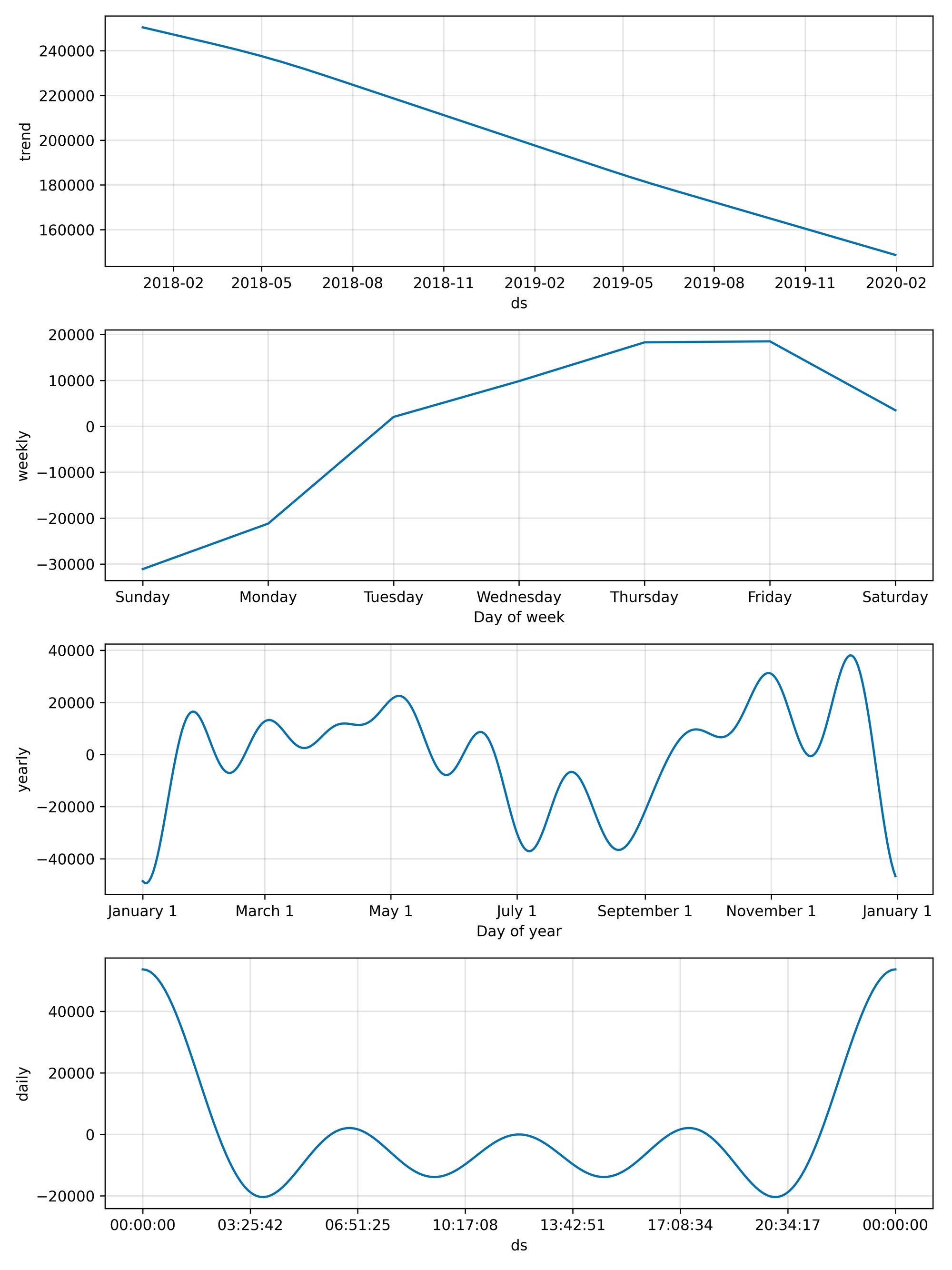
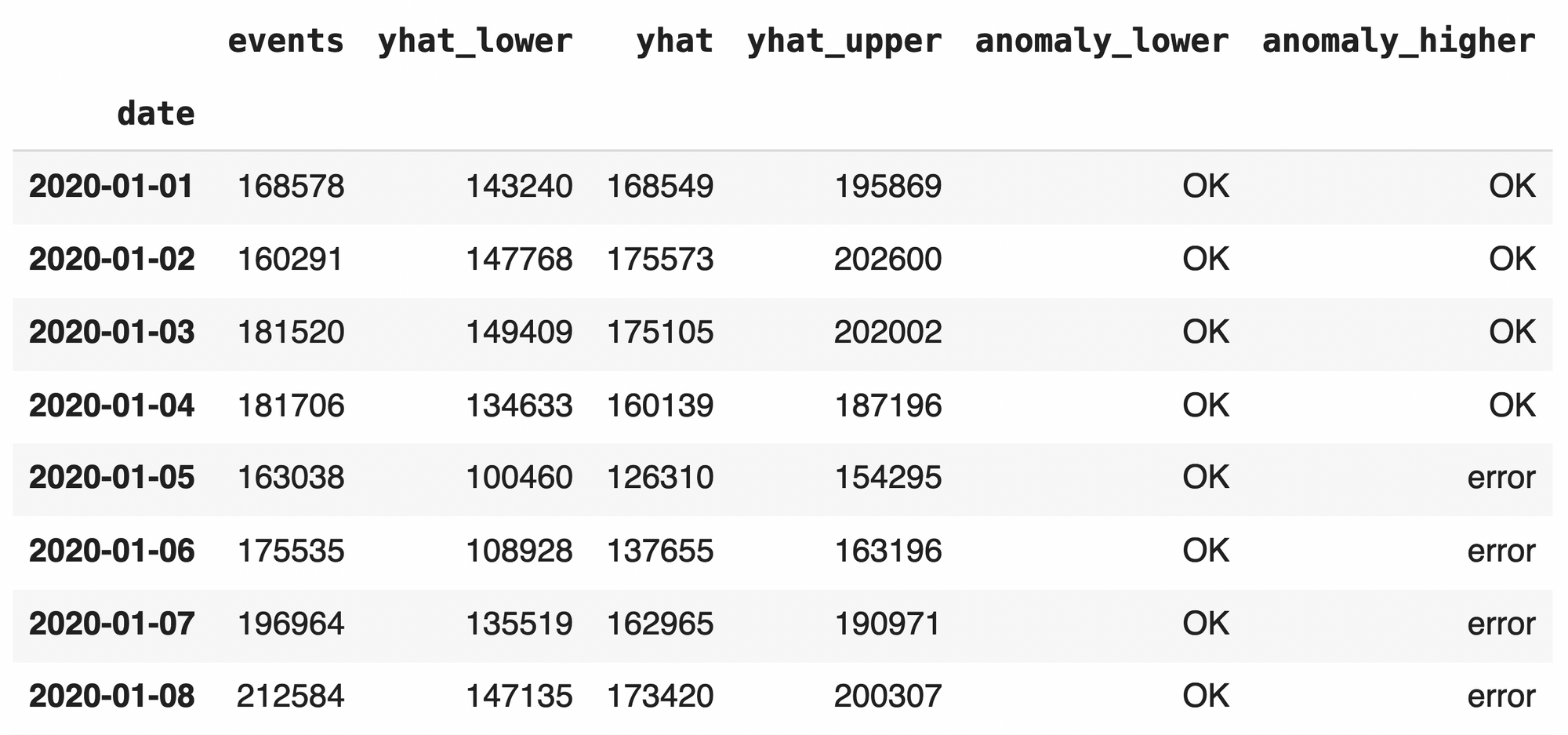
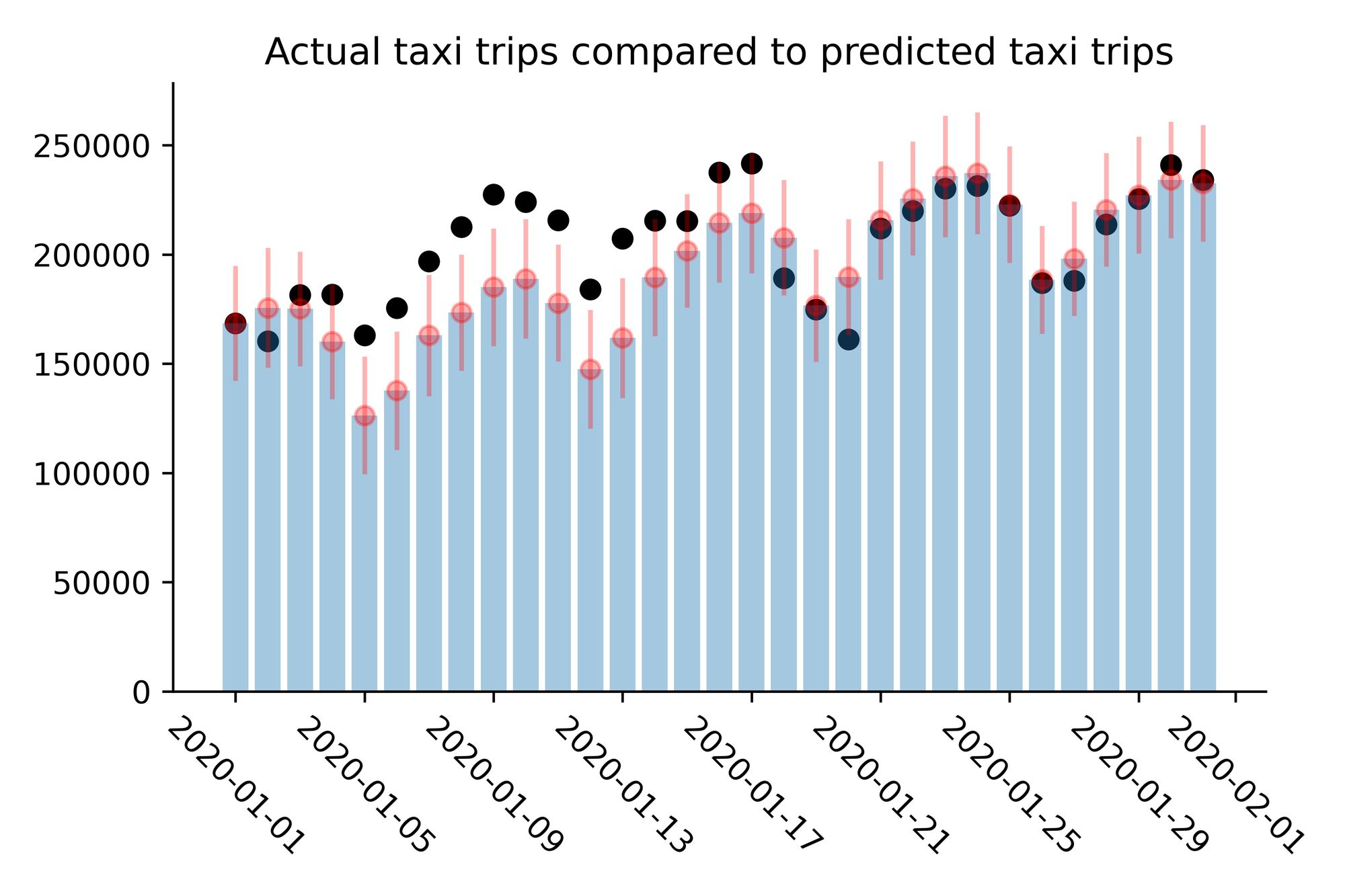
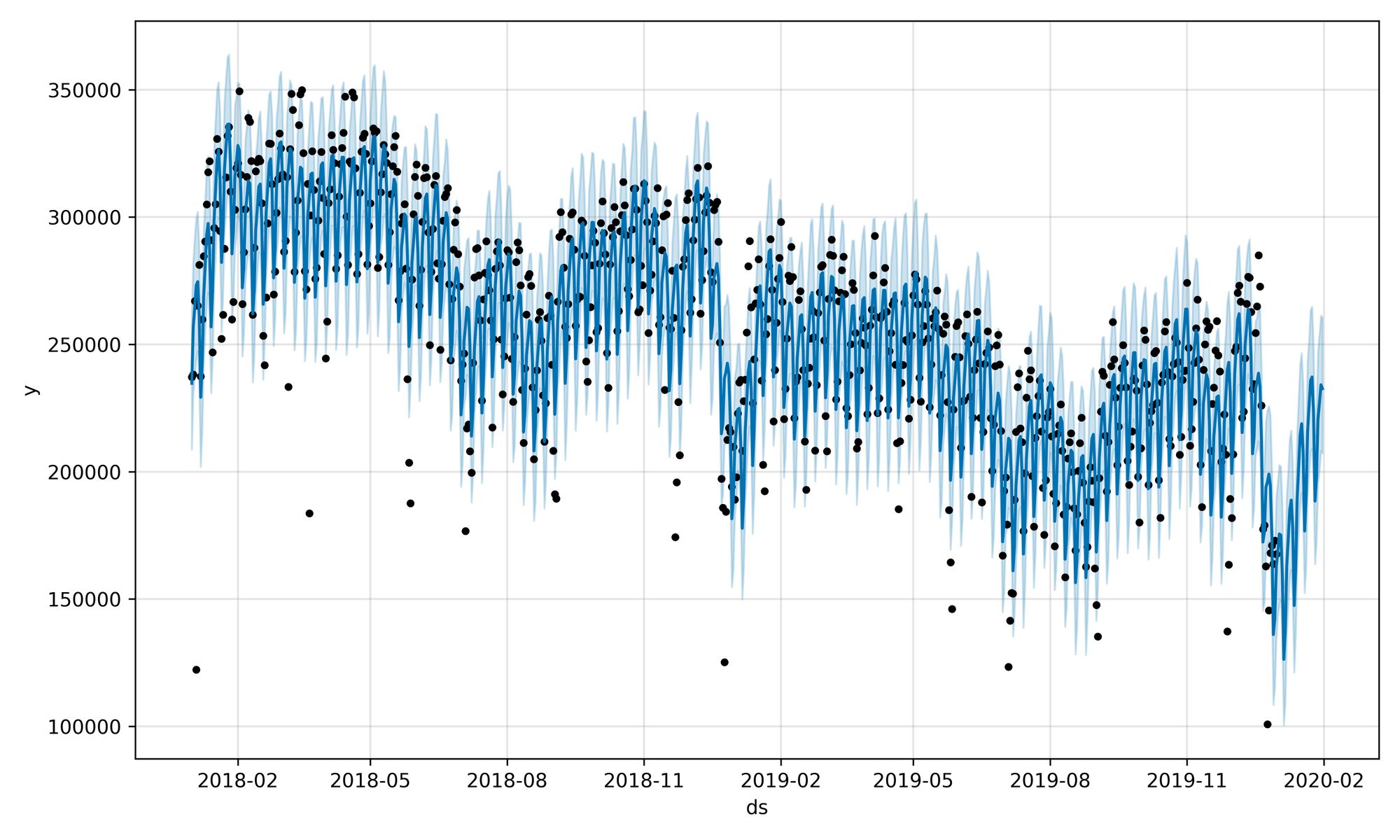
<p>Alerts based on simple statistics are valuable; in a recent <a href="https://blog.tinybird.co/2021/06/24/anomaly-detection/">blog post</a>, we explored the use of the z-score statistic based on the context of the last n minutes of time-series data to alert when a data value was anomalous. However, you may want to use a more complex model to predict control limits. For example, if you have a long run of time-series data from which you can extract seasonality and trend then there is value in using a Python library that contains time-series models, such as <a href="https://facebook.github.io/prophet/">Prophet</a> or <a href="https://www.statsmodels.org/stable/index.html">statsmodels</a>. There is no need to code the model from scratch, you can simply fit your model and generate predictions on another platform and then use those predictions in Tinybird for your alerts. Thereby leveraging the power of pre-coded or even pre-trained models to predict realtime data.</p><p>The workflow is:</p><ul><li>extract your time-series from the Data Source</li><li>fit your model to the time series</li><li>generate predictions from the fitted model</li><li>create a Data Source of the predictions</li><li>alert when a data value is beyond the predicted control limits using an API Endpoint</li></ul><p>Let’s walk through an example using Prophet on two years of historic New York taxi trip data (2018 and 2019) to predict the next month’s data (January 2020) and generate alerts. Full details are in in this <a href="https://github.com/tinybirdco/examples/blob/master/notebook/alerts_from_time_series_predictions.ipynb">Google Colab notebook</a>.</p><h2 id="step-1-sql-query-to-extract-the-time-series">Step 1: SQL query to extract the time-series</h2><p>Query the Data Source using the CLI from within a notebook to generate the time series. The ‘taxi’ Data Source contains the <a href="https://www1.nyc.gov/site/tlc/about/tlc-trip-record-data.page">New York City Taxi &amp; Limousine Commission Yellow Taxi Trip</a> data for 2018 and 2019, some 187 M records.</p><figure class="kg-card kg-embed-card"><iframe loading="lazy" width="100%" src="https://snippets.tinybird.co/endpoint?code=output%20%3D%20%21tb%20sql%20--rows_limit%201000%20--format%20csv%20%5C%0A%22SELECT%20toDate%28tpep_pickup_datetime%29%20as%20date%2C%20%5C%0Acount%28%29%20as%20events%20%5C%0AFROM%20taxi%20%5C%0AWHERE%20date%20BETWEEN%20%272018-01-01%27%20AND%20%272019-12-31%27%20%5C%0AGROUP%20BY%20date%22%0A%0A&amp;language=bash&amp;title=Query%20daily%20count%20of%20events%20in%202018%20and%202019&amp;run=&amp;token="></iframe></figure><p>Load the time series of the number of events each day into a pandas DataFrame</p><figure class="kg-card kg-embed-card"><iframe loading="lazy" width="100%" src="https://snippets.tinybird.co/endpoint?code=df%3Dpd.read_csv%28io.StringIO%28output.n%29%29%0A&amp;language=bash&amp;title=DataFrame%20of%20event%20counts%20in%202018%20and%202019&amp;run=&amp;token="></iframe></figure><h2 id="step-2-fit-your-model">Step 2: Fit your model</h2><p>Model the time-series data by fitting the Prophet model in python.</p><figure class="kg-card kg-embed-card"><iframe loading="lazy" width="100%" src="https://snippets.tinybird.co/endpoint?code=prediction_df%20%3D%20pd.DataFrame%28%29%0Aprediction_df%5B%27ds%27%5D%20%3D%20df.date%0Aprediction_df%5B%27y%27%5D%20%3D%20df.events%0Amodel%20%3D%20Prophet%28daily_seasonality%3DTrue%2C%20%0A%20%20%20%20%20%20%20%20%20%20%20%20%20%20%20%20weekly_seasonality%3DTrue%2C%20%0A%20%20%20%20%20%20%20%20%20%20%20%20%20%20%20%20yearly_seasonality%3DTrue%29%0Amodel.fit%28prediction_df%29%0A%0A&amp;language=bash&amp;title=Fit%20the%20model&amp;run=&amp;token="></iframe></figure><h2 id="step-3-generate-predictions">Step 3: Generate predictions</h2><p>Generate predictions from the fitted model.</p><figure class="kg-card kg-embed-card"><iframe loading="lazy" width="100%" src="https://snippets.tinybird.co/endpoint?code=days_to_predict%20%3D%2031%0Afuture%20%3D%20model.make_future_dataframe%28periods%3Ddays_to_predict%29%0Aforecast%20%3D%20model.predict%28future%29%0A&amp;language=bash&amp;title=Generate%20predictions&amp;run=&amp;token="></iframe></figure><p>Plot the historic data and the predictions for the next month, and the components of the fitted time-series model: trend, daily, weekly and yearly.</p><figure class="kg-card kg-embed-card"><iframe loading="lazy" width="100%" src="https://snippets.tinybird.co/endpoint?code=fig%20%3D%20model.plot%28forecast%29%0Afig.savefig%28%27prophet_plot_1.jpg%27%2C%20dpi%3D600%29%0Afiles.download%28%27prophet_plot_1.jpg%27%29%0A&amp;language=bash&amp;title=Plot%20data&amp;run=&amp;token="></iframe></figure><figure class="kg-card kg-image-card kg-card-hascaption"><img src="https://tinybird-blog.ghost.io/content/images/2023/09/6253d980eca27cf8f095d67d_new_york_taxi_time_series-7.jpeg" class="kg-image" alt="Historic data for 2018 and 2019 and the predictions for the next month" loading="lazy"><figcaption>Historic data for 2018 and 2019 and the predictions for the next month</figcaption></figure><figure class="kg-card kg-embed-card"><iframe loading="lazy" width="100%" src="https://snippets.tinybird.co/endpoint?code=fig%20%3D%20model.plot_components%28forecast%29%0Afig.savefig%28%27prophet_plot_2.jpg%27%2C%20dpi%3D600%29%0Afiles.download%28%27prophet_plot_2.jpg%27%29%0A&amp;language=bash&amp;title=Plot%20components&amp;run=&amp;token="></iframe></figure><figure class="kg-card kg-image-card kg-card-hascaption"><img src="https://tinybird-blog.ghost.io/content/images/2023/09/62562cc2a6f87c1cc83b4f8e_new_york_taxi_time_series_components-7.jpeg" class="kg-image" alt="Daily, weekly, yearly and trend components of the New York Taxi time series" loading="lazy"><figcaption>Daily, weekly, yearly and trend components of the New York Taxi time series</figcaption></figure><p>The trend in the number of daily yellow taxi trips is clearly descending, with peak activity on Thursdays and Fridays, fewer trips in the summer and most trips at night.</p><h2 id="step-4-data-source-of-predictions">Step 4: Data Source of predictions</h2><p>Write the predictions to a Tinybird Data Source.</p><figure class="kg-card kg-embed-card"><iframe loading="lazy" width="100%" src="https://snippets.tinybird.co/endpoint?code=forecast.to_csv%28%27.%2Fdatasources%2Ffixtures%2Fforecast.csv%27%2C%20index%3DFalse%29%0A%21tb%20datasource%20generate%20.%2Fdatasources%2Ffixtures%2Fforecast.csv%20--force%0A%21tb%20push%20datasources%2Fforecast.datasource%20--fixtures%20%20%0A&amp;language=bash&amp;title=Generate%20Data%20Source&amp;run=&amp;token="></iframe></figure><h2 id="step-5-alerts-pipe-and-api-endpoint">Step 5: Alerts Pipe and API Endpoint</h2><p>Create an alerts Pipe with an Endpoint to look at the actual January 2020 data and identify unusual days by comparing this data to the predictions.</p><figure class="kg-card kg-embed-card"><iframe loading="lazy" width="100%" src="https://snippets.tinybird.co/endpoint?code=DESCRIPTION%20%3E%0A%20%20comparison%20of%20actual%20vs%20expected%20%0A%0ANODE%20actual_events%0ADESCRIPTION%20%3E%0A%20%20%20%20events%20per%20day%20in%20January%202020%0ASQL%20%3E%0A%0A%20%20%20%20SELECT%20toDate%28tpep_pickup_datetime%29%20as%20ds%2C%20count%28%29%20as%20events%20%0A%20%20%20%20FROM%20taxi_2020_01%20%0A%20%20%20%20WHERE%20ds%20BETWEEN%20%272020-01-01%27%20AND%20%272020-01-31%27%20%0A%20%20%20%20GROUP%20BY%20ds%0A%0ANODE%20with_predicted_events%0ADESCRIPTION%20%3E%0A%20%20%20%20join%20with%20predicted%20events%20for%20January%202020%0ASQL%20%3E%0A%0A%20%20%20%20SELECT%20%2A%20FROM%20actual_events%0A%20%20%20%20LEFT%20JOIN%20forecast%0A%20%20%20%20USING%20ds%0A%0ANODE%20beyond_the_limits%0ADESCRIPTION%20%3E%0A%20%20%20%20identify%20anomalous%20days%0ASQL%20%3E%0A%0A%20%20%20%20SELECT%20%2A%2C%0A%20%20%20%20If%28events%20%3C%20yhat_lower%2C%20%27error%27%2C%20%27OK%27%29%20AS%20anomaly_lower%2C%0A%20%20%20%20If%28events%20%3E%20yhat_upper%2C%20%27error%27%2C%20%27OK%27%29%20AS%20anomaly_higher%0A%20%20%20%20FROM%20with_predicted_events%0A&amp;language=Tinybird&amp;title=actual_vs_expected.pipe&amp;run=&amp;token="></iframe></figure><p>Monitor the Endpoint to send alerts. You could test your Endpoint at the end of each day to see if the word ‘error’ appeared, and then investigate the anomaly.</p><figure class="kg-card kg-image-card kg-card-hascaption"><img src="https://tinybird-blog.ghost.io/content/images/2023/09/62562cc26afcdfde009919ad_new_york_taxi_time_series_actual_predicted_table-7.png" class="kg-image" alt="Events, predictions and identification of anomalies" loading="lazy"><figcaption>Events, predictions and identification of anomalies</figcaption></figure><figure class="kg-card kg-image-card kg-card-hascaption"><img src="https://tinybird-blog.ghost.io/content/images/2023/09/62562cc12fa83478f03b8348_new_york_taxi_time_series_actual_predicted_plot-7.jpeg" class="kg-image" alt="Comparison of actual taxi trips and predicted taxi trips" loading="lazy"><figcaption>Comparison of actual taxi trips and predicted taxi trips</figcaption></figure><h2 id="realtime-alerts-with-predictions">Realtime alerts with predictions</h2><p>For simplicity, this example uses daily data. For operational analysis in real time the periodicity can be a much shorter time. Within Tinybird, every minute we run API Endpoints on operational logs to notify us of anomalous conditions, allowing us to adjust systems to keep services running optimally.</p><p>Although you can do a great deal of analysis of your realtime data using SQL, there is no need to forego the use of modelling techniques in other environments. With Tinybird you can mix-and-match to maximise effectiveness in your realtime analysis of your data.</p>