---
title: "Vibe data engineering"
excerpt: "You're probably sick of hearing people talk about "vibe coding", but what about "vibe data engineering?" ;)"
authors: "Javi Santana"
categories: "Product updates"
createdOn: "2025-03-17 00:00:00"
publishedOn: "2025-03-17 00:00:00"
updatedOn: "2026-01-15 00:00:00"
status: "published"
---

<p>You're probably tired of the term "vibe coding" by now. I feel you, but I do think the term is useful to explain a "way to do things". This is essentially vibe coding data engineering, or what some call vibe data.</p><p>We use LLMs for everything these days. At Tinybird, for example, we use it to spot SQL problems, optimize SQL queries, <a href="https://www.linkedin.com/posts/javisantana_im-a-big-fan-of-creating-ad-hoc-visualizations-activity-7284491610476711937-ttMi?utm_source=share&amp;utm_medium=member_desktop&amp;rcm=ACoAAAB5CrEBAM8MJvKmk4L86t3SIsJYVrGEF9k"><u>create ad-hoc visualizations</u></a>, <a href="https://gist.github.com/javisantana/56a8262dcd65e2b511e5cc3cd6705b07"><u>optimize Parquet</u></a> files, etc. </p><p>So, why not embed that experience directly into the product? </p><p>Don’t get me wrong, I don’t love the AI hype, but I do like using tools when it makes sense.</p><p>That is <a href="https://www.linkedin.com/posts/javisantana_we-are-adding-small-touches-of-llms-to-tinybird-activity-7263122328455172096-a-mf?utm_source=share&amp;utm_medium=member_desktop&amp;rcm=ACoAAAB5CrEBAM8MJvKmk4L86t3SIsJYVrGEF9k"><u>the approach we have been taking</u></a>: adding AI progressively, only when it adds value, and without leaning too much on AI and focusing instead on the actual problem.</p><p>That’s what <code>tb create</code> is about. It’s a way to get 80% of the way to a data project in about 1% of the time it would otherwise take, to create that materialized view you don’t want to type, to create those three API endpoints that look almost exactly the same, or to just modify a table schema because you don’t remember the exact data type you used.</p><p>Maybe you would call it "vibe data engineering" or vibe coding data engineering. Really, it's just a way to move faster, test your ideas faster, and get something shipped (while adhering to best practices). It's the essence of vibe data.</p>
<!--kg-card-begin: html-->
<div class="tip-box"><div class="tip-box-container"><div class="tip-box-title">Tinybird Forward is here.</div><div class="tip-box-content">Last week, we launched <a href="https://www.tinybird.co/blog-posts/announcing-tinybird-forward">Forward</a>, a new Tinybird UX that makes shipping software with big data requirements faster and more intuitive.<br><br>Start using it by installing the new CLI: <code>curl https://tinybird.co | sh</code></div></div></div>
<!--kg-card-end: html-->
<h2 id="digging-into-tb-create">Digging into <code>tb create</code></h2><p><code>tb create</code> is the essential <a href="https://www.tinybird.co/blog-posts/announcing-tinybird-forward" rel="noreferrer">Tinybird Forward</a> command, it gives you a basic data project to start testing and iterating.</p><p>But it's more than just a command with a little sprinkle of LLM magic, it's the starting point of a data project that follows best practices. It’s opinionated, based on a proven project structure honed by years of building production data projects for our customers. It handles all of the "little things" that make shipping a Tinybird data project into production fast and easy.</p><p>Without <code>tb create</code>, here's what you'd need to do every time you started a new project:</p><ol><li>Set up a database</li><li>Create all the tables and table schemas</li><li>Create the ingestion API</li><li>Create the API endpoints</li><li>Create the data transformations</li><li>Create the unit tests and e2e tests for your endpoints</li><li>Configure your CI/CD workflows</li></ol><p>Now, you don't start a new project every day, or even every week... but if you could do all of those things with a single command, maybe you <em>would</em> start a new project every week:</p>
<!--kg-card-begin: html-->
<iframe width="100%" src="https://snippets.tinybird.co/XQAAAAKHAQAAAAAAAABBKUqGk9nLKzhSlIxIcweRvMdU9j8OLzo5LE-bBwOor-sJOMe4v2a245nhvjpap77z5pQ1AaMu_c9iRUdc2_wb2-f8EPo7V0EwQdqQevsKp3D2FkgtreqxqazGEtunLQ83uOrEQjork9OH72B86KMgSdf5eS0TnmP6A-BZNKjW48HnburumEF1cjAebyBiJGkNIxIg4bZrd52IppvyaCmTi8Ne2mC0ZoPM5R2B0VqvMUMSNaIY3pov23YCVD9vws371h3qPMTMR4Pidi64DIkLQKWaXtRY_UFvjJUYArOx0JLwORTpfaMwE16SANSqO1YdcD56s8T_d_S2xt_z9YoS73z3FadU5972i1XnuepY2OUOfxU5vahrUN8YSUb_NN45AA/embed"></iframe>
<!--kg-card-end: html-->
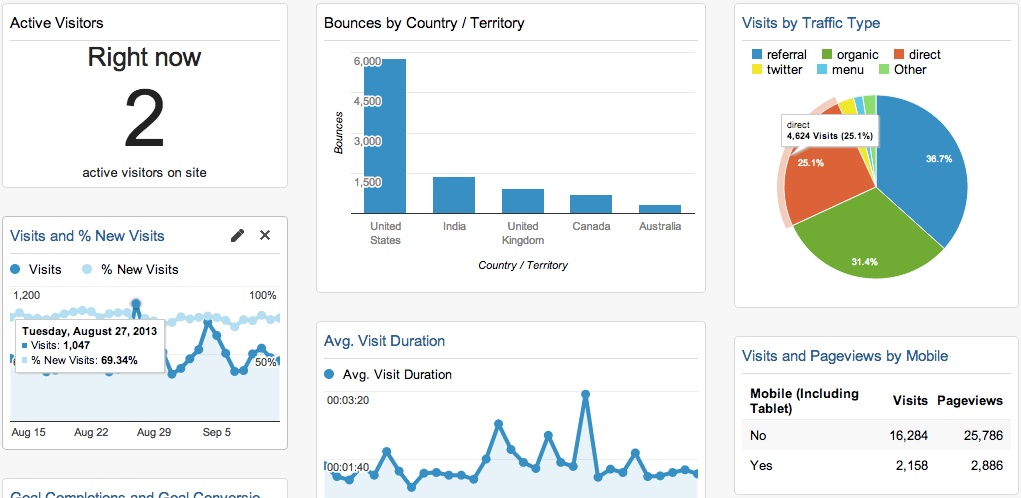
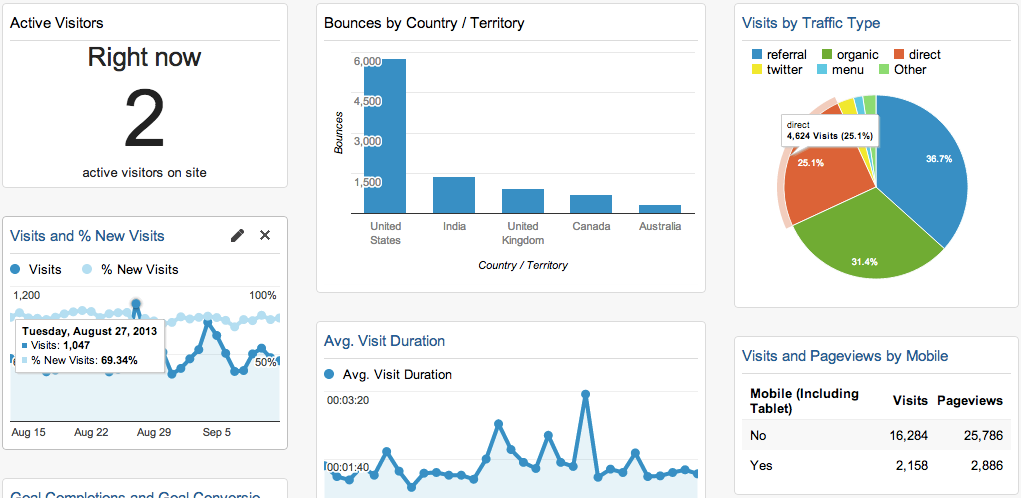
<p>Or better yet, just send the image of the dashboard you want to build and let Tinybird generate the project for you. :mindblown: For example, this creates a Google Analytics clone from this dashboard in about 30 seconds:</p><figure class="kg-card kg-image-card kg-card-hascaption"><img src="https://tinybird-blog.ghost.io/content/images/2025/03/image.png" class="kg-image" alt="" loading="lazy" width="1021" height="498" srcset="https://tinybird-blog.ghost.io/content/images/size/w600/2025/03/image.png 600w, https://tinybird-blog.ghost.io/content/images/size/w1000/2025/03/image.png 1000w, https://tinybird-blog.ghost.io/content/images/2025/03/image.png 1021w" sizes="(min-width: 720px) 720px"><figcaption><span style="white-space: pre-wrap;">Source: </span><a href="https://neilpatel.com/wp-content/uploads/2013/09/inside-a-ga-dashboard.png"><span style="white-space: pre-wrap;">https://neilpatel.com/wp-content/uploads/2013/09/inside-a-ga-dashboard.png</span></a></figcaption></figure>
<!--kg-card-begin: html-->
<iframe width="100%" src="https://snippets.tinybird.co/XQAAAAK1AwAAAAAAAABBKUqGk9nLKzhV5EJ71u5GvyHoYrt010P2iwSqi7lRXFrdaWbDSAzO07Zo4fkgTwU-Sw5bfLyxnjzQ8qxE9B-Vi9B0CyIq0rDnhASkil1D9HNi95UNXJROa3yEl_tczbmpWV8XzhQfIkpMCL75bOomNx1lQMzM_XRtslhtSSrGtx-NCKiJdGPvpzuHqZXcnfuk2J2OBZMChCsSaEDidliLBJSSgkVBiDleELjETSqi_SX5Q2-viIAbUAZwMsjpvP2VkKb19TsxuS1u_uklElPfP6foXvuNfb_Xyi1PYCPVd6ud4uINZgUgv2v5zpANkVLAHD2ZVLI-Pf_sWQyga7mNnEZmEHbwNC6RMgOWxvx6nUJhoEy_GlSDdC7dH0Gg3ITbJGf2AHbZVDPcthfVdtTGFzGJp4F4wiSLjmlyehhI5kJFa6bTA5XyJWrQkxkgTE_Mt9MbVtzxJCSOHjiVVzrVGnS0BCM3cKaXt0BMcMpyeWfhdeHxwZxskWD-4mM5tTn1tV1pkE_kaADq_DyrJJ9RxDB-rCzx7K7cKmkBc-lIr9aJhzeKbFIG0Oybf8cfdFOvNdwr86d7ZCzGsJyAtoh-xdQDlvHHTTT53cFQqHmtqGWjI9rKcPhOP96VON85_e7x7mXV4ucl1k39cKyUgfhQ_GPmwl4Da5kv35_2FacI__3V61c/embed"></iframe>
<!--kg-card-end: html-->
<p>Then you just deploy it:</p>
<!--kg-card-begin: html-->
<iframe width="100%" src="https://snippets.tinybird.co/XQAAAAJcAAAAAAAAAABBKUqGk9nLKvRaOfGR3LhYjXqhWX_zKHX4QEhyfcCh0kkDT0bQbCv6fqjXwzwA7R3mTNIa_S9k-ScggkAKOUp39wgkFSGbZh4H-N0bk5Xh1fku6sJ5F___6yzgAA/embed"></iframe>
<!--kg-card-end: html-->
<p>Then you're just a function away from capturing pageviews and having a fully working analytics project. Here's a vanilla JavaScript script to send data to the pageviews datasource. You could copy &amp; paste this into your website HTML/javascript (it’s not production code, but it's good enough):</p>
<!--kg-card-begin: html-->
<iframe width="100%" src="https://snippets.tinybird.co/XQAAAAKyAwAAAAAAAABBKUqGk9nLKwXUqzyq32UPYRCSAijTgV9zhaJ73VKx__hTxCPPbrxL9YXQ0qUvMNOIB6GsCnf2zoGHZIPb6ENINxkOhcpYF71eKIwSEMeZuXmrsEPtoKnMCeR4riTrOXPhDOP1jSYYLP8gCZ9tGd3OhBwdRTRm3JZ3rx0CEr-apJnMDGQEnF04pedlFyWqTHv07ay_L3oLF3FENziolTQs5w-XjiACNI_4y0XAYdG-RCo6RmOOgN0Lq0hs0T8g-MAINad2kp7BRJ8TQbIktX747OprFLCHXcLYUO3QYrEpQ5x5wFkRf5cR2U0xmMrozlI3IVpDN78RC4--X78KXaxnjwNjxCYIR8SjgywjZee7kJkaaxMekEko032vozEasfk2gYM61SZw6DpH7-Mos0HNabubXde_4jaJFddbUPFc32xocOIlaugNxxuOnB8NmjC4R2NYJ-PEyqeIcjkFw3dR2vAfmhU9gYAV3gFDaO0orTaHb3-SzMWvoJSx9u4nUwjZIguqOMXnf7mkieZCzTwAeLyi31iN24HE_zDrxDhcNSSABk1dBtCPz9FR9WATif52f9DqFfAfqqIyyclzHhimm2eamQWAOvC1FU_Jzdz8p4Pgp64m6fxaFGYpwCWrQp6rkRi97SfYUDrkY3KfYqhZn4OK6bywPtzZF195o6xJgGcj2o0Qy-QEte0qvxbAe6eorh-VL7yVxxdKQkorvg7mzT0DEqfs7j4YHX5WiCsQJdl6NA__4EpObw/embed"></iframe>
<!--kg-card-end: html-->
<p>You could send 1 billion rows a day and it would just work, because <code>tb create</code> follows data engineering best practices when it creates resources.</p><h3 id="not-just-for-creating-projects-from-scratch">Not just for creating projects from scratch</h3><p>By the way, <code>tb create</code> doesn't just create new projects, it can also create new resources for existing projects...</p>
<!--kg-card-begin: html-->
<iframe width="100%" src="https://snippets.tinybird.co/XQAAAAIqAQAAAAAAAABBKUqGk9nLKvXp-xOcXOBayajODO5Y5nFSYtZta42wf0BRbRCeuf72QoGg3VQG9CFwYL-WpDQEgx1FllKoe9OfEeVZdK_ekAg_deSRZXB7rvNOHC-NjGb8Z5CGnNB3PoxkdKNkt9DDMp5tQaS-w12dviYzuDVk_GIbpRJBmZu01BmrG0acvxC2QtQ5Np4zIi1Fl_SRRMu3A0OIhImxOihWmiFrHQkOnuUUx4LMvWHD3hUg1Wj-gaEq5MFUim49D7qZPKPWW667-J477y0j0q7V95dvKdpmtU4BKWD8sDzg/embed"></iframe>
<!--kg-card-end: html-->
<p> ...or modify existing resources</p>
<!--kg-card-begin: html-->
<iframe width="100%" src="https://snippets.tinybird.co/XQAAAALcAAAAAAAAAABBKUqGk9nLKvRkfWRgLJY4eW239fNDe1BFWibgeDBaJwGB6LEh4ef2WdqHNBSZ543yi4doFjrjhc9UXj9jIdmvb70frWbVbdxV3-ZKaUmgzJHb8WGhMe_BvozYUOwCHPRuWondBYL9U60W3k4t9JU-gZ1rhH-V5LEmQnhFEGeNPawOu1POqQAjvdZ37gRgqebuDRGiRP1-g2MI0HkKHxN7WIOnNYPXoQ0lnE_YxXQg_p__yvlAAA/embed"></iframe>
<!--kg-card-end: html-->
<h3 id="the-anatomy-of-a-generated-data-project">The anatomy of a generated data project</h3><p>When you run create, it generates a project with the following structure:</p>
<!--kg-card-begin: html-->
<iframe width="100%" src="https://snippets.tinybird.co/XQAAAAInAwAAAAAAAABBKUqGk9nLKvkhqV1V1ADDbI2-XucaV4AAgcHewUscglVoJWR19NePaTPZQX0kKlzAA7QkhrO1Ag9dz_GptXwhUiwCBu5BwifkLkR05CALqmYm1aHulVfAKHy9x3zyYqVysRz4pCpjpYrHSPc3OX8BJP_xzLrWTZAskt3Zx50oK15gl7jDvfuGjlj4dWU8IHby07cgq81Zkq1fd1eOB5ne-EiLF9P7o8w70vJIMR3gVXcQ8avoVb7mbdG65xtdNcLwDZUhSFSD5GeRGgf9WqCmNpgCNXs6FoN4x5J7sc6dnbTvDqiDETArXd-EoNUMOcEAh0sXx7L5vCi_OhYh6-pW8rAYH6alWaFHaRG08n-57nSyYlrGzcGhtGFXj6dFOr2sK8v0DoMjktK_M7TPBWicRCdr4rv-ugNosR9QfRvkGVfZqObBiFmSt5dcbhsw_AimpIS_Yi5qHyGo9EkuhVzFmybcneGoMQ1Atv1cl6gdJbvc4G0jIsBsLimkrvKIQBqw4Mw34BG1PpOxrtp5eOo0GNJHS-lmg4zzvIOCsJEkrHwD03tp1ylcvIUWFoqzg5gPxgQnu8UX8fFKs1a48r6nJIUYdZGPVslu5NzxHWt2_-zHCtg/embed"></iframe>
<!--kg-card-end: html-->
<p>This is the basic scaffolding to build, test, and deploy any data project in production. It has everything you need.</p><h3 id="beyondprompt-more-ways-to-start-a-project">Beyond <code>--prompt</code>: More ways to start a project</h3><p>While the AI-powered project generation is impressive, <code>tb create</code> offers other options to fit your workflow:</p><ul><li><strong>Create a data source from existing data</strong>: Use the <code>--data PATH</code> option to create a project based on files that contain your data.</li><li><strong>Specify project location</strong>: The <code>--folder PATH</code> option lets you define where your project files will be created (for example if you want to create a <code>tinybird</code> or <code>analytics</code> folder in your root.</li><li><strong>LLM agent rules</strong>: With the <code>--agent</code> flag, you can create rules for an LLM agent (currently Cursor and Windsurf are supported). With this, you could use your IDE to generate resources rather than Tinybird's AI, which gives you more fine-tuned control over your model selection and other project-level prompts you may have created.</li></ul><h2 id="getting-started">Getting started</h2><figure class="kg-card kg-embed-card"><iframe width="200" height="113" src="https://www.youtube.com/embed/TFS-OO63OT4?feature=oembed" frameborder="0" allow="accelerometer; autoplay; clipboard-write; encrypted-media; gyroscope; picture-in-picture; web-share" referrerpolicy="strict-origin-when-cross-origin" allowfullscreen="" title="0 to MVP in seconds with LLMs and tb create"></iframe></figure><p>To create your first project, you need:</p><ul><li>A container runtime like Docker or Orbstack</li><li>Linux or macOS</li></ul><p>From there, you just:</p>
<!--kg-card-begin: html-->
<iframe width="100%" src="https://snippets.tinybird.co/XQAAAAL3AAAAAAAAAABBKUqGk9nLKu-VbhUZaYCRiW2_WnvTurtaLuCGt_VAxGAk5jlw6WEvBRKjtnw_nracyCW6CETagzTkSR66xtl5zUza5C1H2pOOr8UwvVHm8VtiL_yRAfohOOeBGcUWEc34E9Ps7af5JbyUq58AmGbFIhruuutHU_Z5AZGXZ76hmjyTnA0BK90Pnmk_omFgBBlokUoRqYphPpXgU0KX5SxHW2vO2tuNj3wgG5D975Yq5Ih8gxXVaBbaV4dtyJqlFRJPs-nabs69mlOf__Nb8KY/embed"></iframe>
<!--kg-card-end: html-->