---
title: "Ship data as you ship code: deploy changes with one command"
excerpt: "We've redesigned the Tinybird CLI, codename "FORWARD". You can now test it in beta."
authors: "Javi Santana"
categories: "Product updates"
createdOn: "2025-02-13 00:00:00"
publishedOn: "2025-02-13 00:00:00"
updatedOn: "2026-01-15 00:00:00"
status: "published"
---

<p>Last week I shared that <a href="https://www.tinybird.co/blog-posts/tinybird-is-local-first" rel="noreferrer">Tinybird is changing to a local-first experience</a>.</p><p>This was the first step in adapting Tinybird to better fit a developer’s workflow, but deploying changes to production was still a manual, error-prone process. Not anymore. </p><p>We redesigned the Tinybird CLI to handle the hard parts of managing state changes in data infrastructure so you can focus on shipping.</p><h3 id="painful-with-a-raw-database">Painful: With a raw database</h3><p>Imagine this common scenario: you have an <a href="https://www.tinybird.co/blog-posts/building-an-insights-page-for-your-saas" rel="noreferrer">insights page</a> in your live app. </p><p>The latency is good, but you realize you can optimize your queries by adding a materialized view. If you’re making changes in a raw database, you need to think about:</p><ol><li>If you have enough database resources</li><li>How to break the backfill into chunks and use the right settings</li><li>How to manage timing to repoint your production workload once the backfill job finishes</li><li>If it fails, you need to start from scratch or find a way to handle the problem</li><li>Probably a lot more edge cases...</li></ol><h3 id="less-painful-the-old-tinybird-way">Less painful: The old Tinybird way</h3><p>Tinybird has handled some of those things for you, but you still had to figure out how to:</p><ol><li>Create a new materialized view and push it to Tinybird</li><li>Backfill the materialized view with data, ensuring no duplicates exist between historical data and live events</li><li>Edit your endpoints to use the new materialized view and push the changes to Tinybird</li><li>Clean up the old resources</li></ol><p>A seemingly simple optimization required manual steps that were easy to get wrong. This added a ton of friction that prevented you from shipping fast.</p><h3 id="the-new-happy-path-one-cli-command">The new, happy path: one CLI command</h3><p>With these changes, it's just this:</p><ol><li>Make your changes locally</li><li>Run <code>tb deploy</code></li></ol><p>We’re changing the Tinybird CLI to better manage data projects and state changes. We believe you should be able to do everything locally, even test a deployment. </p><p>Think about the new CLI like:</p><ol><li>A compiler that validates your project</li><li>A VM that builds and runs your project end-to-end (like a small SaaS in your laptop)</li><li>A tool to deploy from local → production, managing state changes for you</li></ol><p>You don’t usually see so many features at the same time. </p><p>Most CLIs follow the UNIX philosophy of “do one thing and do it well.” But in Tinybird’s case, that “one thing” is handling large, complex data projects, so "one thing" becomes many things.</p><figure class="kg-card kg-embed-card"><iframe width="200" height="113" src="https://www.youtube.com/embed/Tm_m-as4SEY?feature=oembed" frameborder="0" allow="accelerometer; autoplay; clipboard-write; encrypted-media; gyroscope; picture-in-picture; web-share" referrerpolicy="strict-origin-when-cross-origin" allowfullscreen="" title="These 7 CLI commands will change how you work with data"></iframe></figure><p>Read on to learn about some of our design decisions…</p><h2 id="the-onboarding-process">The onboarding process</h2><p>We were inspired heavily by Next.js. You run <code>npx create-next-app@latest</code>, answer some basic questions, and – boom – your app is running. In Tinybird, you can now do the same:&nbsp;</p><p><code>tb create</code></p><p>Like <code>create-next-app</code>, this generates all of the scaffolding for your project. We also added some nice features:</p><ol><li>Generate <code>.cursorrules</code> to teach your AI code editor to play nicely with the data project resources.</li><li>Use <code>--prompt</code> to allow an LLM to generate the basic resources for your app.</li></ol>
<!--kg-card-begin: html-->
<iframe width="100%" src="https://snippets.tinybird.co/XQAAAAKPAAAAAAAAAABBKUqGk9nLKwprjso9jar80Loakv0rY1Xvxl05KmakMJI5V6Pcg5yjiYJBtBSpkbj7w1_5Cd947HrGnwd0-mUSNtM4sogyqfBjbpoBfv27vEIuw49Kz8u91ZK7cwl6lWKShvoxga-Mx5H-4pS8tK473vgBubfa57mXKech4Is4A___6S0AAA/embed"></iframe>
<!--kg-card-end: html-->
<p>This way, you can use your AI-assisted IDE to start working fast, no Tinybird experience required (btw, you should try Cursor Agent Mode. <a href="https://www.linkedin.com/posts/javisantana_a-2-minute-video-of-an-ai-agent-using-cursor-activity-7287524714455994368-x_cT?utm_source=share&amp;utm_medium=member_desktop"><u>I made this video to show how it works</u></a>).</p><h3 id="two-resources">Two resources</h3><p>We decided to have a massively reduced set of primitives:</p><ol><li>Data sources: where you store your data</li><li>Pipes: how you transform the data and expose it as an API</li></ol><p>With those primitives, you can build any project. You only need to learn 2 things, and one of them is pretty much just SQL.</p><h3 id="seed-data">Seed data</h3><p>Any project needs data, but it becomes critical when your only tool is SQL. You can start up a project with:</p>
<!--kg-card-begin: html-->
<iframe width="100%" src="https://snippets.tinybird.co/XQAAAAJ9AAAAAAAAAABBKUqGk9nLKzhNeMTQtIkdSLlOOtcVVCN_76Wymhsk09Nter1Vx_Wc0m9zT7RxHf11crQUm75rzX5xU9pAeMQqxizmkzV012PSAZQRfaHQWnXrfcaViMffxyVLb4_VANDoomNYNqj93AcZmHdbHlR_WW-t_YPj__1X4AA/embed"></iframe>
<!--kg-card-end: html-->
<p>That generates the data sources and fixtures to use during the project build.</p><p>Sometimes, your data is generated by your app and you don’t have a sample. Don’t worry, we got you covered:</p>
<!--kg-card-begin: html-->
<iframe width="100%" src="https://snippets.tinybird.co/XQAAAAK-AAAAAAAAAABBKUqGk9nLKzhNevzsSEvuQSMQsC9cSl4MKVmF4zKnC9mVSEgnyxn3xW2VMajmx56LywyMfO_SrQHqPlyNisOG_9pCfKJAXdjBAIyCK2D426wzcZQdeW06iIsIvj6VOWKH2Xy3HD97geOf-F5WhT12mmJQgW6qUbxJ3NSbgpuj2lrGwJeg-ibJ_cE9erq-DjZ_UpoLyppRO4UFs-mCtoW4qzC7H__Tw0AA/embed"></iframe>
<!--kg-card-end: html-->
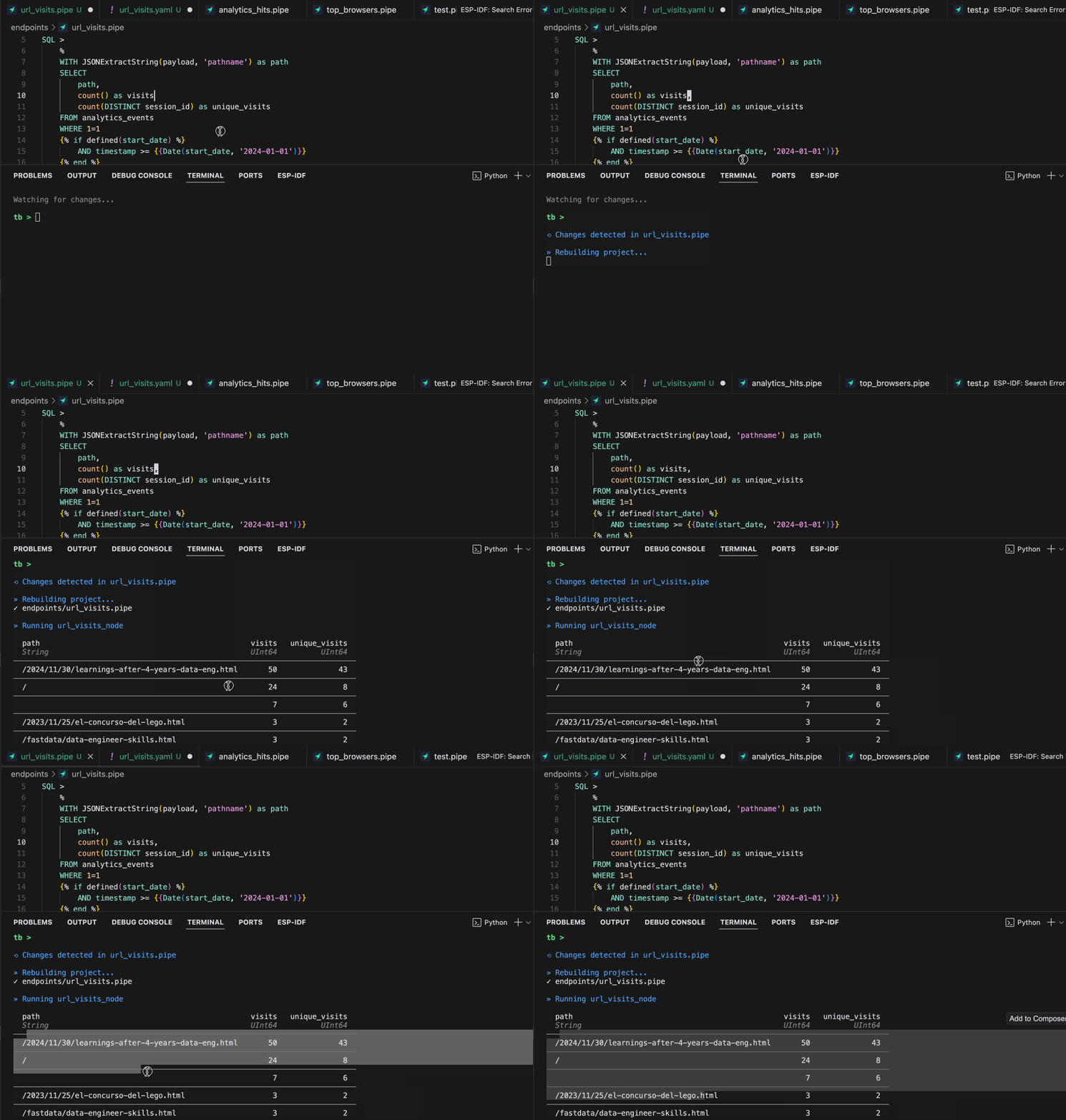
<p>Again, we are using LLMs to help you move faster. Tinybird even saves the prompt in case you want to change it later.</p><h3 id="iteration">Iteration</h3><p>Nobody wants to wait 20 minutes for a build. Programming is about iteration, the faster the better. We are investing heavily in a fast feedback loop. To give you some data: When we started testing our first iteration of the new local experience, the  build was 30+ seconds. Now, it’s 150ms. And we don't even use Rust. It's Python and C++. </p><p>We also added a command to get feedback about your project: <code>tb dev</code></p><p>Again, we were inspired by Next.js and other frameworks. Like those frameworks, Tinybird has a <code>dev</code> command that listens to changes in data project resources and rebuilds the project with each change. The feedback is instant.&nbsp;</p><p>We decided to take it further. Instead of just checking the syntax, we rebuild the project and print the results so you can validate the logic and see the endpoint results in your terminal.</p><p>The dev command does not just listen for <code>.datasource</code> and <code>.pipe</code> resources. It also listens for changes in your fixtures and reloads it. So you can edit the fixture and see how different data affects your build.</p><figure class="kg-card kg-image-card"><img src="https://lh7-rt.googleusercontent.com/docsz/AD_4nXe0DL3EEbhnKqv0454CuxGaa1r95Ax4hsW5oCDV8HatKwsT0JDX9rpBEQPtKG4W4QQFM6MFAkvKgedpzgkOyxRfffT4fwPb931sDvZEBQkJtV2k0wN-nGBAJBcS-qWLjSxFwN3l1g?key=iipoCqgyIrDyjP7b8pS-dKaE" class="kg-image" alt="" loading="lazy" width="1031" height="723"></figure><p>We are still improving on error reporting. SQL is tricky, and sometimes giving the exact location for an issue is not trivial. More on that later.</p><h3 id="tests">Tests</h3><p>Like before, you can run <code>tb sql “select …. from table”</code> and get results to check things ad hoc.</p><p>But now, if you already have the logic, the CLI can generate tests for you:</p>
<!--kg-card-begin: html-->
<iframe width="100%" src="https://snippets.tinybird.co/XQAAAAJsAAAAAAAAAABBKUqGk9nLKwQUU2g-jZn2gsZAQNxMaxdyKoxPbi05J_cv0BVaAt7Wn92shp9mdWNueMqk2ACgT3T9hJ5zN2RhFg260c8hD-SgV5UUuyad6nHNtXmOt_3SZ_9ayrqMXad__9JOgAA/embed"></iframe>
<!--kg-card-end: html-->
<p>Again, we are using LLMs to analyze the SQL, generate a set of tests that cover all the possible paths based on the parameters, and generate the expected results. This is usually boring (and often overlooked). Now Tinybird will handle for you.</p><p>To run the tests, use the command:</p>
<!--kg-card-begin: html-->
<iframe width="100%" src="https://snippets.tinybird.co/XQAAAAJRAAAAAAAAAABBKUqGk9nLKuxXAuQBaLArosBIcFdtT3XX0fRKZUIAJR75t2hsrrQqd1pD7PEpW4B-FRMXjLC8EDG_rHZX9zynJrUzv-5paDm5NARZSvi__dP-gA/embed"></iframe>
<!--kg-card-end: html-->
<p>But what happens when you update the logic? You can update the test as well:</p>
<!--kg-card-begin: html-->
<iframe width="100%" src="https://snippets.tinybird.co/XQAAAAJdAAAAAAAAAABBKUqGk9nLKvEbqpg3Pvn0KgcmYcW1FYllE0Fu58eMjm3peGS6krv-gf_fjqmB_AJezWgUlpDwX0OehMdVOSHuHv7PYLf7hpegk_RP2T-6N4mxn1NX3L__7HU4AA/embed"></iframe>
<!--kg-card-end: html-->
<p>This reruns the test and updates the expected result.</p><h3 id="different-environments">Different environments</h3><p>We are clearly differentiating the execution environments. Each environment has different properties.</p><p>There is a disposable build environment that is regenerated on each build. You can still access it and check what’s inside. Think about it like an in-memory database (sqlite).</p><p>There is a local environment where you can test the deployment using the <a href="https://www.tinybird.co/blog-posts/tinybird-local-docker-container" rel="noreferrer">Tinybird local container</a> before moving to production.</p><p>And finally, there is a production environment where you can deploy to the Tinybird cloud service.</p><p>You can access environments with:</p>
<!--kg-card-begin: html-->
<iframe width="100%" src="https://snippets.tinybird.co/XQAAAAKIAAAAAAAAAABBKUqGk9nLKvXp9EdgiwJOftxC-PphVbnRuP6uZKxGhcCqics63k_HbYCVoiO1X4ZxLDpjdkhr16CW52B2ET7WIiQrCfY_amuFFNMcAoOODHbiZXl0XWS1FhACpBapOCx53zJAaO7MRVCCev__7RCAAA/embed"></iframe>
<!--kg-card-end: html-->
<p>You need to pick the right environment based on your objective, but it gives you a lot of flexibility.</p><h2 id="tinybird-is-moving-forward">Tinybird is moving FORWARD</h2><p>Internally, we've given this new CLI a codename: <code>FORWARD</code>. It's a good name, not only because it represents a step forward in terms of improving the Tinybird developer experience and continuing to shift toward a local-first workflow, but also because it represents the broader shift Tinybird is making to better serve all developers who need an analytics backend for their app (and want to skip the complex infra work this typically requires). Tinybird Forward is our commitment to developer velocity and modern workflows.</p><p>This is now in beta. If you want to start working with the new CLI and experience Tinybird Forward firsthand, <a href="https://www.tinybird.co/docs/v2" rel="noreferrer">check out the beta docs</a>. Get help and provide feedback in the <code>#forward</code> channel of our <a href="https://www.tinybird.co/community" rel="noreferrer">Slack Community</a>.</p>
