---
title: "To the limits of SQL... and beyond"
excerpt: "The Tinybird templating language lets you do more than define query parameters for your endpoints."
authors: "David Margulies"
categories: "Product updates"
createdOn: "2023-09-25 00:00:00"
publishedOn: "2022-07-15 00:00:00"
updatedOn: "2025-04-24 00:00:00"
status: "published"
---

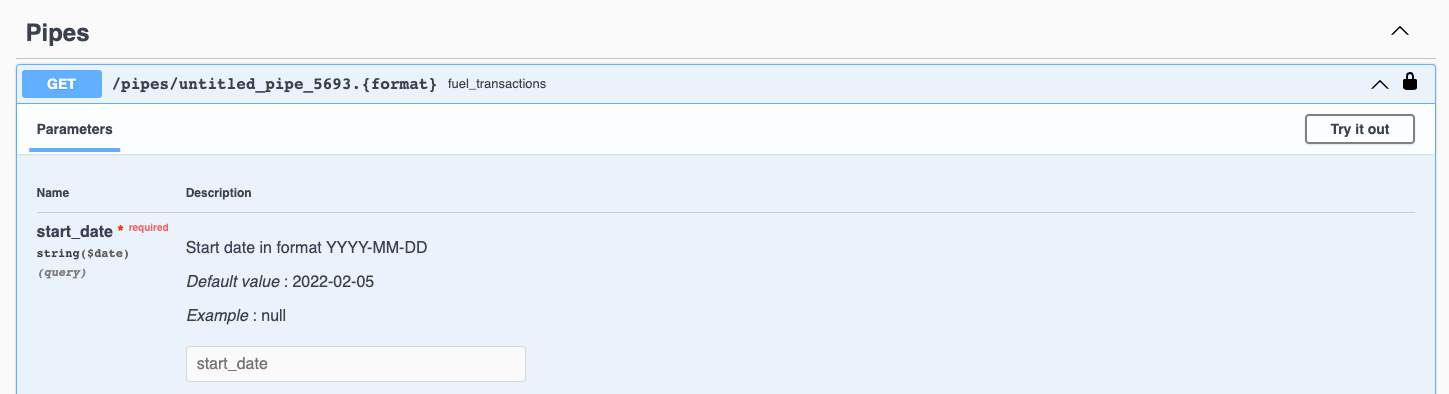
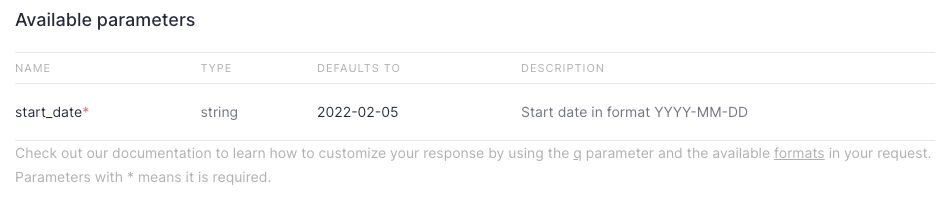
<p>Tinybird’s special sauce is the one-click API endpoint. You write some SQL, click a button, and - boom - you’ve got a REST API endpoint fully loaded with OpenAI compatible docs.</p><p>Why did we focus on the API endpoint? Simple: our mission is to make it <em>delightful</em> for developers to build things with data. What better way to do this than to make it simple to build a customizable API on top of a real-time data source?</p><p>Of course, an API isn’t an API without parameterization, which is why query parameters are a fundamental part of our architecture. We support parameters out of the box, defined within SQL queries in Tinybird Pipes using a templating language.</p><p>This post explains a bit more about our approach to parameterization, and some cool examples putting a few of the more complex use cases into action in Tinybird.</p><h2 id="anatomy-of-a-tinybird-endpoint-parameter">Anatomy of a Tinybird endpoint parameter</h2><p>The basic post-ingestion flow of data in Tinybird starts with a Pipe, which is a set of chained SQL queries where subsequent nodes can <code>SELECT FROM</code> prior nodes. Typically, the final node in the Pipe is then published as an API endpoint.</p><p>Using our templating language, you can add an API parameter to any node in the chain. Here’s a very simple example of a <code>DateTime</code> query parameter used to filter an audit log of user behavior:<br></p><figure class="kg-card kg-embed-card"><iframe width="100%" src="https://snippets.tinybird.co/XQAAAAI0AQAAAAAAAABBKUqGk9nLKw88WMK_VgB8Z-anFDGqEVmgEm46VY-yp6ifo8pHmJ0gGFrTVeHrTX9GjvyASchzy9at8aaFsv8KMEMKAxGMDZ-eph_-NXQQR-uX2lZmienxotkiALfVp0_cPurWSnhjAtzN4P1209lhr0KNtx4uB8XZxVy_R4Rda0HkCqJ2SQdtLN6VLepW2hC7e3fxLg-1YpfdfFp1PcaLFBeA1iIyFklzwKJzVZDlbrBeMpTEErwjEUAkmP36KpwJ975F6TOFoIxJDfGnWorBmg_jWLxhLI7dLVWC3I8EBFRXjQ4lVp2Zhd-NGf2C6LSez1-WE44NmTQj9lv--IJmQA/embed"></iframe></figure>
<!--kg-card-begin: html-->
<div class="tip-box"><div class="tip-box-container"><div class="tip-box-title">The % Character</div><div class="tip-box-content">When adding a parameter to a Tinybird Pipe, you have to add the '%' character to the beginning of the query. This happens automatically in the UI, but if you're writing Pipes in the CLI, make sure to add the '%'.</div></div></div>
<!--kg-card-end: html-->
<p>After you publish this node as an endpoint, you can see the new parameter on the API Endpoint page.</p><figure class="kg-card kg-image-card kg-card-hascaption"><img src="https://tinybird-blog.ghost.io/content/images/2023/09/62cef57195bbdcabb0301c99_E8LXNDPB-vugIrnO5pDnwbSavHCG0LCc-7SuZG5rtwmxptGC1xXmcQ59WizuU62hTzQJM-wdbZJXRe50ZOd6Jdo8vneqSooHXZyNIrs5bc6IEY_XUDgfwRaY0KgItn84hK8-V9tIXbPRSr3PKn4-11.png" class="kg-image" alt="A parameter for a Tinybird endpoint in the Tinybird UI" loading="lazy" width="950" height="206" srcset="https://tinybird-blog.ghost.io/content/images/size/w600/2023/09/62cef57195bbdcabb0301c99_E8LXNDPB-vugIrnO5pDnwbSavHCG0LCc-7SuZG5rtwmxptGC1xXmcQ59WizuU62hTzQJM-wdbZJXRe50ZOd6Jdo8vneqSooHXZyNIrs5bc6IEY_XUDgfwRaY0KgItn84hK8-V9tIXbPRSr3PKn4-11.png 600w, https://tinybird-blog.ghost.io/content/images/2023/09/62cef57195bbdcabb0301c99_E8LXNDPB-vugIrnO5pDnwbSavHCG0LCc-7SuZG5rtwmxptGC1xXmcQ59WizuU62hTzQJM-wdbZJXRe50ZOd6Jdo8vneqSooHXZyNIrs5bc6IEY_XUDgfwRaY0KgItn84hK8-V9tIXbPRSr3PKn4-11.png 950w" sizes="(min-width: 720px) 720px"><figcaption><span style="white-space: pre-wrap;">The new parameter in the Tinybird UI</span></figcaption></figure><p>You can also share the documentation with your team directly from Tinybird, or you can peek over at the Swagger docs and see the new parameter.</p><figure class="kg-card kg-image-card kg-card-hascaption"><img src="https://tinybird-blog.ghost.io/content/images/2023/09/62cef5719f0f5b3edf08fdb5_JK2WV4QUW58ZfZAEsdAedrZ2xgORIV2P-N5F3x-8YXDWsw3fHDvV7aGnIRedKpP5elCngGj517Hoj88TKm9298DNbBsqMuUO1t2afE1v0Z2uwzff7oqHAgReYBqvJyR4bZP21GJYaE66KEiSiuk-11.png" class="kg-image" alt="A parameter for a Tinybird endpoint in Swagger documentation" loading="lazy" width="1449" height="394" srcset="https://tinybird-blog.ghost.io/content/images/size/w600/2023/09/62cef5719f0f5b3edf08fdb5_JK2WV4QUW58ZfZAEsdAedrZ2xgORIV2P-N5F3x-8YXDWsw3fHDvV7aGnIRedKpP5elCngGj517Hoj88TKm9298DNbBsqMuUO1t2afE1v0Z2uwzff7oqHAgReYBqvJyR4bZP21GJYaE66KEiSiuk-11.png 600w, https://tinybird-blog.ghost.io/content/images/size/w1000/2023/09/62cef5719f0f5b3edf08fdb5_JK2WV4QUW58ZfZAEsdAedrZ2xgORIV2P-N5F3x-8YXDWsw3fHDvV7aGnIRedKpP5elCngGj517Hoj88TKm9298DNbBsqMuUO1t2afE1v0Z2uwzff7oqHAgReYBqvJyR4bZP21GJYaE66KEiSiuk-11.png 1000w, https://tinybird-blog.ghost.io/content/images/2023/09/62cef5719f0f5b3edf08fdb5_JK2WV4QUW58ZfZAEsdAedrZ2xgORIV2P-N5F3x-8YXDWsw3fHDvV7aGnIRedKpP5elCngGj517Hoj88TKm9298DNbBsqMuUO1t2afE1v0Z2uwzff7oqHAgReYBqvJyR4bZP21GJYaE66KEiSiuk-11.png 1449w" sizes="(min-width: 720px) 720px"><figcaption><span style="white-space: pre-wrap;">The new parameter in the automatically generated Swagger docs.</span></figcaption></figure><p>Of course, simple query parameters like the one above are just par for the course. We couldn’t <em>not </em>have them in our product from day one.</p><p>But we wanted to take things a step further and extend the functionality beyond just simple parameterization. We often tell customers that what you can do in Tinybird is constrained only by the limits of SQL. But in reality, you can take it even further.</p><p>Let me explain:</p><h2 id="powerful-query-parameters">Powerful query parameters</h2><p>Inspired by the possibilities that other template engines offer, we implemented a similar approach in our Pipes. When you write SQL in Tinybird, you can not only add typed parameters using a templating language but also extend the logical use of those parameters beyond the limits of SQL with more complex expressions.</p><p>Rather than try to explain how those work, I figured I could just offer some of my favorite examples of Tinybird's templating engine in action. So here are some cool examples of complex template expressions you can add to Tinybird Pipes to extend the functionality of your query parameters.</p><h2 id="examples-of-complex-parameterization-in-tinybird">Examples of complex parameterization in Tinybird</h2><h3 id="use-filter-arrays">Use filter arrays</h3><p>Want to filter results by more than one parameter value? Pass an array:</p><figure class="kg-card kg-embed-card"><iframe width="100%" src="https://snippets.tinybird.co/XQAAAAL2AAAAAAAAAABBKUqGk9nLKvKkqnV8nsDRIeaGqJGkQr0GKwkz6m5_dMnfdYWNxRZlc7I4FIYsJ5MJypxQr7Jn3Uw1Bm5Ed95IE9k5uK4ijCj0Gww_LMH4wpZLvEZqox1bhXkJU-g6p3KBYHLAtFGtdVhH0XbrbOcYTzMiFahpNMPOSW_WG0kOLQkAfEaosNezZ9Yd8HYyj5aWqOFYlOOnbZB7r85iU0UdM6V1zMn-S06t2X7DX7am1Kt1sCceC15jhPLu_Keg7CxaTAeKKYzhzMmkVEmqIv9b3_0uqck/embed"></iframe></figure><h3 id="perform-dynamic-aggregations">Perform dynamic aggregations</h3><p>Want to change the granularity of a <code>GROUP BY</code> based on a selected date range? Create a dynamic aggregation:</p><figure class="kg-card kg-embed-card"><iframe width="100%" src="https://snippets.tinybird.co/XQAAAALgAgAAAAAAAABBKUqGk9nLKv29HKdd4OSGNM5ZmuW_S42KleFjvL6h0Zf28vY8hYOZ3gXjFmG-z4zQDuk_AsJmt94vRlUdM9ny7YwWSSXx6rFHYIvPnjXSDu17HadMwtnEYP90MEu1SdxTVEej5i_oiQTPfUA9pz9jCy5ASFNUZhvacBpgC6aIMSsS-NwsOh42P75SHd2OP0w8QcffvZmmX0V_lHJFMVEcnK3aLtfYMln4PoSta87aWDLeMzSSRiAXK5j0ps2lyluMpdK7IbZ6fOeQu2rdCyQTivqVnzOWUJGkd7LgB0BEeREMbziHdzKZRyDs2D13rYTWlSykRPIn3IrLqC-XjXjhRi5gkOgXQNEUC_xBdQcb_L1jogw6t1pq0Vw6sQIyy0sHUu_iIqRvJ_Bazo_0mQhGFjuJdNsNvbhXzd91xKGgVYWmoA57F0kdLrZ-xQHI67bYyZunc6ohazsL-QOHfpAHZtKTtpAJLybWhx2M3Tayp3OOlnxGWGJrMhlzA5ASDkXRX8V1_UwMhg/embed"></iframe></figure><h3 id="select-if-a-parameter-is-defined">SELECT if a parameter is defined</h3><p>Want to change your data source or filters based on if a parameter is defined? Use an <code>if defined()</code> expression:</p><figure class="kg-card kg-embed-card"><iframe width="100%" src="https://snippets.tinybird.co/XQAAAAJuAQAAAAAAAABBKUqGk9nLKu3lMdvU-083lyvG3kPDfMpEipfLk3v_a1sJS0NBlgWODRY20hKt5rzXjOynI7tnH0Dg8sj8mYGS1nWJ1xewB6XZAx-xludWsUxEaARyJZO81h_Kl7_HJavnLTXOh4caf2k_wRcgmfn6URV03OOfTHFa8CiADnwd9WjtqU1hPxvlvIDAEah3PNCXJpRCTHSC1qkULVY6fE3YEK0a-6gbJx6STVIfwntN8HIgcdqZ04glSyFdExD5WggXV7J6e2D1MLvmBiL850mbF34XvzGopcq5HVY6MWbM9sSVodKGjhYNpadrCB5AvGBMtiBXlYjbcKMmu_9Wi8MA/embed"></iframe></figure><h3 id="select-variable-columns">SELECT variable columns</h3><p>Want to give the frontend the power to <code>SELECT</code> and/or <code>GROUP BY</code> variable columns from a data source? Use the <code>columns()</code> function:</p><figure class="kg-card kg-embed-card"><iframe width="100%" src="https://snippets.tinybird.co/XQAAAAJcAQAAAAAAAABBKUqGk9nLKwKonIXk4Gw1wqDQooJbpxaRhKixhZDVhD8BP-ihLylIChsXhJx2t3zTBPKC91iBxZStHYbsJJ8Nud8nn0T9cP6n7vW225lFv0w1O9HOg1nE7J5cYv7utgALwmwnaYvWdcQiqJkkD2VHzrfTKAD0vI4EwH9Rdl5gwx9EZCNHkxsFUVfWDj12nL5vw1wxuYrvtlelf3oqULjZZSygB58m4emXMcEptq-kM2uD8KTf7CSFnt7T4WmjK4rg0d_EBPjgQ8aKYjdKZ7IiNXWeTv_ka7PtcS1rjGpPIOa8rhXMX7l4Yb8cFSzGCePEWPn__50igAA/embed"></iframe></figure><h2 id="and-much-much-more">And much, much more.</h2><p>These are just 4 examples, and there are even more powerful things you can do with templates, including setting private variables, <code>for</code> statements, throwing errors, <code>sql_and</code>, <code>elif</code>…<br><br>You can find a more complete list in our <a href="https://www.tinybird.co/docs/guides/publish/advanced-dynamic-endpoints-functions" rel="noreferrer">advanced templating guide</a> or in the <a href="https://www.tinybird.co/docs/cli/advanced-templates" rel="noreferrer">advanced templates API docs</a>.</p>