---
title: "Use AWS SNS to send data to Tinybird"
excerpt: "SNS is a popular pub/sub messaging system for AWS users. Here's how to use SNS to send data to Tinybird."
authors: "David Manzanares"
categories: "Product updates"
createdOn: "2023-09-25 00:00:00"
publishedOn: "2022-07-12 00:00:00"
updatedOn: "2022-09-08 00:00:00"
status: "published"
---

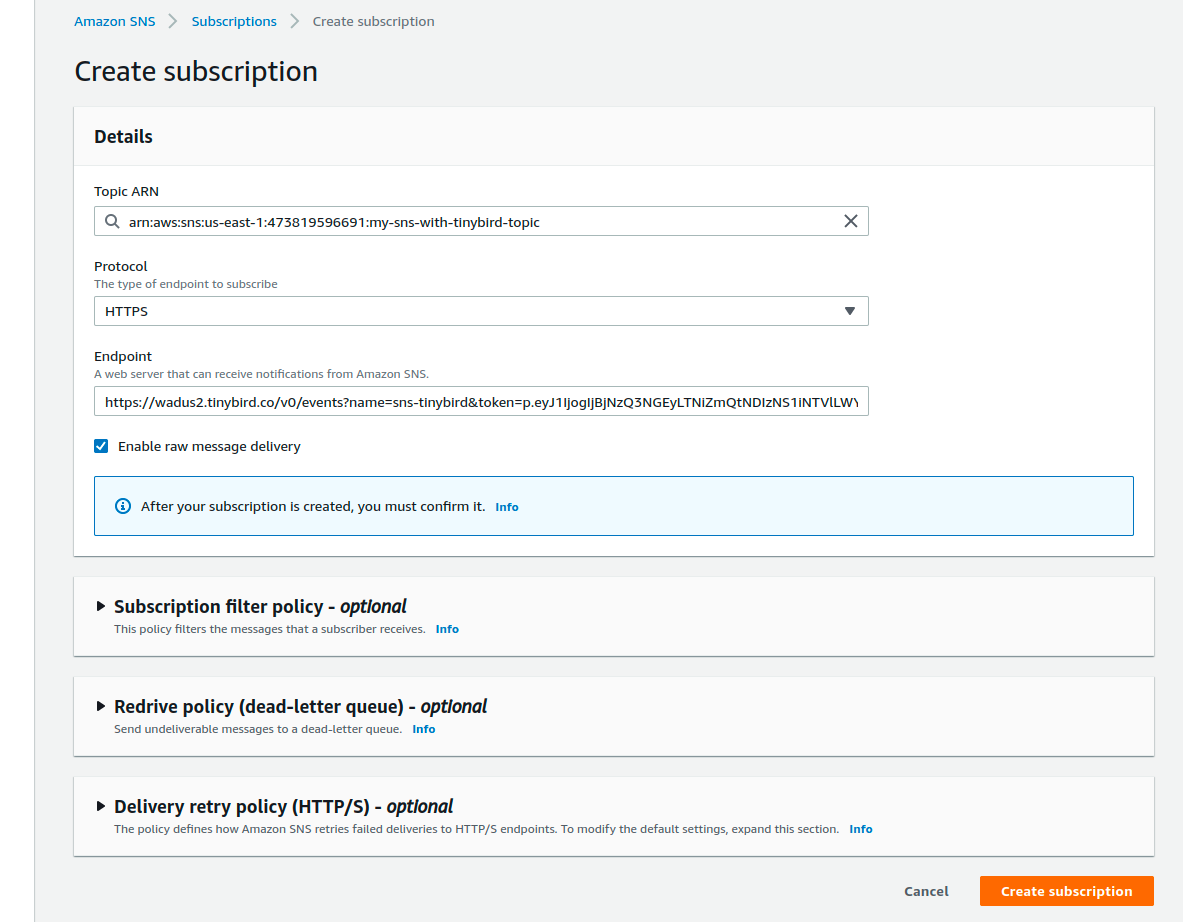
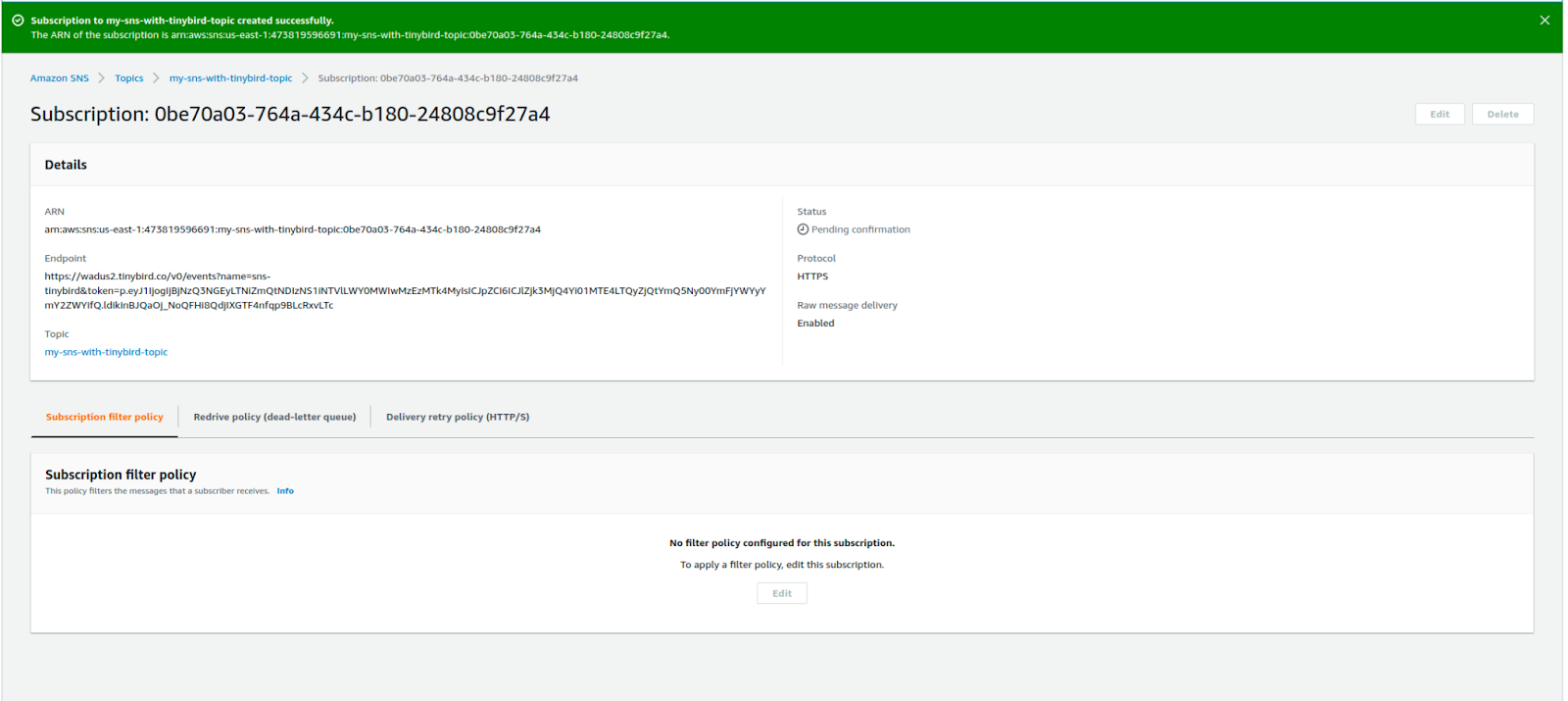
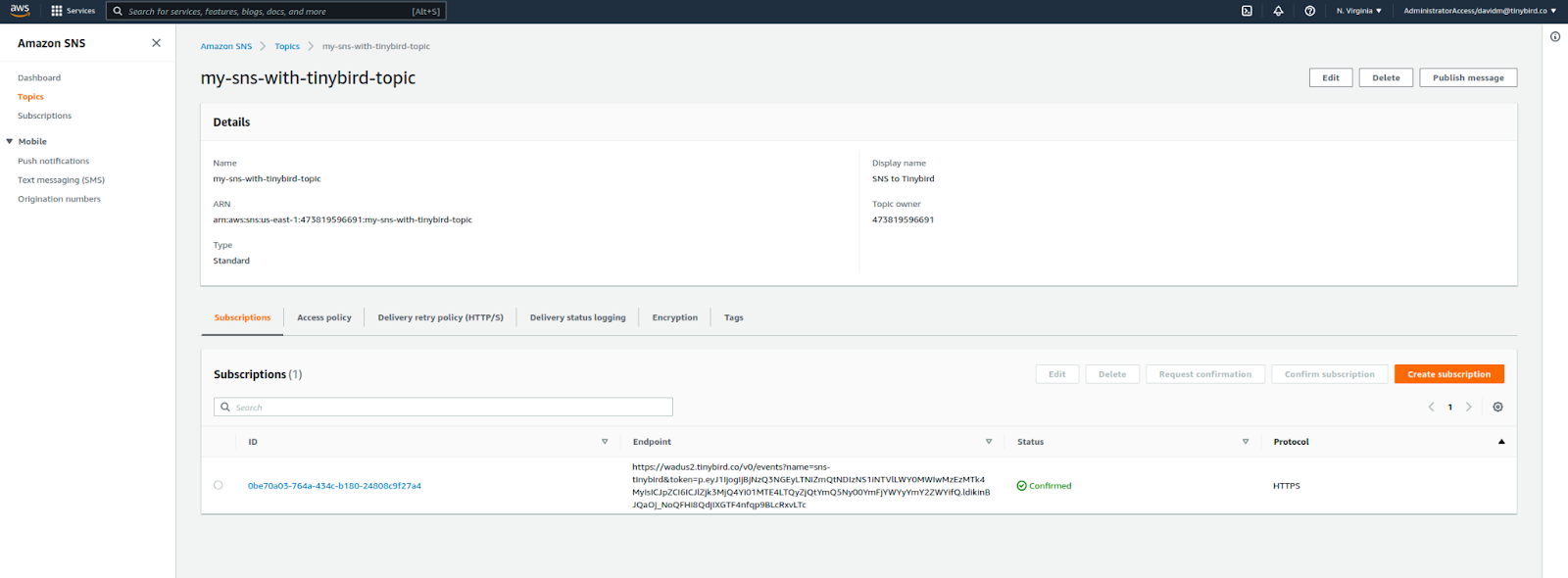
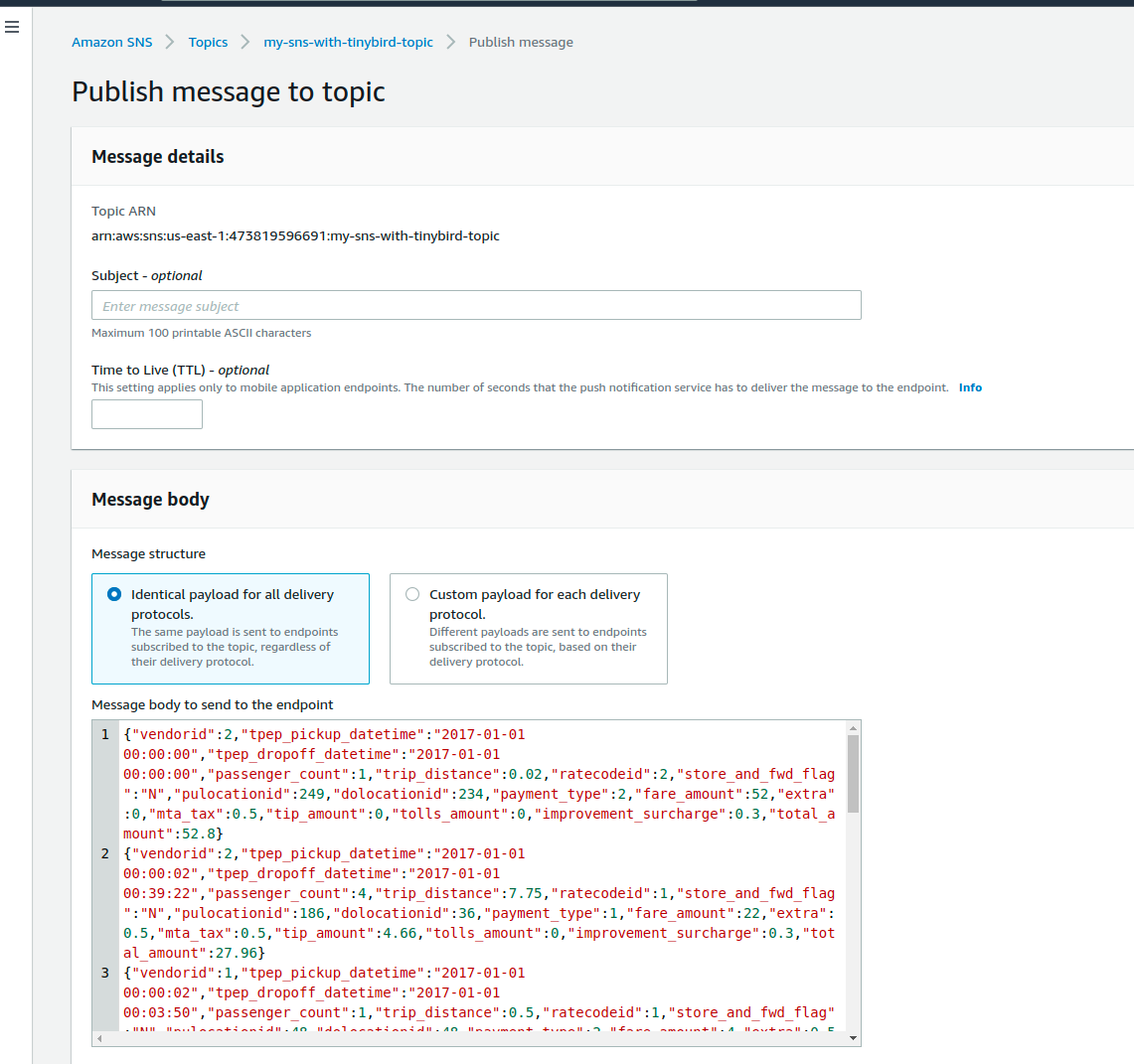
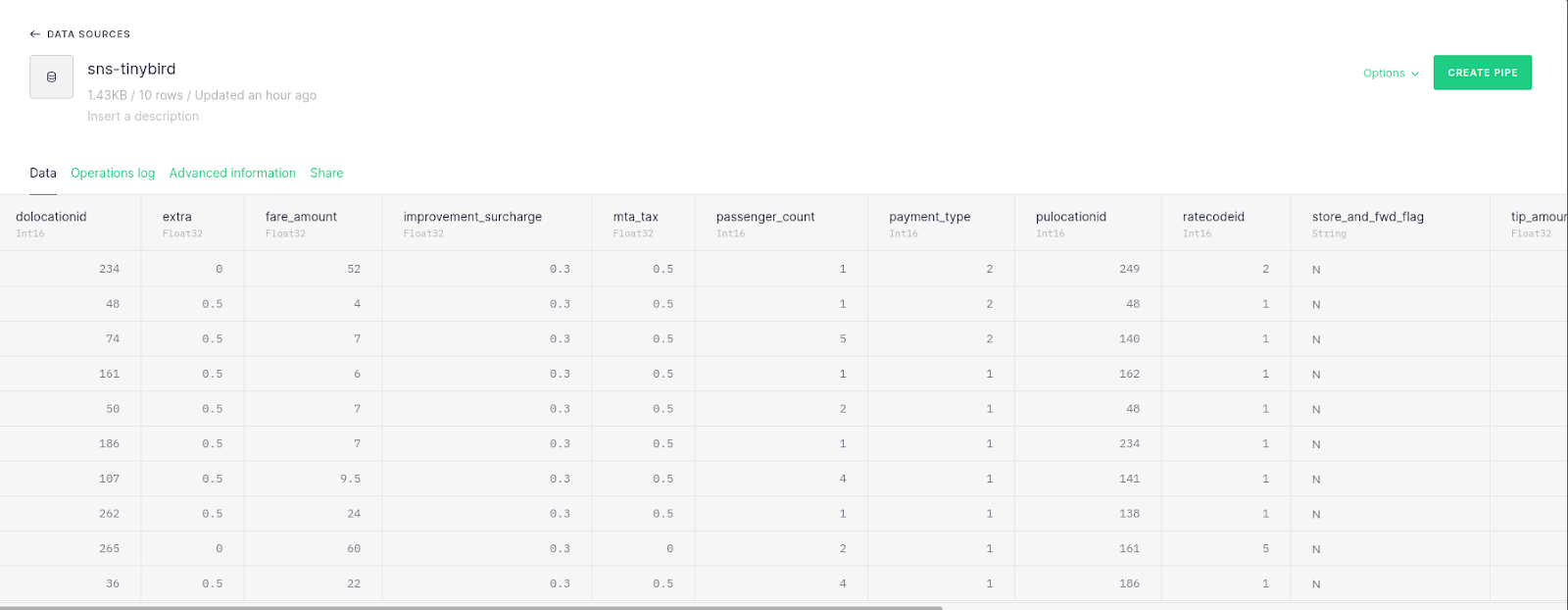
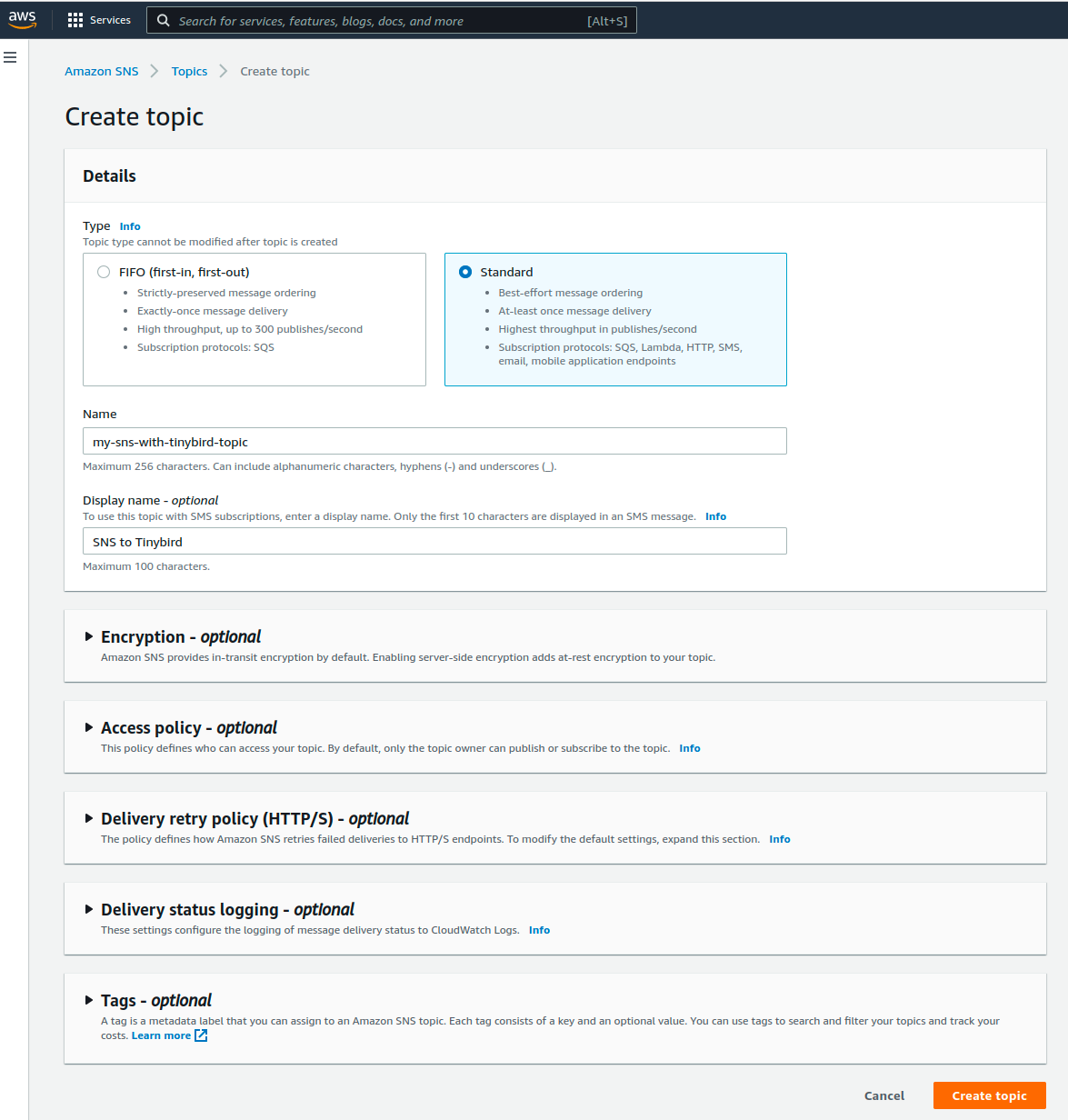
<p>If you operate on AWS infrastructure, <a href="https://aws.amazon.com/sns">AWS's Simple Notification Service (SNS)</a> provides a simple managed service for pub/sub messaging to various AWS and external services. Understanding amazon sns limits and capabilities helps you design better integration workflows.</p><p>Given that a lot of Tinybird customers operate on AWS, SNS tends to be one of our most requested data origins. It provides an easy-to-use path to distribute messages to multiple destinations, allows for message filtering, and has built in data-loss prevention mechanisms. Because it's a tool our customers regularly use and like, we've prioritized making it possible to connect SNS to Tinybird.</p><p><strong>And now, we are happy to say that we can support data ingestion from SNS!</strong> We’ve conditionally rolled it out for all customers and are opening up the feature to feedback. If you have any, please share it with us in our <a href="https://www.tinybird.co/join-our-slack-community">community Slack</a>.</p><h2 id="how-to-use-sns-to-send-data-to-tinybird">How to use SNS to send data to Tinybird</h2><p>Here’s how to use AWS SNS to send data to Tinybird:</p><h3 id="step-1-use-an-existing-sns-topic-or-create-a-new-one">Step 1: Use an existing SNS topic or create a new one</h3><p>From your AWS console, navigate to an existing SNS topic or create a new one.<br></p><figure class="kg-card kg-image-card kg-card-hascaption"><img src="https://tinybird-blog.ghost.io/content/images/2023/09/62c70d490005ce12c678d3aa_U1HFi4yHfXskX8WrRlka7Q98ehqnqNklWh41xllFFeustgbGvCKSi70NpUDuHXke5XcAKrZEC8gFzYSmLzFM_VaRgLi30o8VHfv-14fn1pN3Tju4ZG0y8HAmSFnNnlSq4xlGfIsN-hwC9m5P-Q-10.png" class="kg-image" alt="A webpage showing how to create an SNS topic to send data to Tinybird" loading="lazy"><figcaption>Create an SNS topic to send data to Tinybird.</figcaption></figure><h3 id="step-2-create-a-new-subscription-for-the-topic">Step 2: Create a new subscription for the topic</h3><p>Define a new subscription using the Tinybird <code>/events</code> API endpoint as the subscription Endpoint using the following syntax:<br></p><p><code>https://api.tinybird.co/v0/events?name=YOUR_DATA_SOURCE_NAME&amp;token=YOUR_TOKEN</code><br></p><p>Make sure to select <strong>HTTPS</strong> as the protocol and check “Enable Raw Message Delivery”, then click “Create Subscription.”<br></p><figure class="kg-card kg-image-card kg-card-hascaption"><img src="https://tinybird-blog.ghost.io/content/images/2023/09/62c70d4a021cd66894de3620_VASXjak4DrN1hP8rPHwQM07_OQhjHBINy1rGdLZ8LbIl1L10TILe3AD6etyPFlcRs3wLBZqr8rQLZ2JsQmBbS2jFpsfNVF8KbKDAoWxZ8SEmqg1GIHTOhgTD1Thoh0JagX1-Xwq41iydBZmlcQ-11.png" class="kg-image" alt="A webpage showing how to create a subscription from AWS SNS to the Tinybird /events endpoint" loading="lazy"><figcaption>Creating a subscription to an SNS topic using the Tinybird /events endpoint.</figcaption></figure><p>You should see a confirmation screen like the one below.</p><figure class="kg-card kg-image-card kg-card-hascaption"><img src="https://tinybird-blog.ghost.io/content/images/2023/09/62c70d4acdcc219a7e633a48_lTlsZ1MHTtjxiiE528jSeKCPLbpDbER6w7bv3v1lhmbTvwFhVEwU9LxwlpHzB7zRs5QuD5_Yz0O5vfwP2z65cWoGNbL8iRSAq3J0e2fS0ny0Ejv2tg8I_4UStvkH67yWgwwdBX_4pPN7rqoPtg-11.png" class="kg-image" alt="AWS SNS confirmation screen" loading="lazy"><figcaption>Success!</figcaption></figure><h3 id="step-3-start-sending-messages-to-your-sns-topic">Step 3. Start sending messages to your SNS topic</h3><p>You can manually publish messages to your new SNS topic from the topic page by clicking "Publish Message". This is a great way to aws sns test your integration before deploying to production.</p><figure class="kg-card kg-image-card kg-card-hascaption"><img src="https://tinybird-blog.ghost.io/content/images/2023/09/62c70d4a1f75d98741baf0c7_sG2OOBEugXESvYdi2d_oIQZ21SDrdYzecnN8wcq7m6zxMvtwgqZExztPRYdVhsRKkut2JDunXXAygHdrkSun0yz75-B92YiwiaU9ZtkmfOR1XQQO-fZZqpcgwdaOwcnCEzqr_7r7HfNUxXtDhg-11.png" class="kg-image" alt="A webpage showing how to publish a message to an SNS topic." loading="lazy"><figcaption>Publish a message to your SNS topic to test the connection.</figcaption></figure><p>Just define the JSON payload to be sent in the Message Body section. When using AWS SNS for data integration, being aware of amazon sns limits such as message size (256 KB max) and throughput rates ensures smooth operation of your data pipeline.</p><figure class="kg-card kg-image-card kg-card-hascaption"><img src="https://tinybird-blog.ghost.io/content/images/2023/09/62c70d4afd84384d203947dc_vN_p1StGN2RhY4c6rHyfYsTj7ZMaB6Gl6DlgSBti14mIJS4wBxCxVSupk4AR0fW11eJUnzUdVdq-WRWGLW5-9LMZDav7dHRTuAEc11Zx4dQZbW3eg_fh0GzwqHn8hjxyLKWie7KiH7S76YfRDA-11.png" class="kg-image" alt="A webpage to publish a message to an SNS topic showing the JSON message structure" loading="lazy"><figcaption>Use JSON structure to send data to /events.</figcaption></figure><p>You should see data appear in your Tinybird data source. Using AWS SNS as your message broker allows you to reliably send data to Tinybird at scale.</p><p><br></p><figure class="kg-card kg-image-card kg-card-hascaption"><img src="https://tinybird-blog.ghost.io/content/images/2023/09/62c70d4ae1a47920dd29fb29_ktrXRZqjJ3m0-vj1rU_XvmZS-ULU1MEF0OnRp8uy8XgZmbPh3usdo6RrVJJZvRS214e-IztY4E2bRtlsdPYlBba-eULJihnVOgNNq3DciyoQFqNIXRjYE6vaTMzjdd7IGWu6Zrhh0Sy1-xZC7w-11.png" class="kg-image" alt="A Tinybird data source" loading="lazy"><figcaption>Boom. Data in Tinybird!</figcaption></figure><p>Here’s a bit of JavaScript showing how to publish a new message to the SNS topic. Just replace your AWS region and Topic ARN in the code.<br></p><figure class="kg-card kg-embed-card"><iframe width="100%" src="https://snippets.tinybird.co/XQAAAAJ-AgAAAAAAAABBKUqGk9nLKzhOVoYe9JuXgiTBdLVeG0tLp9HuQ4-twrY2ax_3DjSC6mHSuAy4cOvR7dRfCFgIumeQav0UJWUkxH59VvB1VnFtGSfw1VOt0zqvpJfjarG9ZFOOduA30dFgjalT1_YDdY7Ft2fF5pMtIjEk6HgrETVvwiMzBomPDMpQs-oJJcxCLEF0HBZToGaj_znapDdMRgyMFwxgd9gYqUUnuFGbM20RKgd7c4FFpFA_z9oyXjW2V9yS9NHI91HTdliSGV-BByRkPEZFuV_6ewIAg0YUlG4b6BxW-RJCnsb0hqnlZ3_eNyxzveyHn54H6UGL-_CwvYUrCxJJ4IWPGDcrkQ_7OJuC89XIS0IZUIURQr7qpsVwxuaUOqLK8XjuCFOAJLLV-tD_S9AL8ek2yBusw2mSdtNFMAiLTDlIvInH75pDIn4dm69J41rUqyp3YNCmihrWf7RwuuQL32OMdq8XDgm-2dZCXTe24UYb4EYyvq482RsEPK-qlHPghtHBuiNvLUW6dsChnw2tnHlyUQP_tFgFvA/embed"></iframe></figure><p>As always, if you have any questions or run into issues, you can join our <a href="https://www.tinybird.co/join-our-slack-community">Slack community</a>.</p>