---
title: "Iterating terabyte-sized ClickHouse® tables in production"
excerpt: "Schema migrations on a streaming ClickHouse table? At 100s of MB/s? Here's how we do it across clusters without losing a single bit."
authors: "Alberto Romeu"
categories: "Engineering Excellence"
createdOn: "2024-03-04 00:00:00"
publishedOn: "2024-03-11 00:00:00"
updatedOn: "2025-04-24 00:00:00"
status: "published"
---

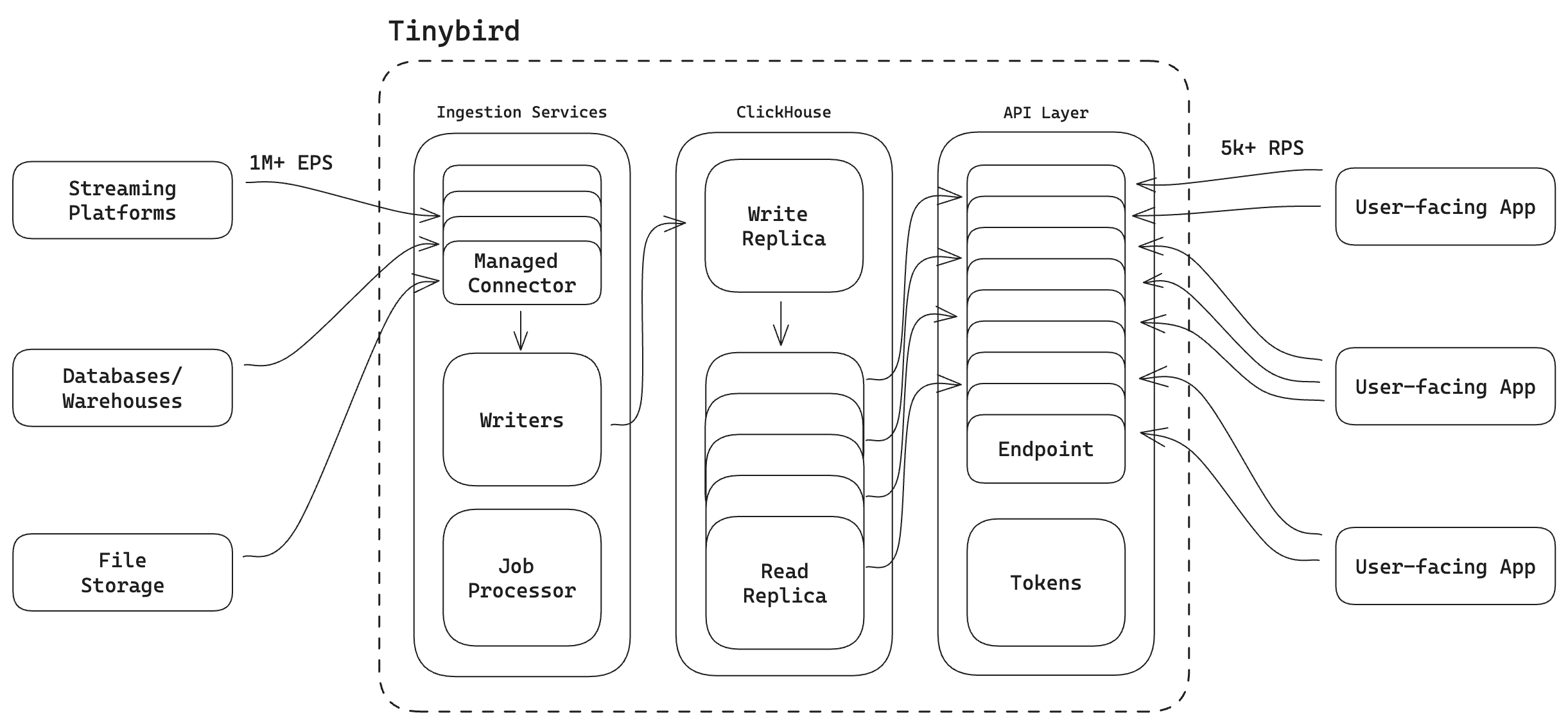
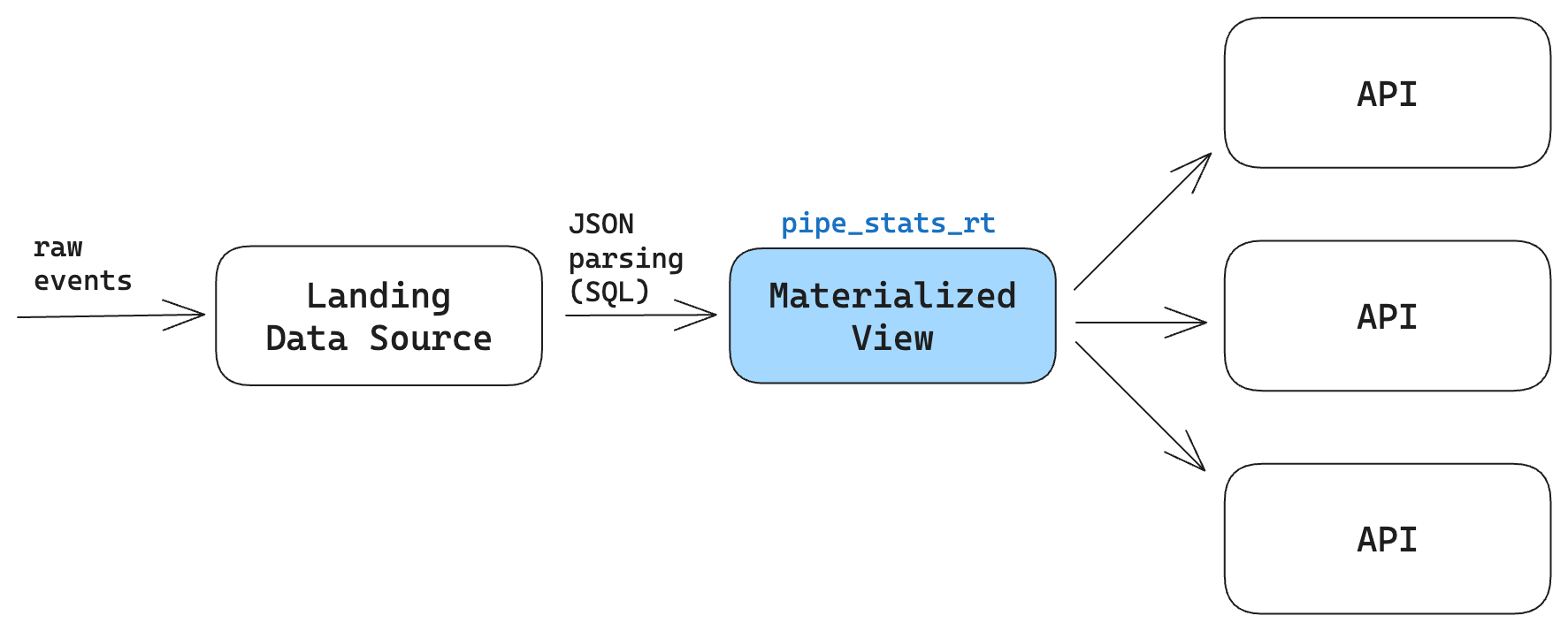
<p>When we first released Tinybird, you could ingest a CSV file into a <a href="https://www.tinybird.co/blog-posts/managed-clickhouse-options/" rel="noreferrer">managed ClickHouse® cluster</a>, write an SQL query, and expose that query as a fast API. It was super simple. You had cron jobs extracting data from your systems as files and pushing them into Tinybird so you could build real-time APIs over the data.</p><p>If you wanted to migrate the schema on one of the ClickHouse® tables in Tinybird, you could just stop your cron job or do the work between runs. Depending on the ingestion frequency, you could have hours or days to do the schema change, deploy it, backfill historical data, etc.</p><blockquote><strong>Batch is easy</strong>.</blockquote><figure class="kg-card kg-image-card kg-card-hascaption"><img src="https://lh7-us.googleusercontent.com/NU6iEhbPDYCOWMtnzb2UCvYsvMKB0iik7WR1MWsLhUaGruLlKPHa7oPaSg9tzDRbJpNTUWc50sb_JddKQiJUPDzZRI37Z4lW1I7xhUqmy83Oa3q9CUZeHV2nVP5PC4Yy4Vn7PXInPVtNX_SP3ZnDhKc" class="kg-image" alt="" loading="lazy" width="999" height="193"><figcaption><span style="white-space: pre-wrap;">When ingestion happens in batch, you have a bit of time to make changes before new data arrives.</span></figcaption></figure><p>A lot has changed since those early days. Now, basically every Tinybird customer is using a streaming connector to write data to Tinybird in real time. Some of our customers ingest millions of events per second using Kafka, and many others use our Events API to stream tens of thousands of rows per second directly from their applications.</p><blockquote><strong>Streaming is hard</strong>.</blockquote><figure class="kg-card kg-image-card kg-card-hascaption"><img src="https://lh7-us.googleusercontent.com/xiG2rdjJh46iPBBlwKT7he_EbeUoCCCdTBJLEVz37ZnL6A3r--Jxu1Pdmq4mg-hG7GnGqIbmSZpzIZrmMCnw__6gbbsI8eLtSEX7WWiuRXrdcMP0mCF12XXs1tg034GYws0GCVnJd05-IYDMF2Z8muw" class="kg-image" alt="" loading="lazy" width="1154" height="208"><figcaption><span style="white-space: pre-wrap;">With streaming ingestion, you get no such breaks.</span></figcaption></figure><p>Tinybird data projects that have several moving parts:</p><ol><li><strong>Ingestion</strong>. You create <a href="https://www.tinybird.co/docs/concepts/data-sources" rel="noreferrer"><u>Tinybird Data Sources</u></a>, which pair <a href="https://www.tinybird.co/blog-posts/managed-clickhouse-options/" rel="noreferrer">managed ClickHouse®</a> tables with fully integrated ingestion connectors from sources like Apache Kafka, Confluent, Redpanda, Kinesis, BigQuery, S3, etc. Like any ClickHouse® table, the schema gets defined on creation.</li><li><strong>Transformation</strong>: You then create <a href="https://www.tinybird.co/docs/concepts/pipes" rel="noreferrer"><u>Pipes</u></a>, which are chained nodes of SQL that transform your ingested data, performing filtering, joins, and aggregations in real time. You can create Pipes for <a href="https://www.tinybird.co/docs/concepts/materialized-views" rel="noreferrer"><u>Materialized Views</u></a>, <a href="https://www.tinybird.co/docs/publish/copy-pipes" rel="noreferrer"><u>Copy Jobs</u></a>, or…</li><li><strong>Publication</strong>: You publish your Pipes as <a href="https://www.tinybird.co/docs/concepts/apis" rel="noreferrer"><u>Endpoints</u></a>, providing the output of your transformations as a low-latency REST API.</li><li><strong>Consumption</strong>. Finally, you integrate those Tinybird APIs with your user-facing applications which could make thousands of concurrent requests every second.</li></ol><figure class="kg-card kg-image-card kg-card-hascaption"><img src="https://tinybird-blog.ghost.io/content/images/2024/03/tinybird-architecture.png" class="kg-image" alt="" loading="lazy" width="2000" height="923" srcset="https://tinybird-blog.ghost.io/content/images/size/w600/2024/03/tinybird-architecture.png 600w, https://tinybird-blog.ghost.io/content/images/size/w1000/2024/03/tinybird-architecture.png 1000w, https://tinybird-blog.ghost.io/content/images/size/w1600/2024/03/tinybird-architecture.png 1600w, https://tinybird-blog.ghost.io/content/images/size/w2400/2024/03/tinybird-architecture.png 2400w" sizes="(min-width: 720px) 720px"><figcaption><span style="white-space: pre-wrap;">A highly simplified use case architecture for Tinybird.</span></figcaption></figure><p>As you can see, the challenge presented by streaming data is that any change to the schema of a Data Source can have immediate and cascading effects all the way up to your user-facing product. When you're simultaneously streaming data and serving thousands of concurrent API requests, schema migrations become especially risky.</p><blockquote>Schema migrations on tables with streaming ingestion present a significant risk, as any problems or mistakes can immediately cascade to the end user.</blockquote><h2 id="the-anatomy-of-a-streaming-clickhouse-schema-migration-in-tinybird">The anatomy of a streaming ClickHouse® schema migration in Tinybird</h2><p>At Tinybird, we maintain an internal observability data project that is deployed in every one of our supported regions (dozens of ClickHouse® clusters).&nbsp;</p><p>Within that data project is a table called <code>pipe_stats_rt</code>. It stores a row for every request made against every Tinybird API for the last 7 days. It contains roughly 20 columns, including:</p><ul><li><code>pipe_id</code></li><li><code>processed_bytes</code></li><li><code>result_rows</code></li><li><code>token_name</code></li><li><code>status_code</code></li><li><code>duration</code></li><li>etc.</li></ul><p>This table is one of our <a href="https://www.tinybird.co/docs/monitoring/service-datasources" rel="noreferrer"><u>Service Data Sources</u></a>, a set of tables for which every Tinybird customer has a partial view. Service Data Sources like <code>pipe_stats_rt</code> allow Tinybird to monitor and explore their Tinybird usage in real time using SQL queries that they can then publish as observability APIs.</p><p>Here, for example, is some SQL you could write over <code>pipe_stats_rt</code> to get the average processed data of an API over the last 60 minutes:</p>
<!--kg-card-begin: html-->
<iframe width="100%" src="https://snippets.tinybird.co/XQAAAAKPAQAAAAAAAABBKUqGk9nLKzhNiGrtEf9I8Avm_Mr12k7nRynQjQui3F7MCTaC7v4wnsyqZXFoues3pb0FaGri94hlgfwQcdqDU6lm8yuU5mDyGyCctyRhJn_I0jHFXgAeOWEG10V9M71UTktLkFRx4yG5kmuYj-1eK9E7EU5oZutNRX3HOnn_-j4qkjSJrHoXYtlqyq7mS23CWCe6xwbXrIS1b_wt-od735FLRZAUSxaIzYVVWxScZGXIF9dLV5njC2OGxTdFbTCCJSkYPZUBB4ubBq2KWWNiZVdIsbW2USooF176akSGYfR6sGHZ4o9zUhYVWCtD8VNnsi5XJGMbfvAT8sfIIYgbvpMSkbjzgG7VpXn_7C_W6K1Njokwc9dJN_4J2eSXVMI82jO_F7Az_qDw8fbZ0ypAZ19NprJ5wfq4Ngn_50WwAA/embed"></iframe>
<!--kg-card-end: html-->
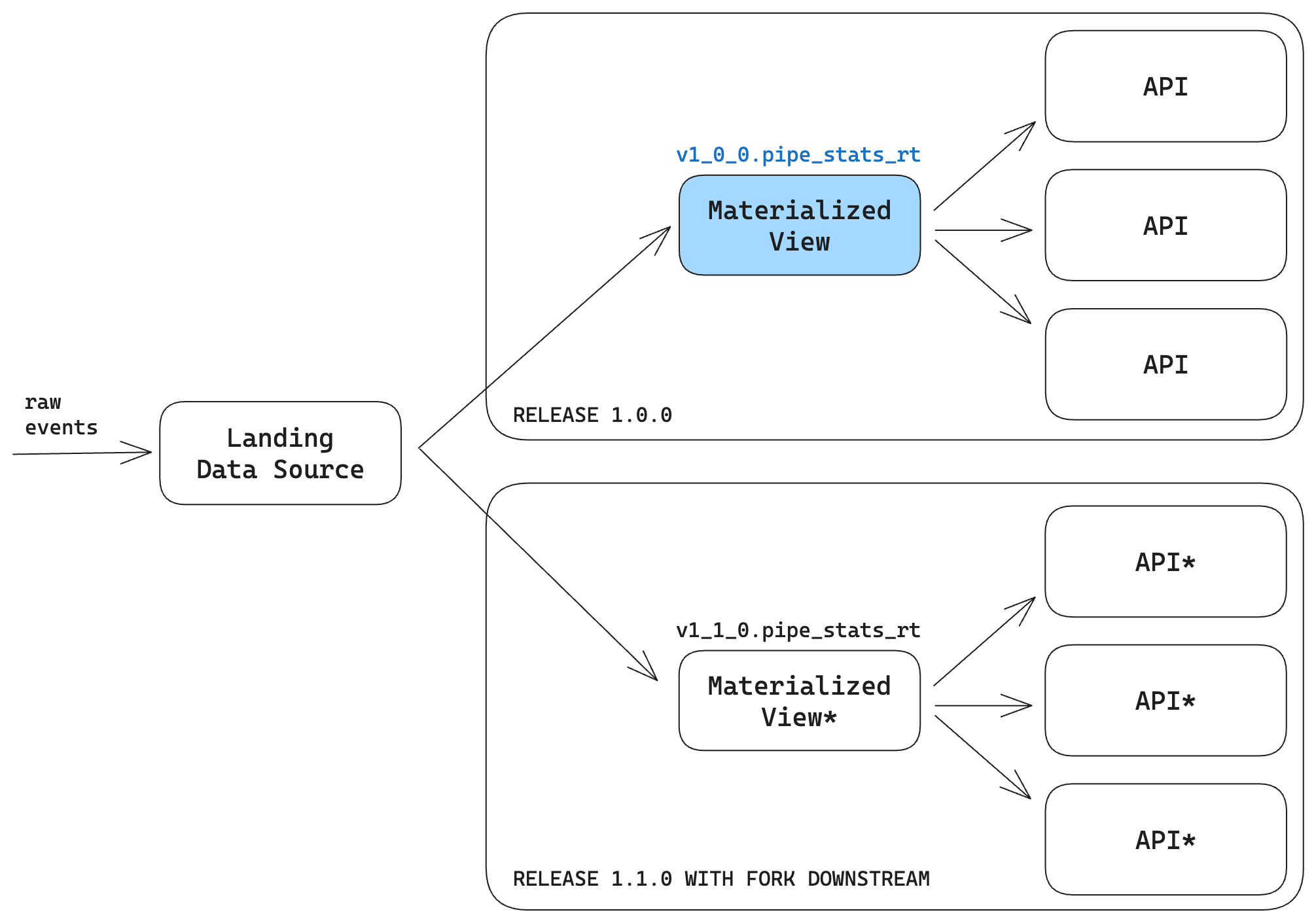
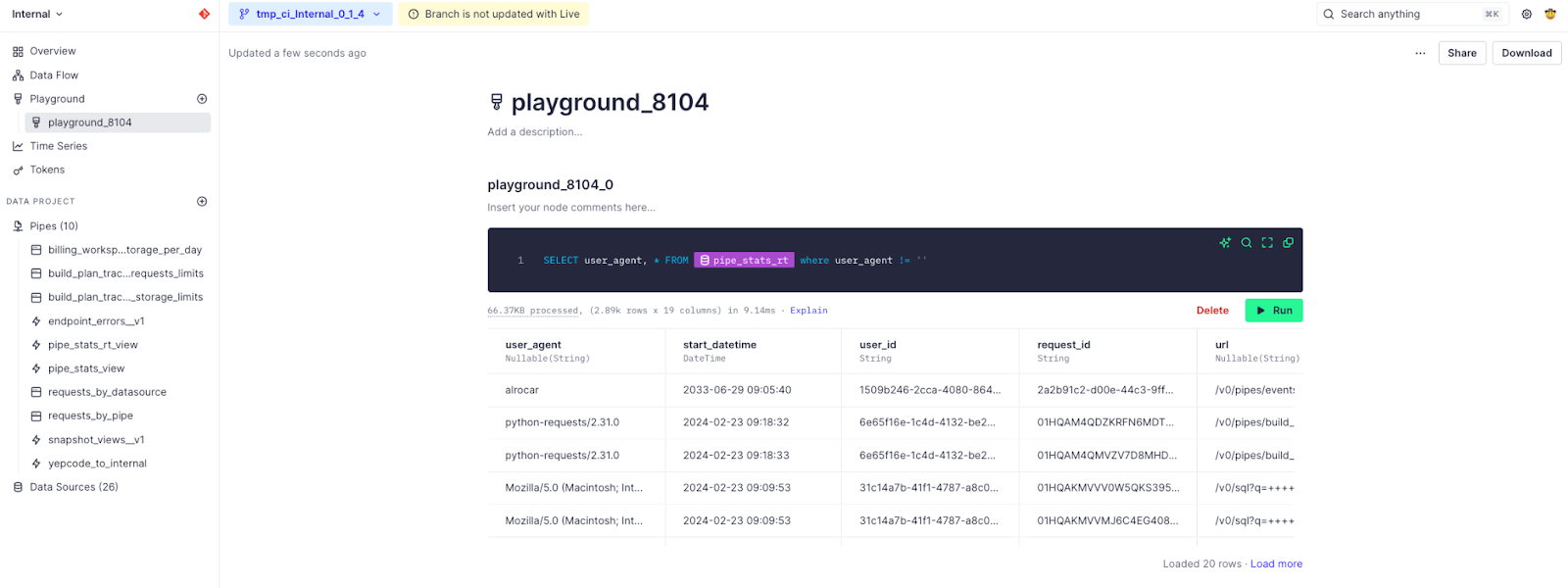
<p>Like any Tinybird Pipe, this can be published as a <a href="https://www.tinybird.co/docs/query/query-parameters" rel="noreferrer"><u>parameterized API</u></a>.</p><h3 id="we-needed-to-add-a-new-column-in-pipestatsrt-based-on-customer-feedback">We needed to add a new column in <code>pipe_stats_rt</code> based on customer feedback</h3><p>Recently, one of our largest customers came to us with a problem. They use Tinybird to build APIs and integrate them into user-facing products like their retail websites, mobile apps, etc.</p><p>The data engineers at this company use <code>pipe_stats_rt</code> to monitor these APIs for errors after they've been integrated into the software. If the frontend teams use an incorrect data type or improper formatting for a query parameter, for example, it will show up as an error in <code>pipe_stats_rt</code>.</p><p>Until recently, Tinybird didn't expose the user agent of the API request in <code>pipe_stats_rt</code>, which meant that our customer struggled to determine if errors were isolated to certain brands or applications. It would often take them a few days to figure out which team was actually responsible for improperly integrated APIs.</p><p>Since each website or application sent a unique <code>user_agent</code>, they asked us to add the <code>user_agent</code> request data to the Service Data Source so they could better isolate and debug API integration problems.</p><p>This, of course, called for a schema migration on the <code>pipe_stats_rt</code> table, which stores terabytes of data, ingests thousands of events per second, and is deployed across dozens of clusters supporting many concurrent user queries. 😳</p><h2 id="how-we-approached-the-schema-migration">How we approached the schema migration</h2><p>When we work with customers, we often recommend that you don't maintain the critical schema in the table in which the raw usage events are written, especially when you have unstructured data sources that may add or subtract new fields at any point in time.</p><p>As a rule of thumb, it's a lot easier to migrate the schema of a Materialized View than a landing Data Source, and in most cases, the teams that manage the landing Data Source (typically Data Engineering) are often different from the teams developing APIs over Materialized Views (typically Software Engineering).&nbsp;</p><blockquote>It is good practice to maintain the critical schema outside of the landing table. This way you can make changes downstream without breaking ingestion.</blockquote><p>In our case, the landing Data Source in our internal project contains only a few columns, with the entire event payload stored in a single column as a JSON string.</p><p>We parse that JSON in an SQL Pipe and create a Materialized View from the results, defining the needed schema in the resulting Materialized View. It's this Materialized View with which our users can interact.</p><figure class="kg-card kg-image-card kg-card-hascaption"><img src="https://tinybird-blog.ghost.io/content/images/2024/03/landing-to-materialized.png" class="kg-image" alt="" loading="lazy" width="1773" height="714" srcset="https://tinybird-blog.ghost.io/content/images/size/w600/2024/03/landing-to-materialized.png 600w, https://tinybird-blog.ghost.io/content/images/size/w1000/2024/03/landing-to-materialized.png 1000w, https://tinybird-blog.ghost.io/content/images/size/w1600/2024/03/landing-to-materialized.png 1600w, https://tinybird-blog.ghost.io/content/images/2024/03/landing-to-materialized.png 1773w" sizes="(min-width: 720px) 720px"><figcaption><span style="white-space: pre-wrap;">We stream raw API request data into a landing Data Source and then use an SQL Pipe to parse the incoming JSON before writing it to a Materialized View Data Source.</span></figcaption></figure><p>Because we define <code>pipe_stats_rt</code> in a Materialized View, we could make the change in our application backend to add the <code>user_agent</code> attribute to the JSON payload without requiring a schema change to the landing Data Source, and therefore without breaking ingestion. We could then modify the schema in the Materialized View even as new events with the <code>user_agent</code> attribute were streaming in.</p><h3 id="but-altering-clickhouse-materialized-views-isnt-very-robust">But altering ClickHouse® Materialized Views isn't very robust</h3><p>Unfortunately, altering a Materialized View in ClickHouse® is an <a href="https://clickhouse.com/docs/en/sql-reference/statements/alter/view"><u>experimental feature behind a feature flag</u></a>. Even if you can do it, you generally don't want to. Making a hot change to a Materialized View that's constantly receiving update triggers from new rows in the landing Data Source can lead to all kinds of cascading issues that can be very hard to undo.</p><p>So, how do you avoid hot changes on a Materialized View that's getting triggered to update thousands of times a second?</p><h3 id="past-use-clickhouse-and-a-lot-of-manual-operations">Past: Use ClickHouse® and a lot of manual operations</h3><p>In the past, this was <em>painful</em>. It was manual, slow, and brittle. We had to directly interact with the underlying ClickHouse® clusters and manually create and deploy all the new resources.</p><p>The basic steps looked like this:</p><ol><li>ssh into the production ClickHouse® cluster</li><li>Create a new table, <code>pipe_stats_rt_new</code> in each cluster</li><li>Create a new ClickHouse® materialized view to begin writing to the new table</li><li>Make sure the new materialized view is actually being triggered by manually initiating a query</li><li>Make an <code>INSERT INTO _ SELECT</code> query to backfill all the data, making sure not to leave gaps or duplicates.</li><li>Use a ClickHouse® <code>EXCHANGE</code> operation to swap the old table for the new one while ensuring the operation is atomic.</li><li>Do each of these steps for every single region, with the added caveat that each cluster has slightly different requirements based on how it is configured.&nbsp;</li></ol><p>This whole operation could take a week or more, and it wasn't getting any easier as we added more Enterprise customers in new cloud regions.</p><blockquote>If we made a mistake, the effects could be catastrophic. We had an internal document with all the steps, quirks, and tribal knowledge needed to avoid breaking production.</blockquote><p>We had an internal document with all the steps to follow, the various quirks and tribal knowledge, what to do in case of catastrophe, etc. Any mistake could result in broken production data pipelines, which ultimately meant data loss.</p><p>We did eventually automate part of this operation to make it less manual, but still we lacked any way of testing the change in an isolated environment. We couldn't run an automated test suite and thus had no safe way of deploying the changes to production.</p><p>We did what most data engineers do for schema migrations, etc.: run some random queries here and there a.k.a. "the eyeball test".</p><h3 id="present-use-version-control">Present: Use version control</h3><p>We recently released a <a href="https://www.tinybird.co/docs/classic/work-with-data/organize-your-work/working-with-version-control" rel="noreferrer"><u>git integration</u></a> for Tinybird, offering some features on top of ClickHouse® that make this kind of schema migration much less painful.</p><p>In this case, Tinybird can enable a <em>fork downstream,</em> When you <a href="https://www.tinybird.co/docs/concepts/branches" rel="noreferrer"><u>create a new branch</u></a>, Tinybird will analyze the dependency graph and apply changes to the updated Data Sources <em>and</em> all of the downstream dependencies in the new branch.</p><blockquote>Using Tinybird's git integration, our schema migrations rely on tried and true software development principles like version control, CI/CD, and automated testing.</blockquote><p>You can maintain these changes in Releases, so you can have a Live Release, which is in production, and a Preview Release, which you can use to test the changes in a production-like sandbox that contains an exact copy of the production resources, including the last partition of data.</p><div class="kg-card kg-callout-card kg-callout-card-grey"><div class="kg-callout-text">Releases are deprecated (<a href="https://www.tinybird.co/docs/changelog/2024-05-28-releases-deprecation">read more</a>)</div></div><p>This means you can test how schema changes propagate all the way into the application by utilizing the new Endpoints in your test branch, which will query real production data. When you're happy, you can merge and deploy the changes.</p><figure class="kg-card kg-image-card kg-card-hascaption"><img src="https://tinybird-blog.ghost.io/content/images/2024/03/fork-downstream.png" class="kg-image" alt="" loading="lazy" width="2000" height="1403" srcset="https://tinybird-blog.ghost.io/content/images/size/w600/2024/03/fork-downstream.png 600w, https://tinybird-blog.ghost.io/content/images/size/w1000/2024/03/fork-downstream.png 1000w, https://tinybird-blog.ghost.io/content/images/size/w1600/2024/03/fork-downstream.png 1600w, https://tinybird-blog.ghost.io/content/images/2024/03/fork-downstream.png 2011w" sizes="(min-width: 720px) 720px"><figcaption><span style="white-space: pre-wrap;">When you create a new git branch in a git-synced Tinybird Workspace, Tinybird will analyze the dependency graph and fork the downstream resources. In our case, that meant replicating the Materialized View containing the parsed JSON as well as the API Endpoints we create on top of it.</span></figcaption></figure><p>There are some other great features and benefits here:</p><ol><li><strong>Rollbacks</strong>. If you mess something up, the old Materialized View still exists in the original branch, so it's easy to roll back to a previous state if needed.</li><li><strong>Backfilling with no data loss</strong>. Since you're maintaining the old downstream in production, it's easier to use <a href="https://www.tinybird.co/docs/production/continuous-integration" rel="noreferrer">Continuous Deployment actions</a> to backfill all the historical data before the migration (without duplicating any of the data after).</li><li><strong>Previews</strong>. Since you have a copy of all the downstream dependencies, it's easy to evaluate performance and quality using production data before you merge the changes into production.</li></ol><p>Of course, there is a drawback, namely that you have to maintain the data resources on both branches while you perform backfill operations. This results in duplicate data processing, but given the amount of time and pain it saves you, we think this is a more than acceptable tradeoff.</p>
<!--kg-card-begin: html-->
<div class="tip-box"><div class="tip-box-container"><div class="tip-box-title">Why not use ClickHouse® POPULATE?</div><div class="tip-box-content">We don't use ClickHouse® POPULATE to backfill data because it has several flaws. In fact, the ClickHouse® docs <a href="https://clickhouse.com/docs/en/sql-reference/statements/create/view#materialized-view:~:text=We%20do%20not%20recommend%20using%20POPULATE%2C%20since%20data%20inserted%20in%20the%20table%20during%20the%20view%20creation%20will%20not%20be%20inserted%20in%20it.">recommend against it</a>. You can read our documentation for a deeper understanding of <a href="https://www.tinybird.co/docs/classic/work-with-data/strategies/backfill-strategies">backfill strategies</a> in these kinds of scenarios.</div></div></div>
<!--kg-card-end: html-->
<h2 id="how-we-did-the-schema-migration">How we did the schema migration</h2><p>We use Tinybird's integration with git to manage our <code>Internal</code> data project as we would any software project. The code is housed in a git repository <a href="https://www.tinybird.co/docs/classic/work-with-data/organize-your-work/working-with-version-control#connect-your-workspace-to-git-from-the-cli" rel="noreferrer">synced to the Tinybird Workspace</a> so that changes deployed in git are propagated to the Tinybird servers.</p><p>In our case, we host our code in GitLab, make changes to the data project files alongside the rest of our application code, and then use <a href="https://www.tinybird.co/docs/production/continuous-integration" rel="noreferrer">CI/CD pipelines</a> in GitLab to safely merge and deploy the changes.</p><p>Since everything is defined in textfiles and maintained in source control, the process of making the schema change was just like any other process you'd follow in software version control:</p><ol><li>Create a new branch</li><li>Make and commit the changes to the schema</li><li>Create a merge request with the commits</li><li>Write the script to perform the backfill during deployment</li><li>Generate some data fixtures and write tests to ensure quality</li><li>Deploy the changes to a CI branch to run the tests</li><li>Review the CI</li><li>Merge and deploy</li></ol><p>In this case, the actual code change is simple. We just have to extract the <code>user_agent</code> from the <code>tag</code> column in the landing Data Source in the Pipe which generates our resulting Materialized View…</p>
<!--kg-card-begin: html-->
<iframe width="100%" src="https://snippets.tinybird.co/XQAAAALuAAAAAAAAAABBKUqGk9nLKuxVQV7MpZRRlAt3jUF3hPmXDa0lzBwjoIQaV06Uy5bP9-PLL5dQ3hxeMF3eXIS-K7Ljbn8Sou-izQ7He7acTaVDNErxvp6q3gxfXlS13_hoq_4rGIVqMz10gOF2IH4KfyyR0nLKMmszWYWpGRqxu7bkzFWSTvuGdOHBQ24L9lT-THbxK_GH_3J4xQA/embed"></iframe>
<!--kg-card-end: html-->
<p>… and add the new column to the schema of the Materialized View:</p>
<!--kg-card-begin: html-->
<iframe width="100%" src="https://snippets.tinybird.co/XQAAAALRAAAAAAAAAABBKUqGk9nLKvdk_Z1s2pYcQYsyZMjP25CS87rkHwtgQaxwSgS36aI2hU3c57PorB1HWT8jCyXXcdfbydWF2xpM8pBcCYN5nAhZryggHWm7QNUb1QgbFSR65FXxqpneTQpA4munhssAQGUDlWMZqRms41uoKbcswHDjnZxqofNZyh8_6DfjP__RvwAA/embed"></iframe>
<!--kg-card-end: html-->
<p>Both of these changes were committed and pushed to the new branch.</p><h3 id="backfilling">Backfilling</h3><p>To backfill data, we wrote a script that populated data since the new <code>user_agent</code> column started being ingested up until the current time when the script is run, and then we copied the rest of the historical data over to the new Materialized View.</p><p>To do this, we used parameterized <a href="https://www.tinybird.co/docs/publish/copy-pipes" rel="noreferrer"><u>Copy Pipes</u></a>, another Tinybird feature that allows you to append the results of an SQL query into an existing (or new) Data Source.</p><p>Here, for example, is the <code>.pipe</code> file for the Copy Pipe that we used to populate empty <code>user_agent</code> data up until the new <code>user_agent</code> column was added:</p>
<!--kg-card-begin: html-->
<iframe width="100%" src="https://snippets.tinybird.co/XQAAAAJ8AQAAAAAAAABBKUqGk9nLKwWqVybhJN-FGjbydvHShhJcclO-sKkxWTxOftk4hIFvLoRPzIVYH5Ln43QqzR5XG3d9CqhmKUOGQF9fRaSNSsJaFxSoPVtrdrepQYl7IK5q0SGXeYFa-PnPLTHo4zw0ubFSGlXOVXQi9nQlvwgk-gX-EK2G1RbCB4v5aiEx5uvKcFVc178y0zxyheTih8YFTzec6iSaZDBhdp6hx1mTrCAWgZMlMxoBqZTxp_nqe9LrRUWOjxGybLNYA7q-OJV_hNu5keIuOyDf1vmDtgGizjowTaOCcL0mqUFEEWOxiL_56fFotLb-jIbaBPWpvPiAxPEbtMTSnfKNSeTxhJ8uhA0qn6tXNGr_iGA4IA/embed"></iframe>
<!--kg-card-end: html-->
<p>When you deploy a Copy Pipe to Tinybird, a Copy Job is created that you can run on demand. In this case, we ran the job as a part of the <a href="https://www.tinybird.co/docs/production/deployment-strategies" rel="noreferrer"><u>deployment</u></a> in both CI and CD. Since the copy operations are parameterized, we could pass the current time during <a href="https://www.tinybird.co/docs/production/continuous-integration" rel="noreferrer"><u>CI/CD execution</u></a> or leave the <code>user_agent</code> empty:</p>
<!--kg-card-begin: html-->
<iframe width="100%" src="https://snippets.tinybird.co/XQAAAAKSAwAAAAAAAABBKUqGk9nLKv9RWquWOB0KJrpbIaioKFwgjuf8zJYcghadrlb9HFoBIDvgeP6NCh6dk8eaFimJPa3U1nAtbPwDt5wsnS42KZWJ_EFKkuJJC-6hjEAjdY-doMEF2lp9q5PlE-V1_h6kT6sGsOvFPJRkILEpczaDdvLT0bZ6iGvFHMUjw2krkcPEmnO0Ely32TBaolkVxFWtiB2t5Jrb03VVQOZS-JZNwZDKW5CXg0WTWR5rdQaMZUcIlA8m5rne897vByRQJFSOO_nS_lSiSB46c8vjhKMirBx8g74jfRGVMW_e7hFGNfpb8fgikWrM_3z6RnE1HqFw2snrx7pUaSC5FYQIH_nlEBib54Z6B7WazaHy3dRVSyZeqs-a7nqqwSbjXRCqpLP6OuQHNpgSEEoga_0G2CtwVQNYsHEftmAXjNLXpmS3lpt4PhfLmXjphXmjXcM14BjW5LYwjxV2ueLPoTpjFSVClTD2TkHCvam-qEGfkr0kZo0P4cuasJJse__lvGdlcdiyjMjHQIeQqaAKm9J2WJ0a3e0CJNnU_n_gSwl0OdWr2uqjQUZeKqkilGqtWZxmYZ1ZIYV68Zqg-jiVqD6p5XuOLuMqA4htzzvhCOspZyEfj5abPZmK_-6xRvc/embed"></iframe>
<!--kg-card-end: html-->
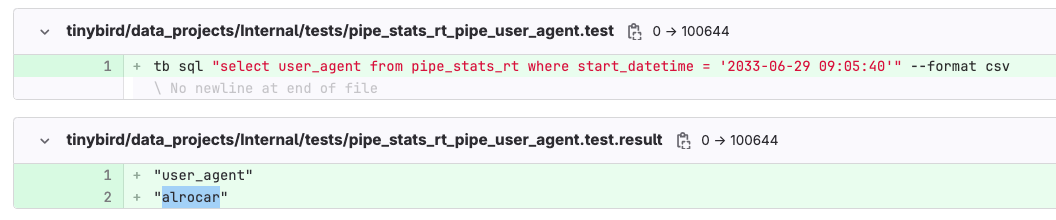
<p>The above script ensured that we had all the historical data backfilled in both the CI branch and in production after the changes were merged and deployed. It guaranteed there were no duplicates or missing events in the final Materialized View.</p><p>In addition, because the Copy Pipes are parameterized, we could even batch the backfill operations by passing different DateTime parameters, so the backfill operations could scale based on the size of the table. In some regions with more load, we broke up the backfill jobs by day to avoid overloading the ClickHouse® cluster.</p><h3 id="testing">Testing</h3><p>After making the schema change and backfilling, we wanted to run some tests to make sure that the changes we got were the changes we expected, namely that new <code>user_agent</code> entries were being correctly materialized.</p><p>In a Tinybird data project, you <a href="https://www.tinybird.co/docs/production/implementing-test-strategies" rel="noreferrer"><u>implement testing strategies</u></a> with <code>.test</code> files, such as those shown below, that contain some commands to run tests over data fixtures supplied during the CI/CD:</p><figure class="kg-card kg-image-card kg-card-hascaption"><img src="https://lh7-us.googleusercontent.com/3X-C7oEUo6jckh1bi0toX_yahO_lwMWeVDv4UfJfZ9t2HeEwJDBQhGohBHrQk1XQ4aEThdDuupCbhZJQbT-kvJ-sg83i6muewWxT6HJ_uogpojy_qISjYYEOqYJDgmsgNVFGlUf2JREhIwG8aYZTsS4" class="kg-image" alt="" loading="lazy" width="1056" height="220"><figcaption><span style="white-space: pre-wrap;">An example Tinybird test that gets run during CI/CD, in this case checking that we get the expected value for </span><code spellcheck="false" style="white-space: pre-wrap;"><span>user_agent</span></code><span style="white-space: pre-wrap;"> in the Materialized View.</span></figcaption></figure><p>In addition to these automated tests, the CI branch is deployed to the Tinybird server, so you can double-check the changes in Preview to do some manual data quality checks or peer reviewing using <a href="https://www.tinybird.co/docs/classic/work-with-data/organize-your-work/working-with-version-control#exploration-workflow" rel="noreferrer"><u>Playgrounds</u></a>.</p><figure class="kg-card kg-image-card kg-card-hascaption"><img src="https://lh7-us.googleusercontent.com/NCAgwp71nWpMbTLVfv9SFf9Ry_EkHui7FPzI8QJqHjW_1K8_THK_b8uYd80rCD7sKTFKzESVSPmXc_stE9vc7vz56ItDUDcWUmPaDjQcX9tKrKte5i5YeWiTafQC0_Dk58KVbdm_KBJQaOxico88xbE" class="kg-image" alt="" loading="lazy" width="1600" height="600"><figcaption><span style="white-space: pre-wrap;">Tinybird Playgrounds allow you to run ad hoc SQL queries over your Data Sources without creating additional resources in your Workspace.</span></figcaption></figure><h3 id="deploying-to-20-regions">Deploying to 20+ regions</h3><p>Once the Merge Request had been deployed and tested in CI, the final step was to deploy the changes in production across all of the different regions and ClickHouse® clusters.</p><p>The process was exactly the same as deploying to the CI branch, but with a different set of credentials for each region's <code>Internal</code> Workspace:&nbsp;</p>
<!--kg-card-begin: html-->
<iframe width="100%" src="https://snippets.tinybird.co/XQAAAAJGAwAAAAAAAABBKUqGk9nLKvQ4Bjqkv5FQSCbGxdoFWTeN5fxUb0WwUNdea_LyGPTOUMfHwvIY7fsse2M5S8-k9o3hMEJWoucw3cFH2jzQM_9jpz5z57W61Gjkjf7po62xfhxx247uvnlybTVQIaV8spLCiY0tw3NRHW8D0M3cW-mD77P5-9V6EXYD_P1k2kz40d931IumAsrhPhNmmL0V0DycmFcgdrMqWv0CiiP9pANQq2TvNxETFvUlwuwbLnnWYau4meLeq2PY4emSDOIj5OglZY0PLpnkUFeDYh7nuwMG-QYtzK-Inq0qfz_p8XSBYRwDxX4L3gPVTK7DKCZaALxhJ5oAjuDN50A_xygGrXbt1ZSHuYv1INOAZ9jxeLfmZ94L3rcUhTFhD-ZXgf_kSYvTfWGcKO-_j1MlJKTO6QLj_PNAxgsP43XlA6Zf7EYY7l5k6R-CzPeJfSIxxqopWUnTc1_yfTRS_5myfgQ/embed"></iframe>
<!--kg-card-end: html-->
<h3 id="promote-to-live">Promote to Live</h3><p>As I mentioned earlier, Tinybird manages versioned deployments through Releases. After CD, the changes merged into your production git branch are reflected in a Preview Release in Tinybird. Therefore, the last thing we did was promote the Preview Release with our changes to the Live Release, thus syncing the Tinybird servers to the production code branch and completing the schema migration!</p><figure class="kg-card kg-embed-card"><blockquote class="twitter-tweet"><p lang="es" dir="ltr">8/100 <a href="https://twitter.com/hashtag/100DaysOfCode?src=hash&amp;ref_src=twsrc%5Etfw">#100DaysOfCode</a> 👨‍💻<br><br>Desde la semana pasada, los usuarios de Tinybird pueden obtener métricas de las APIs que publican filtrando o agrupando por "user_agent" <a href="https://t.co/SWtLMpeTbT">pic.twitter.com/SWtLMpeTbT</a></p>— alrocar 🥘 (@alrocar) <a href="https://twitter.com/alrocar/status/1754420883731427566?ref_src=twsrc%5Etfw">February 5, 2024</a></blockquote>
<script async="" src="https://platform.twitter.com/widgets.js" charset="utf-8"></script></figure><h2 id="summary-and-resources">Summary and resources</h2><p>Schema migrations are never easy. But doing it in a production streaming data system is much, much harder because of all the moving pieces, the data operations required, and the end-to-end nature of the project. For more on designing and optimizing <a href="https://www.tinybird.co/blog-posts/clickhouse-streaming-analytics">high-throughput streaming analytics systems</a>, see our comprehensive guide.</p><p>And, unfortunately, these operations don't natively exist in ClickHouse®, because really it's more of a data engineering problem than a database problem. It requires careful data operations and code management.</p><blockquote>These operations don't exist in ClickHouse®. Which makes sense, because it's not a database problem. It's a data engineering problem.</blockquote><p>Tinybird's git integration was a friend here, and it allowed us to manage and iterate our internal data project alongside the same code we had written to build the user-facing product itself. This made it relatively painless for us to support our customer and reduce their debug time from days to seconds.</p><p>Generally speaking, by integrating Tinybird with git, we can rely on tried and tested software principles that make streaming schema migrations much easier and safer.</p><p>If you'd like to learn more about some of these principles and how they guide work in Tinybird, check out our <a href="https://www.tinybird.co/docs/classic/work-with-data/organize-your-work/working-with-version-control" rel="noreferrer"><u>documentation on version control</u></a> with real-time data projects.</p><p>You can also read up on <a href="https://www.tinybird.co/docs/concepts/materialized-views" rel="noreferrer"><u>Materialized Views</u></a> and <a href="https://www.tinybird.co/docs/classic/work-with-data/process-and-copy/materialized-views/best-practices" rel="noreferrer"><u>how they work in Tinybird</u></a>.</p><p>If you have any questions about this work and how we implemented it, we'd love to chat. You can message us in our <a href="https://www.tinybird.co/docs/community" rel="noreferrer"><u>public Slack community</u></a>.</p>