---
title: "Text search at scale with ClickHouse®"
excerpt: "Searching for thousands of regex patterns on millions of documents in seconds like it’s no big deal."
authors: "Xoel Lopez"
categories: "The Data Base"
createdOn: "2023-09-25 00:00:00"
publishedOn: "2022-07-26 00:00:00"
updatedOn: "2025-04-24 00:00:00"
status: "published"
---

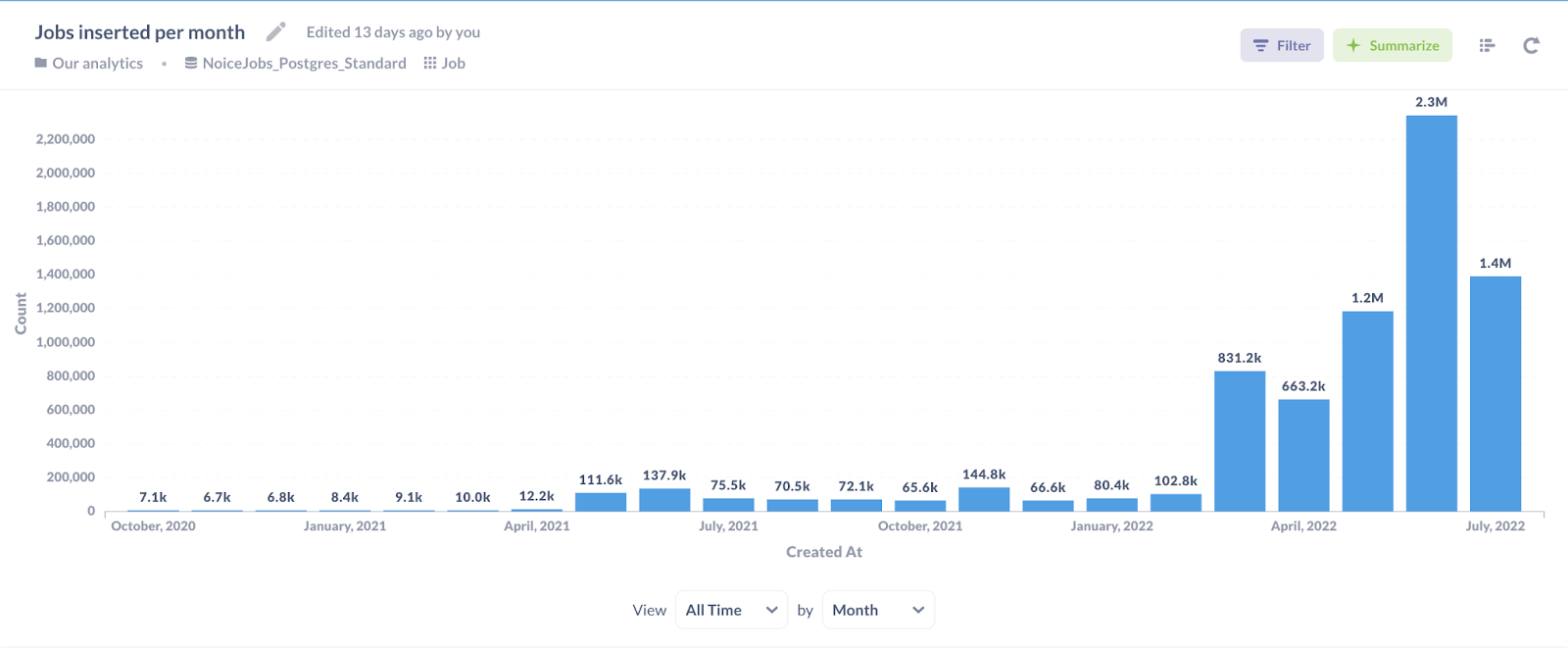
<p>I’m building <a href="http://theirstack.com">TheirStack.com</a>, a market intelligence product for B2B SaaS companies. Among other use cases, it helps our customers find the companies most likely to buy their products. TheirStack identifies the technologies other companies mention in their job posts and delivers that data as buyer intent signals. To do so, we look for thousands of technologies across millions of jobs from hundreds of thousands of companies.</p><p>Looking for thousands of text patterns across millions of documents is not trivial. As our data grew, I had to redo our text search scripts multiple times because what worked with small data became too slow when our data got bigger.</p><h3 id="how-do-we-do-it">How do we do it?</h3><p>For advanced clickhouse text search capabilities, <a href="https://clickhouse.com/docs/en/sql-reference/functions/string-search-functions/#multimatchallindiceshaystack-pattern1-pattern2--patternn">multiMatchAllIndices</a> is all you need. I could end this post here.</p><p>But I'll tell you the story of how we got there. How we started doing clickhouse full text search on Postgres until we couldn't anymore. What I tried, what worked and what didn't. And we do it now with ClickHouse® (via Tinybird) with data 10 or 100x larger than what Postgres can handle.</p><p>Ready? Keep reading.</p><h2 id="first-we-tried-to-do-it-in-postgres">First we tried to do it in Postgres</h2><p>PostgreSQL is our main database, where we store data about the jobs we scrape, the companies they’re from, the technologies we track and more. So at first, it felt natural to write some SQL scripts to parse the jobs directly on Postgres, as they were already there.</p><h3 id="attempt-1-full-text-search-in-postgresql">Attempt #1: Full-Text Search in PostgreSQL</h3><p>Postgres has full-text search capabilities that would work great to process natural language. <a href="https://www.crunchydata.com/blog/postgres-full-text-search-a-search-engine-in-a-database">This post</a> describes in good detail how it works and how to set it up. Unfortunately, it didn’t fit our use case that well. Some of the reasons are also described in <a href="https://about.gitlab.com/blog/2016/03/18/fast-search-using-postgresql-trigram-indexes/">this post</a> from Gitlab about text search on Postgres. To name a few:</p><p><strong>1. It’s case-insensitive.</strong></p><figure class="kg-card kg-embed-card"><iframe width="100%" src="https://snippets.tinybird.co/XQAAAAKvAAAAAAAAAABBKUqGk9nLKzhRtIlaPRthtcoa524D6PPh3LHEiBHaiodX6BZyhUUQ2NqNHr2rGaGfIw4xpB9O4ZbD7XuumHCHR6JytKElskixlKmzd1bJTFsTCPr3dAG54YMLNTCr5fmrxbYRFi-tQxlJRvC1H0BmvxWPZaA3_30VddzptN4KvL_d7ihMAQ-wB1ujwOWs8cQB3L__2S4AAA/embed"></iframe></figure><p>In many cases, we want to make case-sensitive searches. A case-insensitive search is OK if ‘react’ and ‘React’ have the same meaning for you. But for our use case, they don’t, and case-insensitive searches would yield many false positives, which for us have a much higher cost than false negatives.</p><p><strong>2. It tokenizes full words and it discards most characters that aren’t letters or numbers.</strong></p><p>Look at these two examples:</p><figure class="kg-card kg-embed-card"><iframe width="100%" src="https://snippets.tinybird.co/XQAAAAKnAAAAAAAAAABBKUqGk9nLKzhPLgS1xdnNtcoa524D6PPh3LHEh9pWWP1oVqBu-rDGt2nspbRJVknwsaRk1JXpXSap8N_Xy0vE1z1MuIH7B601oMr27BlwyaQEyt4xRhwEKz58aL6tp9hENNA56qYgPNqYIPorRu_g5LF6YEkOhlUE6qQA0Wj1oFAtI0Pe36aC0mfsMVi7__zGeAA/embed"></iframe></figure><p>In our case, those "+" characters in "c++" have meaning and shouldn’t be discarded (which might be ok for most other use cases to make searches on natural text).</p><figure class="kg-card kg-embed-card"><iframe width="100%" src="https://snippets.tinybird.co/XQAAAALQAAAAAAAAAABBKUqGk9nLKzhXmRS1xdnNtcoa524D6PPh3LHEh9pWWP1oVqBu6TVynycHbmjqfqACTetWmr-UbVg0ICWCpzY-o-O3X-2Yo79W_wejkqEsm0t2_iCMHx5fQ8oNi74PKqgWQBsr4E6z4gWQ0Ve6su9Mnsv2rjHJXeAy6qNSbLKKVfFnigUbQFYk4pXVQD_4ZEgY8KTvdxZ0j7KZazFSktXf_8pBYAA/embed"></iframe></figure><p>In a case like this, where we'd want to differentiate the use of "Go" as a proper noun following a comma and a space, the tokenizer discards that comma (and would discard almost all other special characters). This doesn't work for us.</p><p><strong>3. The managed Postgres I use doesn’t support custom dictionaries</strong></p><p>Lastly, to customize full-text search you could add your own <a href="https://www.postgresql.org/docs/current/textsearch-dictionaries.html">dictionaries</a> to try to address some of these problems. But Heroku Postgres (what I was using at the time, and what I’m still using), I couldn’t use custom dictionaries, so I didn’t bother trying to make this work anymore.</p><p>The <a href="https://www.postgresql.org/docs/current/textsearch-controls.html">official docs</a> are a great place if you want to learn more about this Postgres feature.</p><h3 id="attempt-2-regex-matching-in-postgresql">Attempt #2: Regex matching in PostgreSQL</h3><p>Fortunately, Postgres also lets you do <a href="https://www.postgresql.org/docs/current/functions-matching.html#FUNCTIONS-POSIX-REGEXP">pattern matching</a> using regular expressions. So we created one pattern for each technology, and a query like this would return the IDs of the jobs that would match each pattern and were scraped in the current or previous day:</p><figure class="kg-card kg-embed-card"><iframe width="100%" src="https://snippets.tinybird.co/XQAAAALGAAAAAAAAAABBKUqGk9nLKwp5Z4RA4Kc4a3OqAd0jXrsFH3vcTjr61o7NTHuq5XuXXEoadN4E0nZ3HLnBaJ5wXcAIKeF5rZt5yk6Vc7-62SA6CHSZllALSYejNHj0qKDC1D1LSXMYVNgdag8l6ebumb5ERCtXK2XiioPEHfFjo1jxYuZxSkKGdmdDFblbf36lnxf-kjOc_HNgmYuer3w-L82p_LKBJwJa7b0bplk9685vqiL6yY_yjljLJODD6QY_I_L_-TaUgA/embed"></iframe></figure><p>We would run one query like this for every technology we were tracking at the time, every day. We track ~5k technologies, so this is about 5k queries per day.</p><p>Then we would save all the combinations of (<code>job_id</code>, <code>technology_id</code>) in an association table that would be updated every day N times, once per technology searched.</p><p>‍</p><figure class="kg-card kg-image-card kg-card-hascaption"><img src="https://tinybird-blog.ghost.io/content/images/2023/09/62dee9c9b77b8629519882cc_K4SfgMBSYq2V1EuH_mfP3gqotE8vfAxMVTXOZbt-h94yPm5DWzBdbvs0XsCQP-a4MjS7fj2u4rsGY4GDsPqfFcGdnuSAp8G1KvwGB2GdSt8SieMiu6m3UZeG5EU-mQiaJY5rC-2NLbXqnjCSuzE-11.png" class="kg-image" alt="a chart showing the number of job descriptions we scrape month over month" loading="lazy" width="1600" height="662" srcset="https://tinybird-blog.ghost.io/content/images/size/w600/2023/09/62dee9c9b77b8629519882cc_K4SfgMBSYq2V1EuH_mfP3gqotE8vfAxMVTXOZbt-h94yPm5DWzBdbvs0XsCQP-a4MjS7fj2u4rsGY4GDsPqfFcGdnuSAp8G1KvwGB2GdSt8SieMiu6m3UZeG5EU-mQiaJY5rC-2NLbXqnjCSuzE-11.png 600w, https://tinybird-blog.ghost.io/content/images/size/w1000/2023/09/62dee9c9b77b8629519882cc_K4SfgMBSYq2V1EuH_mfP3gqotE8vfAxMVTXOZbt-h94yPm5DWzBdbvs0XsCQP-a4MjS7fj2u4rsGY4GDsPqfFcGdnuSAp8G1KvwGB2GdSt8SieMiu6m3UZeG5EU-mQiaJY5rC-2NLbXqnjCSuzE-11.png 1000w, https://tinybird-blog.ghost.io/content/images/2023/09/62dee9c9b77b8629519882cc_K4SfgMBSYq2V1EuH_mfP3gqotE8vfAxMVTXOZbt-h94yPm5DWzBdbvs0XsCQP-a4MjS7fj2u4rsGY4GDsPqfFcGdnuSAp8G1KvwGB2GdSt8SieMiu6m3UZeG5EU-mQiaJY5rC-2NLbXqnjCSuzE-11.png 1600w" sizes="(min-width: 720px) 720px"><figcaption><span style="white-space: pre-wrap;">We're analyzing over 2 million jobs a month now.</span></figcaption></figure><p>‍</p><p>As you see in the previous graph, we were scraping very few jobs in the first months. We didn’t even need an index to run this process in a reasonable time until we had ~50k jobs.</p><p>Then, in May 2021 the number of jobs scraped per month grew by 10x, and I had to go back to the drawing board as the previous process got too slow.</p><h3 id="attempt-3-making-it-faster-with-trigram-indices">Attempt #3: Making it faster with trigram indices</h3><p>A trigram is a sequence of all the possible 3-character contiguous substrings that can be extracted from a string, and indices on them can make text search queries much faster. You can see what trigrams Postgres produces with the following query</p><figure class="kg-card kg-embed-card"><iframe width="100%" src="https://snippets.tinybird.co/XQAAAAI5AQAAAAAAAABBKUqGk9nLKvkFcCK6RVPHHRtr42QZIE58RAozJI-3x4LmovNlSfD6S3DQnkmA44q2_OmQS3Nv0N9MisXS81iHBWWjo9Hdw8ANwcIknUGAi_PZRRNl_Ugur5-M7Gyv5pczE4GxLjCB7Ioj2qTwvwVIVO_4ZCjR-Rz-ldzwm2ET7QSqnMVyq66xBNrZtp0tygLrTPHsUumaknvsCmHPevzq0REQ8aFrskpDgU7WvKPSEv_d6yXt/embed"></iframe></figure><p>To use trigrams on Postgres, you need to enable the pg_trgm extension running <code>CREATE EXTENSION pg_trgm;</code>.</p><p>If you create a GIN or GiST index on the trigram of a column, queries containing <code>LIKE</code>, <code>ILIKE</code> and regex queries on it will be much faster. GIN indices are slower to create but yield faster queries, so I went for that. To create it, you’d run this query:</p><figure class="kg-card kg-embed-card"><iframe width="100%" src="https://snippets.tinybird.co/XQAAAAKqAAAAAAAAAABBKUqGk9nLKwQfmCK6RVPHHRtr42QZIE58XF-73WjaE_S4WN26KmXLvteFGFrwLZwlArTseAqobG9BAnoINGcJ3nyxQ6dWgYjxTn0XICTJyYaqBXRKeoKf3e5UeBiSDfb99Dp1hIL8T7MBXhXzJQmc_LgpLugl7QxccIqNb6MlVXvjeaAOH2DkMTOjjp9tQLyQpQUWTZj__9tH8AA/embed"></iframe></figure><p>This sped up text queries by ~10x and was great at the beginning… until it wasn’t.</p><p>The description column was quite large, and the trigram index on it was also pretty big - it was taking the same disk space as the column that was being indexed. If we were indexing a column of short text (job titles instead of job descriptions, for example), this approach would still be working today. But that wasn’t the case.</p><p>Data kept growing and, when there were ~1M jobs in the database, queries became too slow again, taking seconds to tens of seconds each. And remember, we were running one query per technology and tracking thousands of technologies. Also, running these queries would put too much load on the Postgres database I was using, in addition to it not being fast enough anymore.</p><p>So I started looking for alternatives.</p><h2 id="then-we-moved-to-tinybird">Then we moved to Tinybird for advanced clickhouse search</h2><p>I knew there were text-specific search solutions out there such as ElasticSearch or Algolia. But I had worked at Tinybird before, was more familiar with it, and I knew it operated on ClickHouse®. I also knew that ClickHouse® could do pattern matching on text with advanced clickhouse search capabilities. And I thought that storing data in a <a href="https://www.tinybird.co/blog-posts/what-is-a-columnar-database" rel="noreferrer">columnar format</a> as ClickHouse® does would likely make those operations much faster than on Postgres.</p><p>So I did a quick test, loading ~1M rows from my jobs table on Postgres on Tinybird, and was happily surprised with the results.</p><figure class="kg-card kg-embed-card"><blockquote class="twitter-tweet"><p lang="en" dir="ltr">Queries that used to take 10s of seconds on Postgres to do full text search ~1M rows, even using a trigram index to make it as fast as possible (but were taking soo much space and slowing down other stuff a lot), just take... ~100ms on <a href="https://twitter.com/tinybirdco?ref_src=twsrc%5Etfw">@tinybirdco</a> <br><br>🤯</p>— Xoel López (@xoelipedes) <a href="https://twitter.com/xoelipedes/status/1492138236415721474?ref_src=twsrc%5Etfw">February 11, 2022</a></blockquote>
<script async="" src="https://platform.twitter.com/widgets.js" charset="utf-8"></script></figure><p>I wrote a script to ingest the latest jobs data from Postgres to Tinybird every 10 minutes, similar to what’s described <a href="https://www.tinybird.co/blog-posts/the-one-cron-job-that-will-speed-up-your-analytical-queries-in-postgres-a-hundred-fold">here</a>.</p><p>Then I wrote a Tinybird Pipe that does the same pattern matching thas was being done on Postgres. There’s no ~* or ~ operator in ClickHouse®, but the <code>match</code> <a href="https://clickhouse.com/docs/en/sql-reference/functions/string-search-functions/#matchhaystack-pattern">function</a> does the same thing. A ClickHouse® equivalent query to the Postgres one shown before would look like this, using <a href="https://www.tinybird.co/docs/query/query-parameters" rel="noreferrer">Tinybird dynamic parameters</a>.</p><figure class="kg-card kg-embed-card"><iframe width="100%" src="https://snippets.tinybird.co/XQAAAALsAAAAAAAAAABBKUqGk9nLKzhPLucU-VBsJ57mio7uNQKpivkMkzhhuPR-YLZErk7uR1T0vaaS8jGnIVSirCpwP01XW7IfYtydjlgscH6ooj_lmD5Tr2OxmRtFKd640gHtTyrELe0EHnAXZGaajRv1ncyVoU271nSYHv_LaP-Eu9ySlPphSSBZmis2CjZt1Fnn_oWz1lxzDGYObr-T_k1lD8ui9xh9ZwihJgIiYHdtsjKIj4QGIFrYKMRSNTQF-zejSTRgEwv6Xwrx/embed"></iframe></figure><p>Note that <code>match</code> is case-sensitive, so if you want to make case-insensitive queries you need to make the pattern start with <code>(?i)</code>.</p><p>This was indeed much faster, and for a few months it worked just fine. But there was a problem.</p><p>Again, we track about 5,000 technologies and we need to make one query per technology, reading the same data. The <code>jobs</code> datasource is sorted by <code>date_posted</code> so that queries only read the data they need. But even if the data for the last day only takes 100MB, 100MB * 10,000 = 1TB read per day… not a number I feel comfortable with.</p><p>So I started to look for ways to do the same, but more efficiently.</p><h3 id="a-failed-idea-ngrambfv1-indices-for-full-text-search-on-clickhouse">A failed idea: ngrambf_v1 indices for full-text search on ClickHouse®</h3>
<!--kg-card-begin: html-->
<div class="tip-box"><div class="tip-box-container"><div class="tip-box-title">Note to reader</div><div class="tip-box-content">This didn’t work. Skip to the next section to learn what did work, or stay here to learn a bit about how indexes work on ClickHouse®.</div></div></div>
<!--kg-card-end: html-->
<p>The first thing I looked for was whether there was something like PostgreSQL’s trigram indexes on ClickHouse®. There are: <code>ngrambf_v1</code> indexes. You can see all the available indexes on the <a href="https://clickhouse.com/docs/en/engines/table-engines/mergetree-family/mergetree/#available-types-of-indices">official docs</a>, and an extended explanation on how indices work on ClickHouse® in <a href="https://altinity.com/blog/clickhouse-black-magic-skipping-indices#:~:text=Index%20Definition&amp;text=To%20make%20it%20even%20more,10%20granules%20and%20so%20on">this post from Altinity</a>.</p><p>The internals of <code>ngrambf_v1</code> indices on ClickHouse® are similar to trigram indexes in Postgres.</p><p>First, ngrams of the size we choose (3 in this case) are extracted from the column to be indexed. The <code>ngrams</code> function produces substrings of N characters.</p><figure class="kg-card kg-embed-card"><iframe width="100%" src="https://snippets.tinybird.co/XQAAAAJaBgAAAAAAAABBKUqGk9nLKuetmFOn4KLgxpXxOZwSTVUmTytUAx2SK6RPN0ClQ90F7YJjMAQe69gru0KUzqFRcsb2LFpuufb2alnJQy88Gde4zUsZYTJXH1gQMbFSmoS7nYBRIHID4JVNZNfzgrK1UIOXA1XlsdfzoFAPN4kYS87qQrufd2rWtZJHTm7aEHLIVR2ajjGpWtHRyzsrakXOYCZwgmFz_C9OayveUQWHDo2prt2sprS4mpJEscLR7Z-fh7UUmQ7XeLTLIAtAw-hsw2Jd3svlmX1zQ164cGFXQwaG9e1Qm0OZTRYwOpEYuwbeVBI-MppPZH0fBTceak2jBC8rETV5KxUZ300-e4Eigrcn_4ChShvtbI1lzayP1iMUQtc-tk3siHGqdsuR9ifBMzseltTnz6PLwd9M0GNPQtt6JW6UMV5SaYbAkWSf_9ujcZw/embed"></iframe></figure><p>Then the index stores in which granules each substring appears.</p><p>There are several reasons this didn’t work for us. The first one is that, unlike in Postgres, ngram indices can’t optimize regex matching functions in ClickHouse®. Only functions that search for substrings in strings can be optimized by <code>ngrambf_v1</code> indices in ClickHouse®. These are functions like <code>LIKE</code>, <code>ILIKE</code> and <code>multiSearchAny</code>, but any functions involving <code>match</code> (that use regex patterns) won’t be faster by using an index like this (source: <a href="https://clickhouse.com/docs/en/engines/table-engines/mergetree-family/mergetree/#functions-support">this table</a> in the docs).</p><p>Another valid reason is that Tinybird doesn’t let you set up indices yet. It lets you set up the sorting key of a Data Source, which is fine for most cases as it’s one of the most important settings to make your queries fast. If you’re going to filter or group by <code>column_a</code> in most of your queries, that should be the first element of the <code>sorting_key</code> setting of your Data Source (read more on making queries fast in <a href="https://www.tinybird.co/docs/query/sql-best-practices" rel="noreferrer">this guide</a> and how to pick good sorting and partition keys <a href="https://kb.altinity.com/engines/mergetree-table-engine-family/pick-keys/">here</a>).</p><p>Last, even if I could get by matching substrings, and I could set up <code>ngrambf_v1</code> indices on Tinybird, I’m still not sure text indices on such large columns as <code>job_description</code> would be useful, while keeping ClickHouse® performant. This is because indices work differently in ClickHouse® compared to in Postgres, for good reasons.</p><p>In Postgres, index entries will point to specific rows in your tables. In ClickHouse®, indices will point to N granules (1 in the example below, the value after <code>INDEX… GRANULARITY</code>), where a granule is a set of M rows (the value after <code>SETTINGS index_granularity = </code>).</p><p>Imagine our table definition is like this:</p><figure class="kg-card kg-embed-card"><iframe width="100%" src="https://snippets.tinybird.co/XQAAAAJuAQAAAAAAAABBKUqGk9nLKvdy3a9QJjhd6ubseqGs3bBHdUB5DjAy4a15gZYxGnyKlzEWfNyXd8-WoR34CEG3u4_2n7YAhmV994NufTPDOttDB-kr0c0BeIlV41puzlg7mbjyda6M4YAtEnDhFJT82LY_BDa5nL9dSLYTzz5iIO1GyC_4UmLHZ_ApNjHXCq5mRw0fedb36WeqWFMuPT8ep9OH5gRvbn9k4Sow15kahQ4y-CByQ9HPEFoKbmxuAXjGDsrIRRJnYiAM7vtlEal2TWKCGf82SNPxaaN38Gjt_axyWV3bzkqoBua8MHaP-VTvTAlT_TAtgythjOsy1CbmAFTJtWADvae6elBKXKQItDLSznjWwhjnYhZvHdWauUpD_9tDLAA/embed"></iframe></figure><p><code>index_granularity</code> defines the number of rows per granule. It’s 100 in this case, but for analytics use cases it makes sense to put a much larger value there. The default value is 8192. Here rows will be sorted by <code>date_posted</code> and the primary index will only contain 1 value for every 100 rows. This is great for analytical queries, as filters and aggregations based on <code>date_posted</code> will be very fast. The smaller the granule size is, the bigger the primary index will become and these queries will run slow.</p><p>Check out <a href="https://clickhouse.com/docs/en/guides/improving-query-performance/sparse-primary-indexes/sparse-primary-indexes-design/">this section of the docs</a> to understand how Primary indices work on ClickHouse® and <a href="https://stackoverflow.com/questions/60255863/how-understand-the-granularity-and-block-in-clickhouse/60271529#60271529">this StackOverflow answer</a> to learn more about table granularity and index granularity work. <a href="https://www.slideshare.net/Altinity/clickhouse-query-performance-tips-and-tricks-by-robert-hodges-altinity-ceo">These slides</a> are also full of good performance tips about indices, column encodings and more.</p><p>Here comes the problem.</p><p>An index will be useful if it can discard lots of rows (or granules, in our case). The column indexed (containing job descriptions) will be quite large, and a granule will contain many rows. So most granules will contain most ngrams, and the index won’t be able to discard many granules unless we set the granule size to very few rows (10 or less). But, as we said before, a very selective index (with a low number of rows per granule) will degrade the performance of other queries. Also, it <em>must </em>fit in memory. Everything is a trade-off!</p><p>To sum this part up: <code>ngrambf_v1</code> filters can be good to speed up text searches on ClickHouse® if:</p><ol><li>The values of the indexed column are rather small (the <code>job_title</code> column would be a good candidate for this, for example)</li><li>You can use them (you can’t yet on Tinybird)</li><li>And you don’t need to do pattern matching and substring matching is enough for you</li></ol><h4 id="extra-tokenbfv1-indices-for-full-text-search">Extra: tokenbf_v1 indices for full-text search</h4><p>ClickHouse® has another type of index that stores tokens that could also be useful if you want to process natural language. You can see how ClickHouse® extract tokens with the <code>tokens</code> <a href="https://clickhouse.com/docs/en/sql-reference/functions/splitting-merging-functions/#tokens">function</a>:</p><figure class="kg-card kg-embed-card"><iframe width="100%" src="https://snippets.tinybird.co/XQAAAAJiAwAAAAAAAABBKUqGk9nLKuezQRUkFW3NMJAJCtydAzmM_sBpUAzvCPHG-8a_2693-JxlSaEvcWpzTGNSSlSVcsrpsiaAFgZLpqsjTFw5SKeIpU5Fi2I04tnMkOXSXpykvu2y2V_Uut29OSZ83mN8BJgxQaiudCu6_1raozOqTD2oknMl8X3EeRF_hXrAaYH834O4aWrWXPL6PNdE9UGuh4VkSKbT01M4nKNTIDTRqn5aY1Qayys_8p0wj423Yp5Ejo8oL1yYRWdC18RJ7-lkrGlD4AfQHxzGLCBom0PjXxBNdqLl1fZ4ThWtaOVnbdt2-gPcUUITxFgsIl3WxWbxng6yO0quqhY9AjjpwBCdamxs_o24ZRwxinIsPA_c23uGI4ifNUeu1ddLfGIArixj8PJPMT0PaTCdzGZ0Yo1_3p8_kf_seydX/embed"></iframe></figure><p>Then, to check if a token exists in a string or column, we’d use the function <code>hasToken</code>:</p><figure class="kg-card kg-embed-card"><iframe width="100%" src="https://snippets.tinybird.co/XQAAAALdAQAAAAAAAABBKUqGk9nLKurUQqlirD8RlWErGwrAKpWEr8-Ph4x-m97-oTl85ixB0ou-4Eyn8vVdUMnwX-8feOFQcZHAkYWjpFhP50_pgn3p2Tq8HgmF_6oS3U-gKtc4CoCrHYrPslhiv8TOQiTDsoxpSMDYd2LioTt9IfUJKYiKmcjMX2kYHL1CD0AIvsmMxyx4CvhM5ULxWA7hIChPJu-8d3rfAoxtDSTAAgRY0hv1GgJyCh4VCsp6-KnvJzO8WEvTCxj8ooZNzc7m9VdVxn_5-v4A/embed"></iframe></figure><p>As you see, it’s case-sensitive:</p><figure class="kg-card kg-embed-card"><iframe width="100%" src="https://snippets.tinybird.co/XQAAAALdAQAAAAAAAABBKUqGk9nLKurUQqlirD8RlWErGwrAKpWEr8-Ph4x-m97-oTl85ixB0ou-4Eyn8vVdUMnwX-8feOFQcZHAkYWjpFhP50_pgn3p2Tq8HgmF_6oS3U-gKtc4CoCrHYrPslhiv8TOQiTDsoxpKcGmFo6bLfYom_xLYQW4XGu5pXgjRW8ZzwHTVU5d_-ZCjVXGXFlBIvy-3u6XIcwCu5tBaUFJ792QL8cez_ieeHYvAX1ZAQUHuVFS3aiwwDeIOazSkwNOzEUe5EQFjeV__qxTAA/embed"></iframe></figure><p>To add a <code>tokenbf_v1</code> index to the <code>jobs</code> table, we’d run something like <code>ALTER TABLE .table_name ADD INDEX ix_job_token_description description TYPE ngrambf_v1(1024, 5, 0) GRANULARITY 1</code></p><p>But this approach wouldn’t work for us either because it also removes special characters and multi-word patterns couldn’t be parsed this way.</p><p>Fortunately, a few weeks later I found something that let me reduce the data I was reading by 10,000x and parse ALL technologies in just a few seconds with a single call…</p><h3 id="the-final-solution-multimatchallindices-on-tinybird">The Final Solution: multiMatchAllIndices on Tinybird</h3><p>A few weeks after that I was taking a look at the <a href="https://clickhouse.com/docs/en/sql-reference/functions/string-search-functions">string search section</a> of the ClickHouse® docs and the short description of the <code>multiMatchAllIndices</code> <a href="https://clickhouse.com/docs/en/sql-reference/functions/string-search-functions/#multimatchallindiceshaystack-pattern1-pattern2--patternn">function</a> caught my attention:</p><p><em>“The same as <code>multiMatchAny</code>, but returns the array of all indices that match the haystack in any order.”</em></p><p>Better seen with an example:</p><figure class="kg-card kg-embed-card"><iframe width="100%" src="https://snippets.tinybird.co/XQAAAAJuAQAAAAAAAABBKUqGk9nLKwKG62Ckmz7smb3H_Mh6_CKHkKX3lfUI8Uq_hTyYOFgxv-beiDKSntK5x6rEG9H4_4-W9EeS51u3NwfUa9H_wSs8TwxsTphiQfSN8b-D6hPEW7UY3S5CEbh_V17wflsYc-144rVn_zfumWfCPD3WCVlg1TnNh0PFAvntgifVn339x032vvTn_Ey0mnKXvakGng17MdFcGSJYscu0Ga09xcB6C2tWJKIlJFXz_gGvpoFojq2U8rm3rkTkgs82amibizVKNgxLVp-jm2G8dThZdEFDrSH2k2uPiHto5d8sROWFajxFOOfhtjXLtaFzbE-8CkmZajjmBFKN8xrYzKb_u8gddKFZmscag3yH6Xl7jODHW4vVOdFmgFcEkBKHKB6SxodahoXQcskN26t5zzM3VzxSvTDG38P2fv__ic-gAA/embed"></iframe></figure><p>This is how you’d run the same query over a full column, instead of over a dummy hardcoded string.</p><figure class="kg-card kg-embed-card"><iframe width="100%" src="https://snippets.tinybird.co/XQAAAAKrAQAAAAAAAABBKUqGk9nLKv3hCMM2rf1CWli6j3U2rfQIIC7bxBUSKJfNsoDDtMw_iMMgUs-2Z5DVSjvT6RjWZrqV5qQIgo0aYSnoMR2TmHbHRgj_onN9pzlavw_s2tHpleSaDKY3OX1sJGMK6xRmLoQxGCjJyc1rAzodwReo32btV-IEQUa_MUzS4alprimMlCpJkR6rC28tNXhmXBUyhfc4Kgc2_ab7L4qfHL9YHlttPNPMf_v2MIGQO_7B17QzmI_aRe8gtr-zPyt0vWxkkSxHaKCmII50kpbvutExqrgO2t59Hhr7qRyFd_b5NRqqZ6ohIF632muAhOlkrdFxtDyzaOo8gNUGln5xGUCUm47nlCYGzC9rUDvJwQEI8f2WmoebY5gUcN0HswPQmYwmVqXmmr8dzPWLdqRawmbMNwC6rsSisqYk2yXOzHtUet6q0_3UwVKEGGz6x4hm7DhWsfzofzjJeP8jv8AA/embed"></iframe></figure><p>These are some of the steps we followed to hit our use case to a T with the <code>multiMatchAllIndices</code> function:</p><h4 id="make-case-insensitive-searches">Make case-insensitive searches</h4><p>Adding <code>(?i)</code> at the beginning of every pattern makes it case-insensitive, like we did before:</p><figure class="kg-card kg-embed-card"><iframe width="100%" src="https://snippets.tinybird.co/XQAAAALWAQAAAAAAAABBKUqGk9nLKzhdipXscryc5eH0rAwrfJGiGoMlcKYvwfousnXVUIjdSrXyZof7l9iEj9uOz7W6utw9qXX9cVukZ-DHrhIUKwv9kYHnZo_6srq70wKCTeHgRMbirxNz_o9lvJ3nTme9IqjJLP0IUdsniNBQLnJz8nlD2YWoXh7WtKIOjIxxMLFxnJejjiKrGeQko-XcAE53K6_7v1ssXrIrM82wuiWs2xV01d5u9gTj7KCihcMCWvo6Yo6EoMiynqTLfmCb1qQsZgi22zGKECZ-gvFcl-G_cuRor3Mgk3q8il9FCmFbZcmIh53jaD-oKVPFDPfGAO8w3rA7v4lnOr5-mT-apiVPJQQfT1uNTl_uvo_Y6JbO58nRGhavWQMjZ-b_r7kTePrK86FPgdYPKMOYFEhbnPFjIEcmkhA2CYTv2Ftr3YjGzFJOi54YavtRbDh95TmEj-mdAsRAbZdonK0VievDHeo9PlFAZuou9SX9-QpAERAAk4U3OUKNuf_b5cIA/embed"></iframe></figure><h4 id="add-an-edit-distance-for-fuzzy-string-matching">Add an edit distance for fuzzy string matching</h4><p>ClickHouse® also lets you do fuzzy matching, where you can pass an edit distance to get exact matches and also similar, non-exact ones:</p><figure class="kg-card kg-embed-card"><iframe width="100%" src="https://snippets.tinybird.co/XQAAAALzAQAAAAAAAABBKUqGk9nLKzhYbB7oNnQao8kZyXBZEHt5xGSKePkS6zE-aSTxUnozWoURbCJYkVPYm0_3Lp9nvSnyoFdBh4yM-FK5ncyIftePr70xxknLj86ZOiRYkWUIGAHTc_z9L711W7_7Rw1eMzebWy6Q8-Yydf2arT1OtwSG8sygRhRedQUYHLvzWjLVYWOeSG6Zk6GwyKZgpKpPEcJ7Of5IZt6Q39iVUp2tFtgRNNw6fplyf6OdHho-h_JsQRfYlsdkD7qvjvoGpGUE4Z3JCUE6Rrvco-TJW9O-XEIsZWa2gdZhfMfQ3sLQyzOjK2056bpBzraQYVF90sGTD5R2JP9QIpyjXHwnEwtA6l-Curh3rx6UrlXS7Lm9bGk5XEulzca874hIjsJTlYTVFxx12RSnOZL8WnxEQgbI0Wk2q02zMBg8aJqYERP0q3RcnBRei56fma_ndyvZ9BMFjJ74n-e_VEyUr_8MGnxMpFn2vtQdQcPfQphAJgBxgXqOBwpt4dpGcH__N1mGAA/embed"></iframe></figure><h4 id="get-the-indices-and-also-the-matching-words">Get the indices and also the matching words</h4><p>Want to get also the exact words from the text column that match the array of patterns passed? I got you covered.</p><figure class="kg-card kg-embed-card"><iframe width="100%" src="https://snippets.tinybird.co/XQAAAAJjAgAAAAAAAABBKUqGk9nLKzhnpKnscryc5eH0rAwrfJGiGoMlcKYvwfousnXVUIjdSrXyZof7l9iEj9uOz7W6utwkOWuW5t7fU4wk7ZpF53wtNAt1pVp3eN9YvoAjAtFQzFLT0M67eNNYzNvYWAk3ptxa7gBr1BfJT6WDHxZkaI2zCehW7Gp-EEXNbNT_iffSgudIaSjIXxRZmljzAQbYCywW6NpvNJDjOqeGrpbJJRtY-oT6JqZLqv77p1c5Pg1Bpwvs1RatiibJowF_bHjm8cDNQepI3V_Ws844gXx3vNR9xPfMxNQzQcmCeGe4X8jFg8jJAkcvEo6JNq-Kr6wP73jAW7nqojuqM66sWoLUrR_iUXsxSOc9v1Bou6skLYYDrKdCUrA3qIBLdTOtOQ1WeBYZm6GvuYBtxwmRpOg6bwabtgHQV4USDROzQSTPk4CH2y6fmVm2_k9LeX941Wqgb8F_D4gxFHx8BcLAD4DSmfRUQ6j8QNMeoEqyfSJQEyxkh7kTtsLeWvc38W9eew3qoDDDi8QcPFskprZa-zGYyq5eOVkozVbjQ53eyH-BYk5u4l6QVqjDbsDv37kgqMxUkFUyoYCeyhYFd-CHHY6za3pMevun6gM/embed"></iframe></figure><h4 id="get-the-whole-line-where-the-matches-were-found">Get the whole line where the matches were found.</h4><p>To have more context on whether a company is actually using a technology or it’s just part of a big “wishlist”, it’s useful to see the sentence where they mention it. This is how to see it all at a glance.</p><figure class="kg-card kg-embed-card"><iframe width="100%" src="https://snippets.tinybird.co/XQAAAAL8AgAAAAAAAABBKUqGk9nLKzh0RUEHaMQM5iUUxqEhQoMOS6_lDifmDcelDSwL0YXwkh5EnTPsUsP1TXEdKBRhUakNdU0SalFwfonwmUQyaPY6ea_guFC834gK9IlISSuBLGfc-wMf1V9UiYNPvv_WeJfhHDGlkiHw3KIcyPVLpuGpz1W-OVVMzyRoOnHJsp3mjg7pDh7ouTAorVV49k9x709mL2aqx8Znn0-lHKwoiJKIr6YycW-jWzB8WykebZTsStr4g_3npZAIdlbcpcd1ga2UFlCc8SMvdpZRMma4_0oO_cw3nnzCtD8fildYJkzSTZx3rf8iWpA0yiyRNEZlqieW84UG9z2rMOlbEMWVKB4a-AQwjIJL-Kk2c9dOzv4xSNrnFF_XHyCRdaPlVlfkXqL5LvEOW3vUsLnustJAPSEUlk4BiXr6VQGrdn8Kf6jWnXPah8XIOmD_MJW0-BKPeyqJt34mnIVj525doZH5NhyzNM96f13yM1Vxxh4nNr6EC2yRSiZP14Sb4yL9D0MdywrnoY7v2SaFndlKh86KL4nNN5HJWkAmb_EHvSQoDNMga4ud-o9MSYt8bmgj86wyjqyQknj4VflwzE_Lp8gfrphjZKal_AWAzNW_YzBy-drTqMwUs3ZuMwiFxqDXd0G2s4NwDxWdAqyo5dny1sOm-__bFg/embed"></iframe></figure><h4 id="parse-lots-of-patterns-at-once-via-parameter">Parse lots of patterns at once via parameter</h4><p>This is coming to an end, I promise. But one last thing: You probably don’t want to type the array of patterns into your queries. With Tinybird, you could pass them via a dynamic parameter doing something like this:</p><figure class="kg-card kg-embed-card"><iframe width="100%" src="https://snippets.tinybird.co/XQAAAAJbAgAAAAAAAABBKUqGk9nLKwwNrwVSwPGxz80IyUzaYxDqpG94gTEuH8uE0GePHsgpYT8vLga2_vy8Xi4duJ-STwFzw374Xm0rXOPOfJM3exBBL3FDCbJ0HIm9j4dtYnW3bsmLV4ctOKC8_9pg2tJwMgg8d0jWoeoFqeDfBBO4pE9P7_nK73jNrccRMa_mYI7eu-U1FQjzPqcZbvNhKAqXFkIwq9LJUP8bcKdG05D6fp_O1xZF9EvbZp6-MEpNT7yDadGkFgyMmqsqE5lz8F1t7TA8q9nmeFtYv_9hpDzIng-RDw2Abga9VmBdegnfUnKhe3am2DLIrn_mNolNd4xPz1PUsS6I9wTmxDkUWsOkGmc6f6qBkw6p1AcqVsz5O5qrxPwjP8yTq5C97kuY34BwE0BnY3ywnlun8Zf6YirA7ElJpgevMBMfG-tx78z5kb-cjrvhSmysY-s2Mf8Wl9FOWGAvHYXSdjrTH5NEtqdukuwA7-W7KNrv-pQYsJnO9oYK1eS2nyFZBAccZtUhHEBA-Iuyzl4lC84rrXhbXcjeSp4FaX-8as_rw7iRPbagw9G5cXI_kxNcJQvjYOLvPC48DFNps1RuES__M5NvDTx-F7Wfkv2IeDZBDWY-fF6NIFskOHildp__GdkxAA/embed"></iframe></figure><p>With this approach you’ll be able to parse ~200 patterns or so with Tinybird at once, but not more because if the array of patterns you pass it too long, you’ll hit the 8kb per SQL length <a href="https://www.tinybird.co/docs/api-reference/overview#limits" rel="noreferrer">limit</a>.</p><h4 id="read-the-patterns-from-disk">Read the patterns from disk</h4><p>But what if you want to parse 2,000 patterns at once? Or 20,000? Or… 200,000? You could store them in another table. I loaded some of the most common technologies TheirStack tracks (you can see the full list <a href="https://theirstack.com/our-data">here</a>) into a DataSource, so that we can see a live query of how this would work.</p><figure class="kg-card kg-embed-card"><iframe width="100%" src="https://snippets.tinybird.co/XQAAAAKTDQAAAAAAAABBKUqGk9nLKvE3WKOoKAY5pt9PpNH4W5k2mbTy5BD7fILIaRBW5ZHDeWrCASNtzl8G5cXH6zmTNHZ9s-00B2zabfCuQCc73aM9kNZq0fVE9c2k_Y-9WatOL7swEWuPxzwXc2mcwjpevyl8N-kgH4MTfjhiZnjtup2qU-FWgaXmeZy5wxrksZcXmBIWjGgYOfI3TSUWQ_eZWH-4sCbOuQM4XqhrlUDAdaGr_dwEJr8Z4HS89WKKQfgY4MHOEX2FilEq5SY5MySACjjQB2inl2xdJQ4PkBBYTqsrSZjByF78-OjT43BqHPAxdQxahKFSWYrLZ1gZ_6Le01pQVRVkRMdm922kagZl8I4BYkddsdAEm30PN-JwiSp8amQ1R5zHIAnhPQS-oIH1U8NqMCGz_YJkk7O_sUSuaXUkZaesE0wXmEbKF316OSsB-B-1o_6QzDNMDL25CT2HhwJ_b_wWDAHlD2i6QHsaZ2ceaZTVUbq-qx5MV0Xzz0sFHpBYQCS6LItruY3GeF7olxpoW5bYiA2Qqecl5U9k_gIEk7HKIXSZSYLRpvwKCfUwt6-a9g52b3xDAQMpikig72VmcWjrarDrXp0MQsJqg5_gCMDIEjN3Ik9p3nnrIGVsLkT3iNws8pSqBm-vCMvUbmFNv5ceytwEeKbwq24YOScXr8GKD4MR4yW9HVezaI1-o6UA8vJJ7I9pcJOA8CceLD_2mNKFk21ADyJNWM9mtm3EW3uojZGvVad-gb2ONwwvxKf_FLwggs-5txFvlYuQRMZcFoCAN81KFixtdlSH2qauTTcY9dHM6IO3z9F5Y0Uz4EC61xwgT4Ids91cd3--LdE3UXBoukBA_HupS_6cWjmx-tql9v3najyWcBCE3FaorH3IF3zG10aD6IfkAvFA2gkdL_WCGG4jhN7ezDWsJOYtoX915fiIQNdmQr8HItyXsQjrJIzGF8XixxijeokPuRiz6p63V2NFC-80DhpT9HLT4RSlyIVre2NAnvDmwxySPvtlpNpQhSbqTIgms_S5SuajtJQW6erhem4uznS1pGdjQC6VRYRUHV6w3bp4Ibhg8PVwwdflsuy4G6JSeIeBVrBLMJJcAGyY4RxUXsh68HULg9AVdtxxKHglE6chZOqcuHA93yPVUza_x4D3rOqpPp6PH3C22HUD6C6sN78CzxPYsiGLjYqseJW0N1xwNkjK_-258YbvVOMX89FTnzgOqSPtZ2_EjZCl3CzV-jgmCVVYaoFgcKaRUpVkDRUvM2vjryyoB3vICbOz1XuxtFogylXNGdetUawOO07JvhwdSik1B10UDbGQPpyQg8hzxYr0IYi-OIyZZKtuUpad1WbHkGKt24bdHUVtBBTFB4vRNiZnSA6Je91VUPgZR9N11GOS-n8ls3E6IdOc1wUajinH-AJHw9GDRlE9JpW2b2E7NXH7TeC3h9PEWvnQUerl_wbWIyNhSTYfZ4fc824gYurf-XepxvfPcF6mkNDpRpem8qlsY1DTJWYL09jSGamTdx48--6xK-nZea1CkjbG5RkFeMvXt07U2oJCT8B5uxdk_Wz7hSTYvYOS-Yr4EoKfa6gJyXMVBcZW20TzNAF0vmv-qVU3-1MbLIRzikPGgYSOI0FQ5C-poUuAi4Kz5ewN3NVpLh2vopbJo8D0eg3k5VH8dwJ6KNuH9s9Ws4FB2747DVHQJlgMiTdAcThGB-Kpc8d1uXONk-G11hXnEbz2ml0uPLcd9HozPm0kM3r6TGTe7CkmkhiDdlvK3p_Xa60EH--AJoDOaXfnHWlpGRLQGVzKWU8LQs3VL2dpWd4dco8WuZvKUV2ZKvrFgsbhKEobOm7L6YUvVs5nh-eGRXtUunemTqh90YNe0JCAD9Bb8vuIr_JrLtka6b4qCyc7bunzVs7JCRdiEBqY-8Ig6uz87jjfyxpdDEeDfQHNt7_FVbxUKTzh7mXmFqwjRvpeOSWGnIN-E167B0ENaLKQaVMC1hdUd7qQFxtEI2Edq0a_4lceHoBp4GyyW6V1cXkx0gGyr1RLZq-YeKfOBy2G6XX9DU36zaoLkRswrtBQCyK18Mu8MfY9OQYrJ228QLifdMLeO32mvzgBgMabo67yA_xJgecUCwQlcdq_cbpZnCsAEULr2p1hoY-o03NPC3xtJ_-w5MV4/embed"></iframe></figure>
<!--kg-card-begin: html-->
<div class="tip-box"><div class="tip-box-container"><div class="tip-box-title">The regex patterns TheirStack uses are more complex</div><div class="tip-box-content">We’re just using the plain names as patterns here, but to get more and better results, the actual patterns we use are more complex. Refining them is a constant process and it getting them right is key to have good quality matches while keeping the false positive rates close to 0.</div></div></div>
<!--kg-card-end: html-->
<p>Finally, to parse <em>all</em> the technologies at once, you’d read them from this Data Source with the <code>groupArray</code> function as an array, and this query would tell you the indices of the patterns of the array that match each job:</p>
<!--kg-card-begin: html-->
<iframe width="100%" src="https://snippets.tinybird.co/XQAAAAJ3BgAAAAAAAABBKUqGk9nLKu90Oz87f9ryB-LfOEbfwgR_OkksZ2NM6xQ2M0WDRvY5vrg2u_S7Gf41kNjzEhljRmpyoufaRz_y9IyKVYRkKWN029ErpmcX76c51i-L5sv0GPYx-8ob9V_Jguu4Bfyaa6pZoSATGyim7xkfokROtIwQBbs7Po-zz3vWXxJM1rwpkIR6Flt4TxAEzTF7l7JaGbTSvLBL3eaI_g0t5yVDjJVbbNvid4QduY6wVT7qfQmO02-hFllrlVkNnuNfJPwtkBvdaeBBOiyHoaDnOOw5gK3yMA6-yopfm7Kgw8gwPOPW1XV-RYP1RqYCLrU66x74pyz-x-8UzRF0FVD9C8s4XSm6uox80TxZntXwk7flQDsffRifcmT_yi9--AmJnfGwVz8_BDbDMqwFNLVA7rI7d5RG-JMmLMRh0CuEmFLaSNyy7m4oUjvAykuE7gI1xAYZPMjjUa8U08q5S1ICLvE8zG4p_6WDaCgVeiSmbWOsOKbICxRlODtBWcLYedhXlDmUfFzIlswm3pky_SW1AjgOWiIs-QyMqSkUONOp5lT_X3dv82b8wIrTUu03-XXKCdREDupFHobUAvuA95iGNdXyHrQ6-mCdhUCaG3NJwz84bnnjncPb3TBIQSmyuLT_aXBnOFoHP-ME_Wo8vISO4IYDEBalHKVyvpMLwzutVAVi_6Tz5tDl_88vsEL6bFqQre6nLzpNPpW_0uRFN1IUjp0n1jzVQzIy8ysjGYqnWbalVVpW0zdTrZ9dy_sx9vc9yXx63NEFbBcVpOA3fS_VmZBn4x4fqqYi8cTbSwnSSJ_3-htoyRFjN2mvg-NEHOdwiotW0N_L0aeupxAZVCac1oIrOYfFS6aUJz__W32yEiYycqctGxs4-XxjB2VhsEzeSUfKrJ6Za2wBdNMxhTggYh2YXdAdqGod504SXFcKsnJvczapZxRapVnUS_bYr_lR58cCQY_XPi-fGKiOzdPJzNSbZFlkjip-UOlfrCvFaMEU6u3ne4MHflXwYDE2t32VbN6dHOoOd6M1HVTiSvOzkiyXuKf8RmYuOyYBUjTcCTM4Potx3tfULZRqIzX9G92pnzK2PbMfl82sc9CxHPwEXe0TRSZ7Z18IaZ6NWozEHBu3Pyv39kzO9eOLjK1K27L-_3CJTq11V9u5Zgpuh-3lUV0-sRkVS7sr_e8rnx4NjEbagSceSJvT09E0a9CBrUAGaykaRRYf4e_H_vFMc6PjWnYj34FdK5eeJR3bilNFSYLX43qBnV4AXXQkgBW087nvnVotEZLOIdi3BV186RN-lFDW9OBC7MR4Q4ZPSt3WiyOL7BjWWok7G8lh0GL6pwICvudYbAwc36WzMrcSDCpeJLSobnZT__RmcA8/embed"></iframe>
<!--kg-card-end: html-->

<!--kg-card-begin: html-->
<div class="tip-box"><div class="tip-box-container"><div class="tip-box-title">We actually parse a cleaned version of job descriptions</div><div class="tip-box-content">Here we’re finding matches of patterns in the full job description, but TheirStack actually cleans descriptions before, so that we remove some noisy parts that normally produce lots of false positives if they are included.</div></div></div>
<!--kg-card-end: html-->
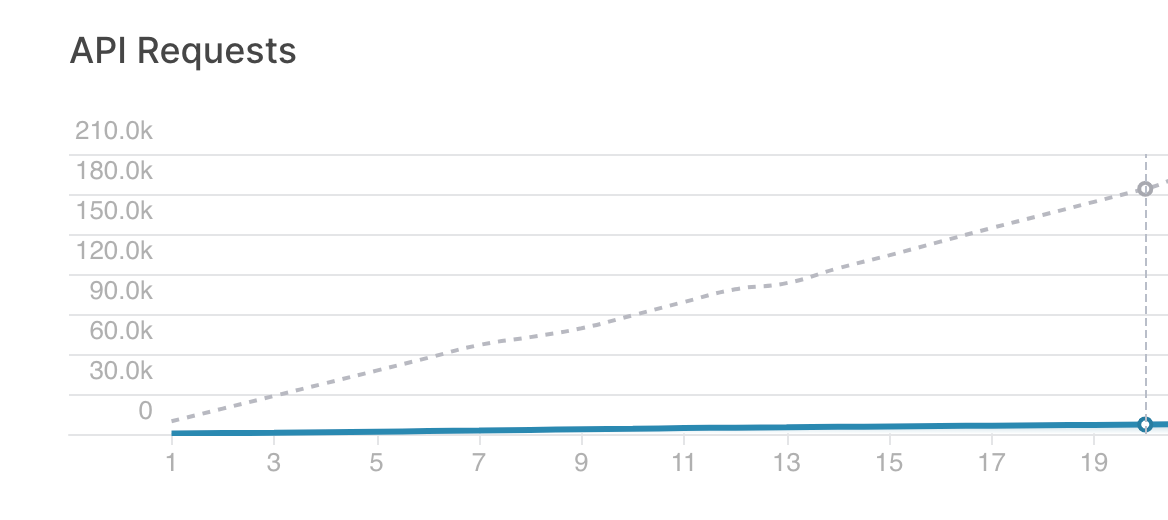
<p>With this approach we were able to collapse 5,000 queries into just one, reducing significantly the amount of data we read and the queries we make, as you can see in this chart (where the blue line is the number of queries made this month and the dotted line is the number of queries made in the previous approach)</p><figure class="kg-card kg-image-card kg-card-hascaption"><img src="https://tinybird-blog.ghost.io/content/images/2023/09/62dee9c9c8dd6a579301ff65_otmpRNTfsp9fhbRiW0ZOREzBiQhZLKVXuYuWX1j-QiOhh3IyjhpqF0ly_YJkFLeVHg1Uo2PEcd0qyxiXA-UiU7nCKUHgCSdGZSsmZxr6Ee9tV08_20dY3W8RpLquS09WdYPJvIB3vzwBfkDp9nU-11.png" class="kg-image" alt="a chart showing the number of API requests reduced when using Tinybird" loading="lazy" width="1168" height="520" srcset="https://tinybird-blog.ghost.io/content/images/size/w600/2023/09/62dee9c9c8dd6a579301ff65_otmpRNTfsp9fhbRiW0ZOREzBiQhZLKVXuYuWX1j-QiOhh3IyjhpqF0ly_YJkFLeVHg1Uo2PEcd0qyxiXA-UiU7nCKUHgCSdGZSsmZxr6Ee9tV08_20dY3W8RpLquS09WdYPJvIB3vzwBfkDp9nU-11.png 600w, https://tinybird-blog.ghost.io/content/images/size/w1000/2023/09/62dee9c9c8dd6a579301ff65_otmpRNTfsp9fhbRiW0ZOREzBiQhZLKVXuYuWX1j-QiOhh3IyjhpqF0ly_YJkFLeVHg1Uo2PEcd0qyxiXA-UiU7nCKUHgCSdGZSsmZxr6Ee9tV08_20dY3W8RpLquS09WdYPJvIB3vzwBfkDp9nU-11.png 1000w, https://tinybird-blog.ghost.io/content/images/2023/09/62dee9c9c8dd6a579301ff65_otmpRNTfsp9fhbRiW0ZOREzBiQhZLKVXuYuWX1j-QiOhh3IyjhpqF0ly_YJkFLeVHg1Uo2PEcd0qyxiXA-UiU7nCKUHgCSdGZSsmZxr6Ee9tV08_20dY3W8RpLquS09WdYPJvIB3vzwBfkDp9nU-11.png 1168w" sizes="(min-width: 720px) 720px"><figcaption><span style="white-space: pre-wrap;">Before switching to Tinybird, we were making almost 180K requests a month. Now it's orders of magnitude fewer.</span></figcaption></figure><p>I could keep talking about extracting data from jobs for hours, but I think it’s time to call it a day. If you want to find the tech stack of potential customers, check out TheirStack’s <a href="https://theirstack.com/?utm_source=tinybird">website</a>, and if you wanna talk more about this, you can find me <a href="https://twitter.com/xoelipedes">on Twitter</a> or on <a href="https://www.tinybird.co/join-our-slack-community">Tinybird’s Slack community</a>.</p><p>Thanks for reading!</p>