---
title: "Multi-tenant analytics for SaaS applications"
excerpt: "Multi-tenant SaaS options for analytics vary wildly in cost and complexity. This guide helps you pick the right architecture in 2026."
authors: "Cameron Archer"
categories: "Scalable Analytics Architecture"
createdOn: "2023-09-25 00:00:00"
publishedOn: "2024-07-03 00:00:00"
updatedOn: "2026-01-15 00:00:00"
status: "published"
---

<p>When you embed multi tenant analytics dashboards into your multi-tenant SaaS app, multi-tenancy adds a layer of complexity. Your customers should see their data, and their data only. Nothing erodes user trust faster than data privacy violations caused by leaked datasets across tenants.</p><p>Here you'll learn the basics of embedding analytics into your multi-tenant SaaS application, specifically using row-level security policies and JSON Web Tokens (JWTs). You'll find resources for building user-facing analytics in multi-tenant environments using Tinybird, a multi-tenant analytics platform for embedding fast and scalable dashboards into SaaS applications.</p>
<!--kg-card-begin: html-->
<div class="tip-box">
  <div class="tip-box-container">
    <div class="tip-box-title">
      Building multi-tenant analytics?
    </div>
    <div class="tip-box-content">
      Try <a href="https://www.tinybird.co">Tinybird</a>, the developer platform for multi-tenant analytics. Stream tenant data from your app with a few lines of code, define metrics with SQL, and instantly publish your analytics as low-latency REST APIs to integrate into your frontend. Tinybird is free to start, with no credit card required and no time limit.
    </div>
    <div style="margin-top: 1rem;" class="flex mt-6 md:mt-8">
    <div>
      <a class="py-3 px-[23px] UI-Button UI-Button--solid UI-Button--primary UI-Button--large UI-Button--link" style="text-decoration: none;" href="https://www.tinybird.co/signup"><span class="UI-Button-inner">Get started for free</span>
      </a>
    </div>
  </div>
  </div>
</div>
<!--kg-card-end: html-->
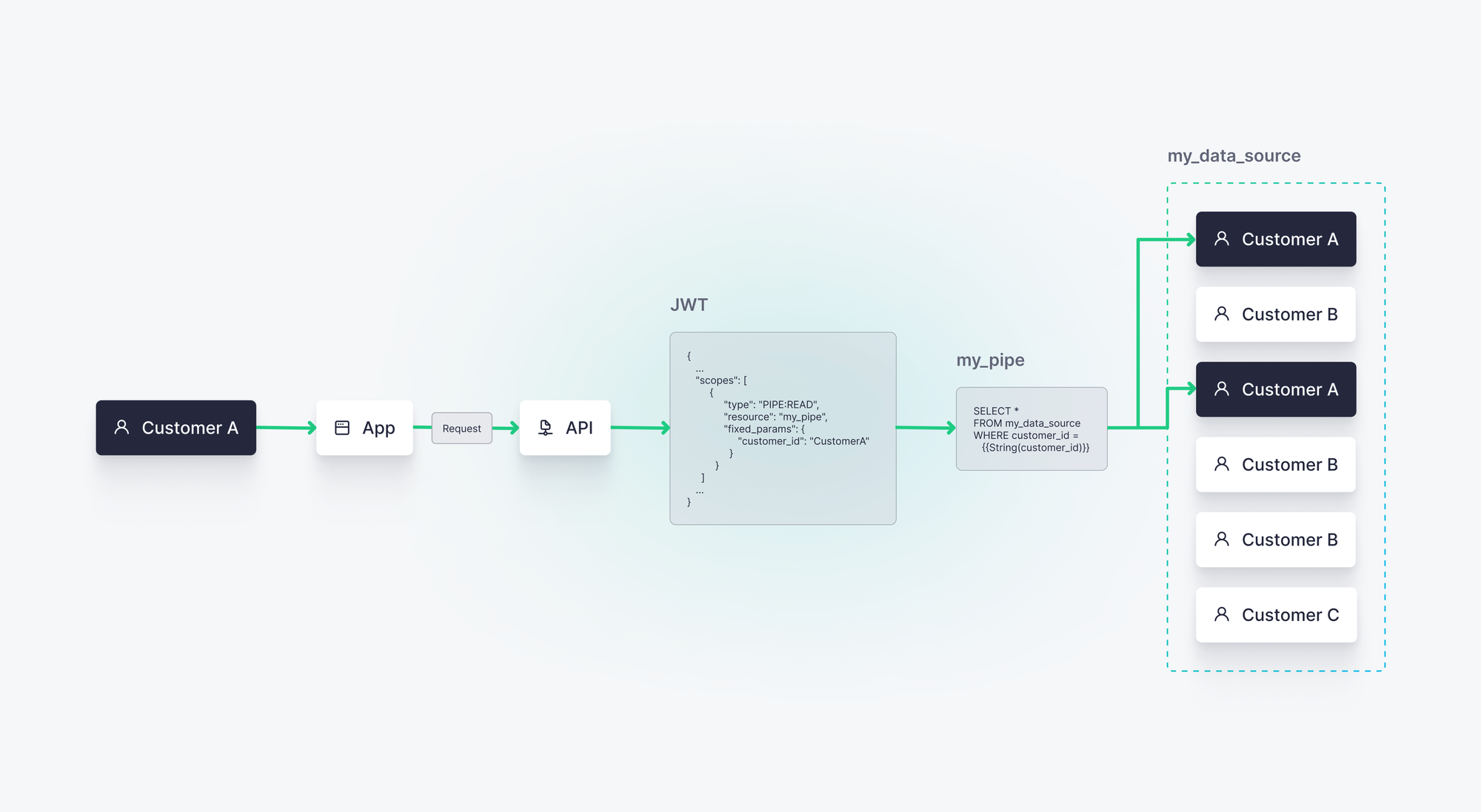
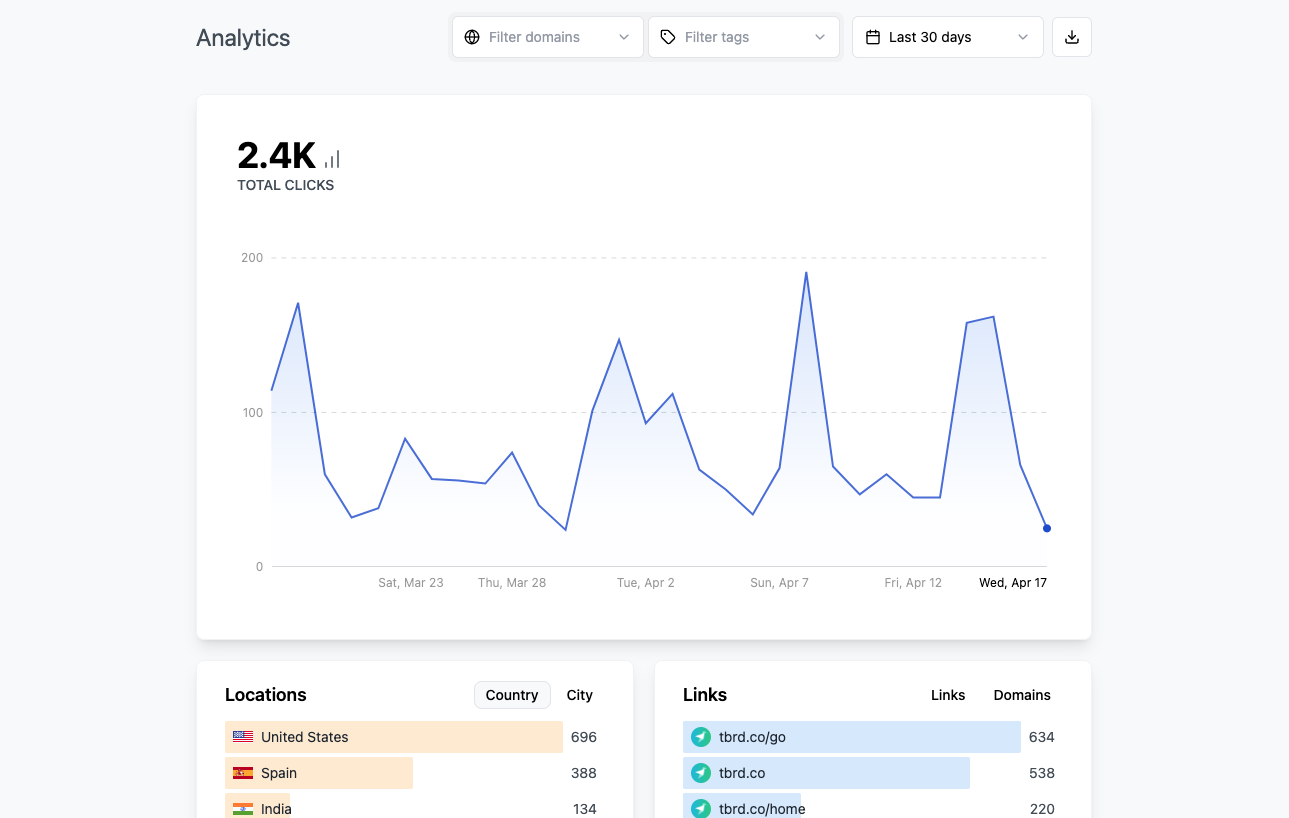
<h2 id="what-is-multi-tenant-analytics">What is multi-tenant analytics?</h2><p>In the context of multi-tenant SaaS, multi tenant analytics is the crossroads of multi-tenancy and user-facing analytics. It simply means that you're capturing data from multiple customers (tenants), storing their data on shared infrastructure, and surfacing tenant-specific metrics to users in the app.</p><h3 id="what-is-multi-tenancy">What is multi-tenancy?</h3><p>Multi-tenancy means that SaaS applications with multiple tenants (customers) use data infrastructure that is shared among all of them. In other words, it's the opposite of dedicated infrastructure for each customer. Data may be shared on the same server, in the same database, or even in the same database table. Multi-tenant architectures are the most common approach to data tenancy in SaaS applications.</p><p>With multi-tenancy, multiple app users initiate requests to that shared infrastructure. Multi-tenant applications need multi tenant access control policies and permissions structures that single tenants can access only their data and that they cannot access other customers' data, either accidentally or maliciously.</p><h3 id="what-is-user-facing-analytics">What is user-facing analytics?</h3><p><a href="https://www.tinybird.co/blog-posts/user-facing-analytics"><u>User-facing analytics</u></a> (aka "customer-facing analytics”) is the pattern of embedding real-time data visualizations or data-driven features into software applications. You’ll implement user-facing analytics if you offer a software service and want to provide real-time data to your end users.</p><p>User-facing analytics differs from classic business intelligence (BI) approaches to analytics in that user-facing analytics provides on-demand data interactions and dashboards for external software users.</p><p>User-facing analytics introduces requirements that Business Intelligence doesn't have:</p><ul><li>Low-latency query response times</li><li>High-concurrency user access</li><li>High data freshness requirements</li></ul><h4 id="user-facing-analytics-vs-embedded-analytics">User-facing analytics vs. embedded analytics</h4><p>User-facing analytics and embedded analytics are two sides of the same coin. The end goal is the same: to surface data analytics to end users of an application.</p><p>In practice, user-facing analytics generally implies that data features and visualizations are integrated directly into the application code, rather than via embedded business intelligence dashboards developed in external tools. There's an emphasis placed on the analytics experience; it should feel integrated into the overall user experience such that the user doesn't notice a difference between the analytics features and non-analytics features of the application.</p><h2 id="example-multi-tenant-analytics-use-cases">Example multi-tenant analytics use cases</h2><p>Multi-tenant analytics can be found across a wide range of SaaS use cases:</p><ul><li><strong>User-facing Dashboards</strong>. Any SaaS company displaying tenant-specific dashboards to app users will likely use multi-tenancy approaches. One example is <a href="https://www.tinybird.co/case-studies/factorial-builds-real-time-data-products-with-tinybird"><u>Factorial</u></a>, a human resources SaaS that provides in-app dashboards to HR managers to track employee performance and well-being.</li><li><strong>Usage-based Billing: </strong>Any SaaS company with usage-based billing will supply pricing observability to their users via user-facing dashboards. This pricing and usage data is often stored in a multi-tenant data architecture. Vercel's <a href="https://vercel.com/changelog/detailed-usage-metrics-are-now-available"><u>multi-tenant usage-based billing analytics system</u></a> is a good example.</li><li><strong>User-generated Content Analytics</strong>. Content platforms build multi-tenant analytics systems to show content creators how end users are engaging with their content. Creator platforms like <a href="https://www.tinybird.co/case-studies/canva"><u>Canva</u></a> and web infrastructure companies like <a href="https://www.tinybird.co/case-studies/dub"><u>Dub</u></a> are great examples.</li></ul><figure class="kg-card kg-image-card kg-card-hascaption"><img src="https://lh7-us.googleusercontent.com/4xjHnCRu8kRuM3qYmPyWKlevTLa2E-tQ09XUem5BYpxwlRFmE6eyIIw5uXtJz3WImfcmKP2lEtMaQ8Vs7-drh0QhZmk_MWhXukgSab5egZ1s3mB7SJIvdQZ4hYoRY_Wr_vAFBhVULVIwGNQI4yQ_lg4" class="kg-image" alt="A screenshot of a user-facing analytics dashboard." loading="lazy" width="1289" height="818"><figcaption><span style="white-space: pre-wrap;">An example user-facing analytics dashboard, showing single-tenant web analytics. Under the hood, this dashboard makes requests to shared data infrastructure.</span></figcaption></figure><p>Each multi-tenant analytics use case involves sensitive personal and corporate data, where data isolation and data security are critical.&nbsp;</p><h2 id="row-level-security-in-multi-tenant-analytics">Row-level security in multi-tenant analytics</h2><p>Row-level security is a critical part of database-driven application development. It’s pretty common to have tables in your application databases containing data from many different sources, and perhaps from different tenants. If that's the case, you need a permissions structure by which users can access specific table rows containing only their data.</p><p>As its name implies, row-level security means you can control which rows of a table your users can access. There are different ways to implement row-level security, but the most common approach is based on the value of one or more columns in the table.</p><p>For example, if you have a column called Customer ID, you could create a rule that says Customer A can only read rows where the Customer ID column has a value of <code>CustomerA</code>.</p><p>In a simple SQL example, you have a table called <code>events</code> that logs an event stream of actions taken by users of your SaaS app, let's say the tenant IDs are stored in a column called <code>customer_id</code>.</p><p>Row-level security means filtering in only records containing a desired customer ID:</p>
<!--kg-card-begin: html-->
<iframe width="100%" src="https://snippets.tinybird.co/XQAAAAK5AAAAAAAAAABBKUqGk9nLKzhSmz8LahsA-kzpEtixxcfCGZOR1-jylscW9fSLIM37PXLXWrWGvfvRkPuMxus9E2_Jll2_pvI59yLpUWPzWa25Y4GyoOXzGwqGQlgeskWcZr4CC64-0AmyBPN3iBk1lTVGjuunDRLRr5EWk_1JbrcsGlwBZBcVXvl87rNrKbQXpaKKOU3ZYq9_gd4IxQwTHUDX47nnBuQtpTTmmScEdeDc_2AIwAA/embed"></iframe>
<!--kg-card-end: html-->
<p>It’s a primitive example, but you get the point.&nbsp;</p><p>How you manage the execution of this query and its row-based security filter depends on your analytics tools.</p><p>Now, you could replace the hard-coded filter with a templating language:</p>
<!--kg-card-begin: html-->
<iframe width="100%" src="https://snippets.tinybird.co/XQAAAALGAAAAAAAAAABBKUqGk9nLKzhRtIYIYLSW96LPiJwydTA_01GcLrkMhLLzl6bzOEyFZk-lM640TEFcLD9m01ShRKgWJXPPjSxa7Y4qMdIAvo5KXzUq0YCLSAsKJs5jDZ-rbxqF8T1rMoQVBXOJc3pEd87xlt_rcAlzjpQir_o09_kxlUKG3TJxwJL4jlgPGBWVGZr4RGCey9FvYmEn4vbsxtGdnjRxS6bgteHDodiIMpta_PyffiA/embed"></iframe>
<!--kg-card-end: html-->
<p>In this case, you could pass the <code>customer_id</code> parameter to the API Endpoint using URL parameters, for example: <code>https.api.tinybird.co/my_api.json?customer_id=CustomerA</code>.</p><p><strong>This is not secure!</strong> It is too easily modified on the client side and should be avoided.</p><h3 id="using-jwts-for-row-level-security">Using JWTs for row-level security</h3><p>JSON Web Tokens (JWTs) provide an ideal security solution for multi-tenant analytics. They are signed resources encrypted using a server-side key, so they can't be manipulated client-side.</p><p>In Tinybird, you can assign row-level READ permissions scopes to the JWT you create for each customer.</p><p>For example, Customer A might have a JWT defined as such:</p>
<!--kg-card-begin: html-->
<iframe width="100%" src="https://snippets.tinybird.co/XQAAAAKvAQAAAAAAAABBKUqGk9nLKzhS2tWfJ-XbXeVXp9sxzLzpkNldAqXlQdxdOILW2Xh81-JAO6a7jqZCeJjEE6lDWGYLmNsj-v9-7uH-1JKnyZtBzSk_ywvKKOFcLmgzT-BiMe5n08l2ANH4vOOI4vW5z2bmAar4z1IjFNjxcDD2RVCOik2co5NpOmThqt5OrhX1yWWR--7tHXGg0Qaea2o5ph2Qr21GyaIMWbwadSnvmNw8FxnsP_2XnEqdEeIWPF9sUWyXCFcdykqiP980nXRqeU0EYxT6zSzj34YcZyH3s1gcW9votL2KEft2wEFX-G34OWvKS-NOy5Q_ZGyDxbsGhmMpSRkrpCKuwucHEzEMakiq2IEtz9O5Ive_3UVm3X15_z0FMAA/embed"></iframe>
<!--kg-card-end: html-->
<p>In this example, <code>my_pipe</code> is a <a href="https://www.tinybird.co/docs/concepts/pipes.html" rel="noreferrer">Tinybird Pipe</a>, effectively an SQL query exposed as an HTTP Endpoint. When Customer A accesses your app, this JWT is used to secure their requests to the Pipe's Endpoint, ensuring that only their data is surfaced by the request. Any attempt to tamper with the JWT will invalidate its signature, so your customer data stays secure and isolated.</p><h2 id="how-to-safely-build-multi-tenant-analytics-in-your-saas">How to safely build multi-tenant analytics in your SaaS</h2><p>To build multi-tenant analytics into your SaaS, you need an analytics solution that can easily handle multi-tenancy through security policies applied to the analytics API.</p><p><a href="https://www.tinybird.co" rel="noreferrer">Tinybird</a> is a multi-tenant data integration platform developers use to ingest tenant data from multiple data sources into a single table and expose derived analytics as <a href="https://www.tinybird.co/docs/concepts/apis.html" rel="noreferrer">API Endpoints</a>. </p><p>Access to Tinybird APIs can be controlled using <a href="https://www.tinybird.co/docs/concepts/auth-tokens#json-web-tokens-jwts" rel="noreferrer">JSON Web Tokens (JWTs)</a> that support row-level security policies with multi tenant access control. Each tenant gets a unique JWT with a row-level security definition limiting the read scope on the source table to data belonging only to the appropriate tenant. This makes Tinybird an ideal multi-tenant data integration platform.</p><figure class="kg-card kg-image-card kg-card-hascaption"><img src="https://tinybird-blog.ghost.io/content/images/2024/07/Diagram---Multi-tenant-analytics---Blog-post-min.png" class="kg-image" alt="A diagram showing how to achieve row-level security for multi-tenant analytics with JWTs in Tinybird." loading="lazy" width="2000" height="1097" srcset="https://tinybird-blog.ghost.io/content/images/size/w600/2024/07/Diagram---Multi-tenant-analytics---Blog-post-min.png 600w, https://tinybird-blog.ghost.io/content/images/size/w1000/2024/07/Diagram---Multi-tenant-analytics---Blog-post-min.png 1000w, https://tinybird-blog.ghost.io/content/images/size/w1600/2024/07/Diagram---Multi-tenant-analytics---Blog-post-min.png 1600w, https://tinybird-blog.ghost.io/content/images/2024/07/Diagram---Multi-tenant-analytics---Blog-post-min.png 2000w" sizes="(min-width: 720px) 720px"><figcaption><span style="white-space: pre-wrap;">In this example, requests made by Customer A to shared data infrastructure on Tinybird are secured by a JWT which limits the scope of their reads only to rows where </span><code spellcheck="false" style="white-space: pre-wrap;"><span>customer_id = CustomerA</span></code><span style="white-space: pre-wrap;">. This is a much more secure approach to multi-tenant analytics, as any attempts to tamper with the JWT will invalidate its signature and result in rejected requests.</span></figcaption></figure><p>Tinybird is an ideal multi-tenant analytics solution because it handles multi-tenancy and user-facing analytics functionality in a single, serverless platform. Companies like <a href="https://www.tinybird.co/case-studies/vercel-relies-on-tinybird-to-power-their-realtime-user-facing-analytics"><u>Vercel</u></a>, <a href="https://www.tinybird.co/case-studies/canva"><u>Canva</u></a>, <a href="https://www.tinybird.co/case-studies/fanduel"><u>FanDuel</u></a>, <a href="https://www.tinybird.co/case-studies/dub"><u>Dub</u></a>, <a href="https://www.tinybird.co/case-studies/factorial-builds-real-time-data-products-with-tinybird"><u>Factorial</u></a>, and <a href="https://www.tinybird.co/customer-stories"><u>many others</u></a> use Tinybird to rapidly develop and deploy scalable multi-tenant analytics solutions.</p><p>To learn more about building multi-tenant analytics with Tinybird, check out these additional resources:</p><ul><li><a href="https://www.tinybird.co/docs/use-cases/web-analytics"><u>Use Case: Building multi-tenant web analytics with Tinybird</u></a></li><li><a href="https://www.tinybird.co/case-studies/canva"><u>Customer Story: Canva designs brilliant user experiences with Tinybird</u></a></li><li><a href="https://www.tinybird.co/docs/live/build-dashboards-for-saas-june-2024"><u>Workshop: Building Customer-Facing Dashboards for SaaS Products</u></a></li></ul>