---
title: "Real-time streaming analytics with Confluent and Tinybird"
excerpt: "Confluent users: stop waiting for batch jobs. Stream your data into Tinybird and build fast APIs on top of it. Real time, for real."
authors: "Alejandro Martin"
categories: "Product updates"
createdOn: "2023-09-25 00:00:00"
publishedOn: "2023-04-18 00:00:00"
updatedOn: "2025-04-24 00:00:00"
status: "published"
---

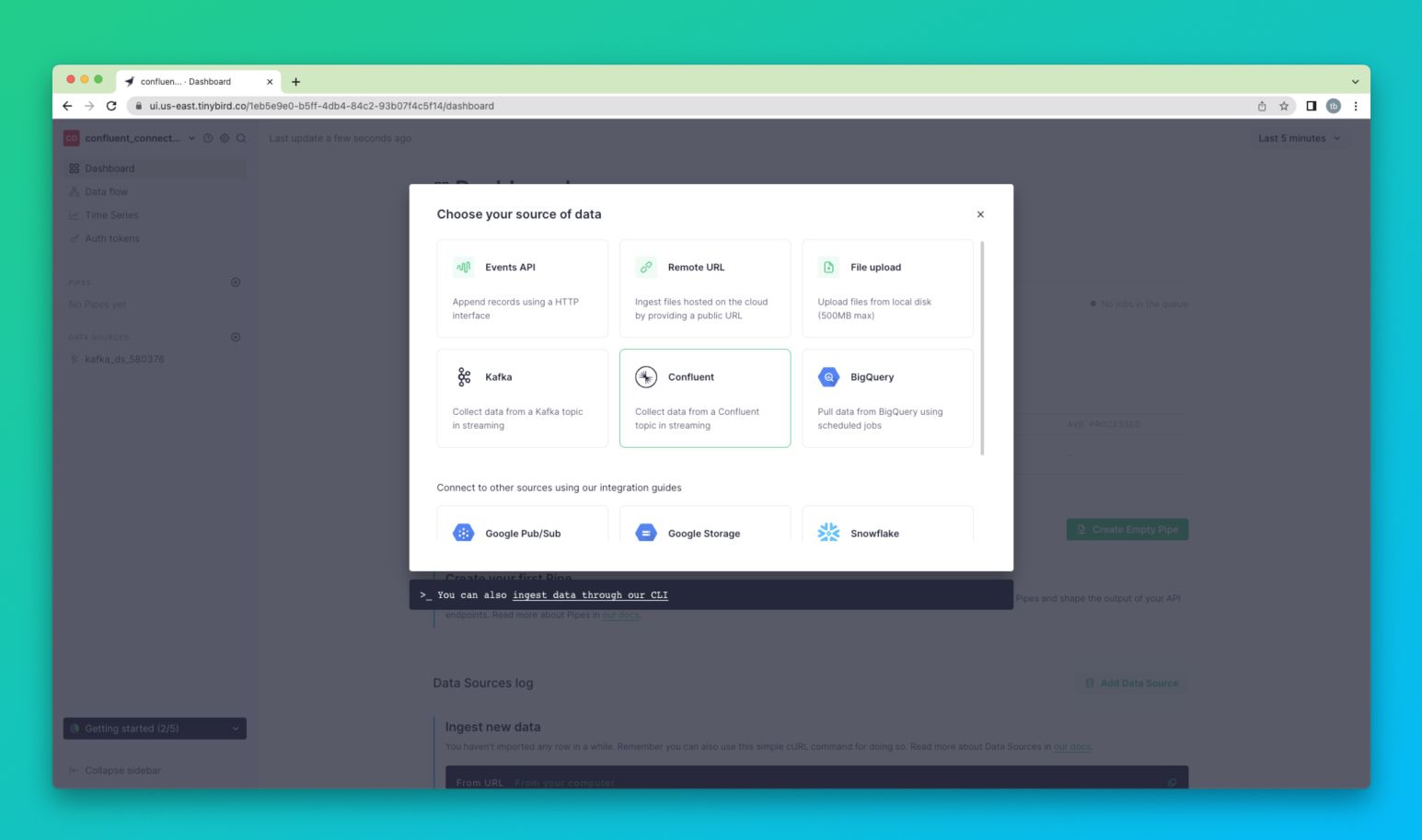
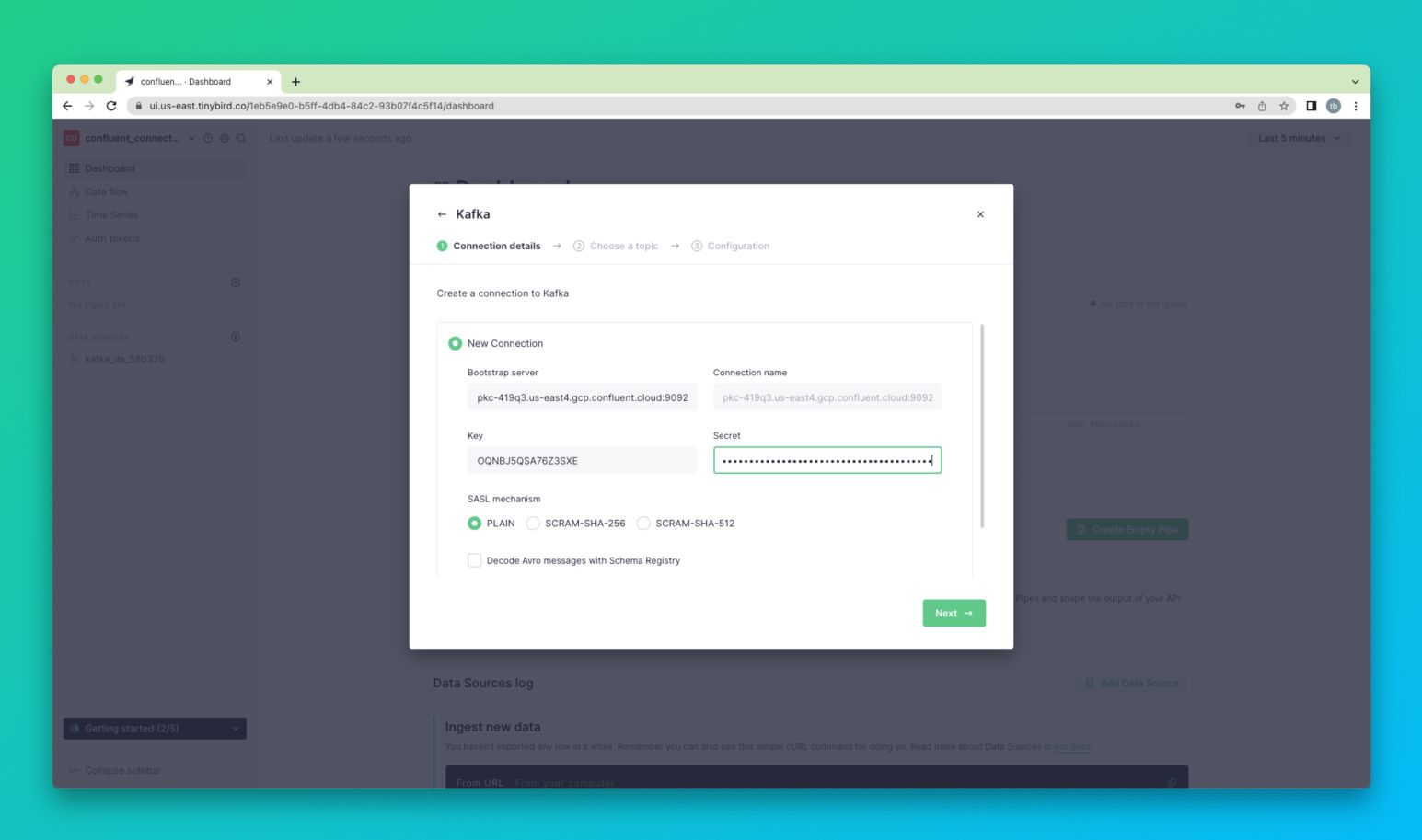
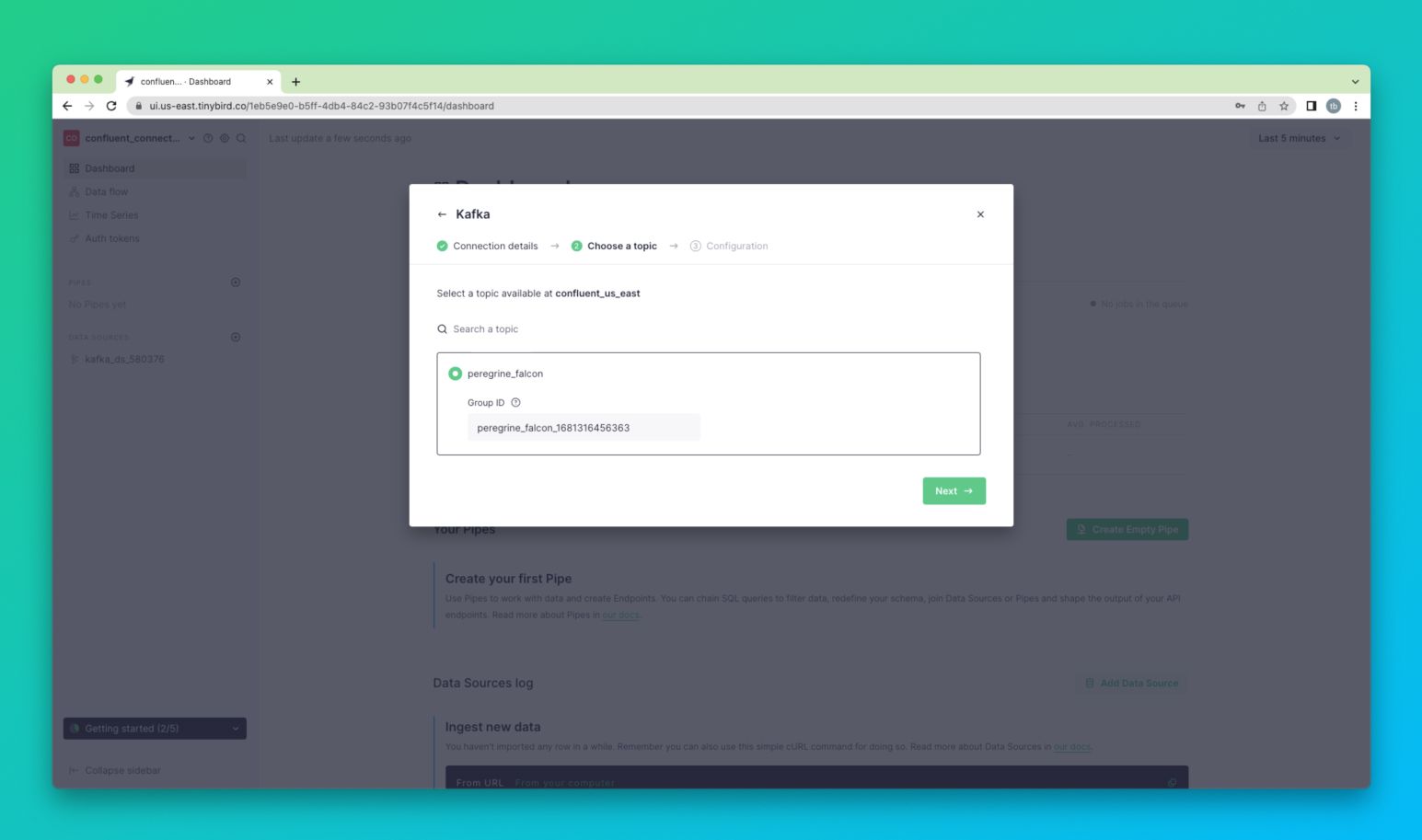
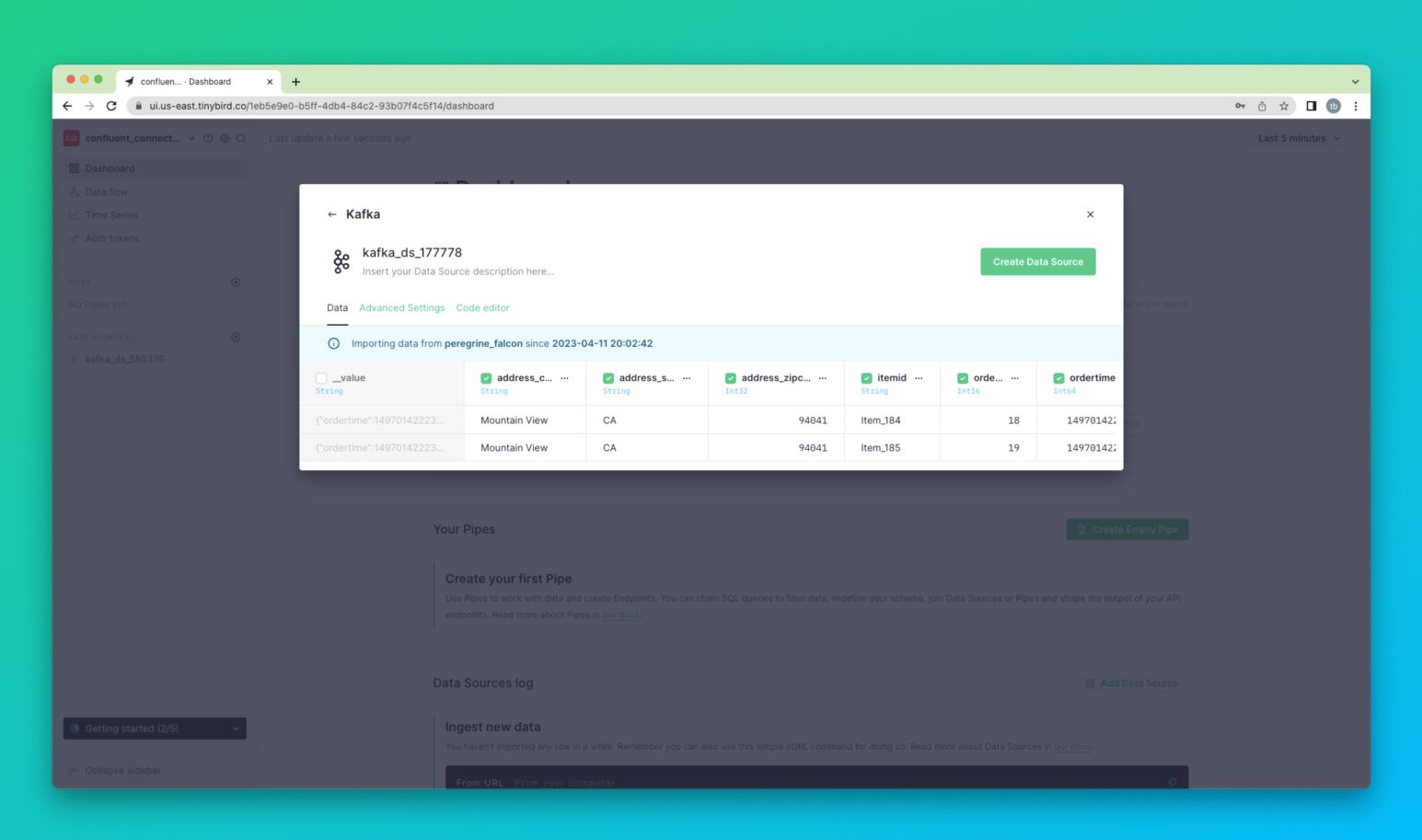
<p>Modern applications are built on the most accurate, up-to-the-second data. Whether it’s stock inventory management, website analytics, in-product analytics, or more, making real-time decisions can make all the difference. Some of the biggest applications on the planet leverage streaming data at scale, and Confluent is the leading platform provider for streaming applications. Confluent is a cloud-native, complete, and fully managed service that goes above and beyond Apache Kafka.</p><p>Many of Tinybird’s customers also use Confluent:</p><ul><li>A top 5 retailer uses Confluent and Tinybird together for <strong>real-time smart inventory management</strong> to reconcile stock across fulfillment centers, retail locations, and online shopping.</li><li>Fanduel uses Confluent and Tinybird to power <a href="https://www.tinybird.co/blog-posts/real-time-personalization"><strong>real-time</strong> <strong>personalization</strong></a> across all their sports betting solutions to improve time-to-first-bet and reduce the risk of fraud.</li><li>Vercel uses Confluent and Tinybird to provide <strong>user-facing real-time analytics tools</strong> so their customers can get accurate visibility into the performance of their sites</li></ul><p>Often, developers need to combine and enrich their streaming data with data from elsewhere. Streaming data on its often is often not valuable, or only partially valuable. To truly get the most out of your streams, you often need to enrich them with dimensions from other sources.</p>
<!--kg-card-begin: html-->
<blockquote>To get the most out of your streaming data sources, you need to enrich them with corresponding dimensions.</blockquote>
<!--kg-card-end: html-->
<p>For example, if you have a stream of real-time sales events from an eCommerce website, you can work out your up-to-the-second sales figures, which is <em>nice</em> to have.</p><p>For teams building streaming architectures on Confluent, it’s also worth understanding the broader landscape of <strong>real-time data processing</strong>. This guide on [real-time data processing](https://www.tinybird.co/blog/real-time-data-processing) explains the core patterns and architectural choices that help you transform, enrich, and operationalize fast-moving data streams at scale.</p><p>But, if you also join this sales event stream with a table of inventory data, you can also begin to make automated, real-time decisions to purchase stock so that you can continue to fulfill orders. For modern retailers, this is a <em>must-have</em>.</p><h2 id="announcing-the-tinybird-confluent-connector">Announcing the Tinybird Confluent Connector</h2><p>Today, Tinybird is excited to launch the <a href="https://www.tinybird.co/solutions/confluent">Tinybird Confluent Connector</a>, which enables our users to ingest their data from Confluent streams, query and combine it with other data sources using SQL, and publish the results as high-concurrency, low-latency APIs. These APIs can power numerous user-facing scenarios, including <a href="https://www.tinybird.co/use-cases/operational-analytics">real-time business intelligence</a>, <a href="https://www.tinybird.co/blog-posts/real-time-personalization">in-app personalization</a>, <a href="https://www.tinybird.co/use-cases/smart-inventory-management">smart inventory management</a>, and many more.</p>
<!--kg-card-begin: html-->
<blockquote>The Tinybird Confluent Connector makes it easy for Confluent users to build low-latency APIs over Confluent data at scale.</blockquote>
<!--kg-card-end: html-->
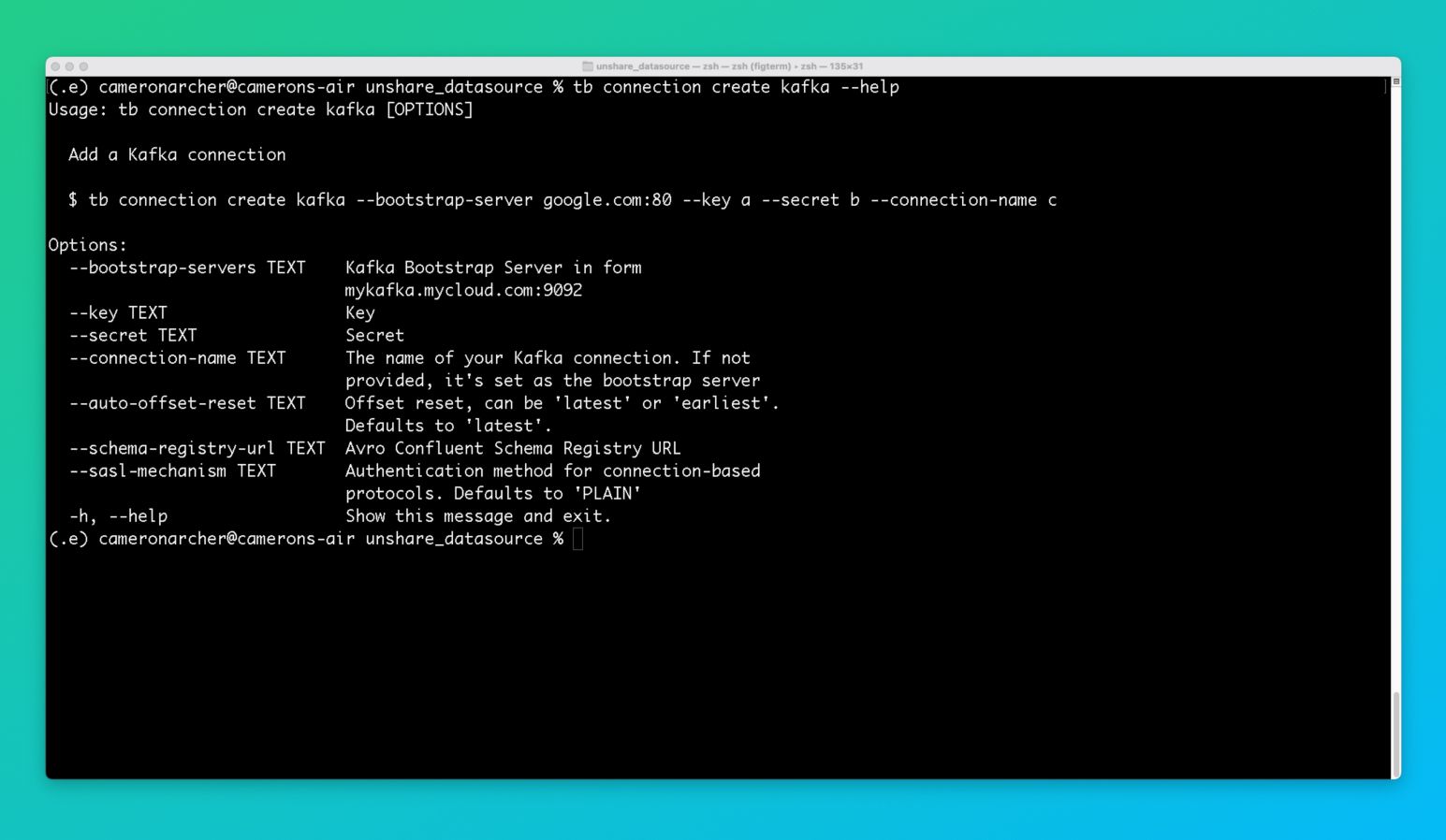
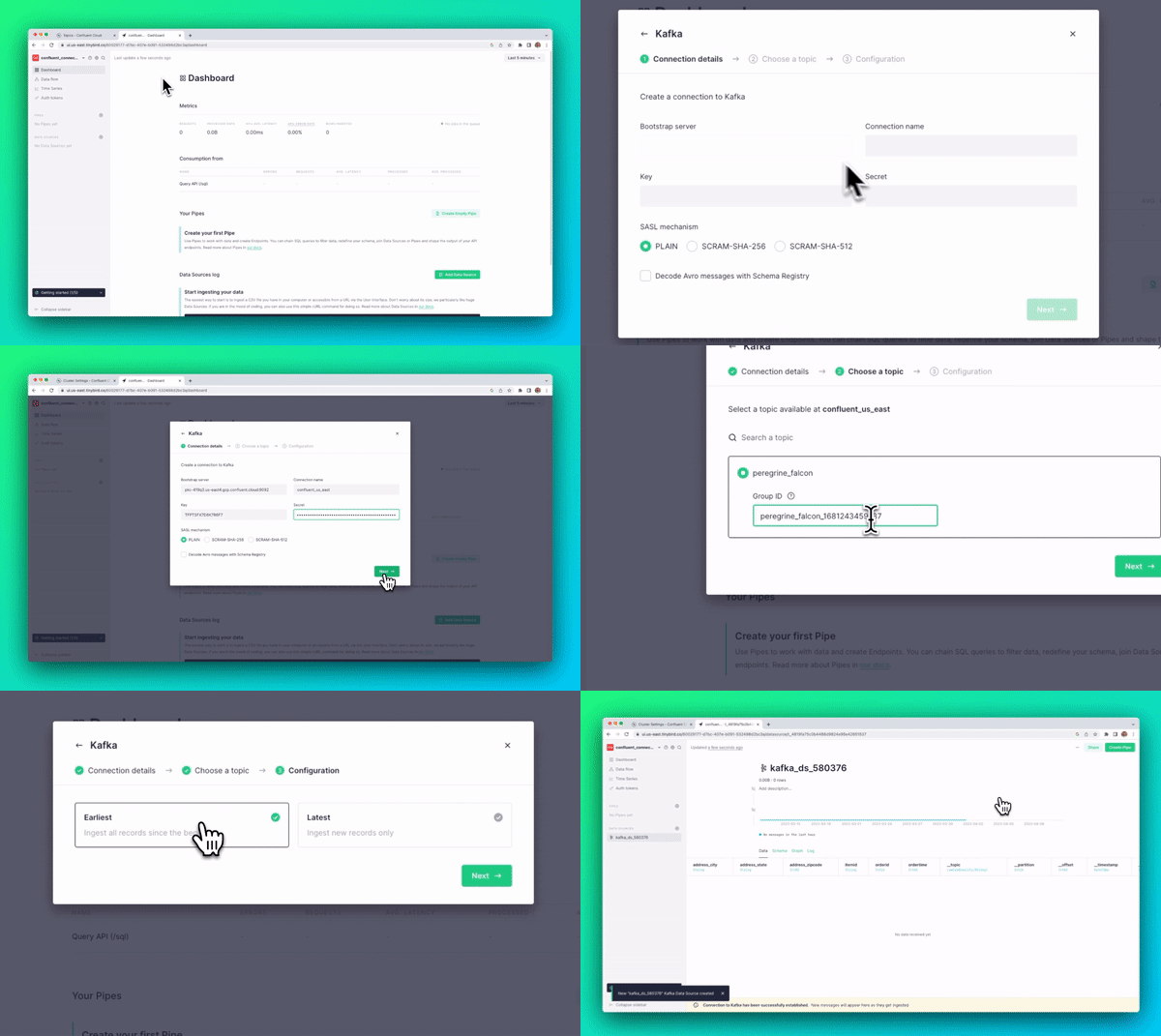
<figure class="kg-card kg-image-card kg-card-hascaption"><img src="https://tinybird-blog.ghost.io/content/images/2023/09/6436e5432b902561031cbd13_screencast_gif-7.gif" class="kg-image" alt="A gif showing the Tinybird Confluent Connector workflow in the Tinybird UI" loading="lazy" width="600" height="357" srcset="https://tinybird-blog.ghost.io/content/images/2023/09/6436e5432b902561031cbd13_screencast_gif-7.gif 600w"><figcaption><span style="white-space: pre-wrap;">The Tinybird Confluent Connector makes it easy to ingest data from a Confluent topic into a Tinybird Data Source.</span></figcaption></figure><p>Already, several Tinybird customers are using the Confluent Connector, with hundreds of topics being ingested daily.</p><p>Read on for more information about how customers use the Confluent Connector today and what it’s like to use it.</p><p>In the meantime, if you’re not a Tinybird customer, <a href="https://www.tinybird.co/product">you can learn more and sign up for free</a> (no credit card required). You can also <a href="https://www.tinybird.co/docs">check out our documentation</a>, or feel free to join the <a href="https://www.tinybird.co/join-our-slack-community">Tinybird Community on Slack</a> and ask us any questions or request additional features.</p><h2 id="setting-up-the-confluent-connector-in-tinybird">Setting up the Confluent Connector in Tinybird</h2><p>You can start using the Tinybird Confluent Connector today in the Tinybird UI. Add a new Data Source as you typically would, and then select the Confluent option in the dialog box.</p><figure class="kg-card kg-image-card kg-card-hascaption"><img src="https://tinybird-blog.ghost.io/content/images/2023/09/6436e134e0b97d831e624f6c_ogULmal8WFbqeUyf5nt_bbOmwa5-CRrpYFJDAQa2Z7-OQcNknykCUfSsYoFtw2gmCNLBKRzE9o9S3FQK_r_NXxXcgnUe82dNN8RdVPEwN_JHQ0rtaqH0X7yBB92mQJGJc_sHRaTlz3WTrRRpT_VxctQ-8.jpeg" class="kg-image" alt="A screenshot showing the Tinybird Confluent Connector being selected in the Tinybird UI" loading="lazy" width="1545" height="913" srcset="https://tinybird-blog.ghost.io/content/images/size/w600/2023/09/6436e134e0b97d831e624f6c_ogULmal8WFbqeUyf5nt_bbOmwa5-CRrpYFJDAQa2Z7-OQcNknykCUfSsYoFtw2gmCNLBKRzE9o9S3FQK_r_NXxXcgnUe82dNN8RdVPEwN_JHQ0rtaqH0X7yBB92mQJGJc_sHRaTlz3WTrRRpT_VxctQ-8.jpeg 600w, https://tinybird-blog.ghost.io/content/images/size/w1000/2023/09/6436e134e0b97d831e624f6c_ogULmal8WFbqeUyf5nt_bbOmwa5-CRrpYFJDAQa2Z7-OQcNknykCUfSsYoFtw2gmCNLBKRzE9o9S3FQK_r_NXxXcgnUe82dNN8RdVPEwN_JHQ0rtaqH0X7yBB92mQJGJc_sHRaTlz3WTrRRpT_VxctQ-8.jpeg 1000w, https://tinybird-blog.ghost.io/content/images/2023/09/6436e134e0b97d831e624f6c_ogULmal8WFbqeUyf5nt_bbOmwa5-CRrpYFJDAQa2Z7-OQcNknykCUfSsYoFtw2gmCNLBKRzE9o9S3FQK_r_NXxXcgnUe82dNN8RdVPEwN_JHQ0rtaqH0X7yBB92mQJGJc_sHRaTlz3WTrRRpT_VxctQ-8.jpeg 1545w" sizes="(min-width: 720px) 720px"><figcaption><span style="white-space: pre-wrap;">You can easily connect send Confluent data to Tinybird with the Confluent Connector.</span></figcaption></figure><p>Then, navigate to Confluent to get your Bootstrap Server, API Key, and Secret to set up the connection in Tinybird.</p><figure class="kg-card kg-image-card kg-card-hascaption"><img src="https://tinybird-blog.ghost.io/content/images/2023/09/6436e13503799c46f0e79fc8_S1qpFrmyjbgepT-7Qt_xOz2qACJYIf8WOTF92iHj0BqJqICSiA-QDa5JT1Hq67DUxjm26rF0inG1qkVg37vpZgn0buaooSuN3zhEzt-elhF1XujIt4TZRmhtCbx6hRuFEMc7s-LbXYsHilMS9PHT0CI-9.jpeg" class="kg-image" alt="A screenshot showing the Tinybird server details being configured in the Tinybird UI" loading="lazy" width="1545" height="913" srcset="https://tinybird-blog.ghost.io/content/images/size/w600/2023/09/6436e13503799c46f0e79fc8_S1qpFrmyjbgepT-7Qt_xOz2qACJYIf8WOTF92iHj0BqJqICSiA-QDa5JT1Hq67DUxjm26rF0inG1qkVg37vpZgn0buaooSuN3zhEzt-elhF1XujIt4TZRmhtCbx6hRuFEMc7s-LbXYsHilMS9PHT0CI-9.jpeg 600w, https://tinybird-blog.ghost.io/content/images/size/w1000/2023/09/6436e13503799c46f0e79fc8_S1qpFrmyjbgepT-7Qt_xOz2qACJYIf8WOTF92iHj0BqJqICSiA-QDa5JT1Hq67DUxjm26rF0inG1qkVg37vpZgn0buaooSuN3zhEzt-elhF1XujIt4TZRmhtCbx6hRuFEMc7s-LbXYsHilMS9PHT0CI-9.jpeg 1000w, https://tinybird-blog.ghost.io/content/images/2023/09/6436e13503799c46f0e79fc8_S1qpFrmyjbgepT-7Qt_xOz2qACJYIf8WOTF92iHj0BqJqICSiA-QDa5JT1Hq67DUxjm26rF0inG1qkVg37vpZgn0buaooSuN3zhEzt-elhF1XujIt4TZRmhtCbx6hRuFEMc7s-LbXYsHilMS9PHT0CI-9.jpeg 1545w" sizes="(min-width: 720px) 720px"><figcaption><span style="white-space: pre-wrap;">Configuring your Confluent Connection is simple in the Tinybird UI.</span></figcaption></figure><p>Once you’re connected, select your topic and give the consumer group a unique name.</p><figure class="kg-card kg-image-card kg-card-hascaption"><img src="https://tinybird-blog.ghost.io/content/images/2023/09/6436e135e3870a92426807ab_-q2_ekA30fxogmLy_eZlerwDlVa-zjuxQLlRO7T7pBAyeWm5X1U1mpd5oyVYX4qa-PvOlXzRcr1J0XLTd2YydqUnQWG9mZ4Pet1IyRGzH2IwrzNYe-HZjP834snhfThSLjoj2eHbAVQhqZ8ULR3OBHA-11.jpeg" class="kg-image" alt="A screenshot showing a Confluent topic being selected in the Tinybird UI" loading="lazy" width="1545" height="913" srcset="https://tinybird-blog.ghost.io/content/images/size/w600/2023/09/6436e135e3870a92426807ab_-q2_ekA30fxogmLy_eZlerwDlVa-zjuxQLlRO7T7pBAyeWm5X1U1mpd5oyVYX4qa-PvOlXzRcr1J0XLTd2YydqUnQWG9mZ4Pet1IyRGzH2IwrzNYe-HZjP834snhfThSLjoj2eHbAVQhqZ8ULR3OBHA-11.jpeg 600w, https://tinybird-blog.ghost.io/content/images/size/w1000/2023/09/6436e135e3870a92426807ab_-q2_ekA30fxogmLy_eZlerwDlVa-zjuxQLlRO7T7pBAyeWm5X1U1mpd5oyVYX4qa-PvOlXzRcr1J0XLTd2YydqUnQWG9mZ4Pet1IyRGzH2IwrzNYe-HZjP834snhfThSLjoj2eHbAVQhqZ8ULR3OBHA-11.jpeg 1000w, https://tinybird-blog.ghost.io/content/images/2023/09/6436e135e3870a92426807ab_-q2_ekA30fxogmLy_eZlerwDlVa-zjuxQLlRO7T7pBAyeWm5X1U1mpd5oyVYX4qa-PvOlXzRcr1J0XLTd2YydqUnQWG9mZ4Pet1IyRGzH2IwrzNYe-HZjP834snhfThSLjoj2eHbAVQhqZ8ULR3OBHA-11.jpeg 1545w" sizes="(min-width: 720px) 720px"><figcaption><span style="white-space: pre-wrap;">You can select your Confluent topics to ingest into Tinybird Data Sources.</span></figcaption></figure><p>Finally, choose which data you want to ingest and define the table schema of your resulting Data Source.</p><figure class="kg-card kg-image-card kg-card-hascaption"><img src="https://tinybird-blog.ghost.io/content/images/2023/09/6436e135bdf814d5db04b167_dHWSGP3423PaAe9uawZwx1lxrXgmSa_yEjAzRpTiw2hCHkEhgQemAU3lr23Pi1d81_J0nI2aTlLift-hmsKk2U0VQMHayovlBVE9p9yOSvPO45Os5Xn8tUrRgYknn--6hZIVQs-uFkz78s3XdWjN3zE-8.jpeg" class="kg-image" alt="A screenshot showing a Tinybird Data Source being created from a Confluent topic in the Tinybird UI" loading="lazy" width="1545" height="913" srcset="https://tinybird-blog.ghost.io/content/images/size/w600/2023/09/6436e135bdf814d5db04b167_dHWSGP3423PaAe9uawZwx1lxrXgmSa_yEjAzRpTiw2hCHkEhgQemAU3lr23Pi1d81_J0nI2aTlLift-hmsKk2U0VQMHayovlBVE9p9yOSvPO45Os5Xn8tUrRgYknn--6hZIVQs-uFkz78s3XdWjN3zE-8.jpeg 600w, https://tinybird-blog.ghost.io/content/images/size/w1000/2023/09/6436e135bdf814d5db04b167_dHWSGP3423PaAe9uawZwx1lxrXgmSa_yEjAzRpTiw2hCHkEhgQemAU3lr23Pi1d81_J0nI2aTlLift-hmsKk2U0VQMHayovlBVE9p9yOSvPO45Os5Xn8tUrRgYknn--6hZIVQs-uFkz78s3XdWjN3zE-8.jpeg 1000w, https://tinybird-blog.ghost.io/content/images/2023/09/6436e135bdf814d5db04b167_dHWSGP3423PaAe9uawZwx1lxrXgmSa_yEjAzRpTiw2hCHkEhgQemAU3lr23Pi1d81_J0nI2aTlLift-hmsKk2U0VQMHayovlBVE9p9yOSvPO45Os5Xn8tUrRgYknn--6hZIVQs-uFkz78s3XdWjN3zE-8.jpeg 1545w" sizes="(min-width: 720px) 720px"><figcaption><span style="white-space: pre-wrap;">You can create a Tinybird Data Source from your Confluent Topics by selecting your data an defining your table schema.</span></figcaption></figure><p>Of course, if you prefer to use the Tinybird CLI, you can use the familiar <code>tb connection create kafka</code> command and follow the prompts using your Confluent details.</p><figure class="kg-card kg-image-card kg-card-hascaption"><img src="https://tinybird-blog.ghost.io/content/images/2023/09/6436e135c83cc0e160e15e25_ZIQMZSBk5a0cXN3Idq06S2Eh3wU2bUfg8_aLl_O1oJGpTzODtSGB3rCh0oba0VVJMyY_uddzzxROFCgS3H4IoUqHyCIBp-_rvK1waZcJXmaDvyVOFSLcpF0frCJyHJd3lYslLXsNYbxrW-GjDVpCQL4-9.jpeg" class="kg-image" alt="A screenshot showing a Confluent connection being created in the Tinybird CLI" loading="lazy" width="1545" height="898" srcset="https://tinybird-blog.ghost.io/content/images/size/w600/2023/09/6436e135c83cc0e160e15e25_ZIQMZSBk5a0cXN3Idq06S2Eh3wU2bUfg8_aLl_O1oJGpTzODtSGB3rCh0oba0VVJMyY_uddzzxROFCgS3H4IoUqHyCIBp-_rvK1waZcJXmaDvyVOFSLcpF0frCJyHJd3lYslLXsNYbxrW-GjDVpCQL4-9.jpeg 600w, https://tinybird-blog.ghost.io/content/images/size/w1000/2023/09/6436e135c83cc0e160e15e25_ZIQMZSBk5a0cXN3Idq06S2Eh3wU2bUfg8_aLl_O1oJGpTzODtSGB3rCh0oba0VVJMyY_uddzzxROFCgS3H4IoUqHyCIBp-_rvK1waZcJXmaDvyVOFSLcpF0frCJyHJd3lYslLXsNYbxrW-GjDVpCQL4-9.jpeg 1000w, https://tinybird-blog.ghost.io/content/images/2023/09/6436e135c83cc0e160e15e25_ZIQMZSBk5a0cXN3Idq06S2Eh3wU2bUfg8_aLl_O1oJGpTzODtSGB3rCh0oba0VVJMyY_uddzzxROFCgS3H4IoUqHyCIBp-_rvK1waZcJXmaDvyVOFSLcpF0frCJyHJd3lYslLXsNYbxrW-GjDVpCQL4-9.jpeg 1545w" sizes="(min-width: 720px) 720px"><figcaption><span style="white-space: pre-wrap;">You can use the standard Kafka Connection workflow to connect to Tinybird using the CLI.</span></figcaption></figure><h2 id="get-started-today">Get started today</h2><p>Still want to learn more? Check out the Confluent Connector Screencast:</p><figure class="kg-card kg-embed-card"><iframe allowfullscreen="true" frameborder="0" scrolling="no" src="https://www.youtube.com/embed/IeYXM32XUt4" title=""></iframe></figure><p>If you’re not yet a Tinybird customer, <a href="https://www.tinybird.co/product">you can learn more and sign up for free</a> (no credit card required) and get started today. The Tinybird Build plan is free forever, with no time limit, but if you need more, use the code <code>CONFLUENT</code> for $300 off a Pro subscription.</p><p>Also, feel free to join the <a href="https://www.tinybird.co/join-our-slack-community">Tinybird Community on Slack</a> and ask us any questions or request any additional features.</p><p>And, if you’re keen to learn more about the Confluent Connector, join our Launch Week Release Round-up on Friday, where we’ll demonstrate all the amazing features we’ve launched this week. <a href="https://www.tinybird.co/live-coding-sessions/launch-week-2-release-roundup">Sign up</a> to get a calendar invite and be notified when the Release Round-up begins.</p><figure class="kg-card kg-image-card kg-card-hascaption"><img src="https://tinybird-blog.ghost.io/content/images/2023/09/6436e135ce431408b0dd5543_pMoAiT8L3Oi4g9KpgHNdSjbQ-YDk750tojYQMpvQ5ZTjH5L66f3ycPCntWAdZDQD7-mNnZnniMfsFFk44NDv1bx93fNv55JT5_RpQ2k9iPq9jRMUIZy1qKnH61clJWXPb6xrPGIEMBMb-QoLgHbiML0-8.jpeg" class="kg-image" alt="Tinybird Launch Week #2 Release Roundup - Click to register" loading="lazy" width="1200" height="630" srcset="https://tinybird-blog.ghost.io/content/images/size/w600/2023/09/6436e135ce431408b0dd5543_pMoAiT8L3Oi4g9KpgHNdSjbQ-YDk750tojYQMpvQ5ZTjH5L66f3ycPCntWAdZDQD7-mNnZnniMfsFFk44NDv1bx93fNv55JT5_RpQ2k9iPq9jRMUIZy1qKnH61clJWXPb6xrPGIEMBMb-QoLgHbiML0-8.jpeg 600w, https://tinybird-blog.ghost.io/content/images/size/w1000/2023/09/6436e135ce431408b0dd5543_pMoAiT8L3Oi4g9KpgHNdSjbQ-YDk750tojYQMpvQ5ZTjH5L66f3ycPCntWAdZDQD7-mNnZnniMfsFFk44NDv1bx93fNv55JT5_RpQ2k9iPq9jRMUIZy1qKnH61clJWXPb6xrPGIEMBMb-QoLgHbiML0-8.jpeg 1000w, https://tinybird-blog.ghost.io/content/images/2023/09/6436e135ce431408b0dd5543_pMoAiT8L3Oi4g9KpgHNdSjbQ-YDk750tojYQMpvQ5ZTjH5L66f3ycPCntWAdZDQD7-mNnZnniMfsFFk44NDv1bx93fNv55JT5_RpQ2k9iPq9jRMUIZy1qKnH61clJWXPb6xrPGIEMBMb-QoLgHbiML0-8.jpeg 1200w" sizes="(min-width: 720px) 720px"><figcaption><span style="white-space: pre-wrap;">Click here to get a calendar invite to our release round-up.</span></figcaption></figure><p>‍</p>