



When you're building real-time analytics into your application, the database choice often comes down to two contenders: ClickHouse® for its raw analytical speed, or TimescaleDB for its PostgreSQL compatibility and time-series optimizations. Both databases handle high-volume data ingestion and complex queries, but they take fundamentally different approaches to storage, scaling, and developer experience.
This comparison examines how ClickHouse® and TimescaleDB differ in architecture, query performance, operational complexity, and total cost of ownership. You'll learn when each database fits your use case, how they handle real-world analytics workloads, and whether managed services like Tinybird or Timescale Cloud make sense for your team.
Key takeaways at a glance
ClickHouse® is a column-oriented database built for large-scale analytical queries, delivering fast aggregations and efficient storage compression. TimescaleDB extends PostgreSQL with time-series optimizations like automatic partitioning and continuous aggregates, combining SQL familiarity with time-series performance. Choose ClickHouse® when you're working with denormalized schemas and need maximum speed for analytical queries across billions of rows. Pick TimescaleDB when you want to combine relational tables with time-series data using standard SQL joins, or when your team already knows PostgreSQL.
Architecture and storage model differences
ClickHouse® and TimescaleDB take opposite approaches to storing data. ClickHouse® stores each column separately on disk, while TimescaleDB stores complete rows together, building on PostgreSQL's row-based design.
Columnar engine in ClickHouse®
ClickHouse® saves each column in its own file on disk. When you run SELECT avg(price) FROM sales, ClickHouse® reads just the price column instead of loading every column in every row. This makes aggregations fast because the database skips data it doesn't need.
Storing similar values together also improves compression. Numbers in a price column compress better when grouped than when mixed with user IDs and timestamps. Compression ratios often reach 10x to 100x, depending on the data.
ClickHouse® processes columns in batches using vectorized execution, which takes advantage of modern CPU instructions. A query that sums millions of values can run in milliseconds because the CPU processes multiple values at once.
Chunked row store in TimescaleDB
TimescaleDB stores all column values for a single row together, following PostgreSQL's row-based model. A table called a hypertable automatically splits into chunks based on time intervals. When you query data from last week, TimescaleDB scans only the chunks covering that week.
This design keeps PostgreSQL's features like foreign keys, triggers, and complex joins while adding time-series performance improvements. You get the full PostgreSQL ecosystem without giving up compatibility.
Ingestion throughput and latency
The speed at which each database accepts new data depends on batch size and consistency requirements.
Batch inserts
ClickHouse® handles large batches efficiently, often processing 4 million rows per second when batches exceed 10,000 rows. The columnar format and lack of row-level locking allow fast writes. Small batches under 1,000 rows create overhead because each insert triggers internal operations.
TimescaleDB performs better with smaller batches due to PostgreSQL's transactional architecture. Benchmarks show TimescaleDB outperforming ClickHouse® for batches under 1,000 rows. The tradeoff is lower peak throughput, typically tens of thousands of rows per second rather than millions.
Streaming connectors and change data capture
Both databases support real-time ingestion through various connectors. ClickHouse® offers native Kafka integration and HTTP streaming endpoints. TimescaleDB works with PostgreSQL-compatible tools like Debezium for change data capture.
Tinybird provides managed streaming ingestion for ClickHouse® through its Events API and connectors, handling backpressure and schema validation automatically. This removes the work of building custom ingestion pipelines.
Query performance on real-time analytics workloads
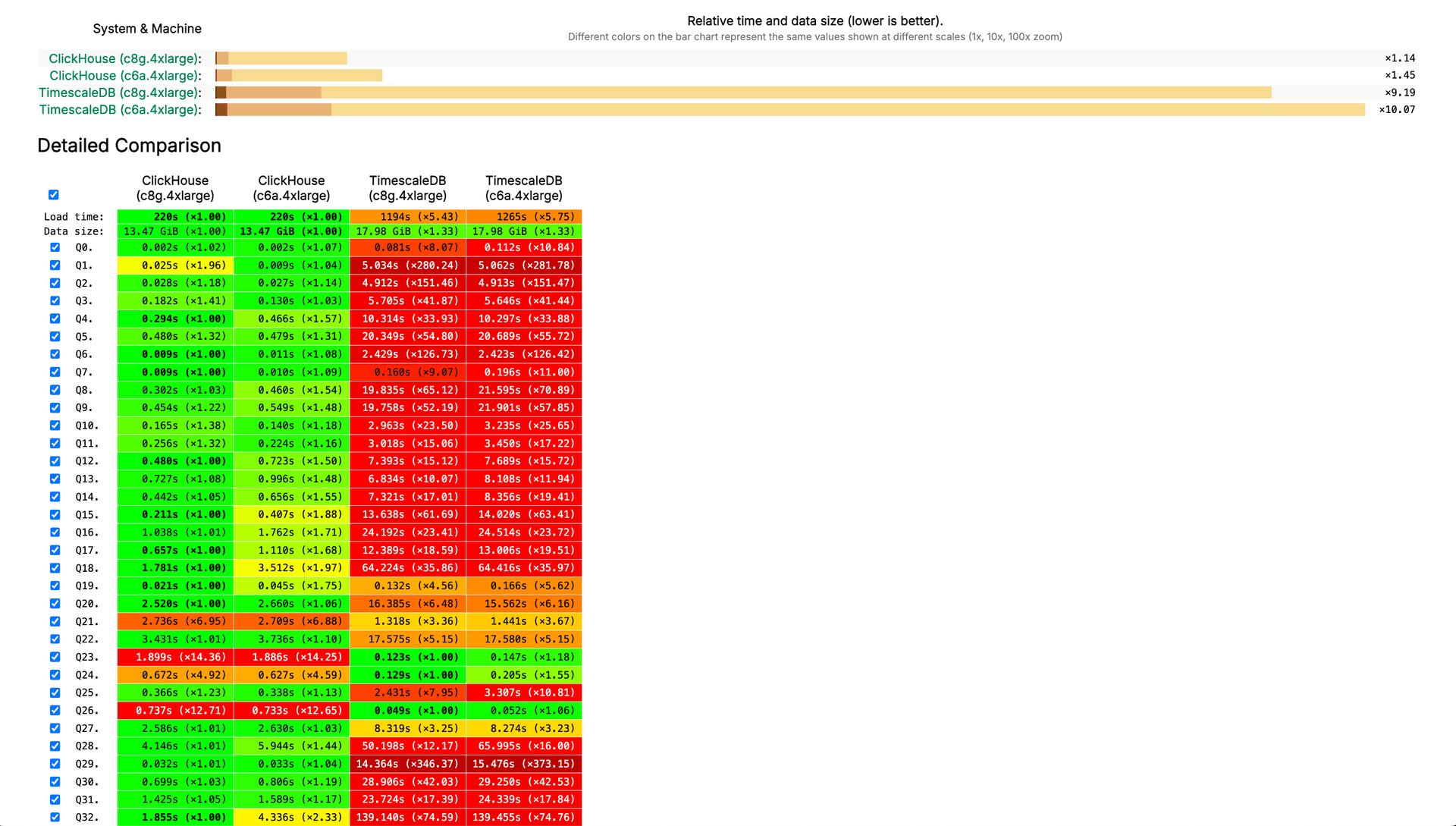
RTABench, a benchmark designed for real-time analytics patterns, shows TimescaleDB running 1.9x faster than ClickHouse® despite being 6.8x slower on ClickBench, which tests large-scale aggregations. The difference comes from how each database handles different query patterns.
Point lookups
TimescaleDB's row-based storage and B-tree indexes make it faster for queries that fetch specific rows. Looking up a single user's session or finding an order by ID typically returns results in single-digit milliseconds.
ClickHouse®'s columnar format means point lookups scan more data structures, though sparse primary indexes help. Applications that mix analytical queries with frequent point lookups often see more consistent latency with TimescaleDB.
Large-window aggregations
ClickHouse® dominates queries that aggregate across large time windows or high-cardinality dimensions. Calculating daily averages across millions of events or summing revenue by product category across billions of rows plays to ClickHouse®'s strengths.
A query like SELECT date, sum(revenue) FROM sales GROUP BY date runs orders of magnitude faster in ClickHouse® when working with hundreds of millions of rows. The columnar format reads only the date and revenue columns, and vectorized execution processes aggregations at CPU cache speeds.
Join and denormalization strategies
TimescaleDB handles normalized schemas with multiple joined tables more naturally. You can maintain separate tables for users, products, and orders, then join them in queries without major performance penalties for moderately sized datasets.
ClickHouse® performs best with denormalized data where related information lives in the same table. Pre-joining tables and storing redundant data reduces query complexity and improves performance. The tradeoff is increased storage space and more complex pipelines to maintain denormalized tables.
Developer experience and tooling
The learning curve and development workflow differ between these databases.
Schema evolution workflow
TimescaleDB inherits PostgreSQL's ALTER TABLE capabilities, making schema changes straightforward. Adding a column, changing a data type, or creating an index uses familiar SQL commands. You can test migrations locally and apply them to production with confidence.
ClickHouse® schema migrations require more care. While you can add columns with ALTER TABLE, changing column types or reordering columns often means creating a new table and copying data. Recent versions have improved this, but the lack of transactional DDL means you can't roll back schema changes atomically.
Building production APIs with Tinybird pipes
Tinybird simplifies ClickHouse® development by providing a declarative syntax for defining data pipelines and API endpoints. Instead of managing SQL queries in application code, you define pipes that transform data and expose results as REST APIs.
Here's a basic pipe that aggregates user activity:
TOKEN activity\_api\_read READ

NODE aggregate\_activity
SQL >
  %
  SELECT
    toStartOfHour(timestamp) AS hour,
    user\_id,
    count() AS event\_count
  FROM user\_events
  WHERE timestamp >= {{DateTime(start\_date, '2024-01-01 00:00:00')}}
  GROUP BY hour, user\_id
  ORDER BY hour DESC

TYPE endpoint
Deploy with tb --cloud deploy and Tinybird generates a parameterized API endpoint automatically. The platform handles query optimization, caching, and scaling without additional configuration.
Storage footprint and compression efficiency
Storage costs matter when time-series data accumulates continuously.
Default compression algorithms
ClickHouse® uses LZ4 compression by default, balancing compression ratio with decompression speed. You can switch to ZSTD for higher compression when storage costs outweigh query performance. Typical compression ratios range from 10x to 100x depending on data characteristics.
TimescaleDB relies on PostgreSQL's TOAST compression, which is less aggressive than ClickHouse®'s columnar compression. Typical compression ratios fall between 2x and 10x. TimescaleDB's compression feature for hypertables can achieve columnar-like compression by converting older chunks into a compressed columnar format.
Partitioning and TTL policies
ClickHouse® supports table-level TTL policies that automatically delete or move old data based on time or other criteria. You can specify different TTL rules for different columns, archiving old data to cheaper storage while keeping recent data on fast SSDs.
TimescaleDB offers retention policies that drop entire chunks after a specified period. Combined with continuous aggregates that pre-compute rollups of old data, this approach balances storage costs with query performance for historical analysis.
Scalability and high availability options
As data volumes grow, both databases offer different paths to horizontal scaling.
Sharding and replication in ClickHouse®
ClickHouse® supports distributed tables that shard data across multiple nodes. You define a sharding key, and ClickHouse® routes writes to appropriate shards automatically. Queries against distributed tables aggregate results from all shards transparently.
Setting up ClickHouse® clusters requires expertise in distributed systems. You configure replication, monitor shard balance, and handle node failures manually. Tinybird eliminates this complexity by providing managed ClickHouse® clusters that scale automatically based on workload, handling sharding, replication, and failover without manual intervention.
TimescaleDB multi-node and Patroni
TimescaleDB offers multi-node deployments for horizontal scaling, though this feature is less mature than ClickHouse®'s distributed tables. For high availability, TimescaleDB typically relies on PostgreSQL clustering tools like Patroni, which provide automatic failover and replication.
Cloud-managed TimescaleDB services handle most operational complexity, but the underlying PostgreSQL architecture means scaling writes remains more challenging than with ClickHouse®.
Time-series functions and analytics features
Both databases provide specialized functions for time-series analysis, though with different approaches.
Materialized views vs continuous aggregates
ClickHouse® materialized views automatically maintain pre-aggregated results as new data arrives. When you insert data into a source table, materialized views update incrementally. Queries against aggregated data run very fast because the computation happened at write time.
Window functions and downsampling helpers
TimescaleDB provides the time\_bucket() function, which groups timestamps into fixed intervals like 5-minute or 1-hour buckets. This makes downsampling queries intuitive: SELECT time_bucket('1 hour', timestamp), avg(value) FROM metrics GROUP BY 1.
ClickHouse® offers similar functionality through toStartOfInterval() and specialized functions like toStartOfHour(). Both databases support window functions for computing running aggregates, though ClickHouse®'s implementation is optimized for analytical patterns while TimescaleDB inherits PostgreSQL's more general-purpose window functions.
Total cost of ownership for self-hosted and managed
The true cost of running these databases includes hardware, operational overhead, and engineering time.
Hardware and ops overheads
Self-hosting ClickHouse® requires expertise in distributed systems. You configure compression codecs, tune merge tree parameters, monitor memory usage, and manage distributed query execution. For organizations without dedicated database engineers, operational burden often exceeds hardware costs.
TimescaleDB's PostgreSQL foundation means more engineers have relevant experience, reducing the learning curve. Standard PostgreSQL monitoring and backup tools work with TimescaleDB. However, optimizing TimescaleDB for large-scale analytics still requires specialized knowledge.
Managed service pricing tiers
ClickHouse® Cloud charges based on compute and storage separately, with pricing that scales with query complexity. Timescale Cloud offers similar pricing models with different rate structures.
Tinybird provides managed ClickHouse® with a developer-focused pricing model that includes data ingestion, storage, and API requests in a single plan. The platform eliminates separate charges for ingestion infrastructure and API gateways, simplifying cost prediction. Sign up for a free Tinybird account to explore pricing for your workload.
Streamlined Migration and Real-Time Replication Workflows
Migrating analytical workloads at scale involves more than exporting tables and re-importing them. Consistency, latency, and schema evolution are the biggest challenges when moving from relational or time-series databases into a columnar analytical engine. Modern ClickHouse® workflows address this by combining high-throughput initial loads, low-latency change data capture, and automatic schema synchronization for both one-time and continuous migration scenarios.
One-time migrations and continuous synchronization
The most reliable approach to migration typically involves two coordinated phases: a full snapshot of the source data followed by a continuous stream of incremental changes.* Initial snapshot: The process begins with a consistent copy of existing data. Large tables are split into multiple ranges and ingested in parallel to speed up the transfer.
- Continuous replication: As the snapshot runs, a change data capture (CDC) stream captures ongoing inserts, updates, and deletes from the source database, leveraging modern Postgres CDC techniques to ensure minimal lag and high consistency.
These are applied to ClickHouse® in near real time, keeping both systems synchronized until cutover.This pattern eliminates downtime, allowing analytical queries to run on ClickHouse® while transactional workloads continue uninterrupted in the source system. In practice, replication lag stays under a few seconds, and large-scale datasets can be migrated within hours rather than days.
High-throughput initial load with parallel snapshotting
Bulk migration into ClickHouse® relies on parallel snapshotting, where multiple threads or workers read disjoint data ranges concurrently. Each thread extracts a subset of rows, serializes them efficiently, and writes them directly into ClickHouse® tables using binary formats.
The most common format combines Avro for row serialization with ZSTD compression, optimizing both CPU and network efficiency.This parallelized process scales linearly with the number of threads until it saturates network or I/O capacity. On modern cloud infrastructure, it’s common to sustain hundreds of thousands of rows per second per core, making it feasible to move billions of rows within a few hours.When working with time-partitioned tables, snapshotting can be organized per partition or per time chunk, ensuring that historical intervals are migrated in order. For compressed datasets that cannot expose low-level identifiers like ctid, the pipeline automatically switches to cursor-based sequential streaming to maintain reliability.
Managing time-series structures and hypertables
Migrating from time-series databases introduces additional complexity due to structures such as hypertables and chunks, which are automatically partitioned by time. These structures continuously create new child tables as data arrives, so the replication process must track these dynamically.A robust CDC implementation ensures that every new chunk created under the internal schema is automatically included in replication, without requiring manual configuration. Once configured, new partitions are captured as soon as they appear, guaranteeing a complete and ordered event stream in ClickHouse®.This design allows organizations to maintain zero manual intervention while new data continues to arrive, a critical feature for systems that write events continuously.
Automatic schema evolution
Real-time systems evolve quickly, and schema drift is inevitable. Columns are added, renamed, or dropped as new features are deployed. Migration pipelines that rely on static table definitions often break in these cases.Modern ingestion layers in ClickHouse® handle schema change detection automatically. When a new column appears in the source system, it’s propagated to the destination schema.When a column is dropped, the pipeline marks it as deprecated rather than breaking replication. These small adjustments make it possible to evolve the schema continuously without manual DDL operations or downtime.
Observability and operational reliability
Large-scale migrations demand visibility. Operators need to know if replication is falling behind, if latency is growing, or if a particular table is producing excessive updates.
ClickHouse® ingestion pipelines expose fine-grained metrics such as throughput (rows per second), replication lag, and per-table insert/update/delete rates, similar to how Apache Web Server introduction describes monitoring and log analysis practices for large-scale systems.They also surface PostgreSQL-native metrics like replication slot size, wait events, and transaction delays.Built-in alerting and notifications — typically through email or Slack — warn teams about issues such as lag spikes or replication slot growth. This monitoring provides confidence that replication is progressing correctly and helps detect anomalies before they impact analytics workloads.
Reliable co-existence during phased migration
For complex applications, migration rarely happens in a single cutover. Instead, teams adopt iterative migration, moving workloads gradually while keeping both systems live.
Transactional queries continue to run on the original database, while analytical dashboards and aggregates migrate first. This approach minimizes risk, provides an early validation of query performance, and allows teams to phase out legacy infrastructure progressively.Because ClickHouse® can ingest and query replicated data in parallel, it becomes a seamless analytical companion to time-series systems during transition periods.
Handling Hypertables, Compression, and Data Integrity at Scale
Migrating from a time-series extension introduces unique engineering challenges. Hypertables split data into small physical chunks, compressed storage complicates replication, and schema evolution must be synchronized without blocking writes. ClickHouse®’s replication workflows are designed to handle all these aspects automatically, ensuring high throughput and full consistency.
Understanding hypertables and chunk-level replication
A hypertable represents a logical abstraction over many underlying child tables, known as chunks, each storing a specific time interval. These chunks are created and dropped automatically as new data arrives.In a migration workflow, each chunk must be captured and replicated individually. By including all child tables in the logical replication publication, the migration engine ensures that every insert, update, or delete from any chunk is streamed correctly to the target ClickHouse® table.The ingestion process reconstructs these chunks into a single continuous table in ClickHouse®, ordered by timestamp and optimized for columnar storage.This approach retains the same time-series semantics while benefiting from ClickHouse®’s compression and vectorized execution for analytical workloads.
Replicating compressed hypertables
Time-series systems often use transparent compression or hybrid row-columnar formats to reduce storage costs. However, compressed hypertables don’t expose low-level system columns like ctid, making parallel snapshotting more difficult.To address this, the migration process detects compression automatically and switches to a streaming decompression path that reads data sequentially. Instead of relying on identifiers, it fetches rows in batches through cursors, ensuring reliability across all chunk types.Once written to ClickHouse®, data is re-encoded using native columnar codecs such as LZ4 or ZSTD. This delivers storage ratios of 10x to 100x while maintaining fast decompression speeds for analytical queries.
Achieving near real-time replication
After the initial backfill, replication transitions into continuous streaming mode. Changes are captured from the source database’s write-ahead log and applied to ClickHouse® in micro-batches.
This approach provides low-latency synchronization, typically maintaining lag of only a few seconds even on write-heavy systems.By batching changes intelligently and parallelizing updates across tables, ClickHouse® achieves steady-state replication at massive scale without overloading either system.
The result is a pipeline that supports both one-time migrations and long-term coexistence where ClickHouse® serves as the analytical read replica.
Monitoring and error recovery
Replication performance is closely monitored through built-in metrics such as throughput, lag, retries, and slot utilization. If a failure occurs — for instance, due to a network interruption — idempotent retry mechanisms ensure the system resumes without data loss or duplication.Advanced setups provide automatic alerting on threshold breaches, allowing engineers to address bottlenecks proactively. Continuous monitoring of replication slot size prevents WAL accumulation on the source database, which could otherwise degrade performance.This observability-first approach allows large-scale migrations to run safely over days or weeks without manual oversight.
Automation and enterprise readiness
Production environments depend on automation. The full replication workflow — from setup to monitoring — can be deployed programmatically through configuration files or API calls.
A typical enterprise setup includes:
Enabling logical replication on the source database.
Registering the target ClickHouse® cluster and secure connection credentials.
Launching parallel snapshot jobs for large tables.
Enabling continuous CDC replication with checkpoint persistence.
Exposing detailed metrics and alerts to monitoring dashboards.Once configured, these pipelines run autonomously, requiring minimal manual maintenance while guaranteeing data consistency, low latency, and resilience to failure.
Optimizing throughput and latency
Replication performance depends on how batches are configured. Larger batches reduce overhead but increase temporary latency; smaller batches minimize lag but consume more CPU. The optimal configuration balances these parameters dynamically, adapting to workload intensity.Compression algorithms like ZSTD further reduce network load, while parallel execution across tables maximizes total throughput. With these optimizations, migration pipelines routinely sustain multi-million-row-per-second ingestion rates under production conditions.
Ensuring data integrity and validation
Even the fastest migration is meaningless without validation. Before switching traffic to ClickHouse®, teams verify data integrity through row counts, primary key checks, and aggregate comparisons between source and destination.
In addition, checksum validation or sample-based aggregation comparisons confirm that analytical results remain identical.This verification step ensures that data consistency is fully preserved and that queries in ClickHouse® produce the same insights users expect from their original system.
Supporting hybrid deployments
Not every organization decommissions its existing time-series system immediately. Many choose a hybrid model, keeping recent data and write operations in the original database while continuously replicating historical or analytical subsets into ClickHouse®.
This pattern combines the transactional advantages of the source system with the query speed and scalability of ClickHouse®, offering a smooth path to modernization without business disruption, much like hybrid architectures used in large-scale social media analytics platforms.
Migration paths from TimescaleDB to ClickHouse®
Organizations often start with TimescaleDB and migrate to ClickHouse® as analytical workloads grow. Here's how that migration typically works.
1. Change-data-capture replication
The first step sets up continuous replication from PostgreSQL to ClickHouse® using CDC tools. ClickHouse® Cloud's ClickPipes feature includes a Postgres CDC connector that handles initial backfill and ongoing synchronization automatically.
This approach lets you run both databases in parallel, sending analytical queries to ClickHouse® while keeping transactional workloads in TimescaleDB. You validate query performance and data consistency before committing to a full migration.
2. Dual-write phase
During dual-write, your application writes data to both databases simultaneously. This eliminates replication lag and lets you test ClickHouse® query performance with real-time data. Monitor query latency, resource usage, and result accuracy during this phase.
Differences in how each database handles null values, timestamp precision, or floating-point arithmetic can surface here. Testing with production traffic reveals edge cases that might not appear in synthetic benchmarks.
3. Cut-over and validation
The final step redirects all analytical queries to ClickHouse® and decommissions the TimescaleDB instance for analytics. Keep TimescaleDB running if it still serves transactional workloads, or migrate those to a separate PostgreSQL instance.
Tinybird's migration support includes schema conversion tools and query translation assistance, helping teams move from TimescaleDB to managed ClickHouse® faster. The platform's observability features make it easier to validate that migrated queries produce correct results with acceptable performance.
When to choose each database
The right choice depends on your data model, query patterns, and team expertise.
- For analytical speed on large datasets: Choose ClickHouse® when you're working with hundreds of millions or billions of rows and your queries primarily aggregate across large time windows or high-cardinality dimensions. Denormalized schemas work best.
- For relational time-series integration: Choose TimescaleDB when you combine time-series data with traditional relational tables using joins, or when your team's PostgreSQL expertise outweighs the performance benefits of ClickHouse®. Normalized schemas and transactional consistency requirements favor TimescaleDB.
- For hybrid approaches: Use both databases for different workloads. Keep recent, frequently updated data in TimescaleDB for operational queries and point lookups. Replicate data to ClickHouse® for long-term storage and complex analytical queries.
Tinybird and the fast path to managed ClickHouse®
Tinybird provides managed ClickHouse® infrastructure designed for developers who want to integrate analytical capabilities into their applications without managing database operations. The platform handles cluster provisioning, scaling, monitoring, and optimization automatically.
Beyond managed infrastructure, Tinybird offers a developer experience focused on speed. Define data pipelines as code using pipes, test locally with tb dev, and deploy to production with tb deploy. The platform generates REST APIs from SQL queries automatically, eliminating the work of building and maintaining separate API layers.
Data ingestion works through the Events API or pre-built connectors for Kafka, S3, and other sources. Tinybird handles schema validation, deduplication, and backpressure without custom code. Create a free Tinybird account to start building with managed ClickHouse®.
FAQs about ClickHouse® and TimescaleDB
Does ClickHouse® support ACID transactions?
ClickHouse® provides eventual consistency but not full ACID transactions like traditional relational databases. Inserts become visible to queries after data is written to disk and merged, which typically happens within seconds. The database is designed for analytical workloads where eventual consistency is acceptable, not for transactional systems requiring immediate read-after-write guarantees.
Can TimescaleDB handle high-cardinality joins efficiently?
TimescaleDB can perform joins, but performance degrades with very high cardinality data due to its row-based storage model, with ingestion rates dropping from 557K to 159K rows/s at 10 million hosts. When joining tables with millions of distinct values in join keys, consider denormalization for frequently joined high-cardinality datasets. TimescaleDB works well for moderate-cardinality joins, such as joining user sessions with user profile data.
How do I protect PII data in ClickHouse®?
ClickHouse® offers role-based access control, row-level security policies, and data masking functions to protect sensitive information. You can define policies that filter rows based on user roles or apply functions that hash or redact PII in query results.