

PricingDocs
Bars

Data Platform

Managed ClickHouse
Production-ready with Tinybird's DX
Streaming ingestion
High-throughput streaming ingest
Schema iteration
Safe migrations with zero downtime
Connectors
Plug and play Kafka, S3, and GCS

Developer Experience

Instant SQL APIs
Turn SQL into an endpoint
BI & Tool Connections
Connect your BI tools and ORMs
Tinybird Code
Ingest and query from your terminal

Enterprise

Tinybird AI
AI resources for LLMs and agents
High availability
Fault-tolerance and auto failovers
Security and compliance
Certified SOC 2 Type II for enterprise
Sign inSign up
Product []

Data Platform

Managed ClickHouse
Production-ready with Tinybird's DX
Streaming ingestion
High-throughput streaming ingest
Schema iteration
Safe migrations with zero downtime
Connectors
Plug and play Kafka, S3, and GCS

Developer Experience

Instant SQL APIs
Turn SQL into an endpoint
BI & Tool Connections
Connect your BI tools and ORMs
Tinybird Code
Ingest and query from your terminal

Enterprise

Tinybird AI
AI resources for LLMs and agents
High availability
Fault-tolerance and auto failovers
Security and compliance
Certified SOC 2 Type II for enterprise
PricingDocs
Resources []

Learn

Blog
Musings on transformations, tables and everything in between
Customer Stories
We help software teams ship features with massive data sets
Videos
Learn how to use Tinybird with our videos
ClickHouse for Developers
Understand ClickHouse with our video series

Build

Templates
Explore our collection of templates
Tinybird Builds
We build stuff live with Tinybird and our partners
Changelog
The latest updates to Tinybird

Community

Slack Community
Join our Slack community to get help and share your ideas
Open Source Program
Get help adding Tinybird to your open source project
Schema > Evolution
Join the most read technical biweekly engineering newsletter

Our Columns:

Skip the infra work. Deploy your first ClickHouse
project now

Get started for freeRead the docs
A geometric decoration with a matrix of rectangles.

Product /

ProductWatch the demoPricingSecurityRequest a demo

Company /

About UsPartnersShopCareers

Features /

Managed ClickHouseStreaming IngestionSchema IterationConnectorsInstant SQL APIsBI & Tool ConnectionsTinybird CodeTinybird AIHigh AvailabilitySecurity & Compliance

Support /

DocsSupportTroubleshootingCommunityChangelog

Resources /

ObservabilityBlogCustomer StoriesTemplatesTinybird BuildsTinybird for StartupsRSS FeedNewsletter

Integrations /

Apache KafkaConfluent CloudRedpandaGoogle BigQuerySnowflakePostgres Table FunctionAmazon DynamoDBAmazon S3

Use Cases /

User-facing dashboardsReal-time Change Data Capture (CDC)Gaming analyticsWeb analyticsReal-time personalizationUser-generated content (UGC) analyticsContent recommendation systemsVector search
All systems operational

Copyright © 2025 Tinybird. All rights reserved

|

Terms & conditionsCookiesTrust CenterCompliance Helpline
Tinybird wordmark
PricingDocs
Bars

Data Platform

Managed ClickHouse
Production-ready with Tinybird's DX
Streaming ingestion
High-throughput streaming ingest
Schema iteration
Safe migrations with zero downtime
Connectors
Plug and play Kafka, S3, and GCS

Developer Experience

Instant SQL APIs
Turn SQL into an endpoint
BI & Tool Connections
Connect your BI tools and ORMs
Tinybird Code
Ingest and query from your terminal

Enterprise

Tinybird AI
AI resources for LLMs and agents
High availability
Fault-tolerance and auto failovers
Security and compliance
Certified SOC 2 Type II for enterprise
Sign inSign up
Product []

Data Platform

Managed ClickHouse
Production-ready with Tinybird's DX
Streaming ingestion
High-throughput streaming ingest
Schema iteration
Safe migrations with zero downtime
Connectors
Plug and play Kafka, S3, and GCS

Developer Experience

Instant SQL APIs
Turn SQL into an endpoint
BI & Tool Connections
Connect your BI tools and ORMs
Tinybird Code
Ingest and query from your terminal

Enterprise

Tinybird AI
AI resources for LLMs and agents
High availability
Fault-tolerance and auto failovers
Security and compliance
Certified SOC 2 Type II for enterprise
PricingDocs
Resources []

Learn

Blog
Musings on transformations, tables and everything in between
Customer Stories
We help software teams ship features with massive data sets
Videos
Learn how to use Tinybird with our videos
ClickHouse for Developers
Understand ClickHouse with our video series

Build

Templates
Explore our collection of templates
Tinybird Builds
We build stuff live with Tinybird and our partners
Changelog
The latest updates to Tinybird

Community

Slack Community
Join our Slack community to get help and share your ideas
Open Source Program
Get help adding Tinybird to your open source project
Schema > Evolution
Join the most read technical biweekly engineering newsletter

Skip the infra work. Deploy your first ClickHouse
project now

Get started for freeRead the docs
A geometric decoration with a matrix of rectangles.

Product /

ProductWatch the demoPricingSecurityRequest a demo

Company /

About UsPartnersShopCareers

Features /

Managed ClickHouseStreaming IngestionSchema IterationConnectorsInstant SQL APIsBI & Tool ConnectionsTinybird CodeTinybird AIHigh AvailabilitySecurity & Compliance

Support /

DocsSupportTroubleshootingCommunityChangelog

Resources /

ObservabilityBlogCustomer StoriesTemplatesTinybird BuildsTinybird for StartupsRSS FeedNewsletter

Integrations /

Apache KafkaConfluent CloudRedpandaGoogle BigQuerySnowflakePostgres Table FunctionAmazon DynamoDBAmazon S3

Use Cases /

User-facing dashboardsReal-time Change Data Capture (CDC)Gaming analyticsWeb analyticsReal-time personalizationUser-generated content (UGC) analyticsContent recommendation systemsVector search
All systems operational

Copyright © 2025 Tinybird. All rights reserved

|

Terms & conditionsCookiesTrust CenterCompliance Helpline
Tinybird wordmark
PricingDocs
Bars

Data Platform

Managed ClickHouse
Production-ready with Tinybird's DX
Streaming ingestion
High-throughput streaming ingest
Schema iteration
Safe migrations with zero downtime
Connectors
Plug and play Kafka, S3, and GCS

Developer Experience

Instant SQL APIs
Turn SQL into an endpoint
BI & Tool Connections
Connect your BI tools and ORMs
Tinybird Code
Ingest and query from your terminal

Enterprise

Tinybird AI
AI resources for LLMs and agents
High availability
Fault-tolerance and auto failovers
Security and compliance
Certified SOC 2 Type II for enterprise
Sign inSign up
Product []

Data Platform

Managed ClickHouse
Production-ready with Tinybird's DX
Streaming ingestion
High-throughput streaming ingest
Schema iteration
Safe migrations with zero downtime
Connectors
Plug and play Kafka, S3, and GCS

Developer Experience

Instant SQL APIs
Turn SQL into an endpoint
BI & Tool Connections
Connect your BI tools and ORMs
Tinybird Code
Ingest and query from your terminal

Enterprise

Tinybird AI
AI resources for LLMs and agents
High availability
Fault-tolerance and auto failovers
Security and compliance
Certified SOC 2 Type II for enterprise
PricingDocs
Resources []

Learn

Blog
Musings on transformations, tables and everything in between
Customer Stories
We help software teams ship features with massive data sets
Videos
Learn how to use Tinybird with our videos
ClickHouse for Developers
Understand ClickHouse with our video series

Build

Templates
Explore our collection of templates
Tinybird Builds
We build stuff live with Tinybird and our partners
Changelog
The latest updates to Tinybird

Community

Slack Community
Join our Slack community to get help and share your ideas
Open Source Program
Get help adding Tinybird to your open source project
Schema > Evolution
Join the most read technical biweekly engineering newsletter
Back to Blog
Share this article:
Back
Oct 09, 2025

OpenAI Agent Builder + Tinybird MCP: Building a data-driven agent workflow

OpenAI just announced AgentKit, a suite of tools for building and deploying AI agents. Here's how to make data-driven, analytical workflows with the Tinybird MCP Server on OpenAI's Agent Builder.
AI x Data
Cameron Archer
Cameron ArcherTech Writer

OpenAI just announced AgentKit, which they describe as "a complete set of tools for developers and enterprises to build, deploy, and optimize agents."

Some proclaim that this vertical integration from OpenAI is going to "kill" many AI startups. Maybe, maybe not. I'm not here to debate it.

What I want to show you is how you can use OpenAI's Agent Builder along with the Tinybird MCP Server to build agentic workflows that don't hallucinate, because they're providing responses based on real, fresh data.

What is OpenAI's AgentKit?

In essence, it's a UI-based workflow builder wrapped around OpenAI models and tool calls, allowing cross-functional teams to build agent chains with conditional logic, "connectors" (read: MCP servers), and even sticky notes!

You can then embed your agent workflow into your application using ChatKit (low-code) or the Agents SDK for Python or Typescript.

Finally, you can run evals on your agents and enable trace grading to score responses and optimize.

OpenAI seems to be pitching this as a cross-functional collab tool. Engineering writes the prompts, "stakeholders" drag and drop workflow blocks to connect everything, legal gets to add guardrails, and then engineering fixes everything so it actually works (maybe).
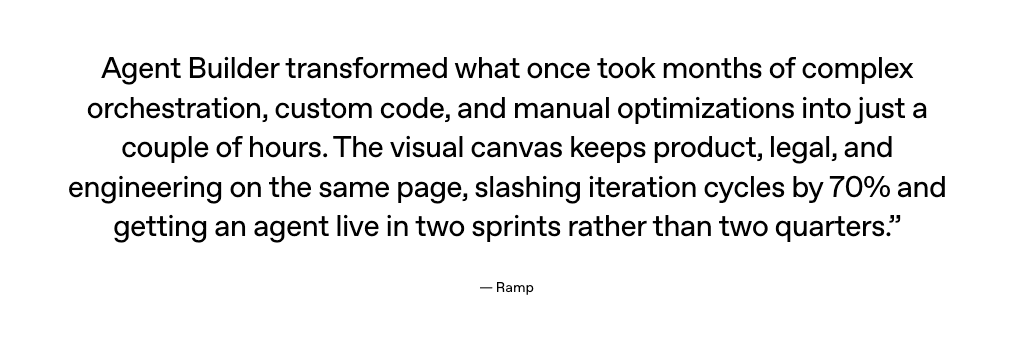
An excerpt from the OpenAI AgentKit announcement post with a quote from Ramp that says "Agent Builder transformed what once took months of complex orchestration, custom code, and manual optimizations into just a couple of hours. The visual canvas keeps product, legal, and engineering on the same page, slashing iteration cycles by 70% and getting an agent live in two sprints rather than two quarters. - Ramp"

We'll see if it actually kills Zapier and n8n, but for now, let's focus on building some agents with the tools we have.

Building a data-driven agent workflow with OpenAI Agent Builder and Tinybird MCP Server

We're going to build an example agent workflow using OpenAI's Agent Builder and the Tinybird MCP Server.

For this example, I'm going to use this public e-commerce demo built with Svelte from Tinybird. The project includes a demo Svelte e-commerce storefront as well as a backend revenue dashboard that visualizes revenue/sales metrics exposed via Tinybird API endpoints.
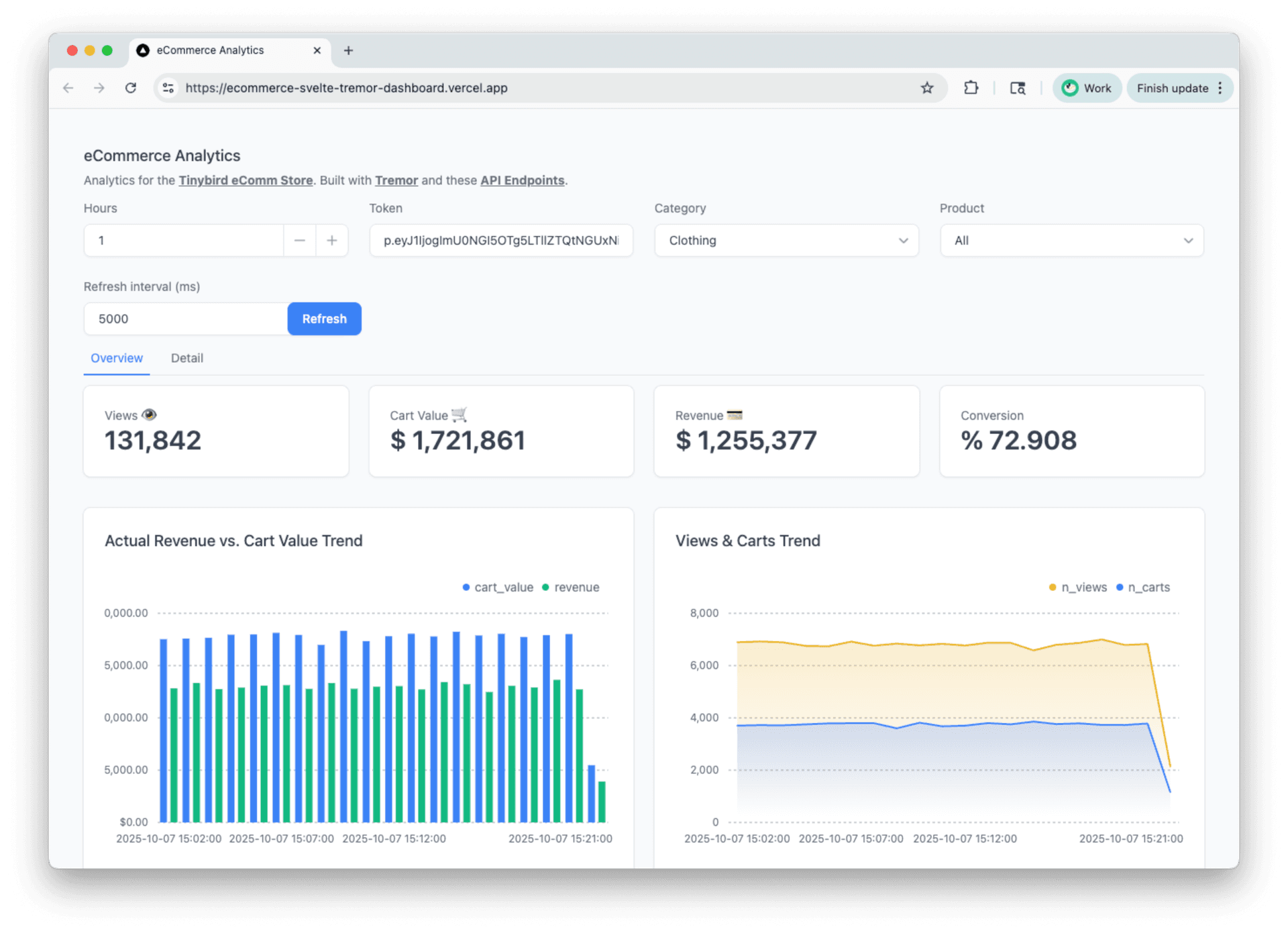
An example ecommerce revenue dashboard backed by Tinybird APIs

We can assume that somebody like a sales analyst might use this dashboard to keep track of sales performance from the store, find sales opportunities, identify stockout risks, etc.

But dashboards are dying, making way for chat-based data exploration, natural-language filtering and personalized analytics UIs. So let's add a helpful sales analyst chat agent to this demo.

We'll build a multi-agent workflow in Agent Builder, designing agents with fine-grained access to Tinybird data via the MCP Server, then embed the chat experience into the revenue dashboard using ChatKit.

Tinybird MCP Server in a nutshell

In case you're unfamiliar with the Tinybird MCP Server, it is a hosted, remote MCP server with access to analytical tools. It includes core tools for resource exploration and query execution against Tinybird data sources. It also includes two specialized server-side agents that can autonomously explore data or generate SQL from text with the context of your Tinybird data source and pipe schemas. In addition, it exposes published Tinybird APIs as tools that LLMs can call when deterministic responses are needed.

The Tinybird MCP Server is secured via Tinybird auth tokens, so you can create multiple connections with fine-grained access control to resources, and even implement row-level security policies with JWT filters.

You can learn more in the official Tinybird MCP Server docs.

TL;DR: The Worfklow

Here's the final workflow I build in Agent Builder:
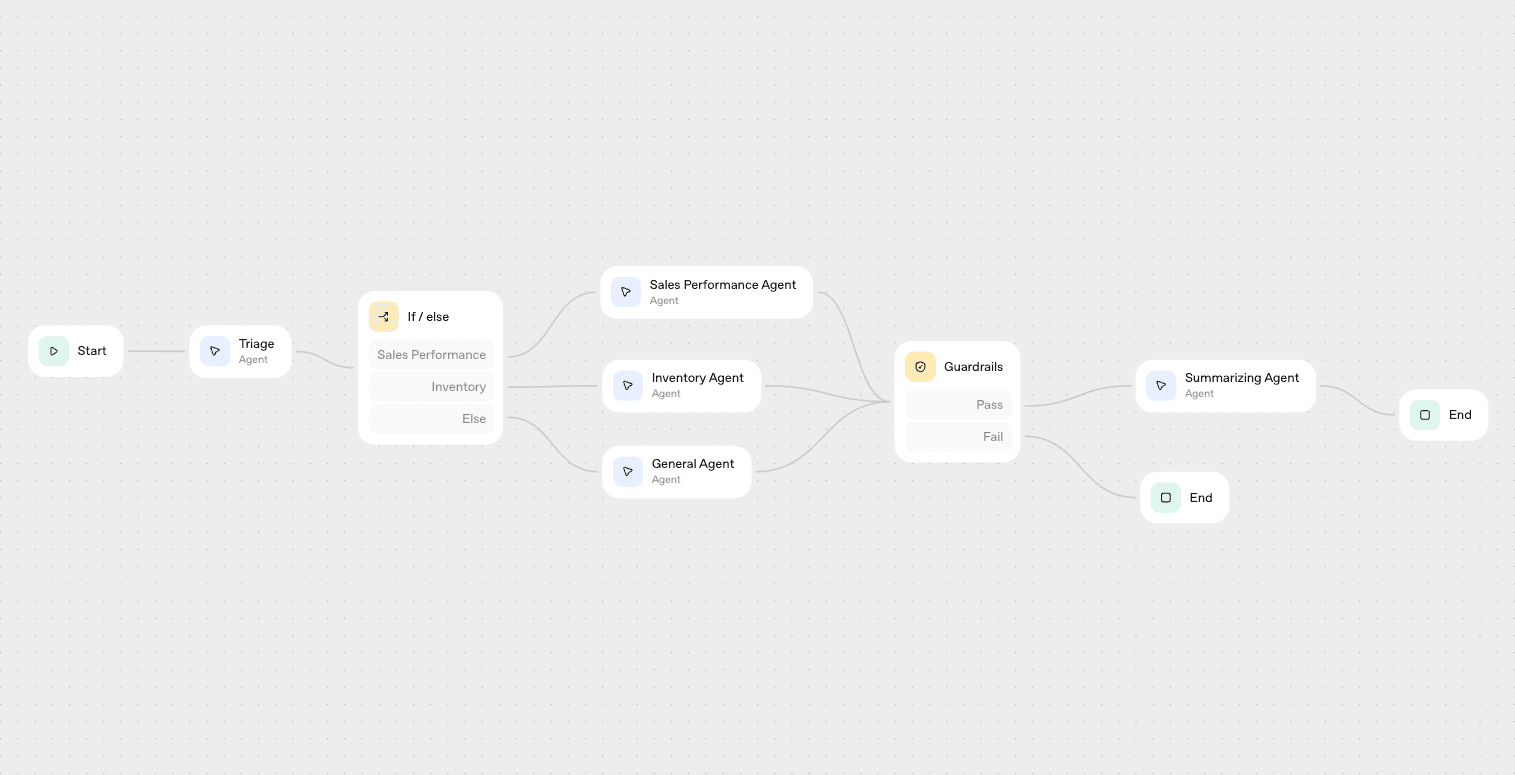
An example workflow built in OpenAI Agent Builder to analyze sales data for a sales analyst

The workflow has the following core steps:

  1. Triage the user input to assign a category (sales_performance, inventory, or other)
  2. Conditional logic to route the request to a specialized agent based on the triage response
  3. Specialized agents for sales performance research and inventory research, with fine-grained access to specific Tinybird MCP tools optimized for the specific task
  4. A general agent for fallback, with full MCP access to the Tinybird workspace.
  5. A guardrail to check for any PII in the responses
  6. A summarizing agent to summarize the detailed research findings provided by the specialized agents

It's pretty basic, but it demonstrates a few nice things:

  1. Using tokens to limit the data scope for specialize agents. Rather than have a single, generalize agent that might need to make multiple tool calls to find the right data, generate a query, execute the query (and attempt retries), we build specialized agents that only have access to a small subset of tools so they can provide faster, more targeted responses.
  2. Triage with structured routing. It's often quite helpful to use a lightweight LLM to triage or reformat the user input text and route it to other forks in the workflow. We use the structured output schema to ensure this agent categorizes deterministically.
  3. Guardrails. This is honestly a really nice feature from OpenAI, as it abstracts all of the regex you might otherwise need to detect PII. It offers other functions too, like content moderation, hallucination checking, etc.

Triage: Routing the input to a specialized analytics agent

The first step in the workflow is to receive the user input and assign a category, one of "sales_performance", "inventory", or "other".

Take a look at the data lineage of the Tinybird data project:
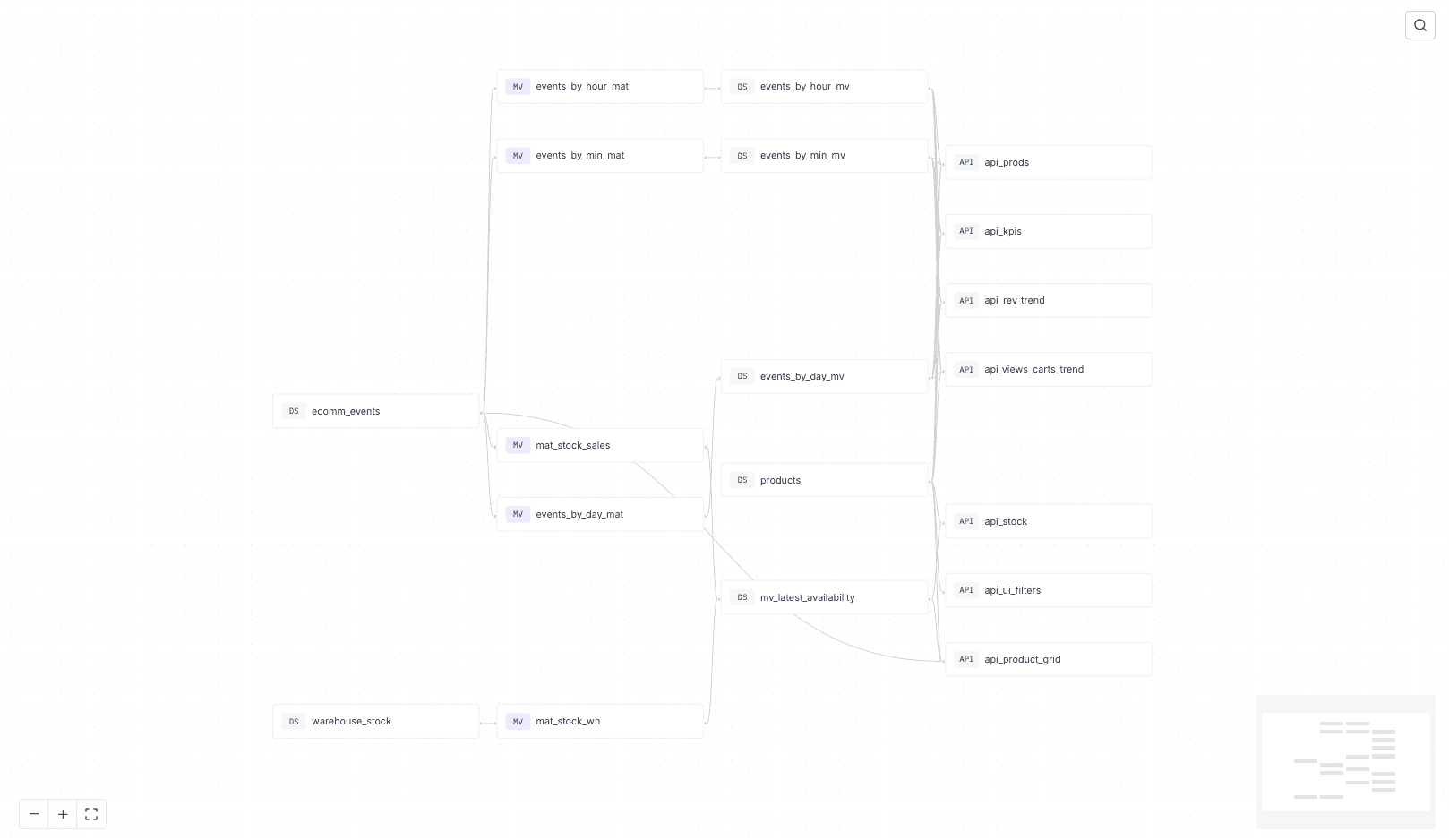
The data lineage of the Tinybird ecommerce data project, showing pipelines for inventory and sales

There are two core pipelines here: one for inventory management, and one for sales and revenue KPIs.

Specifically, we have a Tinybird API endpoint that calculates the latest stock by comparing the latest inventory snapshot with recent sales from the online store:
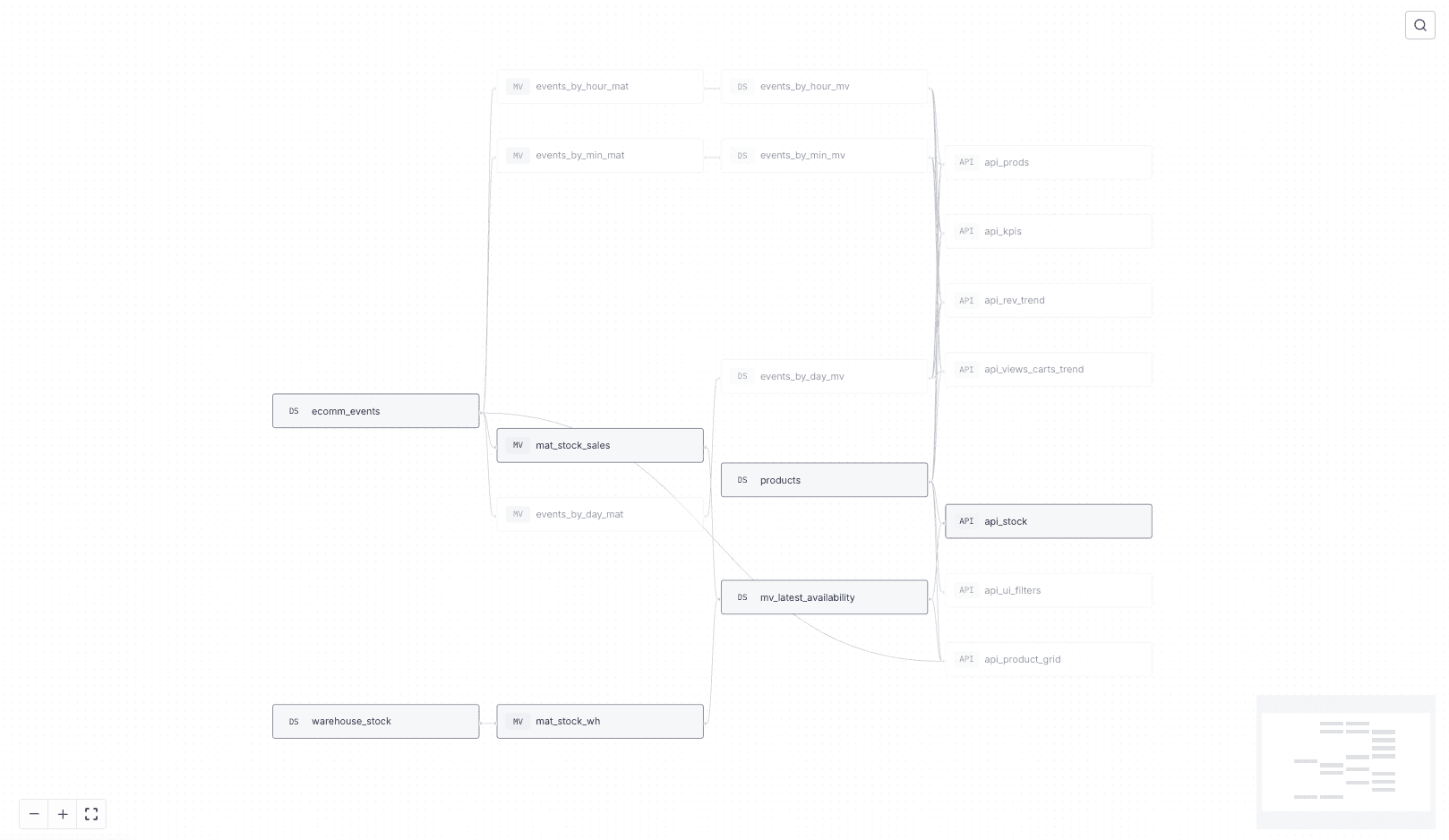
An API calculated in Tinybird to return the latest, most up-to-date inventory

This API uses a simplified lambda architecture that combines infrequent inventory snapshots with real-time transaction data to efficiently calculate real-time stock.

We also have several API endpoints that provide sales and KPIs for products, revenue trends, and conversion rate trends:
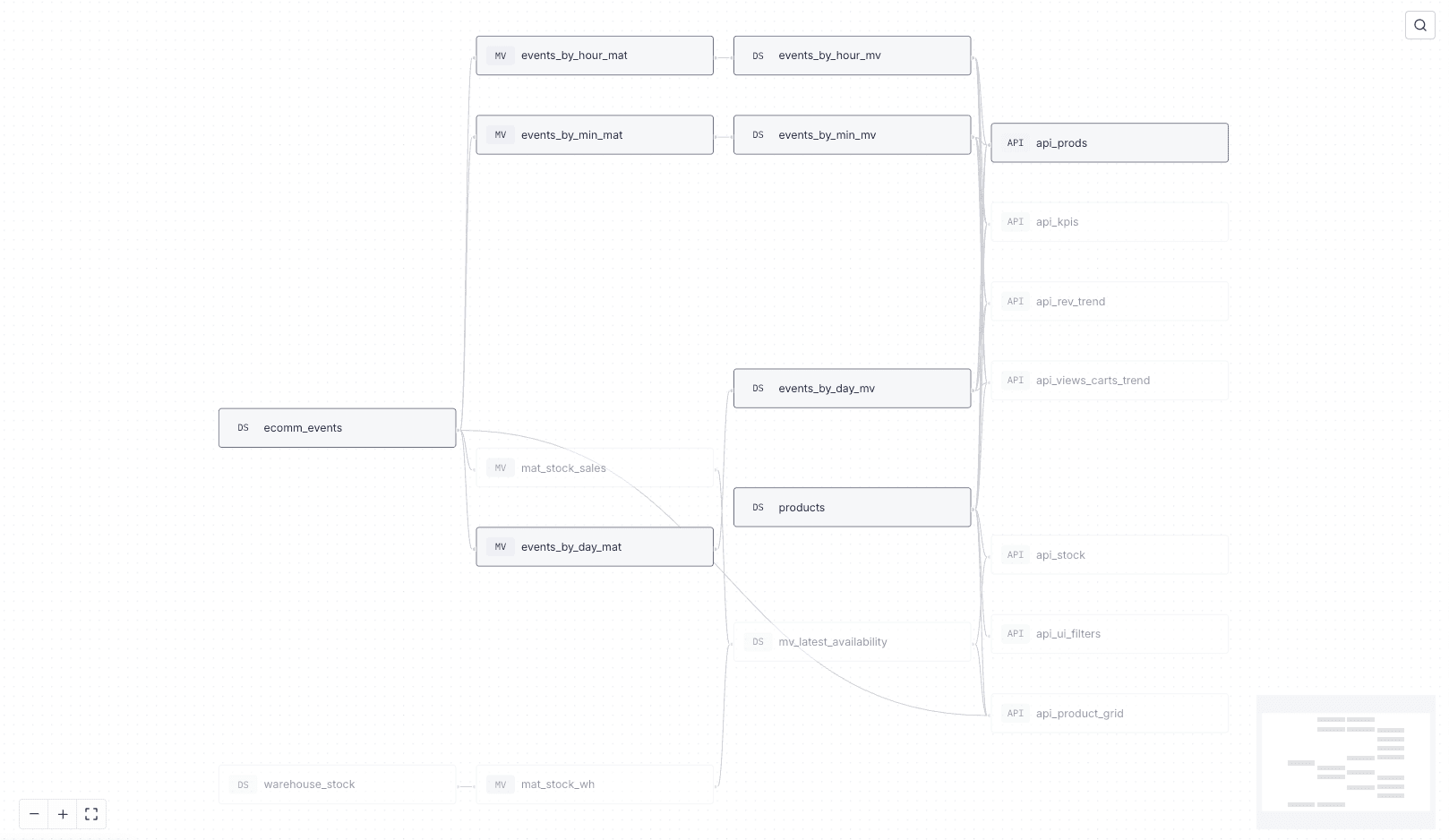
API routes built in Tinybird to return sales performance metrics

These APIs can be useful tools for answering sales performance questions.

So, we want to triage the user input to determine if their question is about inventory or about sales performance (or neither), and then route to the specialize agent.

For this, we use a lightweight "Triage" agent that uses minimal reasoning effort with this prompt:

Explain code with AI
Copy
You classify a user’s natural language question into a category. Choose exactly one: "sales_performance" | "inventory" | "other".

And it provides its response as a structured output based on this JSON schema:

Explain code with AI
Copy
{
  "type": "object",
  "properties": {
    "category": {
      "type": "string",
      "enum": [
        "sales_performance",
        "inventory",
        "other"
      ],
      "default": ""
    }
  },
  "additionalProperties": false,
  "required": [
    "category"
  ],
  "title": "response_schema"
}

Based on that response, we can implement some simple conditional if/else logic to route the user input to the specialized agent:
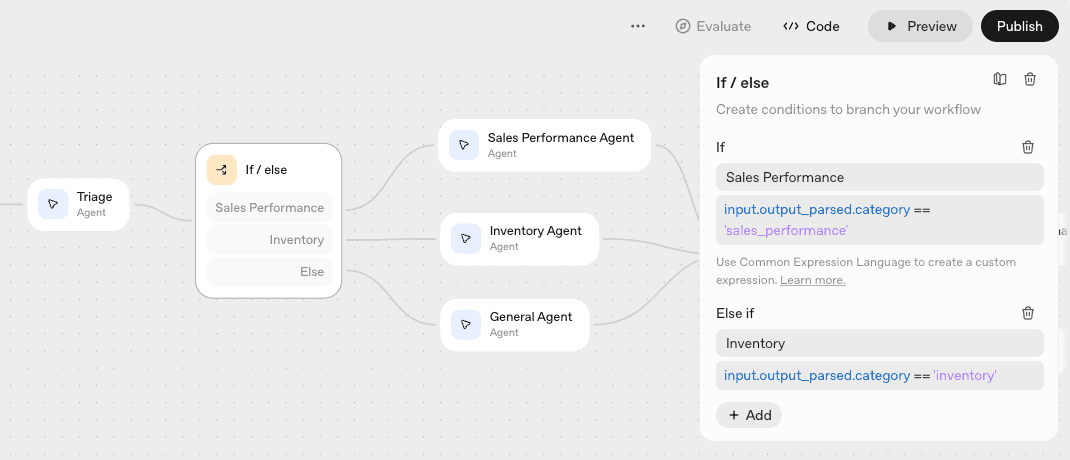
Conditional logic to route the user input to a specialized agent based on user input

Specialized Agents

Rather than throw every user request at a single LLM with full access to the underlying Tinybird data, we create specialized agents that handle specific requests.

This is a common pattern in agent workflows (we do something similar in Tinybird Code) as it generally results in faster, more accurate responses.

Our workflow here is simple: we've created just two specialized agents and one general agent:

  1. Sales Performance Agent answers questions related to sales performance, revenue, and trends.
  2. Inventory Agent answers questions about inventory.
  3. General Agent answers all other questions.

To create our specialized agents, we use unique prompts and leverage the token-based auth of the Tinybird MCP Server, only exposing certain tools and data to the LLM.

Sales Performance Agent

The Sales Performance agent receives user input routed to the sales_performance category by the triage agent.

It's prompt (basic):

Explain code with AI
Copy
You are an expert sales analyst that can analyze data and spot trends about sales performance for an e-commerce store. You have MCP tools available to you to get data about the store performance to answer the user question.

Additionally, we use a scoped Tinybird token with READ permissions for the 4 KPI/revenue performance APIs as well as READ permissions for the underlying ecom_events data source, containing all of the store events data.

These tokens are defined in the Tinybird resource files, e.g.:

Explain code with AI
Copy
TOKEN `sales_performance_mcp_read` READ

DESCRIPTION >
  An API that calculates product-level sales performance KPIs, including views, add to cart value, revenue, and conversion rate for a given time period.

NODE filter_products
SQL >
  %
  SELECT *
  FROM products
  ...

With token-based auth, the agent can fetch predefined metrics using existing APIs (fast, deterministic), or conduct further exploratory analysis on the underlying dataset if needed (slow, comprehensive).

The agent configuration looks like this in Agent Builder:
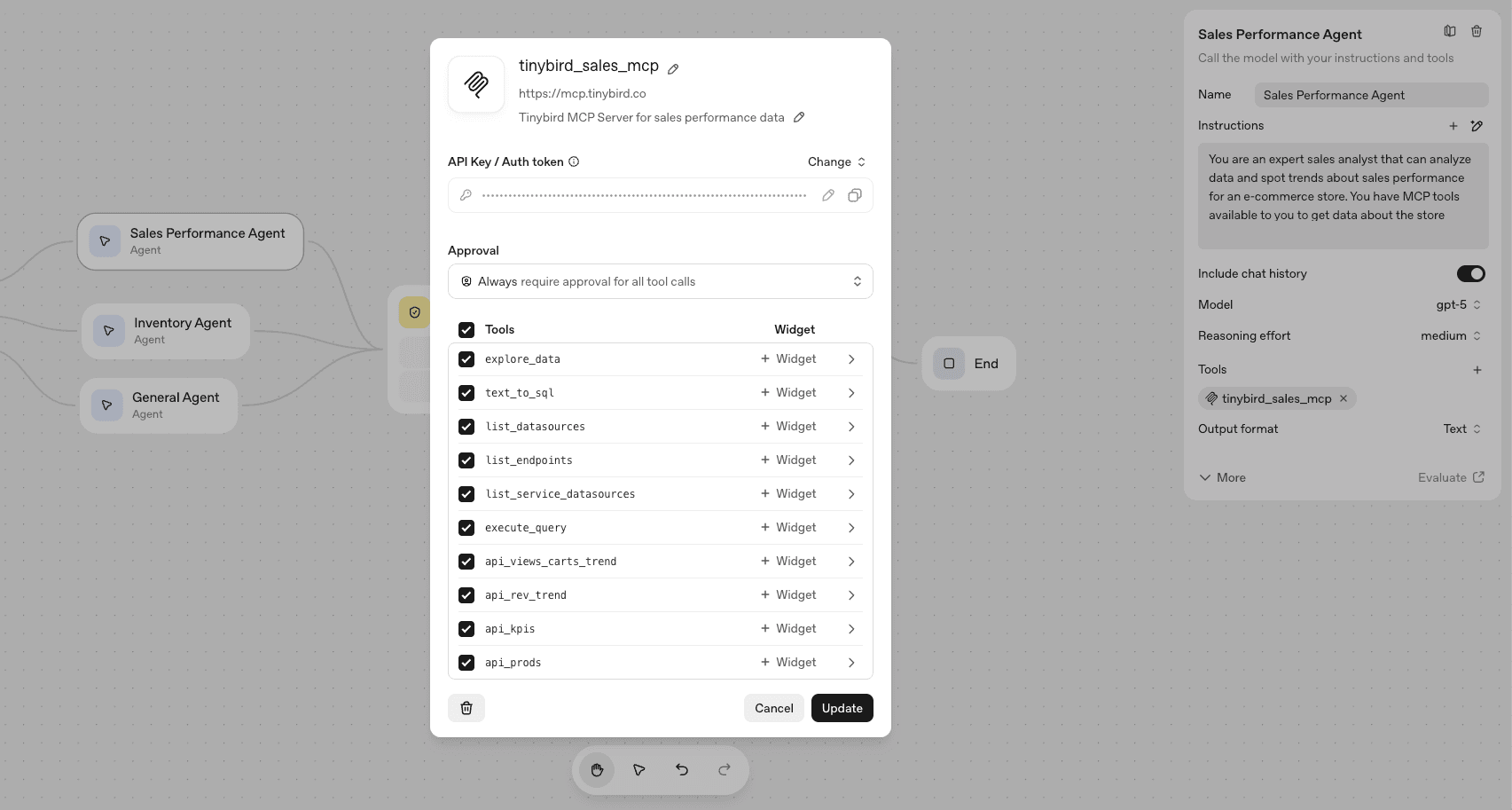
Sales performance agent configuration in OpenAI Agent Builder

So, when a user input is categorized as related to "sales performance", it gets routed to the Sales Performance agent which can then fetch these APIs or explore the underlying events table.

Inventory Agent

The Inventory agent receives user input routed to the inventory category by the triage agent.

It's prompt (basic):

Explain code with AI
Copy
You are an inventory analyst who answers the user's questions about inventory for an e-commerce store. You have access to MCP tools to get the latest inventory data from the e-commerce store.

We use a different scoped Tinybird token that only has READ permissions for the api_stock API endpoint, as this endpoint always returns the latest inventory data. Of course, we could expand the scope if needed, but for now we're keeping things tight.

Any time the inventory agent receives a question from triage, it will immediately go fetch the latest inventory data from that API to provide its response.

The agent configuration looks like this in Agent Builder:
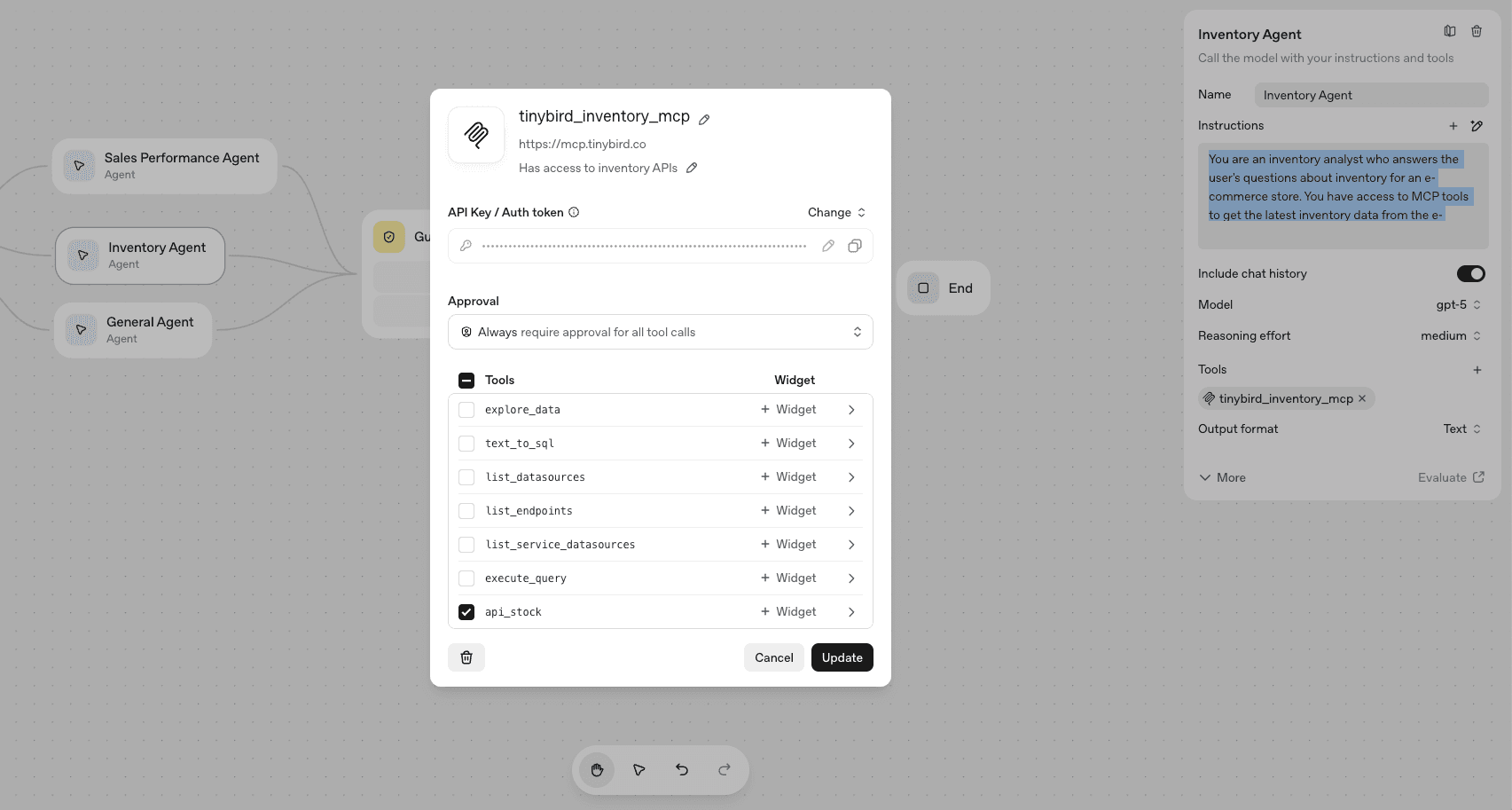
Inventory agent configuration in OpenAI Agent Builder

General agent

In the event that triage can't categorize a request as sales performance or inventory, a fallback route sends the request to a general agent.

This agent has a more generic prompt:

Explain code with AI
Copy
You are a data analyst with access to an explore_data agent tool from the Tinybird MCP server that can explore ecommerce data to provide answers to user questions.

In addition, it can only use the explore_data tool, though it is given full read access to the entire dataset.

The configuration looks like this:
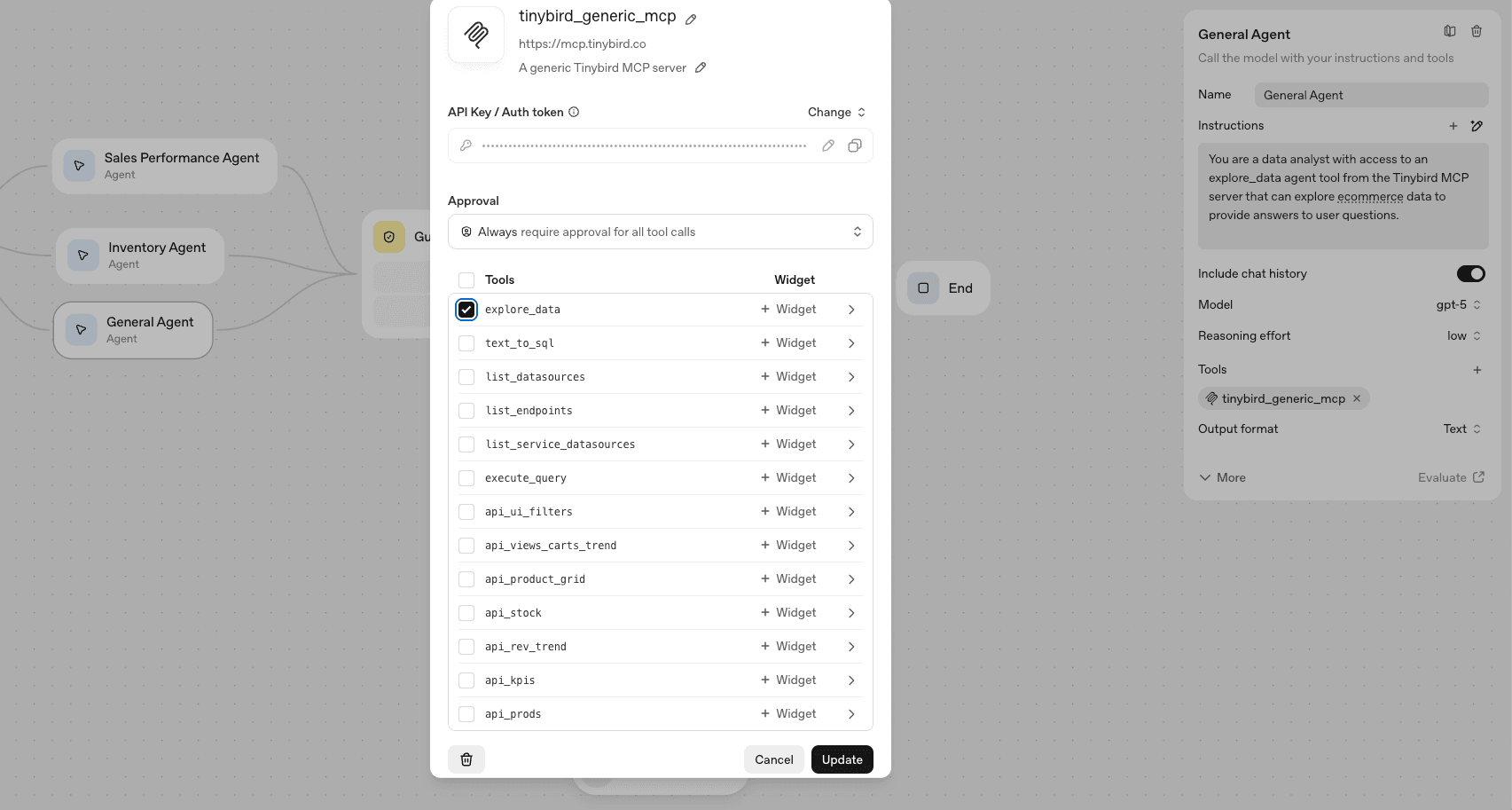
Generic agent configuration in OpenAI Agent Builder

Why only one tool?

The explore_data tool from the Tinybird MCP Server is exceptionally powerful. In fact, it isn't just a tool, but rather a server-side agent that has deep context about the data in Tinybird, including schemas, performance logs, and other metadata.

So, if a user request is generic, we can simply pass it to this explore_data tool that Tinybird offers and not have to worry about error-prone LLM SQL generation, and Tinybird's agent will autonomously arrive at an answer.

This takes a bit longer, as it may require multiple tool calls and exploratory loops, so we don't prioritize this route. Still, it's perfect as a fallback to ensure the user gets an answer, even if it takes a bit longer.

Final result

Here's a quick video showing the agent in action. Note how inventory-related requests get routed to the Inventory Agent, Sales Performance questions to the Sales Performance Agent, and anything else to the general agent. In each case, the agent has the tools it needs thanks to the Tinybird MCP Server to fetch relevant, real-time data and provide insight back to the user.

Integrating the data-driven agent with ChatKit

The last step is to integrate this agent workflow into my revenue dashboard. I could either use ChatKit or the Agents SDK, and OpenAI provides some reference implementations:

  • ChatKit Starter App
  • ChatKit Advanced Samples
  • OpenAI Agents JS SDK

Perhaps I'll follow up on that integration in a later post.

Closing points

OpenAI's AgentKit and Agent Builder provide some nice abstractions for building agentic workflows, and I can see how this will definitely serve cross-functional teams who need a solid agentic backend with a nice, low-code UI.

Whether you use Agent Builder or existing SDKs (or use a different AI provider entirely), the Tinybird MCP Server is the ideal way to give agents the ability to make data-informed decisions. With token-based access control and optimized server-side analytics agents, it allows you to build powerful and flexible agentic workflows that can process billions of rows of data.

More resources here:

  • Introducing the Tinybird MCP Server
  • Video: Build a CLI agent for analytics with the Vercel AI SDK and Tinybird MCP Server
  • Analytics Agent Template from Tinybird
Do you like this post? Spread it!

Skip the infra work. Deploy your first ClickHouse
project now

Get started for freeRead the docs
A geometric decoration with a matrix of rectangles.
Tinybird wordmark

Product /

ProductWatch the demoPricingSecurityRequest a demo

Company /

About UsPartnersShopCareers

Features /

Managed ClickHouseStreaming IngestionSchema IterationConnectorsInstant SQL APIsBI & Tool ConnectionsTinybird CodeTinybird AIHigh AvailabilitySecurity & Compliance

Support /

DocsSupportTroubleshootingCommunityChangelog

Resources /

ObservabilityBlogCustomer StoriesTemplatesTinybird BuildsTinybird for StartupsRSS FeedNewsletter

Integrations /

Apache KafkaConfluent CloudRedpandaGoogle BigQuerySnowflakePostgres Table FunctionAmazon DynamoDBAmazon S3

Use Cases /

User-facing dashboardsReal-time Change Data Capture (CDC)Gaming analyticsWeb analyticsReal-time personalizationUser-generated content (UGC) analyticsContent recommendation systemsVector search
All systems operational

Copyright © 2025 Tinybird. All rights reserved

|

Terms & conditionsCookiesTrust CenterCompliance Helpline

Related posts

AI x Data
Jun 23, 2025
Building an autonomous analytics agent with Agno and Tinybird
Alberto Romeu
Alberto RomeuSoftware Engineer
1Building an autonomous analytics agent with Agno and Tinybird
AI x Data
Jul 02, 2025
How to build an analytics agent with Agno and Tinybird: Step-by-step
Cameron Archer
Cameron ArcherTech Writer
1How to build an analytics agent with Agno and Tinybird: Step-by-step
AI x Data
Jun 10, 2025
MCP vs APIs: When to Use Which for AI Agent Development
Jorge Sancha
Jorge SanchaCo-founder
1MCP vs APIs: When to Use Which for AI Agent Development
AI x Data
Aug 12, 2025
How we built our own Claude Code
Rafa Moreno
Rafa MorenoFrontend Engineer
1How we built our own Claude Code
AI x Data
Aug 22, 2025
Don't Trust the Prompt: Use RLAC to secure LLM database access
Jorge Sancha
Jorge SanchaCo-founder
1Don't Trust the Prompt: Use RLAC to secure LLM database access
AI x Data
Jun 23, 2025
Chat with your data using the Birdwatcher Slack App
Alberto Romeu
Alberto RomeuSoftware Engineer
1Chat with your data using the Birdwatcher Slack App
AI x Data
Apr 17, 2025
Using LLMs to generate user-defined real-time data visualizations
Cameron Archer
Cameron ArcherTech Writer
1Using LLMs to generate user-defined real-time data visualizations
AI x Data
Jul 07, 2025
10 Analytics Agents examples you can copy
Alberto Romeu
Alberto RomeuSoftware Engineer
110 Analytics Agents examples you can copy
AI x Data
May 16, 2025
We graded 19 LLMs on SQL. You graded us.
Víctor Ramirez
Víctor RamirezSoftware Engineer
1We graded 19 LLMs on SQL. You graded us.
AI x Data
Jul 21, 2025
Why LLMs struggle with analytics
Jorge Sancha
Jorge SanchaCo-founder
1Why LLMs struggle with analytics