

PricingDocs
Bars

Data Platform

Managed ClickHouse
Production-ready with Tinybird's DX
Streaming ingestion
High-throughput streaming ingest
Schema iteration
Safe migrations with zero downtime
Connectors
Plug and play Kafka, S3, and GCS

Developer Experience

Instant SQL APIs
Turn SQL into an endpoint
BI & Tool Connections
Connect your BI tools and ORMs
Tinybird Code
Ingest and query from your terminal

Enterprise

Tinybird AI
AI resources for LLMs and agents
High availability
Fault-tolerance and auto failovers
Security and compliance
Certified SOC 2 Type II for enterprise
Sign inSign up
Product []

Data Platform

Managed ClickHouse
Production-ready with Tinybird's DX
Streaming ingestion
High-throughput streaming ingest
Schema iteration
Safe migrations with zero downtime
Connectors
Plug and play Kafka, S3, and GCS

Developer Experience

Instant SQL APIs
Turn SQL into an endpoint
BI & Tool Connections
Connect your BI tools and ORMs
Tinybird Code
Ingest and query from your terminal

Enterprise

Tinybird AI
AI resources for LLMs and agents
High availability
Fault-tolerance and auto failovers
Security and compliance
Certified SOC 2 Type II for enterprise
PricingDocs
Resources []

Learn

Blog
Musings on transformations, tables and everything in between
Customer Stories
We help software teams ship features with massive data sets
Videos
Learn how to use Tinybird with our videos
ClickHouse for Developers
Understand ClickHouse with our video series

Build

Templates
Explore our collection of templates
Tinybird Builds
We build stuff live with Tinybird and our partners
Changelog
The latest updates to Tinybird

Community

Slack Community
Join our Slack community to get help and share your ideas
Open Source Program
Get help adding Tinybird to your open source project
Schema > Evolution
Join the most read technical biweekly engineering newsletter

Our Columns:

Skip the infra work. Deploy your first ClickHouse
project now

Get started for freeRead the docs
A geometric decoration with a matrix of rectangles.

Product /

ProductWatch the demoPricingSecurityRequest a demo

Company /

About UsPartnersShopCareers

Features /

Managed ClickHouseStreaming IngestionSchema IterationConnectorsInstant SQL APIsBI & Tool ConnectionsTinybird CodeTinybird AIHigh AvailabilitySecurity & Compliance

Support /

DocsSupportTroubleshootingCommunityChangelog

Resources /

ObservabilityBlogCustomer StoriesTemplatesTinybird BuildsTinybird for StartupsRSS FeedNewsletter

Integrations /

Apache KafkaConfluent CloudRedpandaGoogle BigQuerySnowflakePostgres Table FunctionAmazon DynamoDBAmazon S3

Use Cases /

User-facing dashboardsReal-time Change Data Capture (CDC)Gaming analyticsWeb analyticsReal-time personalizationUser-generated content (UGC) analyticsContent recommendation systemsVector search
All systems operational

Copyright © 2025 Tinybird. All rights reserved

|

Terms & conditionsCookiesTrust CenterCompliance Helpline
Tinybird wordmark
PricingDocs
Bars

Data Platform

Managed ClickHouse
Production-ready with Tinybird's DX
Streaming ingestion
High-throughput streaming ingest
Schema iteration
Safe migrations with zero downtime
Connectors
Plug and play Kafka, S3, and GCS

Developer Experience

Instant SQL APIs
Turn SQL into an endpoint
BI & Tool Connections
Connect your BI tools and ORMs
Tinybird Code
Ingest and query from your terminal

Enterprise

Tinybird AI
AI resources for LLMs and agents
High availability
Fault-tolerance and auto failovers
Security and compliance
Certified SOC 2 Type II for enterprise
Sign inSign up
Product []

Data Platform

Managed ClickHouse
Production-ready with Tinybird's DX
Streaming ingestion
High-throughput streaming ingest
Schema iteration
Safe migrations with zero downtime
Connectors
Plug and play Kafka, S3, and GCS

Developer Experience

Instant SQL APIs
Turn SQL into an endpoint
BI & Tool Connections
Connect your BI tools and ORMs
Tinybird Code
Ingest and query from your terminal

Enterprise

Tinybird AI
AI resources for LLMs and agents
High availability
Fault-tolerance and auto failovers
Security and compliance
Certified SOC 2 Type II for enterprise
PricingDocs
Resources []

Learn

Blog
Musings on transformations, tables and everything in between
Customer Stories
We help software teams ship features with massive data sets
Videos
Learn how to use Tinybird with our videos
ClickHouse for Developers
Understand ClickHouse with our video series

Build

Templates
Explore our collection of templates
Tinybird Builds
We build stuff live with Tinybird and our partners
Changelog
The latest updates to Tinybird

Community

Slack Community
Join our Slack community to get help and share your ideas
Open Source Program
Get help adding Tinybird to your open source project
Schema > Evolution
Join the most read technical biweekly engineering newsletter

Skip the infra work. Deploy your first ClickHouse
project now

Get started for freeRead the docs
A geometric decoration with a matrix of rectangles.

Product /

ProductWatch the demoPricingSecurityRequest a demo

Company /

About UsPartnersShopCareers

Features /

Managed ClickHouseStreaming IngestionSchema IterationConnectorsInstant SQL APIsBI & Tool ConnectionsTinybird CodeTinybird AIHigh AvailabilitySecurity & Compliance

Support /

DocsSupportTroubleshootingCommunityChangelog

Resources /

ObservabilityBlogCustomer StoriesTemplatesTinybird BuildsTinybird for StartupsRSS FeedNewsletter

Integrations /

Apache KafkaConfluent CloudRedpandaGoogle BigQuerySnowflakePostgres Table FunctionAmazon DynamoDBAmazon S3

Use Cases /

User-facing dashboardsReal-time Change Data Capture (CDC)Gaming analyticsWeb analyticsReal-time personalizationUser-generated content (UGC) analyticsContent recommendation systemsVector search
All systems operational

Copyright © 2025 Tinybird. All rights reserved

|

Terms & conditionsCookiesTrust CenterCompliance Helpline
Tinybird wordmark
PricingDocs
Bars

Data Platform

Managed ClickHouse
Production-ready with Tinybird's DX
Streaming ingestion
High-throughput streaming ingest
Schema iteration
Safe migrations with zero downtime
Connectors
Plug and play Kafka, S3, and GCS

Developer Experience

Instant SQL APIs
Turn SQL into an endpoint
BI & Tool Connections
Connect your BI tools and ORMs
Tinybird Code
Ingest and query from your terminal

Enterprise

Tinybird AI
AI resources for LLMs and agents
High availability
Fault-tolerance and auto failovers
Security and compliance
Certified SOC 2 Type II for enterprise
Sign inSign up
Product []

Data Platform

Managed ClickHouse
Production-ready with Tinybird's DX
Streaming ingestion
High-throughput streaming ingest
Schema iteration
Safe migrations with zero downtime
Connectors
Plug and play Kafka, S3, and GCS

Developer Experience

Instant SQL APIs
Turn SQL into an endpoint
BI & Tool Connections
Connect your BI tools and ORMs
Tinybird Code
Ingest and query from your terminal

Enterprise

Tinybird AI
AI resources for LLMs and agents
High availability
Fault-tolerance and auto failovers
Security and compliance
Certified SOC 2 Type II for enterprise
PricingDocs
Resources []

Learn

Blog
Musings on transformations, tables and everything in between
Customer Stories
We help software teams ship features with massive data sets
Videos
Learn how to use Tinybird with our videos
ClickHouse for Developers
Understand ClickHouse with our video series

Build

Templates
Explore our collection of templates
Tinybird Builds
We build stuff live with Tinybird and our partners
Changelog
The latest updates to Tinybird

Community

Slack Community
Join our Slack community to get help and share your ideas
Open Source Program
Get help adding Tinybird to your open source project
Schema > Evolution
Join the most read technical biweekly engineering newsletter
Back to Blog
Share this article:
Back
Oct 17, 2025

Building real-time, generative UIs for analytics with Tinybird and Thesys

Learn how to create rich, generative analytics UIs backed by real-time data using Tinybird and C1 by Thesys.
I Built This!
Zahle K.
Zahle K.Founding Engineer at Thesys

Analytics is essential for every team, but getting the insights you need is rarely simple. Engineers often spend hours writing custom queries and building dashboards just to deliver the answers product, marketing, and growth teams need.

LLMs have made it possible to query data in natural language, which is a huge step forward. But even then, the output is usually walls of text - hard to read, interpret, and act on.

What if, instead of text or raw SQL results, you could get interactive, real-time visualizations like charts, tables, and dashboards that adapt dynamically to your queries?

Enter Generative UI for web analytics.

Generative UI is a user interface that is dynamically generated in real time by AI to provide an experience customized to fit the user’s intent and context. Instead of pre-built charts or static templates, the interface adapts in real time to the question at hand. Tinybird offers Explorations, a natural language chat interface with some generative UI capabilities for time series data. C1 expands on this by giving you immense flexibility in your generative UIs.

For example, asking "Show me weekly pageviews by source for the last month" doesn’t just return text or a pre-defined chart, it generates an interactive dashboard with tables, charts, and even follow-up queries tailored to your intent.
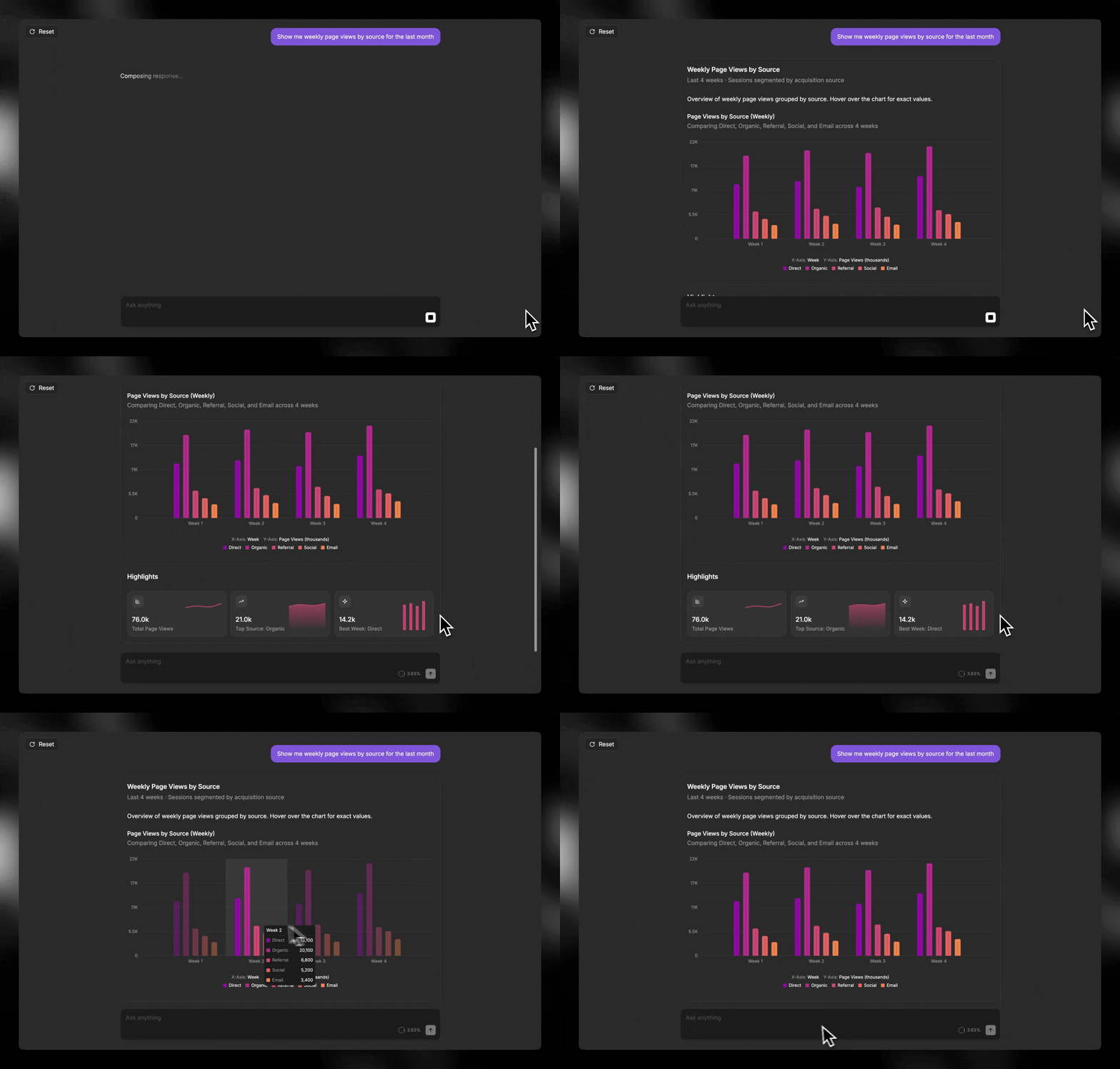
A gif showing a generative UI built by Thesys and backed by Tinybird data

Tinybird + C1: Bringing generative UI to real-time analytics

Tinybird is a managed ClickHouse service that lets developers build real-time analytics and data products over large datasets, with much of the infrastructure complexity handled for you.

The C1 API sits between your backend and an LLM, converting raw model outputs into a structured UI spec with state and actions. The C1 Gen UI SDK renders live as interactive React components with streaming and error handling - no manual UI code required.

Together, Tinybird and C1 let you turn raw analytics data into rich, interactive dashboards in minutes, freeing teams from the slow, rigid workflows of traditional dashboards.
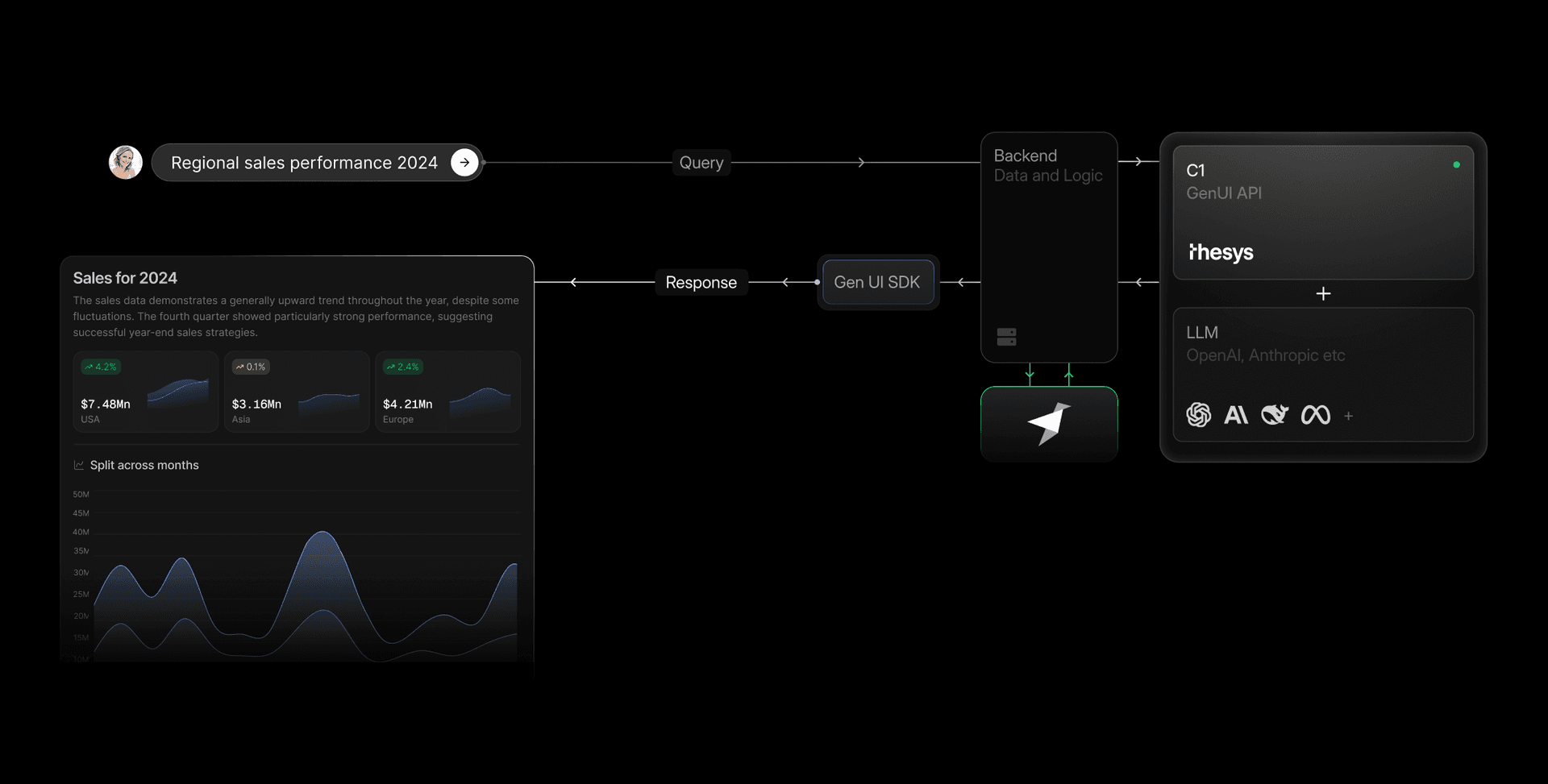
An architecture diagram showing how C1 by Thesys and Tinybird integrate to enable generative UIs for real-time analytics queries

Setup and implementation

Step 1: Next.js + C1 quickstart guide

Thesys provides a CLI to get a project running instantly. Open your terminal and run:

Explain code with AI
Copy
npx create-c1-app web-analytics-agent

This command scaffolds a complete Next.js application with the C1 SDK pre-installed and configured.

Step 2: Run the starter app

Navigate into the new directory and start the development server.

Explain code with AI
Copy
cd web-analytics-agent
npm run dev

Open http://localhost:3000. You'll see a working C1 application.

Step 3: Set up a Tinybird data project

Login to Tinybird and deploy the pre-built web analytics starter kit template.

Explain code with AI
Copy
tb login
tb --cloud deploy --template https://github.com/tinybirdco/web-analytics-starter-kit/tree/main/tinybird

The template includes a small fixture of sample data you can append for testing:

Explain code with AI
Copy
tb --cloud datasource append analytics_events fixtures/analytics_events.ndjson

Verify your setup with:

Explain code with AI
Copy
tb --cloud sql 'select uniq(session_id) from analytics_events'

You should see a row showing the unique session_id count in the sample data.

Step 4: Integrate the Tinybird MCP Server

First, make sure you have your Tinybird host URL and a READ token with access to the resources in your Tinybird project.

Store these in environment variables. Create a .env file in your project root:

Explain code with AI
Copy
TINYBIRD_HOST="<https://api.tinybird.co>"
TINYBIRD_TOKEN="YOUR_TINYBIRD_READ_TOKEN"

Check out the Tinybird MCP Server docs for more information on how to access the MCP server with a Tinybird token.

Step 5: Fetch data from Tinybird via MCP

Next, let's create a simple function to fetch data from Tinybird. Create a new file at app/api/chat/tools.ts:

Explain code with AI
Copy
import { Client } from "@modelcontextprotocol/sdk/client/index.js";
import { StreamableHTTPClientTransport } from "@modelcontextprotocol/sdk/client/streamableHttp.js";
import { RunnableToolFunctionWithParse } from "openai/lib/RunnableFunction";

let mcpClient: Client | null = null;
let mcpTools: RunnableToolFunctionWithParse<Record<string, unknown>>[] = [];

export function getTools() {
   return mcpTools;
}

export async function initializeMCP() {
   // Check to make sure the Tinybird token is available
   if (!process.env.TINYBIRD_TOKEN) {
       console.error('TINYBIRD_TOKEN environment variable not found');
       console.log('Get your token with `tb info ls` and `tb token copy`');
       process.exit(1);
   }

   try {
       // Tinybird remote MCP server URL with token for scoped permissions
       const url = new URL(`https://mcp.tinybird.co?token=${process.env.TINYBIRD_TOKEN}`);

       // Create the transport with a unique session ID
       const transport = new StreamableHTTPClientTransport(url);

       // Create and connect the MCP client
       mcpClient = new Client({
           name: "tinybird-mcp-client",
           version: "1.0.0",
       }, {
           capabilities: {}
       });

       await mcpClient.connect(transport);

       console.log('✅ Connected to Tinybird MCP server');

       // Fetch and list the available tools from the MCP Server
       const toolsList = await mcpClient.listTools();
       console.log('\nAvailable tools:');
       toolsList.tools.forEach(tool => {
           console.log(`  • ${tool.name}`);
       });

       // Convert MCP tools to OpenAI runnable format
       mcpTools = toolsList.tools.map(tool => ({
           type: "function" as const,
           function: {
               name: tool.name,
               description: tool.description || "",
               parse: (input: string) => {
                   return JSON.parse(input);
               },
               parameters: (() => {
                   const schema = tool.inputSchema || {
                       type: "object",
                       properties: {},
                   };
                  
                   // Extract all property keys to add to required array
                   const properties = (schema as Record<string, unknown>).properties as Record<string, unknown> || {};
                   const allKeys = Object.keys(properties);
                  
                   return {
                       ...schema,
                       additionalProperties: false,
                       // Include all property keys in required array (OpenAI strict mode requirement)
                       required: allKeys.length > 0 ? allKeys : undefined,
                   };
               })(),
               function: async (args: Record<string, unknown>) => {
                   console.log(`🔧 Executing MCP tool: ${tool.name}`, args);
                  
                   // Call the MCP tool with the provided arguments
                   const result = await mcpClient!.callTool({
                       name: tool.name,
                       arguments: args,
                   });

                   // MCP tools return content array, extract the text
                   const contentArray = Array.isArray(result.content) ? result.content : [];
                   const content = contentArray
                       .map((item: { type?: string; text?: string }) => {
                           if (item.type === "text" && item.text) {
                               return item.text;
                           }
                           return JSON.stringify(item);
                       })
                       .join("\n");


                   console.log(`✅ Tool result: ${content.substring(0, 200)}...`);
                   return content;
               },
               strict: true,
           },
       }));

       console.log(`📦 Loaded ${mcpTools.length} tools`);
       return toolsList;

   } catch (error) {
       console.error('❌ Failed to connect to Tinybird MCP server:', error.message);
       process.exit(1);
   }
}

// Initialize MCP client when module loads
console.log('Initializing MCP client');
initializeMCP();

Next, modify the backend API route to use this function. Open src/app/api/route.ts and replace the mock data with a call to the new fetchTinybirdData function:

Explain code with AI
Copy
import { systemPrompt } from "./systemPrompt";
import { tools } from "./tools";

await initializeMCP();
const tools = getTools();


export async function POST(req: NextRequest) {
  ...
  const llmStream = await client.beta.chat.completions.runTools({
    model: "c1/anthropic/claude-sonnet-4/v-20250915",
    messages: [
      { role: "system", content: systemPrompt },
      ...messages
    ],
    initializeMcp(),
    stream: true,
  });
  ...
}

Let's see the agent in action

Restart your development server and open the app.

Explain code with AI
Copy
npm run dev

Ask, “Show me traffic for the past year.” Your agent fetches live Tinybird data, streams it to C1, and builds a real-time interactive chart. You can then use follow-up queries to keep exploring.
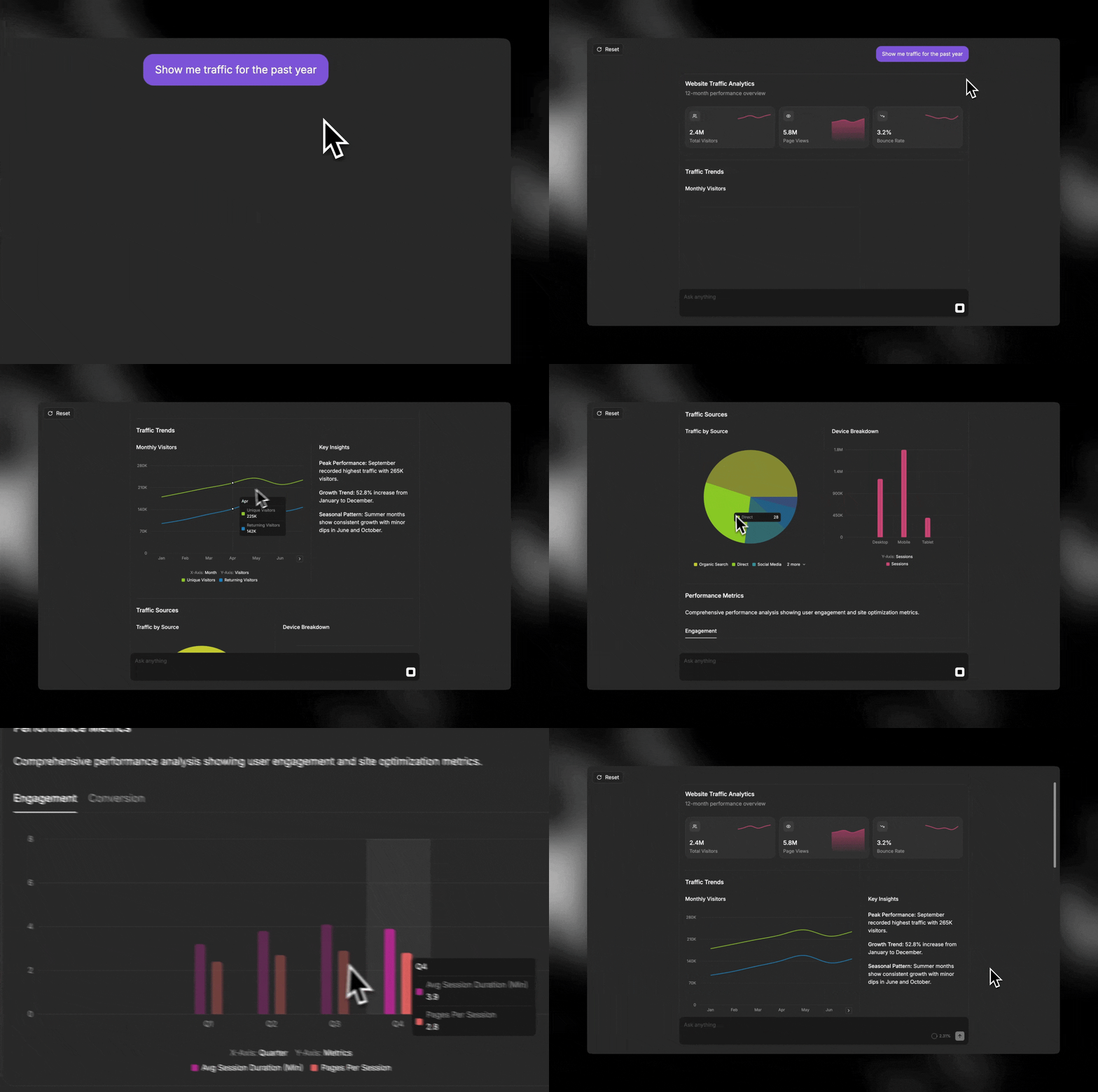
An interactive generative UI session for web analytics using Tinybird and Thesys

Conclusion

In just a few steps, you've built a web analytics agent powered by real-time analytics and generative UI. You've moved beyond the rigidity of traditional dashboards and the limitations of text-heavy AI responses.

By connecting a real-time analytics backend like Tinybird with a generative UI engine like C1, you've created a system that can understand questions and respond with dynamic, purpose-built interfaces. This pattern is incredibly powerful and can be extended to any data source, giving you the leverage to build sophisticated, AI-driven analytics faster than ever before.

More resources

  • Thesys: The Generative UI Company
  • C1 Interactive Demo
  • Tinybird Web Analytics Starter Kit
  • Tinybird MCP Server
Do you like this post? Spread it!

Skip the infra work. Deploy your first ClickHouse
project now

Get started for freeRead the docs
A geometric decoration with a matrix of rectangles.
Tinybird wordmark

Product /

ProductWatch the demoPricingSecurityRequest a demo

Company /

About UsPartnersShopCareers

Features /

Managed ClickHouseStreaming IngestionSchema IterationConnectorsInstant SQL APIsBI & Tool ConnectionsTinybird CodeTinybird AIHigh AvailabilitySecurity & Compliance

Support /

DocsSupportTroubleshootingCommunityChangelog

Resources /

ObservabilityBlogCustomer StoriesTemplatesTinybird BuildsTinybird for StartupsRSS FeedNewsletter

Integrations /

Apache KafkaConfluent CloudRedpandaGoogle BigQuerySnowflakePostgres Table FunctionAmazon DynamoDBAmazon S3

Use Cases /

User-facing dashboardsReal-time Change Data Capture (CDC)Gaming analyticsWeb analyticsReal-time personalizationUser-generated content (UGC) analyticsContent recommendation systemsVector search
All systems operational

Copyright © 2025 Tinybird. All rights reserved

|

Terms & conditionsCookiesTrust CenterCompliance Helpline

Related posts

I Built This!
Jun 06, 2024
Building real-time leaderboards with Tinybird
Jim Moffitt
Jim MoffittDeveloper Advocate
1Building real-time leaderboards with Tinybird
I Built This!
Jan 04, 2022
Operational Analytics in Real Time with Tinybird and Retool
Alison Davey
Alison DaveyDeveloper Advocate
1Operational Analytics in Real Time with Tinybird and Retool
I Built This!
Nov 06, 2023
Build a real-time dashboard in Python with Tinybird and Dash
Cameron Archer
Cameron ArcherTech Writer
1Build a real-time dashboard in Python with Tinybird and Dash
I Built This!
May 25, 2025
How to build CI/CD pipelines for real-time analytics projects
Gonzalo Gómez
Gonzalo GómezSoftware Engineer
1How to build CI/CD pipelines for real-time analytics projects
I Built This!
Aug 06, 2025
Build an analytics agent to analyze your Ghost blog traffic with the Vercel AI SDK and Tinybird
Cameron Archer
Cameron ArcherTech Writer
1Build an analytics agent to analyze your Ghost blog traffic with the Vercel AI SDK and Tinybird
Scalable Analytics Architecture
Dec 03, 2024
Building Real-Time Live Sports Viewer Analytics with Tinybird and AWS
Ariel Pérez
Ariel PérezHead of Product & Technology
1Building Real-Time Live Sports Viewer Analytics with Tinybird and AWS
Scalable Analytics Architecture
May 23, 2025
Building Real-Time Analytics Applications with Redpanda, Iceberg, and Tinybird
Alberto Romeu
Alberto RomeuSoftware Engineer
1Building Real-Time Analytics Applications with Redpanda, Iceberg, and Tinybird
I Built This!
Jul 28, 2025
Multi-agent Mastery: Building integrated analytics features with Claude Code and Tinybird Code
Cameron Archer
Cameron ArcherTech Writer
1Multi-agent Mastery: Building integrated analytics features with Claude Code and Tinybird Code
I Built This!
Feb 13, 2025
Build a data-intensive Next.js app with Tinybird and Cursor
Cameron Archer
Cameron ArcherTech Writer
1Build a data-intensive Next.js app with Tinybird and Cursor
I Built This!
May 20, 2025
IoT monitoring with Kafka and Tinybird
Gonzalo Gómez
Gonzalo GómezSoftware Engineer
1IoT monitoring with Kafka and Tinybird