



Part 1 of 2: Do you really need a dedicated vector database?
A customer in the audience intelligence space came to us with a familiar dilemma. Their pipeline ingests a firehose of social media posts, generates a 768-dimensional embedding for each one, and needs to find the posts most semantically similar to a user's query. They had nearly 20 million posts and growing fast toward hundreds of millions. They were already trialing a dedicated vector-search service. They were about to add yet another vendor to their stack.
Their question was simple: Could Tinybird handle this so they wouldn't have to?
The answer turned out to be yes. But getting there taught us a few things worth sharing.
What the customer needed
The use case is a classic semantic similarity search. A user enters natural-language text describing a topic. The system converts that text into an embedding vector and retrieves the posts whose embeddings are closest to it. Because each post is linked to an author and other metadata, those results can also be used to build audience segments: groups of people who talk about a given topic.
The customer was generating 768-dimensional embeddings and storing them alongside metadata like author, date, and post content. Their data lived in Tinybird, powered by ClickHouse® under the hood.
Their previous approach used AWS S3 Vectors, which is cheap and scales well for storage, but caps search results at 100 vectors. That limitation was a dealbreaker. They needed to retrieve the true top-K nearest results, often hundreds or thousands at a time.
They could tolerate longer response times than usual, but faster would obviously unlock more use cases. What they really wanted was a feasibility signal: is this even worth pursuing, or should they commit to a dedicated vector-search service and move on?
How vector similarity indexes work
Before diving into what happened, a quick primer on how ClickHouse makes vector search fast.
ClickHouse stores data in chunks called granules. Think of them as pages in a book, each holding around 8,000 rows. When a query runs, it reads data one granule at a time. Without an index, finding the nearest vectors means reading every single page.
A vector similarity index adds an intelligent shortcut. It builds an HNSW graph: a network where each node represents one row's embedding, connected by edges to its nearest neighbors. When you search for the vectors closest to your query, the graph navigates from node to neighbor to neighbor, quickly converging on the best matches without scanning every row.
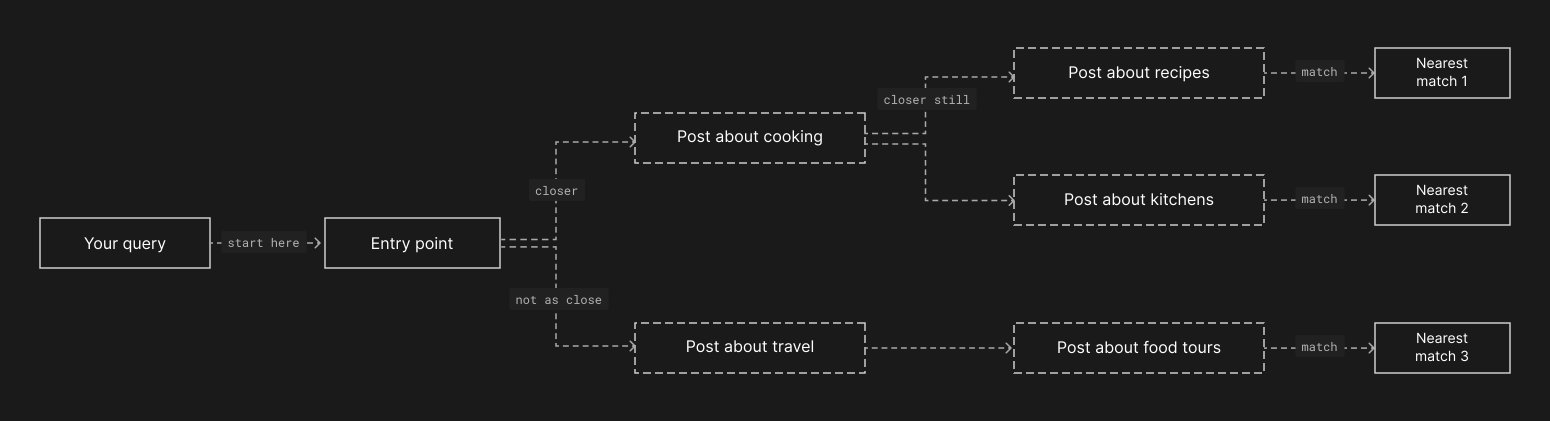
The key idea: after the graph identifies the nearest matches, it maps them back to just a handful of granules. ClickHouse reads only those few pages and skips the rest entirely. In our case, the index skipped 87.5% of all granules, reading just 895 out of 7,175.
Under the hood, this is part of ClickHouse's family of "skip indexes". But instead of storing simple statistics like min/max values, each index block stores an entire navigable graph.
The journey: three insights that changed everything
The evaluation didn't start well. Our first results were terrible. Here's how we went from timeouts to sub-200ms queries.
Insight 1: One index, not fifty-eight
The customer's data was partitioned by month using toYYYYMM(created_at), a common and sensible pattern for time-series analytics. Sixteen months of data meant sixteen partitions. Within each partition, multiple data parts existed due to ongoing ingestion. The total: 58 independent HNSW graphs.
This is the critical thing to understand about vector similarity indexes in ClickHouse: each data part maintains its own separate graph. A vector search query must traverse every graph independently, load each one from object storage, collect candidates from all of them, and merge the results. Fifty-eight graphs meant fifty-eight independent traversals.
The result: 15 to 48 second response times, with frequent timeouts.
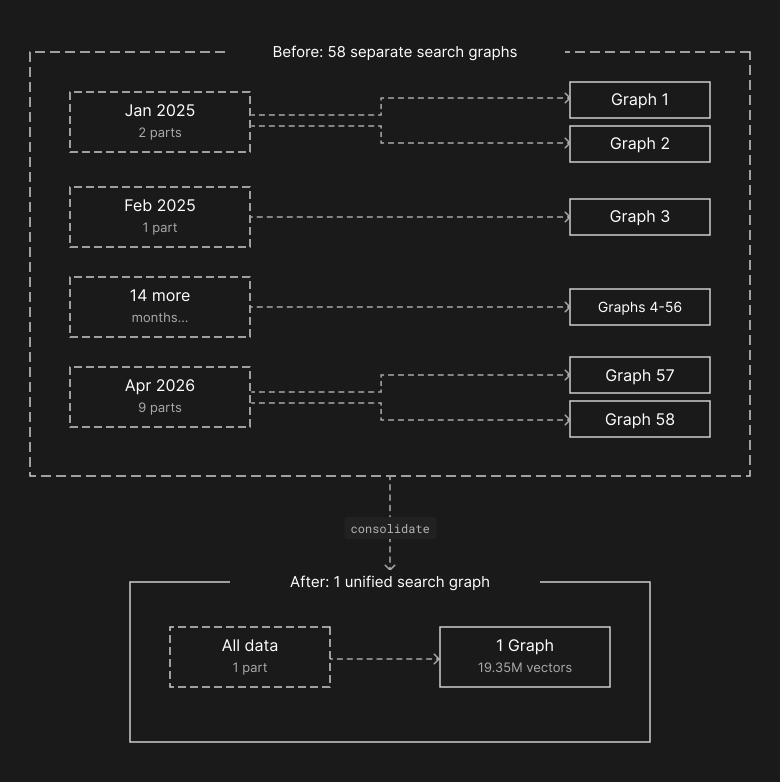
The fix: We dropped the partition key from the datasource definition and deployed the change. The customer didn't have to write a migration, spin up a backfill job, or coordinate cutover. Tinybird Forward detected that the schema change couldn't be handled with a simple ALTER, automatically rewrote the datasource, and backfilled all 19.35 million rows into the new layout in the background while the live version kept serving queries. Once the rewrite landed, we ran an OPTIMIZE TABLE ... FINAL to merge the resulting parts into one. The result: one partition, one part, one HNSW graph covering every row in the dataset.
That single graph could now see all the data at once. Instead of fifty-eight small graphs each returning their own candidates, one global graph navigated directly to the nearest matches and pointed ClickHouse at just a handful of granules to read.
Insight 2: The index must live in RAM
After consolidation, we expected fast queries. Instead, we got 170-second response times. Something was still very wrong.
The HNSW graph for 19.35 million vectors at 768 dimensions is large. The quantized vectors alone take about 30 GB, and the graph structure adds another 5 GB. The total: roughly 35 GB of index data that must be fully loaded into memory for the graph traversal to work.
The default vector_similarity_index_cache_size in ClickHouse is 5 GB. Our index was seven times that size. Every query triggered a full load from object storage into memory, only to have most of it evicted before the next query could use it.
The fix: We increased the index cache to 40 GB on each replica so the entire graph could stay resident in RAM. After a restart and a few warm-up queries, we checked the metrics:
| Metric | Value |
|---|---|
| Index cache bytes loaded | 36.6 GB |
| Index cache cells | 1 |
One cell. The entire HNSW graph for 19.35 million vectors, fully loaded as a single structure in memory.
Queries dropped from 170 seconds to approximately 26 milliseconds. That's a 6,500x improvement from a single configuration change.
Insight 3: Latency stays flat regardless of top-K
This was the finding that genuinely excited the customer. We expected that requesting more results would proportionally increase response times. It didn't.
| Results requested (LIMIT) | Response time |
|---|---|
| 10 | ~26 ms |
| 100 | ~100 -- 200 ms |
| 500 | ~90 -- 230 ms |
| 1,000 | ~80 -- 200 ms |
Whether you ask for 10 results or 1,000, the response time is in the same ballpark. The reason is that the HNSW graph traversal dominates the query time, and it does roughly the same amount of work regardless of how many results you request. The actual data read, fetching the rows for your top-K results, is a small fraction of the total cost.
The customer told us: "The response times don't vary with top-K. This opens a great avenue for us."
Their previous solution capped results at 100. Now they could retrieve 1,000 semantically similar posts in under 200 milliseconds, build richer audience segments, and do it all through a single Tinybird API endpoint.
The results
Here's the full picture of what changed:
| Metric | Before | After |
|---|---|---|
| HNSW graphs | 58 (fragmented across parts and partitions) | 1 (global) |
| Index cache | 5 GB (default, too small) | 40 GB (fits entire index) |
| Query latency | 15 -- 48 seconds, frequent timeouts | 80 -- 200 ms, stable |
| Granule skip rate | Minimal (graphs too fragmented to be effective) | 87.5% of granules skipped |
| top-K sensitivity | N/A (couldn't complete queries) | Flat: same latency for 10 or 1,000 results |
| Step | What changed | Latency |
|---|---|---|
| Starting point | 58 fragmented graphs, default cache | 48,000 ms (+ timeouts) |
| After consolidation | 1 graph, default 5 GB cache | 170,000 ms (index loaded from disk every query) |
| After cache tuning | 1 graph, 40 GB cache, warm | 26 ms (LIMIT 10) |
| Final (high top-K) | Same config, LIMIT 1,000 | 150 ms |
The improvement from start to finish: roughly 1,800x faster. From timeouts measured in minutes to responses you'd barely notice in a UI.
What this means for you
If your use case fits the pattern we tested (ingest a dataset, then query it for semantic similarity) vector search in Tinybird just works. You may not need another service to your stack.
The workflow:
- Ingest your data with embeddings into a Tinybird datasource
- Add a vector similarity index on the embedding column
- Publish an API endpoint that accepts a query embedding and returns the nearest matches via HTTP
The Tinybird API handles the query side natively. You pass the query embedding as a parameter, and the endpoint returns the top-K most similar rows with their distance scores. No separate infrastructure, no additional vendor, no data synchronization between systems.
There is one caveat worth mentioning: the Tinybird CLI and API don't yet natively support creating vector similarity indexes through the standard resource files. For this evaluation, we added the index using ClickHouse's ALTER TABLE directly. If more customers find this capability useful, native support in the Tinybird workflow will follow.
Coming in Part 2: making it work in production
Everything we showed above is the ideal scenario. One partition, one part, one fully cached index. No ongoing ingestion. The data sits still and the queries fly.
Production is messier.
In a real deployment, data arrives continuously. Every insert creates a new data part, and each new part gets its own little HNSW graph. Background merges consolidate parts over time, but the index fragments again with every new batch of data. You can't run OPTIMIZE TABLE ... FINAL on a live production system without careful thought. It's expensive and blocks other operations.
The customer recognized this too. Their production scenario involves continuous ingestion and cross-partition queries, exactly the case where maintaining a single, warm, global index is hardest.
In Part 2, we'll tackle that head-on:
- How to handle continuous ingest without fragmenting the index into dozens of small graphs
- Parameter tuning for the four-way trade-off between query speed, memory usage, ingestion cost, and results accuracy
- Strategies for keeping the index warm and merged, including scheduled optimization and deferred index materialization The ideal case proved that the engine can deliver. The next challenge is keeping that performance in a system that never stops ingesting.