



When we launched Forward, we made a bet: local-first development with a CLI workflow and nudging to CI/CD would be the future of building with Tinybird. And it is. For production work, for team collaboration, for serious data projects, or to work with coding agents.
But we missed something.
You told us. Classic users missed in Forward some of its browser experience after migrating. While development in Forward is a great experience, users missed how fast and flexible Classic was when it came to querying data easily from the UI. And we felt it ourselves: sometimes you just need to run a quick query or check a chart. Opening your terminal, or connecting a BI tool or something of the sort is overkill for something as simple as "let me see what's in this table."
So we're bringing back the browser experience from Classic, yet much improved for Forward.
And they are available for your Cloud environment, in your branches or in your local environment.
What's back
Playgrounds: SQL Editor in the Browser
Write SQL. Hit run. See results. No files. No deploys. Just queries. Want AI to write the SQL or correct it? You can do that too.
Playgrounds is a SQL editor built directly into the Forward UI, specially designed to match the structure of Tinybird's pipes with different nodes.
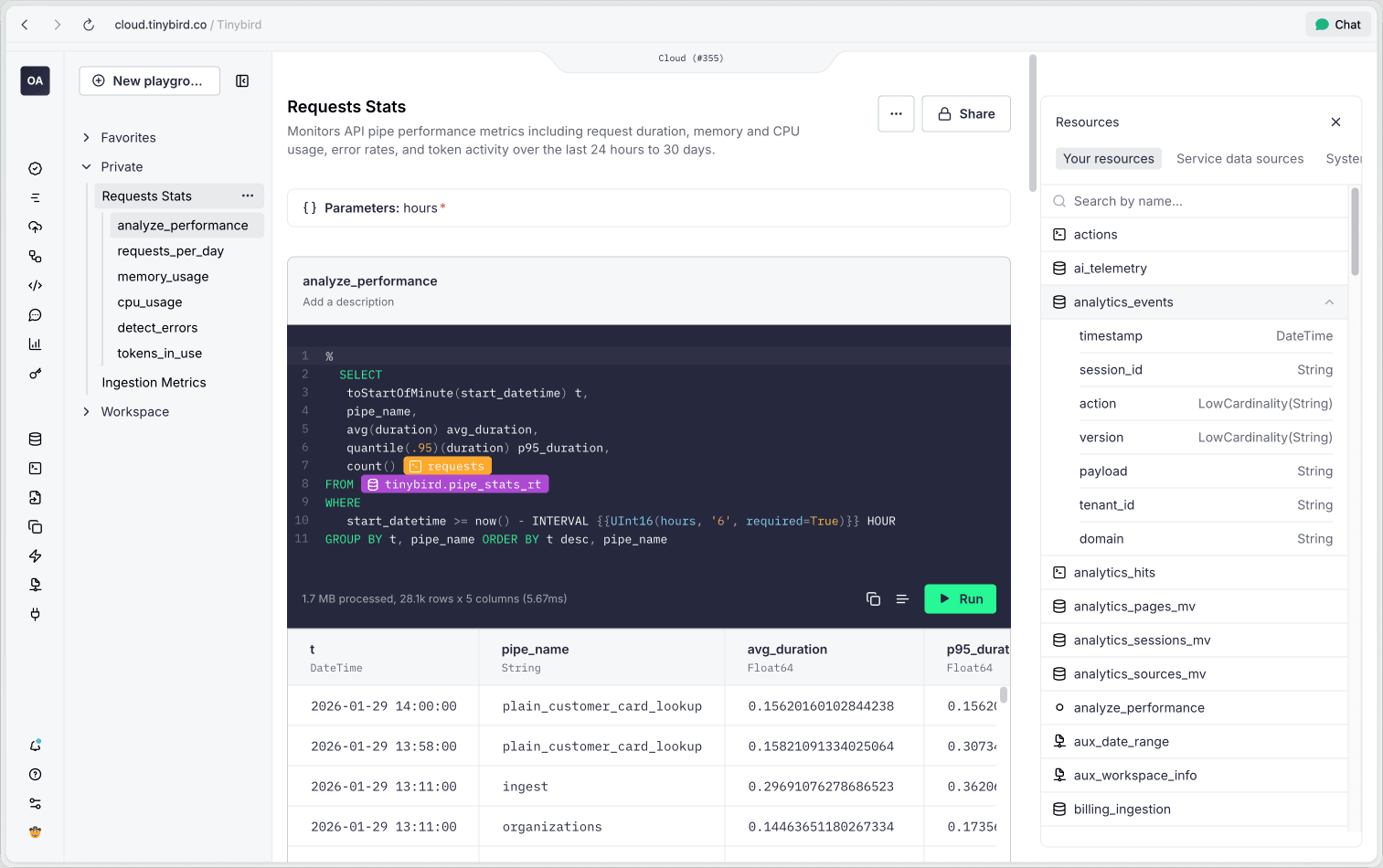
They include everything you loved from Classic, plus:
- Private or Shared - You can have your own personal playgrounds, or you can play together with everybody else on your workspace.
- Template parameters — Set parameter values through UI inputs, so you can debug your endpoints with different values as you work. That means you can take a production API, open the SQL code in a playground and debug/tweak as needed.
- In context information - to see metadata about your data sources: columns, compression, settings or the query plan for your node.
- AI aides - to create and edit your queries with Natural language, to automatically name nodes or update their descriptions or to interpret your query plan
- New and extended controls — For full screen when you need to focus, control over results
- Re-order nodes — Drag and drop to organize your workspace
- Export to JSON/CSV — Sometimes you just want to do something else with the result of a query.
Also, Playgrounds are fully integrated everywhere else in the UI, so it's easy to turn any production API endpoint, datasource or exploration via chat into the underlying SQL query that powers it.
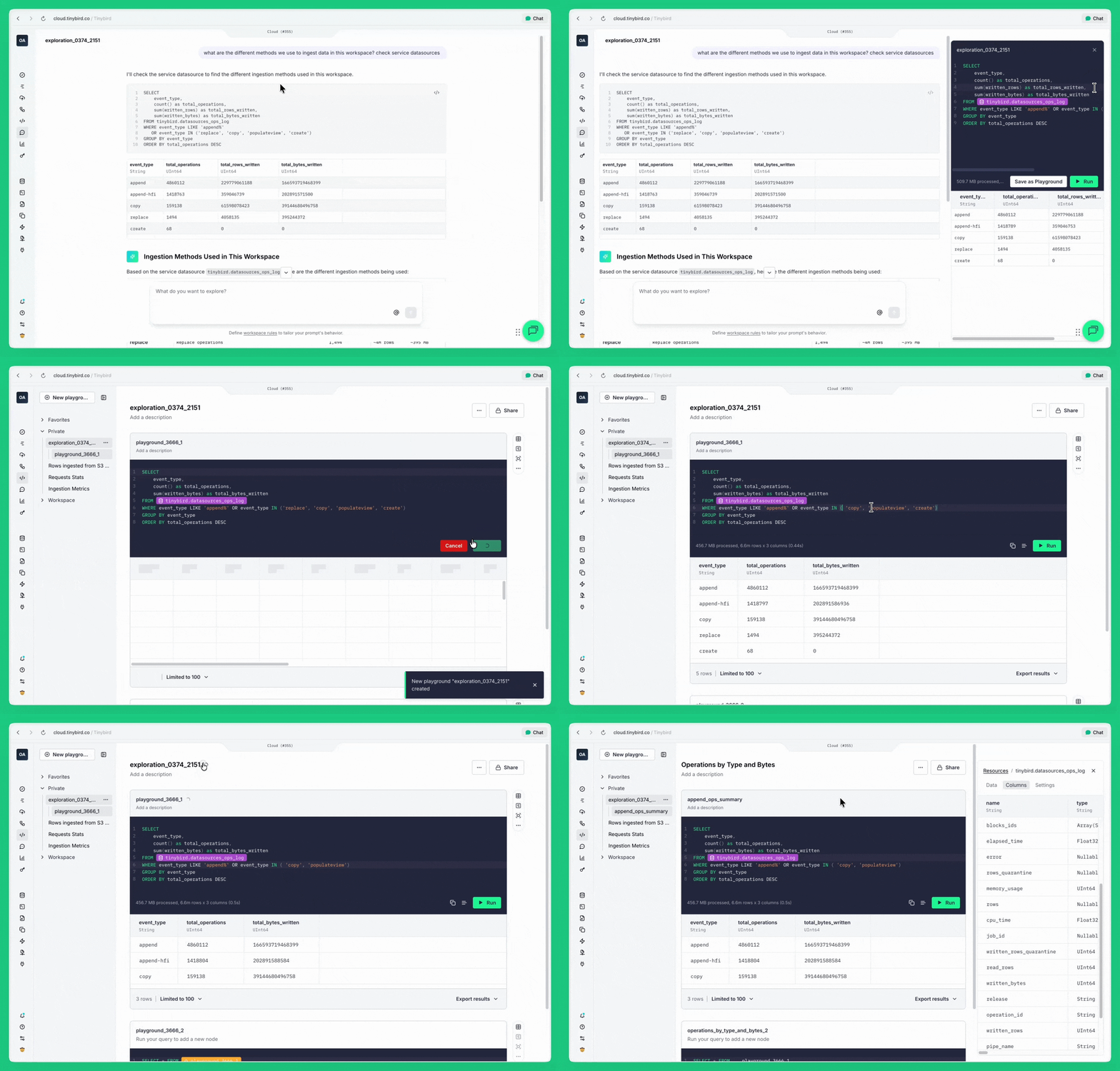
When to use Playgrounds:
If you don't know exactly what you are looking for, we recommend you simply use Explorations to help you find the answers. But if you do know, and specially if you do it repeatedly, nothing beats a SQL query. That's when Playgrounds are great.
But not just that:
- Tinybird code has generated a Materialized View for you and you want to test it before deploying.
- You built an API endpoint with parameters and want to see how it behaves with different date ranges and values.
- You want to dive deeper into what's actually landing on a given table.
- You want to dive deeper into how Explorations came up with a given analysis.
- Your teammate is stuck on a gnarly join and you want to jump in and help debug it together.
Time Series: Quick data visualizations over time
Pick a datasource. Choose which date/datetime column and see records over time. Boom.
From there, iterate as you wish. Whether you want to see averages, quantiles, max values or group by one column or more, you can do it with a couple clicks.
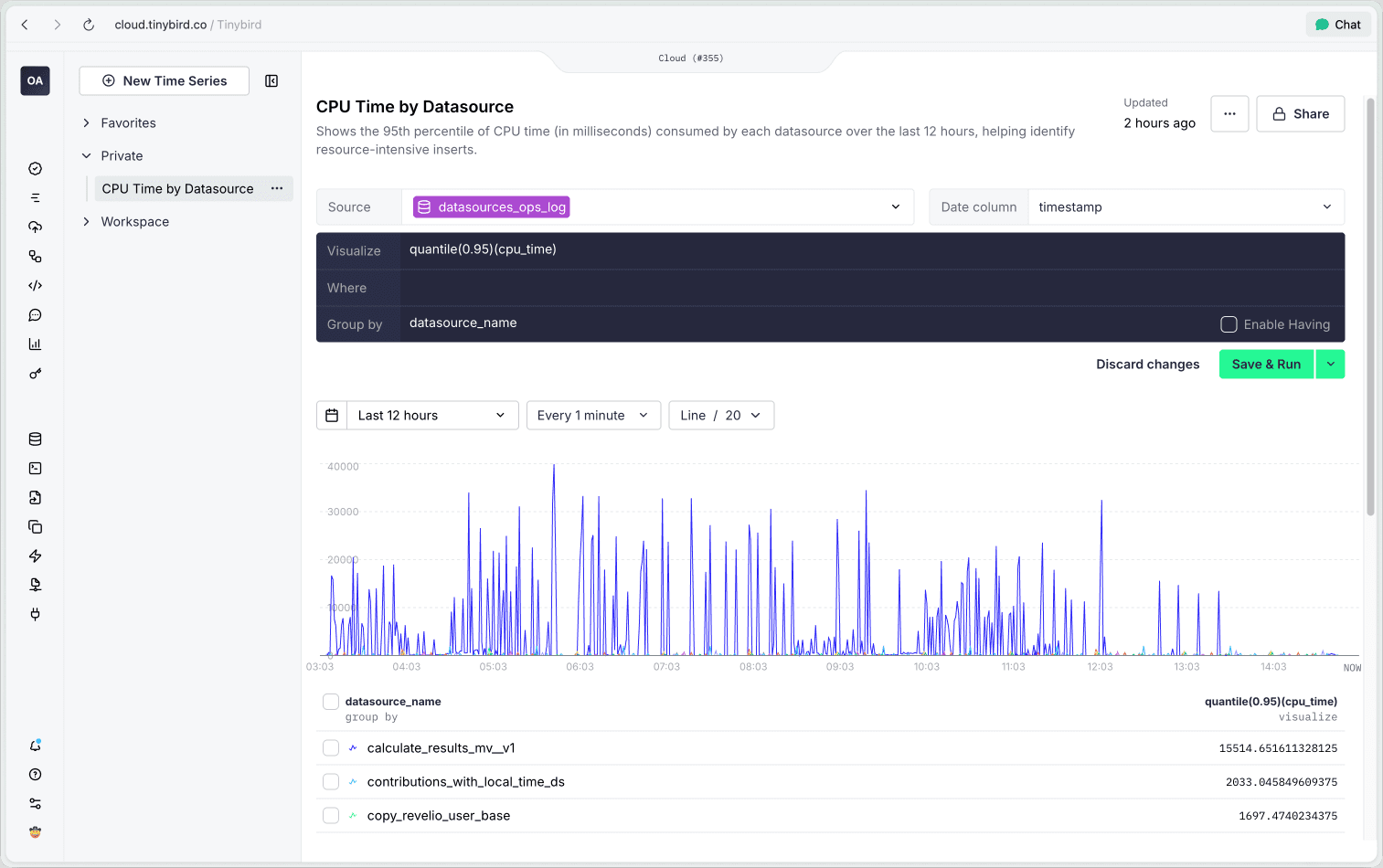
Time Series now has its own spot in the navigation, they are no longer hidden within Explorations. The same simple experience from Classic, with improvements:
- Open from Observability — Click any Observability chart to explore it further.
- Query cancellation — Cancel long-running queries mid-execution.
- Smart zoom — Zoom in and the time selector updates automatically.
- In context information - All the cool metadata you can now see in Playgrounds about the data source? It's here too.
- Private or Shared - And just like Playgrounds, you can have your own personal Time Series visualizations or share them with everybody else on your workspace.
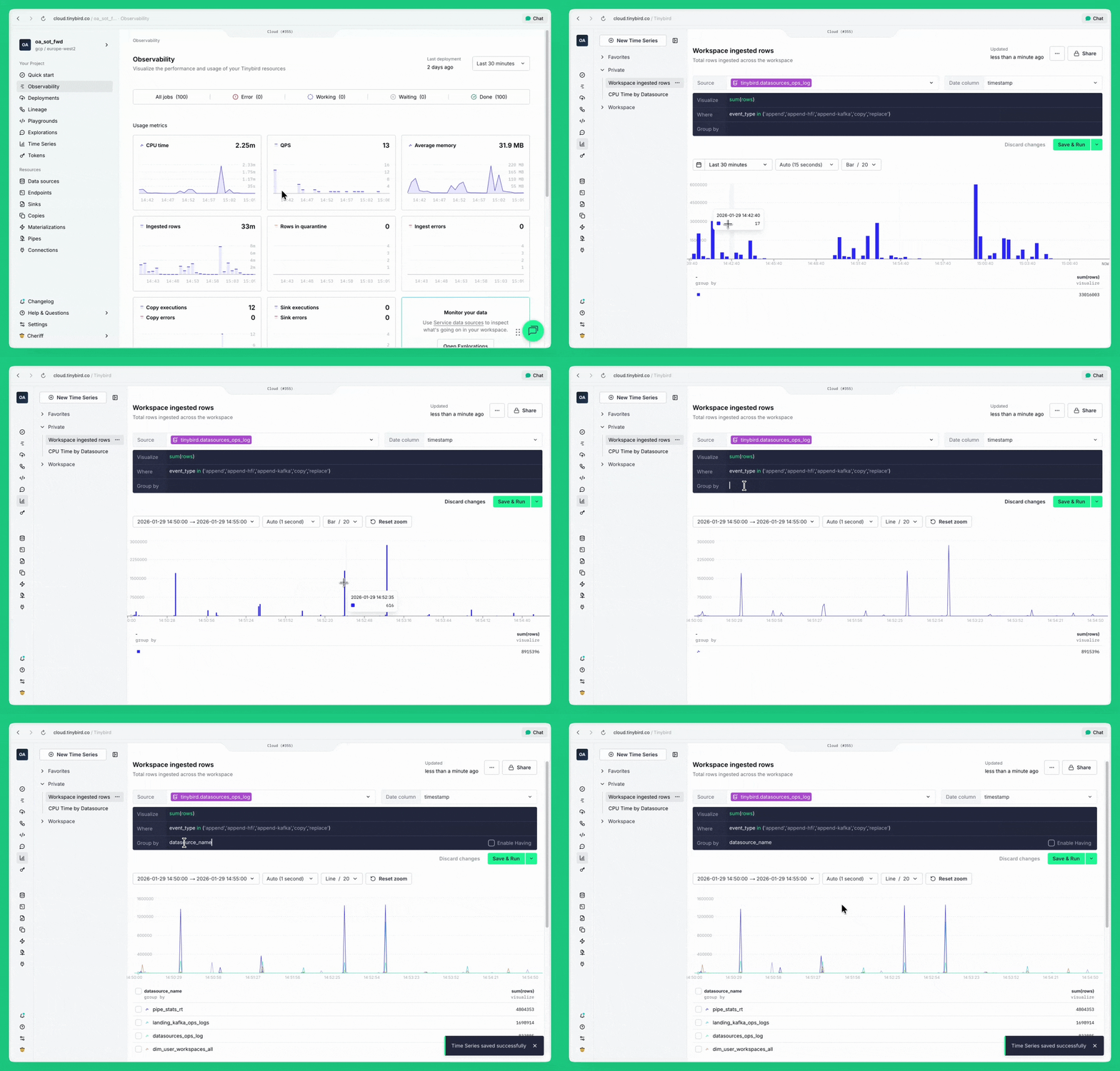
When to use Time Series:
Your data ingestion slowed down an hour ago and you need to see exactly when it happened. An endpoint is feeling slow and you want to eyeball the latency trend over the last day. Your Kafka consumer is falling behind and you need to visualize the lag to understand if it's getting worse. You're curious about a spike in errors or just want to see how traffic has been trending. You don't need a BI tool or a dashboard, you just need to see the chart, right now.
In context information in a Split Screen
We also added the missing split screen view with a bunch of improvements. Check a preview of the data, the settings, lineage, columns details, and more. And explore all data sources, whether they are yours, they are Tinybird Service Data Sources or the underlying System Tables.
Why now?
We launched Forward focused almost entirely on the local experience. The browser was for monitoring. That worked for power users with established workflows.
But Forward should work for everyone. It should be great not just for developers, but for anyone who needs to understand the data in detail.
Whether you're debugging a pipe, exploring unfamiliar data, checking if your ingestion is working, or just curious about a trend, you shouldn't need to leave the browser.
This isn't about replacing local development. This is about making it easier to work with data, in a polished and fast UI. The quick checks. The prototypes. The curiosity. The debugging.
Part of a bigger shift
Branches brought git-based workflows to the UI. Now Time Series and Playgrounds bring querying and visualization. The browser is becoming a first-class citizen again.
More is on the way, so you can choose the right tool for each moment.
We're making Forward the complete experience: query, visualize, develop, observe: all from the browser when you need it, all from the CLI when that's better.
For Classic users: It's time
If you've been holding off on migrating because you'd miss the browser experience... Well, it's back!
Same Time Series and Playgrounds, yet improved. In Forward.
And that's without giving up on everything Forward offers: automatic schema changes, branches, better observability, modern UI, and a platform that keeps getting better.
Try them now
Time Series and Playgrounds are available in Forward today. Open your workspace and look for them in the navigation.


