



When we shipped branches in beta, connectors didn't work. If your data came from Kafka or S3, you couldn't test with real data. Preview deployments weren't there either.
We fixed all of that. This post is about the engineering behind it: how we share production data without copying it, isolate connectors per branch, and deploy changes to production with zero downtime.
Branch architecture
A branch is a full Tinybird project in an ephemeral cloud environment. Its own ClickHouse® database, its own token namespace, its own API surface. You can truncate tables, redefine schemas, drop pipes. None of it touches production.
Branch creation is an API call (POST /v1/environments?name={name}), decoupled from git. Creation is asynchronous: Tinybird provisions compute, mirrors tokens, and optionally attaches partition data.
Each branch gets independent tokens with the same names and scopes as production, so your application code works unchanged. The SDK auto-detects the environment and resolves the right token (details in the GA post).
Zero-copy partition sharing
When you create a branch with --last-partition, Tinybird identifies the last modified partition per datasource and makes it available in the branch. A partition containing gigabytes of data "copies" without duplicating a single byte. No additional storage cost.
Hardlinks, not copies
Tinybird runs a fork of ClickHouse that preserves and extends zero-copy replication (which upstream ClickHouse® is removing) with storage/compute separation.
A production workspace is a ClickHouse database on a cluster configured with cloud storage (S3/GCS). A branch is a different database on the same cluster, with its own tables and its own ZooKeeper paths.
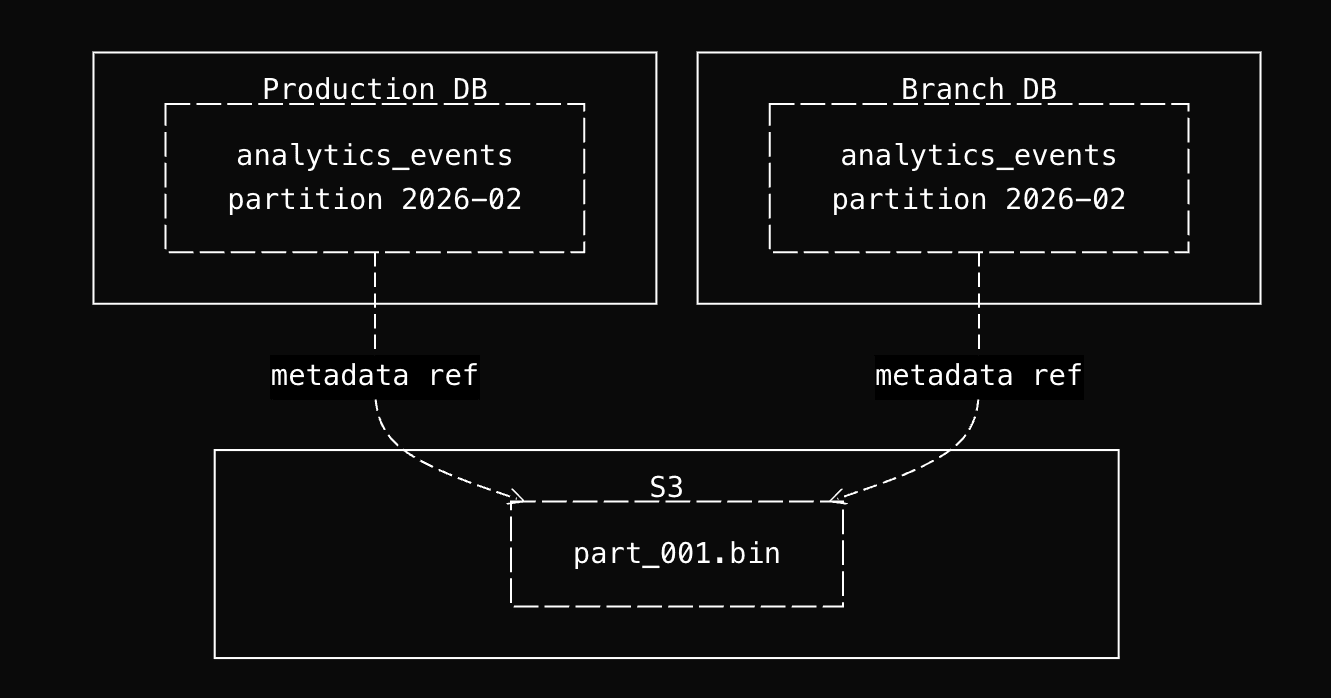
When you create a branch with --last-partition, Tinybird executes ALTER TABLE ... ATTACH PARTITION FROM to bring partitions from the production tables into the branch tables. The key is what happens at the storage layer.
ClickHouse's cloneAndLoadDataPart() checks whether source and destination tables are on the same disk. Since both databases share the same cluster and storage policy (same S3 bucket), they are. So ClickHouse takes the hardlink path: it creates a new metadata entry in the branch table that references the same S3 object keys as the production table and increments a reference count. No CopyObject calls to S3. No bytes transferred.
Why branches can't corrupt production
This sounds dangerous. Two databases pointing at the same S3 objects. But it's safe because ClickHouse® parts are immutable. Once a part is written to S3, it is never modified in place.
- INSERT creates new parts (new S3 objects). The shared parts are untouched.
- ALTER TABLE UPDATE / DELETE (mutations) read the existing parts, write new parts with the changes applied, and mark the old parts for deletion. The old S3 objects stay until garbage collection runs.
- Merges combine small parts into larger ones, producing new S3 objects. The originals are marked for deletion.
- TRUNCATE removes all metadata references from that table. The S3 objects are only deleted when the reference count across all tables drops to zero.
Every write operation produces new objects. The shared objects are read-only. The branch can truncate, mutate, or rewrite its tables without affecting production, and production can keep ingesting without affecting the branch.
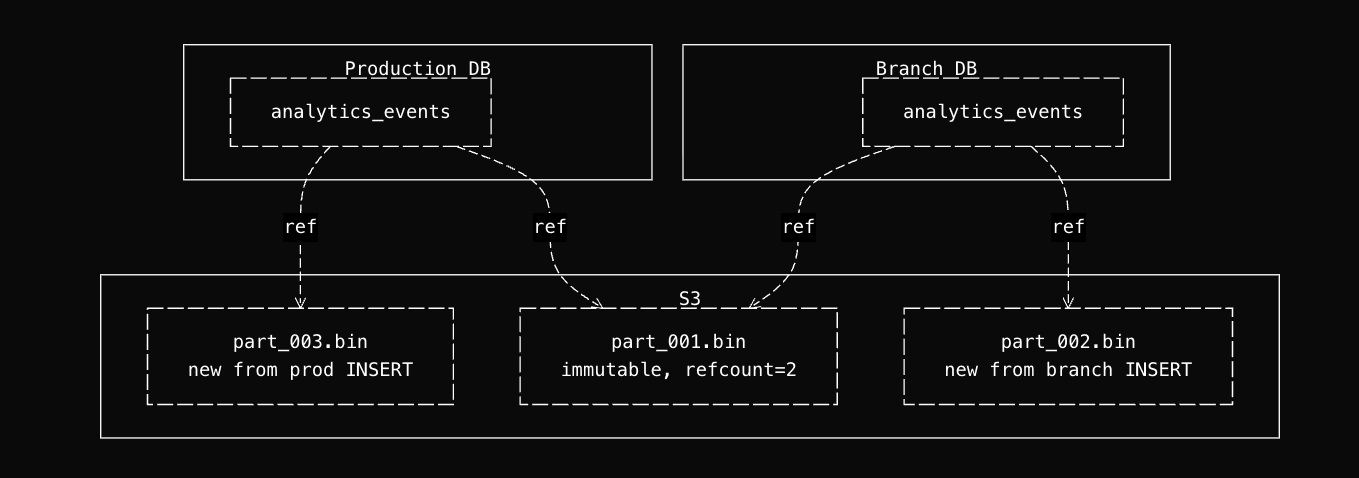
When the branch is deleted, its metadata references are removed, reference counts decrement, and S3 objects are garbage-collected only if no other table references them.
Why last partition, not the full table
--last-partition attaches one partition per datasource. This is a deliberate choice, not a limitation. Attaching the full table would mean replicating potentially hundreds of partition references at the metadata level for data you'll never query in an ephemeral branch.
One partition is enough: schema changes validate against real production values, and query performance on a single partition gives a reasonable proxy for the full table.
The more important data source in a branch is live connector data. Start a Kafka consumer with its own group, or point an S3 connector at a staging bucket. You get real-time ingestion in an isolated environment without replicating production load into an ephemeral branch.
What you give up
The zero-copy path only works when source and destination share the same disk configuration (same S3 bucket/storage policy). If branches ran on a separate cluster or region, ClickHouse would take the freezeRemote() path and copy every S3 object. Currently all branches run on the same cluster as production. Dedicated branch infrastructure is on the roadmap, which would also remove this constraint.
Production can't garbage-collect S3 objects that a branch still references. Long-lived branches can delay cleanup of old parts. Delete branches when you're done.
The attach operation creates hardlinks and registers parts in ZooKeeper individually. A large partition can contain hundreds of parts, each requiring multiple S3 metadata operations and ZK writes. At 50GB+, the cumulative latency can exceed timeouts, so the attach is skipped for that datasource.
The Classic branches implementation works differently.
Connector isolation
Copying data at rest is the easier part. The hard engineering problem is connectors: Kafka consumers, S3 sync jobs, GCS imports. Each has state (consumer group offsets, sync cursors, SQS queues) that can't be naively shared between production and a branch.
Kafka: new group, latest offset
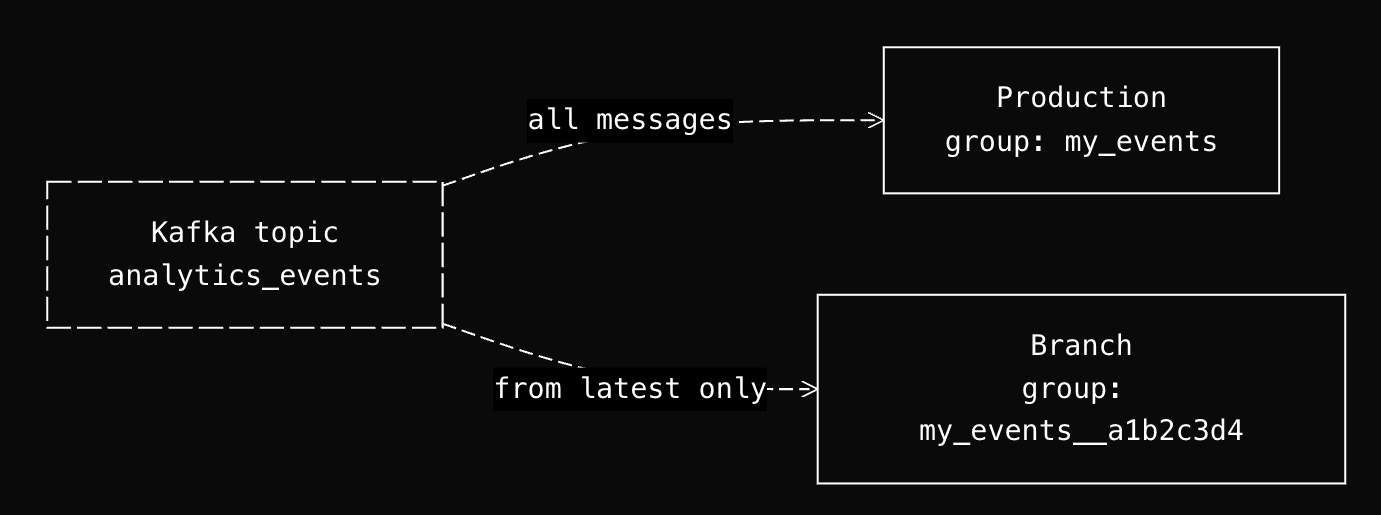
If a branch joins the same consumer group as production, it steals messages. If it starts from offset 0, it replays the entire topic history. Neither is acceptable.
The solution: branches create Kafka connectors stopped by default, and when started, they use a new consumer group with a unique ID that starts from the latest offset.
When started, the start endpoint generates a new kafka_group_id by appending a UUID suffix: {original_group_id}__{8-char-uuid}. Since this group has never committed offsets, Kafka's auto.offset.reset starts from the latest offset. The branch only sees new messages arriving after it starts.
S3 and GCS: sample, don't sync
The problem is different from Kafka. A production S3 connector maintains a sync cursor and watches for new files. It may have synced thousands of files over months. A branch needs representative data, not a full backfill.
The solution: POST /v0/datasources/{name}/sample imports the latest files from the bucket (1-10) without touching the production sync cursor.
Three constraints make this safe: match_limit caps files processed (1-10, default 1), an epoch from_time bypasses the production last_sync_date, and skip_last_sync_update ensures the sample doesn't update the origin datasource's sync cursor.
The --with-connections flag
--with-connections enables connectors in the branch by creating DataLinkers for your connector datasources. Without the flag, connector datasources exist in the branch (they're part of the schema), but they have no active connectors.
tb dev defaults to --with-connections on branches. Branches inherit production secrets by default; override with tb secret set to point at a staging cluster or test bucket instead.
From branch to production
Branches are where you iterate. The deployment API is how changes reach production.
Schema migrations as an API call
Manual ClickHouse schema migrations mean new tables, materialized views, backfills, UNION views, traffic swaps, and cleanup, multiplied by every table in the dependency chain. This is the problem tb deploy solves:
tb deploy
The deployment goes through four stages:
Initialization. Tinybird analyzes your schema changes and builds a dependency graph: which tables changed, which materialized views depend on them, what backfills are needed.
Data migration. For schema changes that require it, Tinybird creates auxiliary tables, runs a backfill, and maintains UNION views so production reads keep working during the transition.
Promotion. A metadata swap points production to the new tables.
Cleanup. Old tables are removed, auxiliary tables are merged back.
For backward-incompatible changes, you declare a FORWARD_QUERY to transform existing data (details in the tb deploy post). The algorithm only migrates from the most upstream change downstream, so a downstream materialized view change leaves your 14TB landing table untouched.
tb deploy --check dry-runs it.
CLI-first is agent-first
Everything described in this post (branch creation, partition attach, connector isolation, schema migrations) is an API call. That's not an accident. Tinybird is CLI and API-first: every operation you can do in the UI, you can do from a terminal or an HTTP request.
This was designed for humans. But it turns out the same properties that make a CLI and API ergonomic for developers make them accessible to coding agents. An agent doesn't need to figure out how to write a ClickHouse migration script, manage consumer group offsets, or coordinate a blue-green deployment. It runs tb branch create, tb dev, and tb deploy. The complexity of branching, authentication, connector isolation, and schema migrations is wrapped into commands.
Tinybird skills close the last gap. They give agents the context they need: what commands exist, what flags to use, how to structure a datasource file, how to write a pipe. The agent reads the skill, calls the CLI, validates against real data in a branch, and deploys. The full workflow in the GA announcement shows what this looks like in practice, including preview deployments and automatic token resolution per CI environment.
Build with it
Branches are available now. Break something in a branch instead of production.
- Branches docs
- CI/CD docs
- web-analytics-starter-kit: full working example with branches, preview deployments, and CI/CD
- TypeScript SDK
Tell us what works and what doesn't: Slack community (#feedback) or GitHub.


