



When you open a pull request on Vercel, your frontend gets a preview deployment. A unique URL, isolated from production, where reviewers can see the change before it ships.
Your data layer didn't get one. The preview app still queried production endpoints, so any data model change was invisible until after the merge.
Now it does. One command in CI creates an isolated Tinybird environment per PR. Your preview app automatically queries the preview data. Merge to main, and your data layer deploys to production alongside your app.
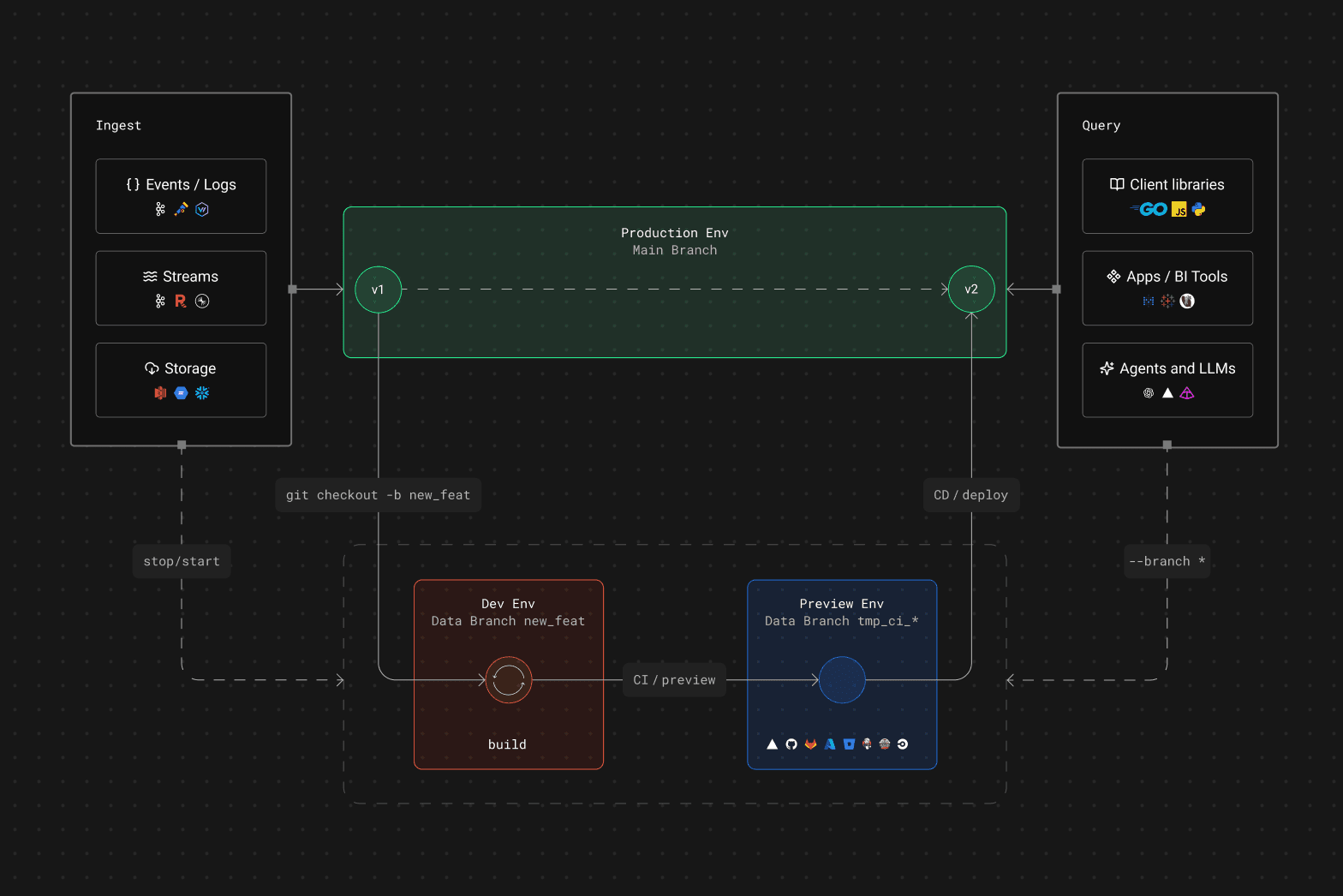
Here's how it works, end to end. We'll use the web-analytics-starter-kit as a concrete example.
The CI workflow
This is the full CI pipeline. It tests locally, then creates a cloud preview:
name: Tinybird - CI Workflow

on:
  pull_request:
    branches: [main]

env:
  TINYBIRD_HOST: ${{ secrets.TINYBIRD_HOST }}
  TINYBIRD_TOKEN: ${{ secrets.TINYBIRD_TOKEN }}

jobs:
  ci:
    runs-on: ubuntu-latest
    services:
      tinybird:
        image: tinybirdco/tinybird-local:latest
        ports:
          - 7181:7181
    steps:
      - uses: actions/checkout@v4
      - uses: pnpm/action-setup@v4
      - uses: actions/setup-node@v4
        with:
          node-version: 22.x
          cache: 'pnpm'
      - run: pnpm install
      - run: pnpm run tinybird:build -- --local
      - run: pnpm run tinybird:preview
Two things happen:
tinybird build --localcompiles your project against a Tinybird Local container running as a CI service. This validates schemas, SQL, and resource dependencies without touching any cloud environment. Fast, deterministic, free.tinybird previewcreates a Tinybird Cloud branch namedtmp_ci_<git_branch>, builds your resources, and deploys them. If the branch already exists from a previous push, it recreates it clean. One isolated Tinybird environment per PR.
That's it. No branch management, no token wiring, no environment configuration.
Automatic branch resolution
This is the part that makes it zero-config.
Both the TypeScript and Python SDKs detect preview environments and resolve the correct branch token automatically. Your app code doesn't change between development, preview, and production:
import { createTinybirdClient } from "@tinybirdco/sdk";

const tb = createTinybirdClient({
  token: process.env.TINYBIRD_TOKEN,
  // ... datasources, pipes
});

// This queries the right environment automatically:
// - Production token → production data
// - Preview deployment → preview branch data
// - Local dev → local data
const results = await tb.query(topPages, { start_date: "2026-03-01" });
Here's what happens under the hood:
- The SDK checks if it's running in a preview environment by reading platform-specific environment variables (
VERCEL_ENV=preview,GITHUB_HEAD_REF,CI_MERGE_REQUEST_SOURCE_BRANCH_NAME, etc.). - If it detects a preview, it reads the git branch name from the platform's environment (
VERCEL_GIT_COMMIT_REFon Vercel,GITHUB_HEAD_REFon GitHub Actions,CI_COMMIT_BRANCHon GitLab, and so on). - It sanitizes the branch name and maps it to the Tinybird preview branch:
feature/user-metrics→tmp_ci_feature_user_metrics. - It fetches the branch token from the Tinybird API using your workspace token, caches it, and uses it for all subsequent queries.
If the preview branch doesn't exist (you forgot to run tinybird preview in CI), the SDK logs a warning and falls back to the workspace token. Your app doesn't crash.
Supported platforms
The tinybird preview command auto-detects your git branch in CI from these platforms:
| Platform | Environment variable |
|---|---|
| Vercel | VERCEL_GIT_COMMIT_REF |
| GitHub Actions | GITHUB_HEAD_REF / GITHUB_REF_NAME |
| GitLab CI | CI_MERGE_REQUEST_SOURCE_BRANCH_NAME / CI_COMMIT_BRANCH |
| CircleCI | CIRCLE_BRANCH |
| Azure Pipelines | BUILD_SOURCEBRANCHNAME |
| Bitbucket Pipelines | BITBUCKET_BRANCH |
| Travis CI | TRAVIS_BRANCH |
| Jenkins | GIT_BRANCH |
You can also override everything with TINYBIRD_BRANCH_NAME (for the branch name) or TINYBIRD_BRANCH_TOKEN (to skip resolution entirely).
The full cycle
Here's what happens when a developer adds a new metric, say, unique visitors by country:
Developer checks out a new branch
  │
  ├─ tb build                      → builds against your configured dev_mode
  │   └─ edit datasources, endpoints, pipes, iterate
  │   └─ dev_mode=branch/local  → builds to a Cloud branch matching your git branch / builds to Tinybird Local
  │
  ├─ git push → open PR
  │
  ├─ GitHub Actions runs CI
  │   ├─ tinybird build --local    → validates schemas and SQL against Tinybird Local
  │   └─ tinybird preview          → creates Cloud preview branch for this PR
  │
  ├─ Vercel creates preview deployment
  │   └─ SDK auto-resolves to Tinybird branch
  │       └─ Preview app shows the new chart with real data
  │
  ├─ Reviewer opens preview URL
  │   └─ Sees the actual result, not just the code diff
  │
  └─ PR merged to main
      └─ CD runs: tinybird deploy  → data layer promoted to production
The developer validates locally before pushing. CI validates again in a clean environment. The reviewer doesn't read SQL diffs and reason about the output — they open the preview URL and see the dashboard with the new metric rendering real data.
The CD workflow
On merge to main, one command deploys to production:
name: Tinybird - CD Workflow

on:
  push:
    branches: [main]

env:
  TINYBIRD_HOST: ${{ secrets.TINYBIRD_HOST }}
  TINYBIRD_TOKEN: ${{ secrets.TINYBIRD_TOKEN }}

jobs:
  cd:
    runs-on: ubuntu-latest
    steps:
      - uses: actions/checkout@v4
      - uses: pnpm/action-setup@v4
      - uses: actions/setup-node@v4
        with:
          node-version: 22.x
          cache: 'pnpm'
      - run: pnpm install
      - run: pnpm run tinybird:deploy
Your data layer deploys alongside your app. Same trigger, same pipeline, same merge.
Preview branches with connectors
If your project uses Kafka, S3, or GCS connectors, preview branches can include them:
tb preview --with-connections
Kafka connections start stopped by default (you don't want a preview branch consuming from production topics). S3/GCS connectors support sample imports. Combined with --last-partition, your preview gets real schema, real data, and real connectors.
What this replaces
Before previews, the workflow for data layer changes was:
- Write the SQL change
- Open a PR with the code diff
- Reviewer reads the SQL and tries to reason about the output
- Merge to main and hope
- Check production after deploy
Now:
- Write the change
- Open a PR
- CI validates locally and creates a preview
- Reviewer opens the preview URL and sees the result
- Merge to main, deploy with confidence
The data layer is no longer the part of your stack you deploy blind.


