



Tinybird runs ClickHouse® with compute-storage separation: S3 (AWS) or GCS (Google Cloud) holds all the data, and local SSDs on each replica act as a cache layer. On top of that, our ClickHouse® fork adds optimizations like a packed part format and zero-copy replication maintenance that make this architecture cheaper and more reliable at scale.
The high-level architecture
Each Tinybird workspace is a database on a ClickHouse® cluster. A cluster has two or more replicas, and each replica has a local SSD cache plus access to object storage:
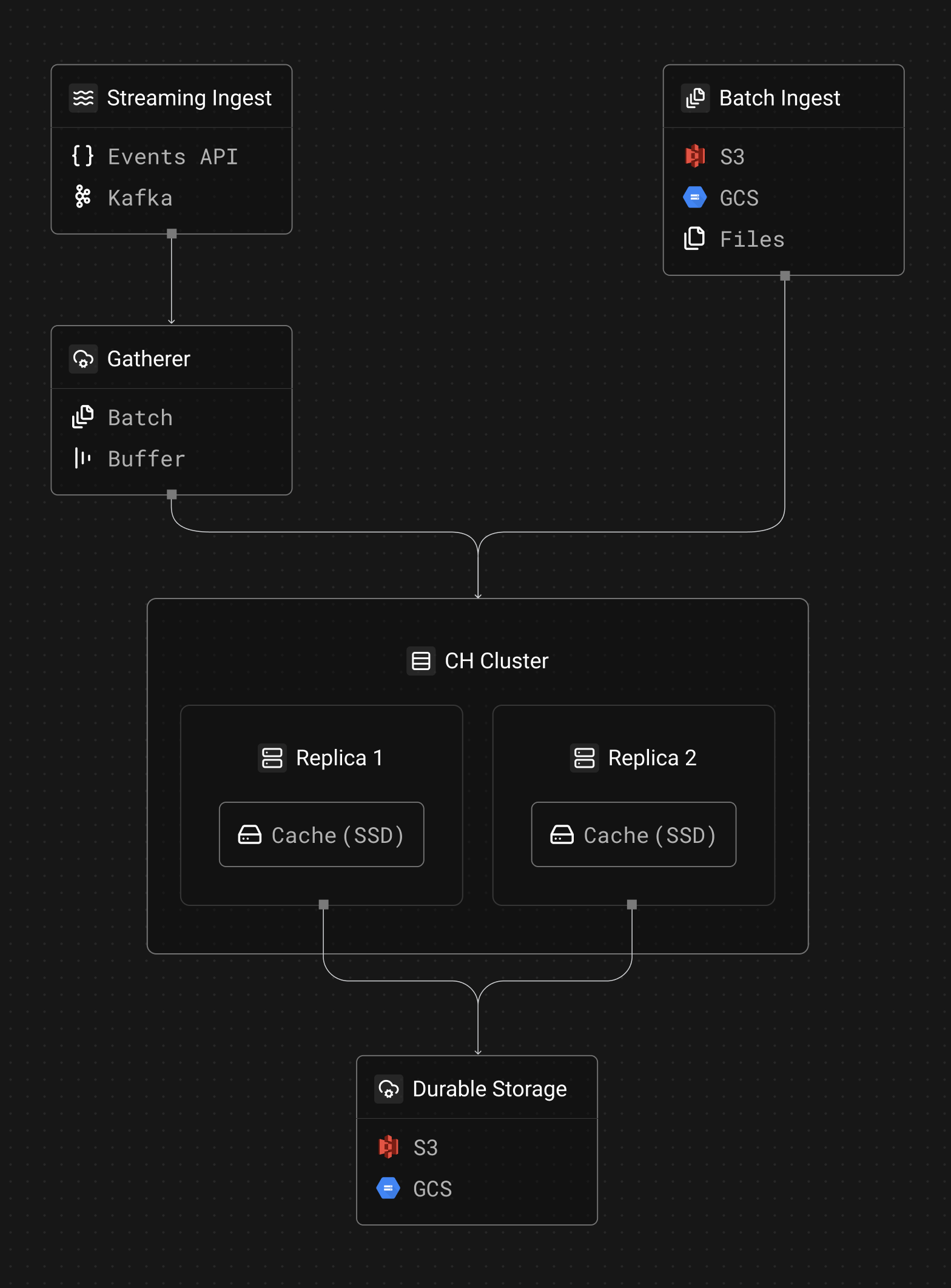
Object storage (S3/GCS depending on your region) is where all data is written and stored. This is where durability comes from, and it's what enables zero-copy replication (replicas share the same underlying data in S3 without duplicating it). All writes go to S3/GCS.
Cache disk is a local SSD on each replica that caches data fetched from object storage. When planning a query, ClickHouse determines which blocks it needs to read. If the data is cached locally, it reads at SSD speed. If not, it fetches from object storage and caches it for future reads. Queries can also be fast over uncached data, especially CPU-intensive aggregations, because ClickHouse is designed to process data efficiently regardless of where it's read from.
How data gets in
Data enters the ClickHouse cluster through two paths:
Streaming ingest (Events API, Kafka) goes through the Gatherer, a component that batches and buffers incoming events before writing them to ClickHouse. Without the Gatherer, each individual event would create a tiny data part in S3, potentially reaching thousands of small files per second that the database would need to compact (merge, in CH's lingo). The Gatherer collects events and flushes them as larger batches, which is both cheaper (fewer S3 API calls) and better for ClickHouse's merge performance.
Batch ingest (S3, GCS connectors, or files to datasources API) writes directly to the ClickHouse cluster without going through the Gatherer. These sources already produce data in bulk and Tinybird limits the number of writes per minute via datasources API, so there's no need for an intermediate batching layer.
In both cases, writes go directly to object storage. The local SSD cache is purely a read-side optimization. When a new part is written, it lands in S3/GCS immediately and is available to all replicas via zero-copy replication.
How queries work
When a query hits Tinybird, ClickHouse determines which data blocks it needs to read. For each block:
- Check the local cache disk. If the data is cached locally, read it at SSD speed.
- Fetch from object storage. If the data isn't cached, ClickHouse fetches it from S3/GCS and caches it for future reads.
The first query over uncached data may be slower (it has to pull from object storage), but subsequent queries over the same data run at SSD speed. For most workloads, the actively queried data fits in the local cache.
How the local cache works
The cache disk is a local SSD attached to each replica. ClickHouse manages what goes in and out of the cache. A few details:
Disk type and size. The cache disk is a fast local SSD. The exact size scales with replica size, from 237 GiB on the smallest replicas to 7.6 TiB on the largest:
| vCPUs | AWS cache | GCP cache |
|---|---|---|
| 4 | 237 GiB | 375 GiB |
| 8 | 474 GiB | 375 GiB |
| 16 | 950 GiB | 750 GiB |
| 32 | 1,900 GiB | 1,500 GiB |
| 48 | 2,850 GiB | 3,000 GiB |
| 64 | 3,800 GiB | 3,000 GiB |
| 96 | 5,700 GiB | 6,000 GiB |
| 128 | 7,600 GiB | 6,000 GiB |
Cache eviction. ClickHouse manages cache eviction. When the cache is full and new parts need to be loaded, older or less-frequently-accessed parts get evicted.
Eviction safeguards. There are limits on how much data a single query can write to the cache. This prevents a large scan from flushing the entire cache and degrading performance for other queries.
No TTL. Parts in the cache don't expire on a timer. ClickHouse data parts are immutable: once written, they don't change (merges create new parts). So a cached part is either valid or it's been superseded by a merge, in which case it's no longer referenced and gets evicted naturally.
Zero-copy replication
Tinybird uses ClickHouse's zero-copy replication, which is one of the main reasons we maintain our own fork. Zero-copy replication means that replicas share the same data in S3 rather than each replica storing its own copy. This has two major advantages:
- Storage cost. You don't pay for N copies of your data in S3. There's one copy, and all replicas reference it.
- Replication speed. Adding a replica doesn't require copying terabytes of data. The new replica just needs to sync metadata and start caching data locally when reading.
The upstream ClickHouse project has deprecated zero-copy replication, which is one of the main reasons we forked. We maintain and improve it because it's fundamental to our architecture.
Packed part format: cutting S3 costs
One problem with running ClickHouse on S3 is that each MergeTree part consists of many small files (column data, indexes, checksums, etc.). Every file is a separate S3 object, and S3 charges per API call, not just per byte stored.
In our ClickHouse fork, we developed a packed part format that combines the metadata files in a MergeTree part into a single packed file in object storage. When ClickHouse needs to access any one of the original files, it reads the relevant byte range from the packed file. (Data files will follow — when they do, the savings will be even larger.)
This reduced our S3 write operations by 30-40% across production clusters. For customers with high ingestion rates, this translates directly into lower infrastructure costs.
What you don't have to manage
Everything described above (the local cache, zero-copy replication, the Gatherer, the packed part format) is infrastructure you never touch directly. Tinybird manages it for you.
In the SaaS offering, you don't configure any of this. In Enterprise, you control replica counts, sizes, and read/write weights. Either way, the storage architecture runs the same way under the hood.
Further reading
- Why we maintain a ClickHouse fork at Tinybird — packed part format, MergeTree optimizations, and CI/CD for our fork
- Self-serve replicas — how Enterprise customers manage their own replica topology
- Scaling real-time ingestion with multiple writers — how the Gatherer scales write throughput
- Tinybird's Kafka connector — how we built our Kafka ingestion layer
- ClickHouse Kafka Engine vs Tinybird connector — why we don't use ClickHouse's built-in Kafka engine


