



Very few people enjoy trying a new database. Maybe you like tinkering with new tech for your hobby projects, but when selecting a database for a production application, you don't want to dig deep into the internals of some niche open-source DBMS with 37 GitHub stars. You just want something that works.
Most developers, given the option, will choose Postgres, MySQL, or MongoDB as their next database regardless of the use case. These databases are familiar, well-supported, and can solve a decently wide range of database problems.
But when it comes to real-time analytics, these databases usually won't work. They're not built for real-time data ingestion, analytical workloads, big aggregates, complex joins, and/or column-based filtering even at a relatively modest scale. For a detailed comparison showing why MySQL struggles with analytics compared to ClickHouse®, see our comprehensive performance benchmarks. Even managed variants like Aurora MySQL face similar performance limitations for analytical queries.
There are three databases that I think are best for real-time analytics, and those are ClickHouse®, Apache Druid, and Apache Pinot.
2026 market update: current comparison pages for this topic consistently benchmark ClickHouse, Pinot, and Druid first, then add newer engines for specific workloads. Validate with your own concurrency and p95 latency profile before choosing.
I'll explain why they're great databases for real-time analytics, and how you can approach deployment and maintenance to simplify development over these highly specialized pieces of tech.
What is real-time analytics?
We can't talk about databases for a use case without understanding the use case for the database.
I've already written a good definitive guide to real-time analytics. If you have the time, I recommend you read it. If you need the TL;DR, here it is:
Real-time analytics is the process of capturing real-time data, transforming it, and exposing the transformed result set to the end user in a matter of seconds or less.
There are five core facets to real-time analytics, and a real-time analytics database must support all of them:
- High Data Freshness. Streaming data must be written and available for querying in seconds or less (without impacting read performance).
- Low Query Latency. Queries must return results in ~<100 milliseconds, aka "web time."
- High Query Complexity. We're talking about analytics, not transactions. That means filters, aggregates, and joins.
- High Query Concurrency. Real-time analytics databases often underpin user-facing apps. They must support thousands of concurrent, user-initiated queries without lagging.
- Long Data Retention. Real-time analytics diverges from stream processing or "streaming analytics" as it must perform complex queries over unbounded time windows. Real-time analytics systems must retain perhaps years' worth of data, with raw tables containing trillions of rows or more.
If you know databases, you know that Postgres, MySQL, and many other popular databases won't feasibly satisfy all these criteria. Few databases can.
What is a real-time database?
A real-time analytics database (aka a real-time database) is simply a database that can support the five facets of real-time analytics at scale:
- High Data Freshness
- Low Query Latency
- High Query Complexity
- High Query Concurrency
- Long Data Retention
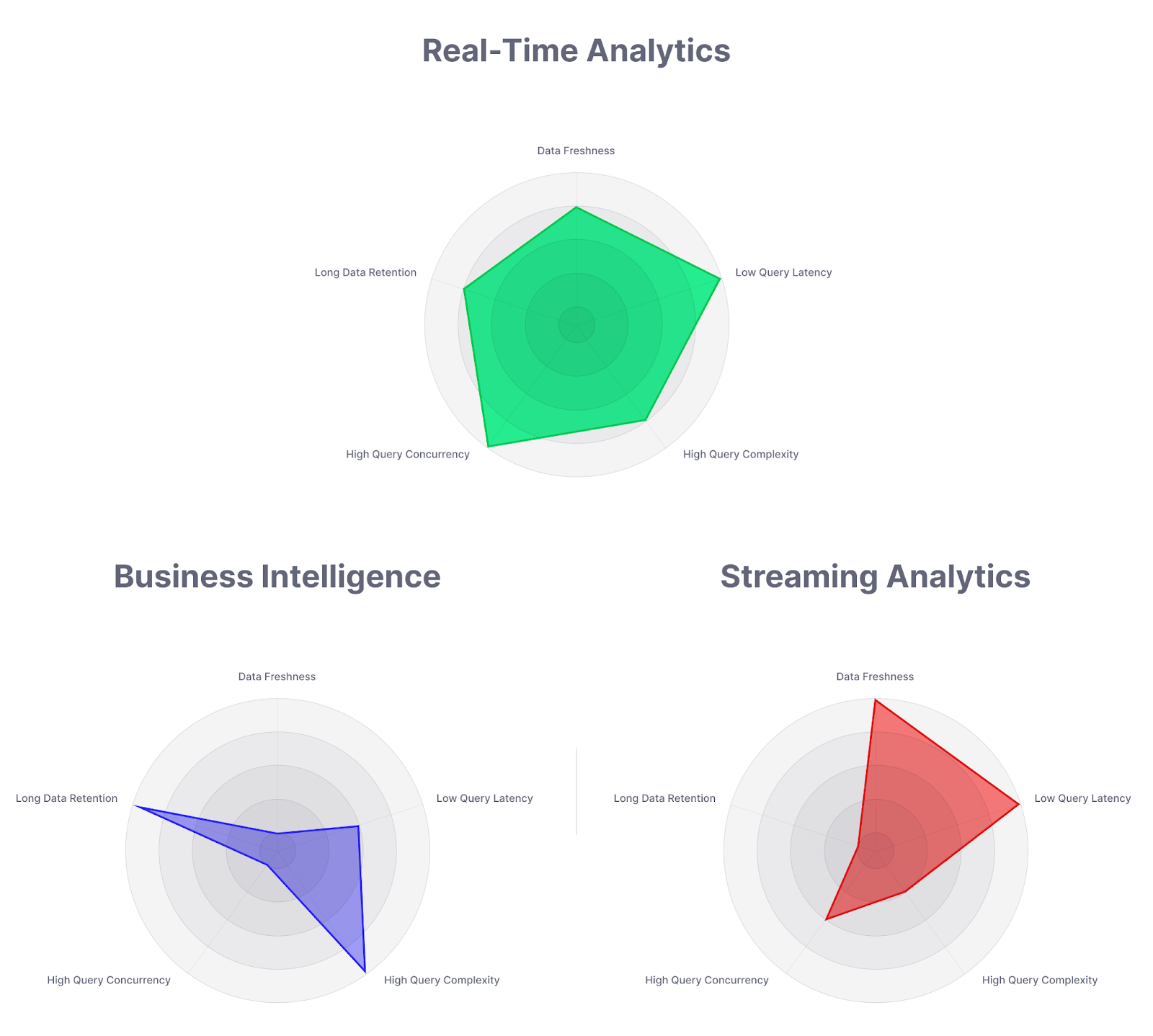
Of course, there's nuance here. It's not just which database you choose, but how you deploy and scale that database. Theoretically, you could use Postgres or MongoDB as a real-time analytics database to a certain extent. You would just need to understand the limitations of their scale and feel comfortable handling complex database operations like sharding, read replicas, scaling, and cluster performance tuning.
But even engineers who can handle the complexities of scaling a database often don't want to. Traditional relational databases like Postgres or MySQL and document databases like MongoDB aren't natively built for real-time analytics. Rather than force them into a use case for which they aren't uniquely built, you should choose a purpose-built database ready to support real-time analytics out of the box.
Note: It's important to distinguish "real-time databases" from "analytics databases." They are not the same thing. Sure, there's some overlap in the Venn diagram, but they're not mutually inclusive terms.
What are some examples of analytics databases?
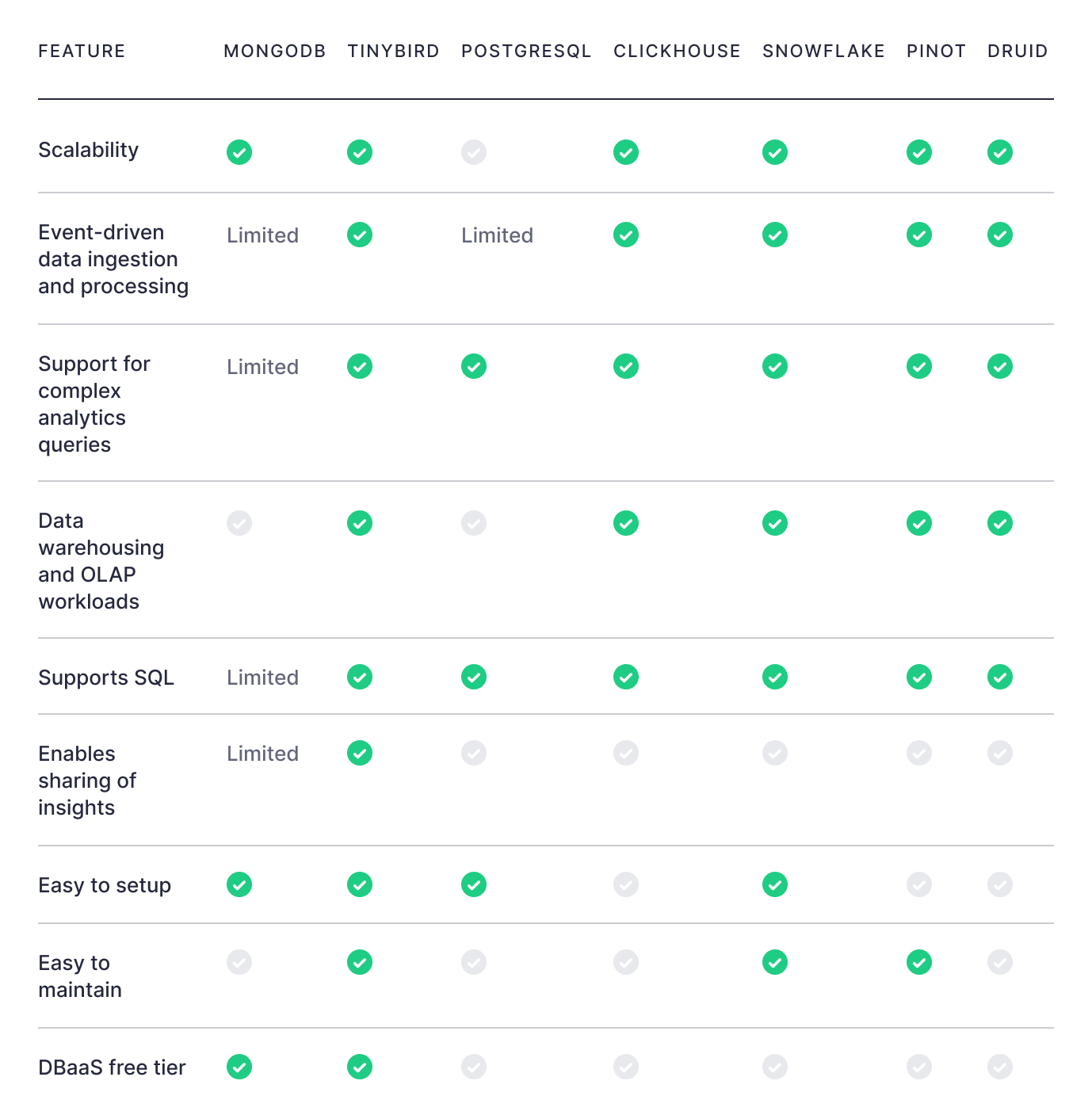
Some common databases used for analytics include MongoDB, Snowflake, Amazon Redshift, Google BigQuery, Databricks, ClickHouse®, Apache Druid, Apache Pinot, Apache Cassandra, Apache HBase, ElasticSearch, and DynamoDB. Cloud-native alternatives like Databend offer elastic scaling by separating storage and compute. MySQL-derived options like MariaDB ColumnStore add columnar capabilities to the familiar MySQL interface.
Some of these are also real-time databases. Most of them aren't. It's important to know the difference. For instance, while BigQuery excels at batch analytics, ClickHouse® is better suited for real-time workloads; see our [detailed comparison of ClickHouse® vs BigQuery](https://www.tinybird.co/blog-posts/clickhouse-vs-bigquery-real-time-analytics) for specifics. Similarly, AWS teams often evaluate [ClickHouse® vs Amazon Athena](https://www.tinybird.co/blog-posts/clickhouse-vs-amazon-athena) for the tradeoffs between consistent low-latency and serverless simplicity.
How are real-time databases different?
Real-time analytics databases are different from generic analytics databases in that they satisfy all of the requirements of real-time analytics, not just some.
Data warehouses, for example, are a class of analytics database that can handle high query complexity and long data retention, but not low query latency and high data freshness.
In-memory databases - like Redis, Memcached, or Dragonfly - will also struggle with real-time analytics use cases. They're fast for key-value lookup but don’t scale to support long-term data storage or complex analytics. While these databases can be used as a result cache on top of a data warehouse or data lake, that still requires an additional process to refresh the cache. By definition, that will impact data freshness.
Modern Real-Time Database Architectures
From Stream Ingestion to Actionable Insights
Real-time analytics is powered by a continuous sequence of ingestion, processing, analysis, and storage.
Every step must happen instantly and predictably, so new data becomes usable the moment it arrives.
Ingestion starts the process. Events flow in from IoT sensors, APIs, databases, message queues, or log streams, and the system must handle millions of records per second without delays.
The best real-time architectures support heterogeneous protocols to stay cloud-agnostic and prevent vendor lock-in, a key principle of cloud computing that ensures scalability and flexibility across platforms.
Once ingested, data moves to the processing layer, where it is transformed, aggregated, filtered, and enriched in motion. This is where exactly-once semantics, window functions, and stream joins ensure consistent, deduplicated output.
By operating continuously, not in batches, the system maintains sub-second freshness across pipelines.
The next layer is real-time analysis, where incrementally refreshed materialized views power queries and dashboards that react instantly to new data.
These views eliminate full recomputation, so users see updated metrics in milliseconds.
Finally, storage keeps the historical depth that real-time analytics needs. Data must remain queryable long-term, even at trillions of rows, so teams can combine fresh streams with historical context without sacrificing latency.
Decoupled Compute and Storage
Modern systems separate compute from storage to achieve elasticity
and cost efficiency.
Data is kept in scalable object storage such as S3
or GCS, while compute nodes handle querying and caching.
This decoupled architecture lets teams scale up for heavy workloads or scale down automatically when load drops, without disrupting query performance.
Many cloud-native platforms also implement tiered storage, where hot data stays on SSDs for ultra-low latency and cold data migrates to cheaper storage. Metadata indexing ensures that even archived data remains instantly accessible.
The result is a cost-efficient architecture that balances speed, scale, and durability.
Hybrid Storage and Continuous Aggregation
Hybrid engines combine row-based ingestion with columnar analytics to efficiently manage streaming data. Fresh data is first written into a row-oriented segment for fast inserts, then compacted into a columnar structure for efficient compression and scanning.
This hybrid approach bridges the gap between OLTP write speed and OLAP query efficiency.
To maintain real-time accuracy, systems use continuous aggregation , incremental refreshes of metrics and views as new events arrive. Instead of recalculating everything, they update only recent partitions.
This approach preserves data freshness, minimizes compute cost, and enables millisecond response times at scale.
Fault Tolerance and Exactly-Once Consistency
Real-time systems must continue working even when parts of the
infrastructure fail. Checkpointing, replay logs, and watermarks preserve state
and ordering across distributed clusters.
Exactly-once semantics
guarantee that every event is processed a single time, even in the presence of
retries or node restarts. This is critical for financial transactions, IoT
telemetry, and monitoring pipelines where duplicates can distort
insights.
Resilient real-time databases combine replication,
distributed consensus, and event-time processing to stay correct under
pressure.
High-Throughput Ingestion and CDC Integration
High ingestion throughput is fundamental, and mastering real-time data ingestion is essential for systems that must handle millions of events per second while maintaining sub-second query availability.
Beyond stream ingestion, Change Data Capture (CDC) allows
transactional systems to push updates directly into analytics databases as
events.
CDC connectors replicate inserts, updates, and deletes in real
time, providing continuous synchronization between operational and analytical
layers. This closes the latency gap between data creation and data insight ,
essential for modern architectures that blend OLTP and OLAP behavior.
Unified Query Model and Developer Velocity
Understanding
what is real-time data processing helps explain why SQL remains the most
powerful interface for analytics. Modern real-time systems extend it with
streaming SQL, where queries are continuous and results update as new data
flows in.
This lets developers interact with streams using familiar
syntax, eliminating the need for custom operators or code-heavy pipelines.
Combined with an API-first model, query results can be instantly published as
endpoints that scale automatically with demand.
The outcome is a
simpler, faster developer workflow where fresh data becomes instantly
accessible to any service or dashboard.
Practical Use Cases and Decision Frameworks
Real-Time Use Cases Across Industries
Real-time analytics is not a single pattern , it’s a requirement across multiple industries.
In financial services, low-latency systems power fraud detection,
algorithmic trading, and risk monitoring where milliseconds define
outcomes.
In IoT and manufacturing, constant sensor streams feed
anomaly detection and predictive maintenance, preventing downtime before it
happens.
In retail and e-commerce, live events drive dynamic pricing,
personalized recommendations, and inventory tracking across global
stores.
In media and gaming, real-time dashboards measure user
engagement, session metrics, and content performance the instant they
occur.
Each use case shares a core requirement: streaming ingestion,
low-latency queries, and long-term retention in one continuous pipeline.
Deployment Models and Operational Tradeoffs
Choosing how to deploy a real-time database depends on priorities around control, scalability, and maintenance overhead.
Self-managed stacks combine open-source components for maximum flexibility. They provide fine-grained control but demand significant operational expertise for scaling, upgrades, and failover management.
Distributed real-time databases offer built-in clustering, horizontal scalability, and strong ingestion throughput. They deliver exceptional speed but require understanding partitioning, storage tiers, and replication.
Hybrid or extension-based systems enhance existing relational databases with streaming capabilities , for example, adding time-series or materialized-view extensions. This approach minimizes migration cost and leverages familiar tools while still unlocking real-time insights.
Scaling and Performance Strategies
Scalability is not only about adding nodes , it’s about sustaining consistent latency under load.
Horizontal scaling distributes data and queries across multiple
compute nodes, while vectorized query execution and in-memory processing keep
performance predictable.
Compression, skip indexes, and parallel
aggregation reduce I/O and enable massive scans to complete in milliseconds.
For user-facing workloads, query caching and precomputation further lower
response times.
The best systems make scaling transparent , automatic,
non-disruptive, and observable through real-time metrics.
Interoperability and Ecosystem Integration
A real-time database must connect easily to the rest of the data
stack. Native connectors to Kafka, Pulsar, BigQuery, Snowflake, and S3
simplify both ingestion and export.
Open protocols and standard SQL
interfaces reduce integration friction, allowing teams to plug in
visualization, alerting, or machine learning tools without custom
adapters.
This ecosystem-first mindset ensures that streaming systems
evolve with changing needs, not against them.
Monitoring, Reliability, and Operational Simplicity
Maintaining real-time performance requires continuous
observability. Monitoring ingestion lag, query latency, and throughput is
essential to prevent silent bottlenecks.
Systems that include built-in
dashboards, health checks, and alerting simplify operations and enable
proactive scaling.
Fault recovery mechanisms , checkpointing,
replication, and replay , guarantee that data remains correct even when nodes
fail.
The goal is always the same: keep data accurate, queries fast,
and operations frictionless.
Making the Right Choice
Every architecture has tradeoffs. Some teams need complete control
to fine-tune every parameter; others prefer managed, serverless platforms that
abstract infrastructure entirely.
The right decision depends on what
you optimize for:
-
Lowest latency and control: self-managed distributed databases.
-
Fastest time to value: fully managed platforms with end-to-end data pipelines.
-
Incremental adoption: hybrid or extended relational systems that bridge OLTP and OLAP.
In every case, success in real-time analytics depends on one principle , turning streams of raw events into usable insight within seconds, at any scale.
Insert this new content immediately after the paragraph that ends with “there are three databases that I think are best for real-time analytics, and those are ClickHouse®, Apache Druid, and Apache Pinot.”
When a general purpose database is good enough for “real time”
Not every team can jump straight to a purpose built real time analytics database. Very often, the first step is to squeeze more out of an existing OLTP database that is already serving your application, usually something like Postgres or a similar relational engine. For a deeper understanding of how real time workloads behave, see real-time analytics: a definitive guide.
The trick is to understand where it works and where it will always hurt.
Hybrid workloads are the default, not the exception
Most application databases end up running a hybrid workload sooner or later. You have:
OLTP activity
Short, simple queries, point lookups, inserts and updates. The goal is low latency and high concurrency for user actions.
OLAP or reporting activity
Long running queries, joins across many tables, heavy aggregations and scans over large data sets.
If you run both in the same database, you create a mixed workload where analytical queries compete with transactional queries for CPU, memory and I/O. Without tuning, that usually leads to:
- Analytics queries that are slow and unpredictable
- Application queries that timeout or queue behind big reports
- Spiky resource usage that is hard to reason about
The goal of tuning is not to make this perfect, but to delay the pain and protect the OLTP workload while you figure out a longer term real time strategy.
Signals that you are pushing your OLTP database too far
Some very common symptoms show up when a general purpose database is doing too much analytical heavy lifting.
Frequent full table scans
Execution plans show sequential scans on large tables and sorts that spill to disk. Queries get slower as tables grow.
Analytics queries triggering statement timeouts
Long running queries hit a statement timeout or are killed manually, which usually means they are blocking more critical operations.
Queues of waiting sessions
max_connections is high, but many sessions are idle in a waiting state or blocked on locks created by big analytics queries.
Disk based sorts and hash operations
Sort and hash steps report external merge or disk usage, which means your work memory settings are not aligned with analytical workloads.
User facing “mystery slowdowns”
The app is slow even though CPU and memory look fine, often because queries are waiting on locks or competing for I/O.
If you are seeing these patterns regularly, that is a strong signal that a dedicated real time analytics database will give you a much better experience.
Practical ways to keep OLTP safe while you add analytics
Even if you stay on a single database engine for now, there are pragmatic ways to limit the blast radius of analytics.
Separate roles and settings for analytics
Create a dedicated analytics role with its own configuration. Give it:
- Higher work memory for complex sorts and hashes
- A statement timeout that caps how long a report can run
- Optionally a different query priority if your database supports it
This keeps aggressive tuning isolated from your OLTP connections.
Use connection pooling for analytics clients
Configure a smaller pool for BI tools and ad hoc analytics so they can never consume all available sessions. A handful of heavy analytics connections are cheaper than hundreds of idle ones.
Offload reads to replicas when possible
If you already run read replicas, sending analytical queries there reduces pressure on the primary. It is not perfect real time, but for many dashboards, a few seconds of replication lag are acceptable. This often pairs well with modern real-time data ingestion patterns.
Recognize when “near real time” is enough
Many use cases do not require sub second freshness. If your reports can tolerate data that is minutes or hours old, you unlock far more options, such as materialized views, scheduled refreshes and batch loads into a dedicated analytics store.
When it is time to move to a real time analytics database
There is a clear point where tuning a general purpose database stops making sense and a purpose built real time database becomes the simpler option.
You are likely there if:
- Analytical queries still take seconds or minutes despite careful tuning
- You routinely aggregate over tens of millions of rows or more
- You have thousands of concurrent analytical queries from user facing features
- You need sub second latency that is reliable during traffic peaks
- Schema and index changes for analytics regularly impact OLTP performance
At that scale, you are fighting the underlying storage and execution model of a generic relational database. A column oriented, distributed OLAP engine will usually be easier to operate than another year of heroic tuning work.
A practical tuning playbook for “almost real time” analytics
Even if your long term destination is a dedicated real time analytics database, you can do a lot today to make “almost real time” analytics work better on your existing systems. The key ideas are tune carefully, pre compute aggressively and push heavy work out of the hot path.
Tune configuration for analytical queries without breaking OLTP
Large analytical queries love memory and parallelism, but uncontrolled tuning can harm everything else. A few settings deserve special attention.
Limit total connections, pool aggressively
High max_connections looks like a safety net, but too many concurrent sessions often kills performance. Keep the total reasonable and rely on connection pools, especially for BI tools that tend to open many idle sessions.
Increase work memory for the right sessions
Complex analytics queries need more work memory for sorts and hashes.
Instead of globally raising it for everyone, set a higher value only for:
- Analytics roles
- Dedicated reporting sessions
Use logs or execution plans to see when operations spill to disk and adjust from there.
Use statement timeouts to protect OLTP
Long running analytical queries can quietly degrade the rest of the system. A sensible statement timeout for analytics sessions ensures:
- Badly written queries are canceled instead of running forever
- Operational workloads remain responsive
Different timeouts for application traffic and analytics traffic work well in hybrid environments.
Leverage parallel query execution carefully
Modern databases can use multiple workers to execute a single query. Increasing parallel workers can make big aggregations much faster, but also:
- Consumes more CPU
- Reduces capacity for other queries
The sweet spot is usually “a few workers per big query”, not “max out all cores for every report”.
Pre compute instead of recomputing everything on every query
Most analytical queries repeat the same heavy work over and over again. You can often trade a bit of storage and batch processing for much faster queries.
Generated columns for expensive expressions
If a query repeatedly calculates the same expression, such as a total amount or normalized metric, a generated column can store that calculation once. Combined with an index, this turns an expensive expression filter into a fast index lookup.
Indexes on expressions and filters that actually matter
For analytics, indexes on raw primary keys are often much less useful than indexes on:
- Common filter expressions
- Date or time ranges
- Status or category fields
Materialized views for heavy aggregations
If you are aggregating millions of rows just to produce a few dozen results, a materialized view is often a huge win. It lets you:
- Run the heavy aggregation once
- Store the results in a compact table
- Refresh on a schedule that matches your freshness needs
Partitioning large tables by natural access patterns
Partitioning large tables by time, region or another natural boundary lets the database:
- Scan only the partitions that matter for a query
- Retire or archive old partitions cleanly
- Maintain indexes on smaller chunks of data
Offload analytics with replicas and separate stores
As analytical workloads grow, you can reduce pressure on your main database by pushing heavy work elsewhere without changing your entire stack overnight.
Use read replicas for reporting and dashboards
Sending read only analytics traffic to replicas keeps the primary focused on writes and mission critical queries.
Replicate selected tables to a separate analytics database
Logical replication or similar mechanisms let you copy a subset of tables into a dedicated analytics database. This is the same pattern used in modern real-time change data capture systems. In that secondary environment you can:
- Create analytics specific indexes
- Build materialized views and generated columns
- Tune configuration purely for OLAP workloads
Move cold, historical data into columnar storage
Very old data is rarely needed for real time decisions, but it still matters for trends and compliance. Storing historical data in columnar tables or files in object storage:
- Cuts storage cost dramatically
- Keeps the primary database lean
- Lets you run heavy, infrequent queries without affecting hot data
Make tuning a continuous habit, not a one off project
Real time and near real time analytics stress databases in ways that evolve as data grows. A few habits keep things healthy over time.
Monitor query plans and slow queries regularly
Track which queries are consistently slow, which ones are growing slower over time and when execution plans change unexpectedly.
Establish a performance baseline
Knowing what “normal” looks like for latency and throughput helps you spot regressions early, instead of waiting for an outage.
Treat database changes like code changes
Schema changes, new indexes and configuration tweaks should follow the same review, test and deploy process as application code.
All of this tuning will not magically turn a general purpose database into the perfect real time analytics engine. It does something more pragmatic. It buys you time and stability while you decide how far you want to go with a dedicated real time analytics database, and it teaches you which queries and workloads actually matter before you make that move.
Other Real-Time Database Alternatives Worth Knowing
While ClickHouse®, Druid, and Pinot are often the first choices for real-time analytics, the landscape of streaming databases and platforms has evolved fast.
Several modern systems now provide low-latency ingestion, continuous processing, and real-time querying at scale.
Each introduces unique design tradeoffs , from serverless elasticity to hybrid transaction/analytics workloads.
RisingWave
RisingWave is a distributed SQL streaming database designed from
the ground up for real-time analytics in the cloud. It’s fully
PostgreSQL-compatible, making it easy to integrate with existing applications
and BI tools.
RisingWave continuously maintains materialized views that
refresh automatically as new data arrives. It uses a decoupled compute-storage
architecture with tiered storage, allowing users to scale elastically and
query both fresh and historical data efficiently.
Built in Rust, it emphasizes fault tolerance, strong consistency, and low operational overhead, targeting teams that want a modern, cloud-native alternative to complex streaming pipelines.
Materialize
Materialize brings the simplicity of SQL to streaming data. It
incrementally updates materialized views in real time as new events arrive,
enabling sub-second analytical queries over live data.
Fully
PostgreSQL-compatible, it integrates with existing data stacks and supports
joins, aggregations, and window functions directly over streams.
Materialize is ideal when you need deterministic results with strong consistency , for example, in financial systems or monitoring platforms that demand accurate, continuously updated metrics.
ksqlDB
ksqlDB extends Apache Kafka into a streaming database, enabling teams to process data in motion with SQL.
It allows developers to create tables, joins, and aggregates
directly from Kafka topics, maintaining materialized views that update
automatically as messages flow through the system.
It supports both pull queries for on-demand lookups and push queries that continuously emit new results. For organizations already invested in Kafka, ksqlDB simplifies streaming logic without adding a separate compute layer.
HStreamDB
HStreamDB focuses on real-time data integration with a cloud-native architecture that separates compute and storage for horizontal scalability.
It implements a publish-subscribe model optimized for low-latency
event delivery and online cluster scaling.
By combining streaming
ingestion, storage, and subscription delivery, HStreamDB helps unify real-time
pipelines with historical replay. It’s well suited for large-scale
event-driven systems that demand continuous reliability and high availability.
EventStoreDB
EventStoreDB is an event-sourced operational database designed to
persist and process immutable streams of events. Instead of updating rows, it
records every change as a new event, providing a complete history of system
state over time.
It’s ideal for event-driven architectures, CQRS
systems, and audit-heavy domains where traceability and replayability are
crucial.
EventStoreDB combines guaranteed writes, concurrency-safe streams, and structured APIs that make it reliable for complex transactional use cases.
DeltaStream
DeltaStream simplifies the creation and deployment of real-time
streaming applications using standard SQL. Built on Apache Flink, it adds a
serverless architecture that scales automatically with incoming
workloads.
Its unified SQL interface lets users define transformations,
joins, and aggregations without writing custom stream processors.
DeltaStream’s design fits organizations that want a fully managed, elastic
environment for continuous analytics without maintaining infrastructure.
Timeplus
Timeplus is a streaming-first analytics platform that merges
streaming and historical data in a single environment. It offers a
high-performance SQL engine optimized for vectorized computation and parallel
processing, enabling sub-second queries even across large data sets.
It
includes interactive dashboards, visualizations, and alerting, allowing teams
to act on fresh insights immediately. Under the hood, Timeplus uses ClickHouse®
for OLAP storage and its own streaming engine for ingestion, creating a bridge
between batch and streaming analytics.
Arroyo
Arroyo is a distributed stream processing engine built in Rust for
low-latency, stateful computations. It supports SQL-based queries, serverless
scaling, and automatic task rescheduling for cloud-native
workloads.
Its focus on simplicity, reliability, and modern
architecture makes Arroyo appealing to developers who want to deploy real-time
pipelines without the operational complexity of traditional frameworks.
When These Alternatives Make Sense
While ClickHouse®, Druid, and Pinot remain the dominant open-source engines for large-scale real-time analytics, these newer systems can fill specific gaps:
-
If you prioritize full SQL compatibility and strong consistency, consider Materialize or RisingWave.
-
If you’re already streaming data through Kafka, ksqlDB is a natural extension.
-
If you need event sourcing and auditability, EventStoreDB is purpose-built.
-
If you prefer managed elasticity with minimal ops, DeltaStream or Timeplus simplify deployment.
-
If you want modern, Rust-based performance, Arroyo and RisingWave offer next-generation architectures.
Each of these platforms represents a different point on the
spectrum between raw control and managed simplicity, strict consistency and
streaming flexibility, and custom pipelines and end-to-end
platforms.
The right fit depends on your scale, latency expectations,
and data governance requirements , but expanding beyond the “big three” opens
new paths to build smarter, faster, and more maintainable real-time systems.
Selection criteria for a real-time analytics database
When it comes to choosing a database for real-time analytics, these are the criteria that I feel are the most important to consider:
Ingestion Throughput
High write throughput is a hallmark of real-time analytics databases, and it is required to achieve the high data freshness characteristic of real-time analytics systems. Real-time analytics databases must scale write operations to support millions of events per second, whether from IoT sensors, user clickstreams, or any other streaming data system.
Databases that utilize specialized data structures like a log-structured merge-tree (LSMT), for example, work well in these scenarios, as this data structure is very efficient at write operations and can handle high-scale ingestion throughput.
Read Patterns
Most analytical queries are going to involve filtering and aggregating. A real-time analytics database must efficiently process queries involving filtered aggregates.
Columnar databases excel here. Since columnar databases use a column-oriented storage pattern - meaning data in columns is stored sequentially on disk - they're generally able to reduce scan size on analytical queries.
Analytical queries rarely need to use all of a table’s columns to answer a question, and since columnar databases store data in columns sequentially, they can read only the data needed to get the result.
Aggregating a column, for example, is one of the most common analytical patterns. With column values stored sequentially, the database can more efficiently scan the column, knowing that every value is relevant to the result.
Many analytical queries also often involve joining data sources. Classic examples include enriching streaming events with dimensional tables. While a full range of join support isn't strictly required for real-time analytics, you'll be limited without robust join support.
If your database lacks join support, you'll likely have to push that complexity to the "left" to denormalize and flatten the data before it hits the database, adding additional complexity and processing steps.
Query Performance
High-performance real-time analytics databases should return answers to complex queries in milliseconds. There's no hard and fast rule here, though many accept that user experience starts to degrade when applications take longer than 50-100 milliseconds to refresh on a user action.
Real-time analytics databases should be fast for analytical queries without excessive performance tweaking and include optimization mechanisms (such as incrementally updating Materialized Views) to improve performance on especially complex queries.
Once again, columnar databases excel here, because they generally must scan less data to return the result of an analytical query.
However, not all columnar storage is the same, and the specific DBMS might introduce delay to query responses. Snowflake, for example, uses columnar storage. But Snowflake seeks to distribute queries across compute, scaling horizontally to be able to handle a query of arbitrary complexity. This "result shuffling" tends to increase latency, as you'll have to bring all the distributed result sets back together to serve the query response. ClickHouse®, on the other hand, seeks to stay as "vertical" as possible and attempts to minimize query distribution, which typically results in lower latency responses.
Concurrency
Real-time analytics is often (though not always) synonymous with "user-facing analytics." User-facing analytics differs from analytics for internal reporting in that queries to the database are driven not by internal reporting schedules, but by on-demand user requests. This means you won't have control over 1) how many users query your database, and 2) how often they query it.
Database queries in user-facing analytics are initiated by application users, which significantly limits your control over query concurrency.
A real-time analytics database needs to be able to support thousands of concurrent requests even on complex queries. Scaling to support this concurrency can be difficult regardless of your database.
"But I don't have thousands of concurrent users!" you might say. Not yet, at least. But a single user can make many queries at once, and part of choosing a database is considering future scale. Even modest levels of concurrency can be expensive on the wrong database. Plus, if your application succeeds and concurrency skyrockets, database migrations are the last thing you want to deal with.
Scalability
Every database, whether real-time or not, must be able to scale. Real-time analytics databases need to scale as each of the above factors remains. A real-time analytics database allows you to scale horizontally, vertically, or both to maintain high data freshness, low latency on queries, high query complexity, and high query concurrency.
Ease of Use and Interoperability
The more specialized the use case, the more specialized the requirements. But a highly-specialized database isn't always the right choice, if for no other reason than they can be very hard to deploy, they can lack a supportive community, and they may suffer from a bare bones (or non-existent) data integration ecosystem.
Even simple things like a lack of support for SQL, the world's most popular and well-understood query language, can slow you down significantly.
Don't choose a database just because it's fast. Choose a database that makes you fast. It's no use having fast queries if your development speed slows to a crawl.
What is the best database for real-time analytics?
As I mentioned up top, I think that the three best databases for real-time analytics are:
All these databases are open-source, column-oriented, distributed, OLAP databases uniquely suited for real-time analytics. Your choice will depend on your use case, comfort level, and specific feature requirements. From a pure performance perspective, most won't notice a major difference between these three for most use cases (despite what various synthetic, vendor-centric benchmarks might suggest). For a detailed technical comparison of ClickHouse® and Druid, including architecture, performance benchmarks, and operational considerations, see our ClickHouse® vs Druid comparison. For ultra-low latency applications serving millions of concurrent users, our ClickHouse® vs Pinot comparison explains which database excels at user-facing analytics. For workloads requiring high concurrency and complex multi-table joins, MPP databases like StarRocks offer different trade-offs; see our ClickHouse® vs StarRocks comparison. Other options like Firebolt, built on a forked ClickHouse® engine with managed infrastructure, offer alternatives for teams seeking separation of storage and compute; see our ClickHouse® vs Firebolt comparison for details. Single-node alternatives like MonetDB can also be worth considering for research and exploratory workloads; see our ClickHouse® vs MonetDB performance comparison. If you're connecting to ClickHouse® from your application, check out our guide on ClickHouse® Python clients.
That said, each of these databases is relatively complex to deploy. They're niche databases, with much smaller communities than traditional OLTP databases and many more quirks that take time to understand.
The best databases for real-time analytics have smaller communities and less support than traditional databases, so they can be harder to manage and deploy.
Because of this, many developers may choose to use managed versions of these databases. A managed database can abstract some of the complexity of the database and cluster management. For those specifically evaluating managed ClickHouse® services, our detailed comparison of Tinybird vs ClickHouse® Cloud breaks down the key differences in infrastructure, APIs, and developer experience.
Tinybird is a great example of a managed real-time data platform that can simplify the deployment and maintenance of a real-time database.
Why choose Tinybird as a real-time analytics database
Tinybird is not a real-time analytics database, per se. Rather, it's a fully integrated real-time data platform built on open-source ClickHouse®. Tinybird bundles the ingestion, querying, and publication layers of a data platform into a single managed service. It not only abstracts the complexities of the database itself; it gives you a fully integrated, end-to-end system to build real-time analytics products.
If you're looking for a real-time analytics database, here's why you might consider Tinybird:
- It's insanely fast. Tinybird is built on open-source ClickHouse®, meaning you get all that raw performance out of the box. Tinybird can routinely run complex analytical queries over billions or trillions of rows of data in milliseconds.
- It's easy to use. Unlike open-source ClickHouse®, Tinybird is exceptionally easy to work with. It's a serverless real-time data platform implementation that presents as a SaaS. You can sign up and create an end-to-end real-time data pipeline from ingestion to API in 3 minutes. That ease of use means you can be much more productive with little effort. You won't ever need to fuss with the complexities of setting up, maintaining, and scaling a database cluster.
- Connecting your data is easy. On top of the database, Tinybird offers a host of fully managed connectors to ingest data from many sources such as Apache Kafka, Confluent Cloud, Google BigQuery, Snowflake, Amazon S3, and more. It even has an HTTP streaming endpoint to write thousands of events per second to the database directly from your application code. With these integrated connectors, you'll save time and money by avoiding developing and hosting external ingestion services.
- Tinybird works with version control. Tinybird integrates directly with git-based source control systems. This simplifies complexities like schema migrations by allowing you to lean on tried and true software engineering principles to branch, test, and deploy updates in real time.
- Fully-managed publication layer. Many real-time analytics use cases are going to be user-facing. This means embedded analytics in software, products, and services accessed by users. Tinybird makes this extraordinarily easy through a fully managed API publication layer. Any SQL query in Tinybird can be published instantly as a fully documented, scalable HTTP Endpoint without writing additional code. Tinybird hosts and scales your API so you don't have to. For user-facing analytics applications, you can't beat that.
There are many factors to consider when choosing a database for real-time analytics. ClickHouse®, Apache Druid, and Apache Pinot are great open-source options when you want complete control over the database implementation and can spend time maintaining and scaling the database cluster.
But development speed is just as important as query speed, so you might go for something like Tinybird. You'll get all the underlying performance without the added effort.
Whether you choose Tinybird as a real-time analytics database or something else, keep the five facets of real-time analytics in mind, and choose a database that best supports your use case, pricing requirements, and development style. For detailed pricing analysis comparing real-time analytics platforms across multiple scenarios, see our comprehensive cost comparison between Tinybird and ClickHouse® Cloud.
Good luck! For a comprehensive comparison of ClickHouse® alternatives including managed services and cloud data warehouses, see our honest comparison of the top ClickHouse® alternatives in 2025.


