Send Bird webhooks to Tinybird
With Bird you can send email, SMS, WhatsApp, and Apple Messages for Business messages through one API. By sending Bird webhooks to Tinybird, you can analyze delivery and engagement data in real time.
Some common use cases for sending Bird webhooks to Tinybird include:
- Tracking delivery and bounce trends for order confirmations, welcome emails, and password resets.
- Comparing opens and clicks across message types.
- Joining email events to your orders with the identifiers in message metadata.
- Building dashboards that help your support team find delivery problems.
- Counting incoming SMS and Apple Messages for Business replies by hour.
This guide covers two setups:
- Direct: Bird sends webhooks straight to the Events API. No server needed.
- Receiver (optional): a small Node.js server verifies Bird webhook signatures before it forwards events to Tinybird.
Before you start
Before you connect Bird to Tinybird, ensure:
- You have a Bird workspace where you can create webhooks.
- You have a configured email sender and a test recipient you control.
- You have a Tinybird Workspace.
Connect Bird to Tinybird
- In your Tinybird project, create a Data Source called
bird_events_raw:
DESCRIPTION >
    Raw Bird webhook bodies, including repeated deliveries and connection tests.

SCHEMA >
    `ingested_at` DateTime `json:$.ingested_at` DEFAULT now(),
    `event_type` String `json:$.type` DEFAULT 'unknown',
    `occurred_at` String `json:$.timestamp` DEFAULT '',
    `event` JSON `json:$` DEFAULT '{}'

ENGINE "MergeTree"
ENGINE_PARTITION_KEY "toYYYYMM(ingested_at)"
ENGINE_SORTING_KEY "event_type, ingested_at"

TOKEN bird_raw_ingest append
The event column stores the full request body with the JSON data type, so you can query nested fields such as event.data.metadata.order_id directly. occurred_at keeps Bird's original event timestamp, and ingested_at records when Tinybird received the row.
The JSON type doesn't keep null fields, and nested values such as tags can come back as JSON strings. If you need the exact original body, use String instead.
Deploy the project and copy the
bird_raw_ingestToken. It can only append to this Data Source.In Bird, create a new webhook.
Paste the Events API URL in Endpoint URL. Use the URL-encoded
bird_raw_ingestToken:
https://api.tinybird.co/v0/events?name=bird_events_raw&format=json&wait=true&token=<bird_raw_ingest_token>
format=json tells Tinybird to read the body as JSON. wait=true makes Tinybird confirm the write before it responds.
The API host in the following examples must match your Workspace's region. See the full list of regions and hosts
Under Subscribed events, select
email.delivered,email.bounced,email.opened, andemail.clicked, then create the webhook.Save the Bird signing secret in your secret manager and confirm in Bird that you saved it. The direct setup doesn't use it, but you need it if you add signature verification later.
You're done. Send an email to your test recipient and check Recent attempts on the Bird webhook and the
bird_events_rawData Source for new rows.
The endpoint URL contains a Tinybird Token. Treat it as a secret and keep it out of screenshots and shared logs. Request bodies can contain recipient details or message content, so restrict access to the Data Source and set a retention period.
Bird checks only the HTTP status, not the row counts in the Tinybird response. If a delivery succeeds but no row appears, check the Quarantine Data Source.
Example payload
An email.delivered event looks like this:
{
  "type": "email.delivered",
  "timestamp": "2026-10-14T12:00:00Z",
  "data": {
    "email_id": "em_01krdgeqcxet5s7t44vh8rt9mg",
    "recipient_id": "er_01krdgeqcxet5s7t44vh8rt9mg",
    "workspace_id": "ws_01krdgeqcxet5s7t44vh8rt9mg",
    "recipient": "customer@example.com",
    "recipient_role": "to",
    "tags": [{ "name": "flow", "value": "welcome" }],
    "metadata": { "order_id": "example-order" },
    "broadcast_id": null
  }
}
For other channels, open any event in the Bird event catalog to see its payload schema.
The Send test event action in Bird sends a body with only type. It creates a row with an empty occurred_at. Send a real message to check the full event data.
Query email activity
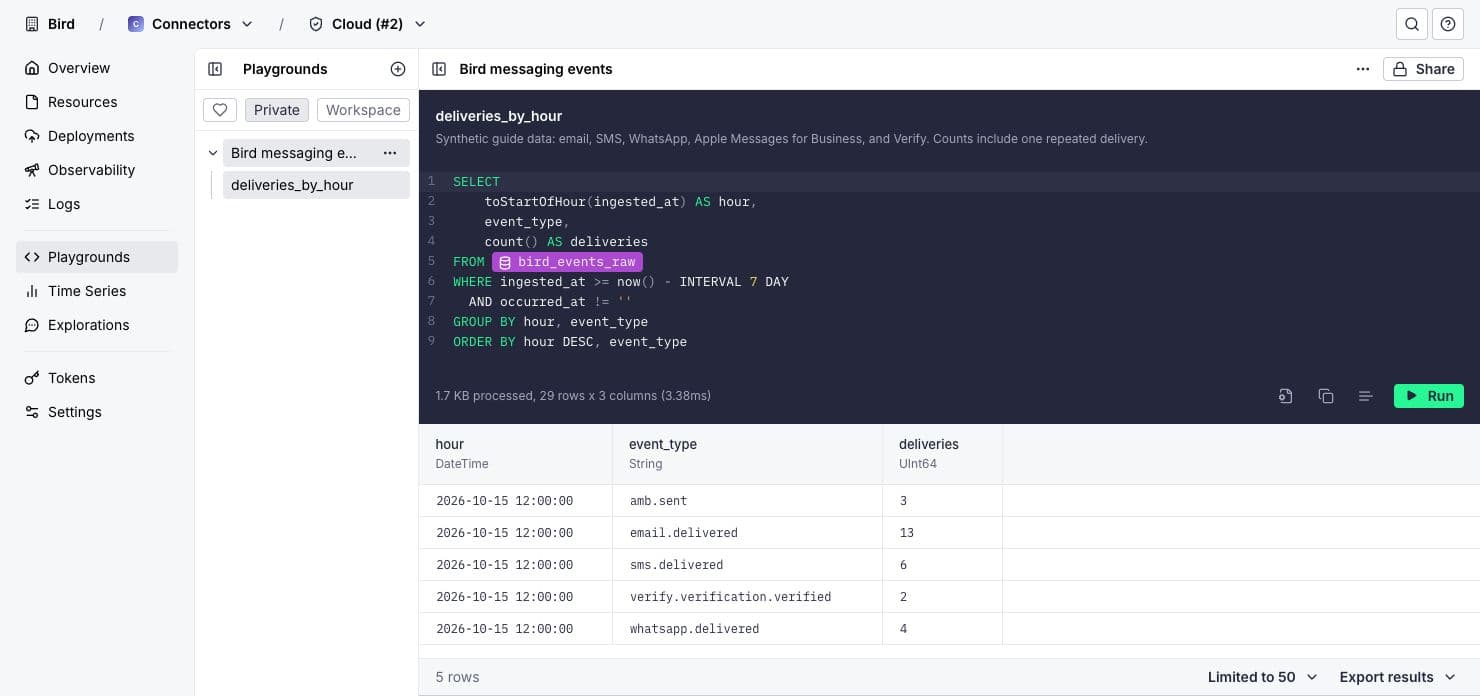
Count webhook deliveries per hour, excluding connection tests:
SELECT
    toStartOfHour(ingested_at) AS hour,
    event_type,
    count() AS deliveries
FROM bird_events_raw
WHERE ingested_at >= now() - INTERVAL 7 DAY
  AND occurred_at != ''
GROUP BY hour, event_type
ORDER BY hour DESC, event_type
This query counts rows, not distinct events or recipients. Bird can deliver the same event more than once, and the request body doesn't include Bird's webhook-id header. If you need exact event counts, use the receiver setup.
Automated systems can trigger some opens and clicks. Use tags, broadcast IDs, or metadata to connect email events to your app data.
Add SMS, WhatsApp, and Apple Messages for Business
Configure the channel in Bird and subscribe to its event types on the same webhook. The same Data Source stores every channel.
- SMS: use
sms.delivered,sms.undelivered, andsms.failedto check delivery for reminders and order updates. Usesms.receivedto count incoming replies and find busy periods for your support team. - Apple Messages for Business: use
amb.receivedto count incoming messages by hour or business account. Match each message to the next outbound response withdata.message.conversation_idto calculate response times.amb.sentmeans Apple accepted the message. It doesn't confirm delivery or a read. - WhatsApp: use WhatsApp events to check delivery, reads, and incoming messages.
- Verify: use Verify events to count completed verifications.
Remove duplicate rows before you calculate per-event metrics such as response times.
Verify webhook signatures (optional)
Use a receiver to verify Bird signatures before events reach Tinybird. The receiver also stores the signed webhook-id as the event ID and checks that Tinybird stored each event.
Bird webhook → signature-verifying receiver → Tinybird Data Source → SQL queries
You need Node.js 22 or later, an HTTPS server, the Bird signing secret, and a Tinybird Token with append permission. You don't need a Bird API key. You can use this setup with or without the direct setup.
Step 1: Create the Data Source for verified events
The receiver writes to a separate Data Source, bird_events, with a different schema:
DESCRIPTION >
    Verified Bird webhook events, including repeated deliveries.

SCHEMA >
    `event_id` String `json:$.event_id`,
    `event_type` LowCardinality(String) `json:$.event_type`,
    `occurred_at` DateTime64(3) `json:$.occurred_at`,
    `event` JSON `json:$.event` DEFAULT '{}'

ENGINE "MergeTree"
ENGINE_PARTITION_KEY "toYYYYMM(occurred_at)"
ENGINE_SORTING_KEY "event_type, occurred_at, event_id"

TOKEN bird_ingest append
Deploy the project and store the bird_ingest Token in your secret manager. If you don't need the full payload, change the receiver to send only the fields you need.
Step 2: Set up the receiver
Install the Bird SDK in an empty Node.js project:
npm init -y
npm install @messagebird/sdk
Save the following code as server.mjs. It verifies the raw request body and the webhook-id, webhook-timestamp, and webhook-signature headers with bird.webhooks.unwrap, then sends one NDJSON row to /v0/events?name=bird_events&wait=true.
import { createServer } from "node:http";
import { pathToFileURL } from "node:url";
import { BirdClient, BirdWebhookVerificationError } from "@messagebird/sdk";

export function createWebhookServer({
  signingSecret,
  tinybirdToken,
  tinybirdHost,
}) {
  if (!signingSecret || !tinybirdToken || !tinybirdHost) {
    throw new Error(
      "Set BIRD_WEBHOOK_SECRET, TINYBIRD_TOKEN and TINYBIRD_HOST.",
    );
  }
  const host = new URL(tinybirdHost);
  const local = ["localhost", "127.0.0.1", "[::1]"].includes(host.hostname);
  if (
    (host.protocol !== "https:" && !(local && host.protocol === "http:")) ||
    host.username ||
    host.password ||
    host.search ||
    host.hash ||
    host.pathname !== "/"
  ) {
    throw new Error(
      "TINYBIRD_HOST must be an HTTPS origin, or HTTP localhost for development.",
    );
  }
  const target = new URL("/v0/events?name=bird_events&wait=true", host);
  const bird = new BirdClient({ webhooks: { secret: signingSecret } });

  const server = createServer((req, res) => {
    const deadline = AbortSignal.timeout(12000);
    const onDeadline = () => {
      if (!res.headersSent) res.writeHead(503, { Connection: "close" });
      if (!res.writableEnded) res.end(() => req.destroy());
    };
    deadline.addEventListener("abort", onDeadline, { once: true });
    receive(req, res, deadline)
      .catch(() => {
        if (!res.writableEnded && !res.destroyed) {
          if (!res.headersSent) res.writeHead(503);
          res.end();
        }
      })
      .finally(() => deadline.removeEventListener("abort", onDeadline));
  });
  server.requestTimeout = 10000;
  server.headersTimeout = 10000;
  return server;

  async function receive(req, res, deadline) {
    if (req.url !== "/webhooks/bird") {
      res.writeHead(404).end();
      return;
    }
    if (req.method !== "POST") {
      res.writeHead(405, { Allow: "POST" }).end();
      return;
    }

    const headers = {};
    for (const name of [
      "webhook-id",
      "webhook-timestamp",
      "webhook-signature",
    ]) {
      const value = req.headers[name];
      if (typeof value !== "string") {
        res.writeHead(401).end();
        return;
      }
      headers[name] = value;
    }
    const chunks = [];
    let size = 0;
    for await (const chunk of req) {
      size += chunk.length;
      if (size > 1024 * 1024) {
        res.writeHead(413).end();
        return;
      }
      chunks.push(chunk);
    }

    let event;
    try {
      // Parsing and reserializing before verification changes the signed bytes.
      event = bird.webhooks.unwrap(
        Buffer.concat(chunks).toString("utf8"),
        headers,
      );
    } catch (error) {
      if (!(error instanceof BirdWebhookVerificationError)) throw error;
      res.writeHead(401).end();
      return;
    }
    if (!event || typeof event !== "object" || typeof event.type !== "string") {
      res.writeHead(400).end();
      return;
    }
    if (Object.keys(event).length === 1) {
      // Bird's connection test is signed but contains no production event data.
      res.writeHead(204).end();
      return;
    }
    if (
      typeof event.timestamp !== "string" ||
      !Number.isFinite(Date.parse(event.timestamp)) ||
      !event.data ||
      typeof event.data !== "object" ||
      Array.isArray(event.data)
    ) {
      res.writeHead(400).end();
      return;
    }

    const row = {
      event_id: headers["webhook-id"],
      event_type: event.type,
      occurred_at: event.timestamp,
      event,
    };
    const result = await fetch(target, {
      method: "POST",
      headers: {
        Authorization: `Bearer ${tinybirdToken}`,
        "Content-Type": "application/x-ndjson",
      },
      body: `${JSON.stringify(row)}\n`,
      redirect: "error",
      signal: deadline,
    });
    const counts = await result.json();
    if (
      result.status !== 200 ||
      counts?.successful_rows !== 1 ||
      counts?.quarantined_rows !== 0
    ) {
      console.error("Tinybird did not confirm ingestion", {
        status: result.status,
        eventId: row.event_id,
      });
      res.writeHead(503).end();
      return;
    }
    res.writeHead(204).end();
  }
}

if (
  process.argv[1] &&
  import.meta.url === pathToFileURL(process.argv[1]).href
) {
  const server = createWebhookServer({
    signingSecret: process.env.BIRD_WEBHOOK_SECRET,
    tinybirdToken: process.env.TINYBIRD_TOKEN,
    tinybirdHost: process.env.TINYBIRD_HOST,
  });
  const port = Number(process.env.PORT ?? 3000);
  server.listen(port, "127.0.0.1", () =>
    console.log(
      `Bird webhook receiver: http://127.0.0.1:${port}/webhooks/bird`,
    ),
  );
}
Set these environment variables in your secret manager, or in a .env file for local development. Keep .env out of version control.
BIRD_WEBHOOK_SECRET=<your_bird_webhook_signing_secret>
TINYBIRD_TOKEN=<bird_ingest_token>
TINYBIRD_HOST=https://api.tinybird.co
PORT=3000
The receiver listens on 127.0.0.1:3000. Put it behind an HTTPS reverse proxy, or adapt it to your server platform, so /webhooks/bird is reachable at a stable HTTPS URL. The SDK also checks the delivery timestamp, so keep the receiver's clock synchronized.
Step 3: Register the receiver webhook
- In Bird, create a new webhook.
- Enter the receiver's HTTPS URL in Endpoint URL.
- Under Subscribed events, select
email.delivered,email.bounced,email.opened, andemail.clicked, then create the webhook. - Copy the signing secret to
BIRD_WEBHOOK_SECRETand confirm in Bird that you saved it. - Start the receiver:
node --env-file=.env server.mjs
Each Bird webhook has its own signing secret. Use the one that matches the endpoint.
Step 4: Test the receiver
In Bird, open the receiver webhook, select Send test event, pick an Event type, and select Send test. This checks connectivity and signature verification. The test body contains only type, so the receiver accepts it without sending a row to Tinybird.
To check ingestion, send an email to your test recipient and look for a new row in bird_events.
The receiver returns:
204after Tinybird confirms one stored row and no quarantined rows.401for an invalid signature.503for an ingestion failure, so Bird can retry.
Step 5: Count distinct events
SELECT
    toStartOfHour(occurred_at) AS hour,
    event_type,
    uniqExact(event_id) AS events
FROM bird_events
WHERE occurred_at >= now() - INTERVAL 7 DAY
GROUP BY hour, event_type
ORDER BY hour DESC, event_type
uniqExact(event_id) counts each event once even if Bird delivered it more than once. Grouping by the original event timestamp keeps repeated deliveries in the same hour. This query doesn't remove duplicate rows. For other queries, use a deduplication strategy.
The result counts events, not recipients. For recipient metrics, group by email ID and recipient ID.
Troubleshoot ingestion
| Setup | Problem | What to check |
|---|---|---|
| Direct | Bird records 403. | The Tinybird Token and its append permission. |
| Direct | Bird records 404. | The Tinybird region, Workspace, and Data Source name. |
| Direct | Bird records success, but the row is missing. | The Quarantine Data Source and the Data Source schema. |
| Direct | Counts are too high. | Exclude connection tests. Check for repeated deliveries. |
| Receiver | The connection test succeeds, but Tinybird has no row. | The test request has no event data. Send a real message. |
| Receiver | Bird records 401. | The signing secret, raw request body, signature headers, and system clock. |
| Receiver | Bird records 503. | The Tinybird region, Token permissions, schema, and Quarantine Data Source. Retries can't fix configuration errors. |
| Receiver | Event counts are too high. | Count distinct event IDs. One message can produce several events. |
The receiver accepts request bodies up to 1 MiB. A single 12-second limit covers receiving the body and sending it to Tinybird. Bird has a 15-second delivery timeout.
For higher throughput or long Tinybird outages, add a durable queue after signature verification. Return a success response once the queue stores the event, then send batches from the queue to Tinybird.